Read the statement by Michael Teeuw here.
Failed Update
-
@DarkV show me the ~/MagicMirror/installers/upgrade.log
looks like this is a hybrid os… 64 bit kernel and 32 bit runtime… and the wrong architecture node was installed
so, again do this,
hash -r
sudo apt-get remove nodejs npm -y
hash -r
node -v
should get not found
then dowhich nodeshow the results, nothing means not found
if there is a result do
node -v -
@sdetweil Reading package lists… Done
Building dependency tree… Done
Reading state information… Done
Package ‘npm’ is not installed, so not removed
The following packages were automatically installed and are no longer required:
libfuse2 raspinfo
Use ‘sudo apt autoremove’ to remove them.
The following packages will be REMOVED:
nodejs
0 upgraded, 0 newly installed, 1 to remove and 0 not upgraded.
After this operation, 183 MB disk space will be freed.
(Reading database … 108415 files and directories currently installed.)
Removing nodejs (20.5.1-deb-1nodesource1) …
dpkg: warning: while removing nodejs, directory ‘/usr/lib/node_modules’ not empty so not removed
Processing triggers for man-db (2.9.4-2) …
junior@MAGIC-MIRROR:~ $ hash -r
junior@MAGIC-MIRROR:~ $ node -v
-bash: /usr/local/bin/node: No such file or directory
junior@MAGIC-MIRROR:~ $ which node
/usr/local/bin/node
junior@MAGIC-MIRROR:~ $ node -v
-bash: /usr/local/bin/node: No such file or directory
junior@MAGIC-MIRROR:~ $ -
@DarkV oh such joy
sudo n ls sudo n prune sudo n uninstall hash -r which node `` -
@sdetweil I am glad you know what all this means as I have no clue, many thanks for taking the time to help me, the wifey will kill me if this f***s up:beaming_face_with_smiling_eyes: .
login as: junior
junior@192.168.2.52’s password:
Linux MAGIC-MIRROR 6.1.21-v8+ #1642 SMP PREEMPT Mon Apr 3 17:24:16 BST 2023 aarch64The programs included with the Debian GNU/Linux system are free software;
the exact distribution terms for each program are described in the
individual files in /usr/share/doc/*/copyright.Debian GNU/Linux comes with ABSOLUTELY NO WARRANTY, to the extent
permitted by applicable law.
Last login: Tue Oct 31 12:51:37 2023
junior@MAGIC-MIRROR:~ $ hash -r
junior@MAGIC-MIRROR:~ $ sudo apt-get remove nodejs npm -y
Reading package lists… Done
Building dependency tree… Done
Reading state information… Done
Package ‘npm’ is not installed, so not removed
The following packages were automatically installed and are no longer required:
libfuse2 raspinfo
Use ‘sudo apt autoremove’ to remove them.
The following packages will be REMOVED:
nodejs
0 upgraded, 0 newly installed, 1 to remove and 0 not upgraded.
After this operation, 183 MB disk space will be freed.
(Reading database … 108415 files and directories currently installed.)
Removing nodejs (20.5.1-deb-1nodesource1) …
dpkg: warning: while removing nodejs, directory ‘/usr/lib/node_modules’ not empty so not removed
Processing triggers for man-db (2.9.4-2) …
junior@MAGIC-MIRROR:~ $ hash -r
junior@MAGIC-MIRROR:~ $ node -v
-bash: /usr/local/bin/node: No such file or directory
junior@MAGIC-MIRROR:~ $ which node
/usr/local/bin/node
junior@MAGIC-MIRROR:~ $ node -v
-bash: /usr/local/bin/node: No such file or directory
junior@MAGIC-MIRROR:~ $ ^C
junior@MAGIC-MIRROR:~ $ sudo n ls
node/20.8.0
junior@MAGIC-MIRROR:~ $ sudo n prune
/usr/bin/n: line 474: /usr/local/bin/node: No such file or directory
node/20.8.0
junior@MAGIC-MIRROR:~ $ sudo n uninstall
Do you wish to delete node and npm from /usr/local? yUninstalling node and npm
/usr/local/bin/node
/usr/local/bin/npm
/usr/local/bin/npx
/usr/local/bin/corepack
/usr/local/include/node
/usr/local/lib/node_modules/npm
/usr/local/lib/node_modules/corepack
/usr/local/share/doc/node
/usr/local/share/man/man1/node.1
junior@MAGIC-MIRROR:~ $ hash -r
junior@MAGIC-MIRROR:~ $
which node
junior@MAGIC-MIRROR:~ $ which node
``
junior@MAGIC-MIRROR:~ $ -
@DarkV ok,
two more commands for info before running
lsb_release -a
file /bin/bash
NOW try to run my upgrade script… note that it will NOT install node in test mode…
so you have to use the second link that adds the apply parm
-
@sdetweil said in Failed Update:
file /bin/bash
unior@MAGIC-MIRROR:~ $ bash -c “$(curl -sL https://raw.githubusercontent.com/sdetweil/MagicMirror_scripts/master/upgrade-script.sh)” apply
curl: (18) transfer closed with 23780100 bytes remaining to read
xz: (stdin): Unexpected end of input
tar: Unexpected EOF in archive
tar: Unexpected EOF in archive
tar: Error is not recoverable: exiting nowError: failed to download archive for 20.8.0
doing test run = false
update log will be in /home/junior/MagicMirror/installers/upgrade.log
Check current Node installation …
Node currently installed. Checking version number.
Minimum Node version: v20.8.0
Installed Node version: v20.5.1
Node should be upgraded.
Installing Node.js …
Reading package lists… Done
Building dependency tree… Done
Reading state information… Done
nodejs is already the newest version (20.5.1-deb-1nodesource1).
The following packages were automatically installed and are no longer required:
libfuse2 raspinfo
Use ‘sudo apt autoremove’ to remove them.
0 upgraded, 0 newly installed, 0 to remove and 0 not upgraded.
node version is
Node.js installation Done! version=v20.5.1
npm WARN deprecated uuid@3.4.0: Please upgrade to version 7 or higher. Older versions may use Math.random() in certain circumstances, which is known to be problematic. See https://v8.dev/blog/math-random for details. -
@DarkV man this is a pain
one more try
sudo apt-get remove nodejs npm -y
hash -r
which node
which n
if which n response with empty then do
sudo apt-get install nonce n responds then
sudo n 20.8.0	--arch armv7l
hash -r
node -v
should say V20.8.0
i notice that I didn’t copy this little part from the install script…
please let me know
-
@DarkV never mind that won’t work… need node and npm to install n… grr…
ok, only way out is to redo the sd card
backup your MM
see https://github.com/sdetweil/MagicMirror-backup-restorecopy the backup folder MM_backup off the sd card (it can save to github too)
reflash the sd card with latest os
boot, no updates,
run install script to install MM
verify it runs
restore your config using my restore script (can restore directly from github too)test
sorry, the nodejs guys made a mess of this as they changed the node install process too… and it doesn’t work.
-
@sdetweil All is OK. I am so grateful for all of your assistance. In my opinion, what you performed was alchemy or witchcraft. I’ve been attempting to identify the problem and have made multiple unsuccessful attempts. An old picture I had from a few months ago was my saviour. My wife was becoming tired of my futile attempts at updating.
You have brought me happiness and protected me from madness. That’s a significant victory.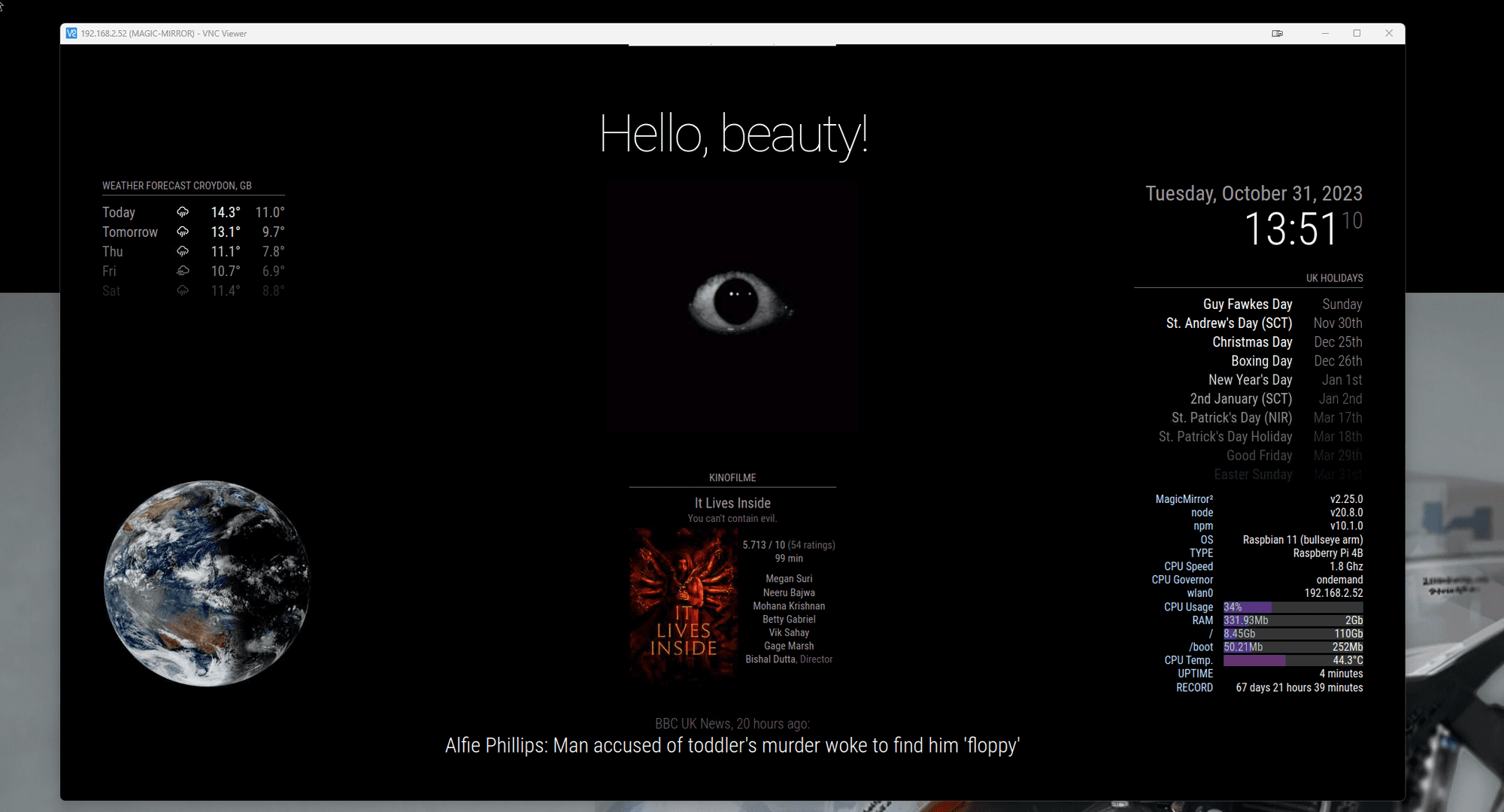
-
@DarkV before you jump off the bridge! try this
sudo apt-get remove nodejs npm -y
hash -r
make sure gone
which nodethensudo apt-get install nodejs:armv7l
node -v -
@sdetweil I don’t know what happened, but the reply is above. Many thanks
-
@DarkV cool… i didn’t expect that it, i’m glad!!
-
@sdetweil I did this
sudo apt-get remove nodejs npm -y
hash -r
which node
which nif which n response with empty then do
sudo apt-get install n
once n responds then
sudo n 20.8.0 --arch armv7l
hash -r
node -vThen both scripts and it went through!
-
@DarkV said in Failed Update:
–arch armv7l
awesome… it was that sneaky little --arch parm…
fixing upgrade script now . sorry for your troubles
-
@sdetweil No worries, thanks you for your time
-
@DarkV any chance you still have the os image file you are running
the info says (from the upgrade.log)
6.1.21-v8+ #1642 SMP PREEMPT Mon Apr 3 17:24:16 BST 2023 aarch64 GNU/Linux
the os is Distributor ID: Raspbian Description: Raspbian GNU/Linux 11 (bullseye) Release: 11 Codename: bullseye
only one I can find online says
6.1.21-v7+trying to test fix for the problem you encountered.
if you still have the image file can you give me its name…
also, what pi is this, 3 or 4?
thanks| edit: was able to make one
| install bullseye armhf
| edit /boot/config.txt
add
arm_64bit=1then u will boot 64bit kernel, (seen with uname -a, aarch64)
Linux raspberrypi4 6.1.21-v8+ #1642 SMP PREEMPT Mon Apr 3 17:24:16 BST 2023 aarch64 GNU/Linuxand have 32 bit runtime (seen with file /bin/bash
/bin/bash: ELF 32-bit LSB executable -
@sdetweil
Sam, I did an update yesterday and found Node 20.8 not working on my raspbian bullseye install.
I had an issue mentioned by someone else here before referring a missing GLIBCXX_3.4.26 file.
I needed to purge and install node 18.x. Then it worked.
Possible that this happens for more users with Raspbian
Bullseye.
I see your upgrade script requests Node 20.8.
Not sure if that may be an issue for other people as well? -
@lavolp3 can u send me the ~/MagicMirror/installers/upgrade.log
so I can see what happened…
same userid at gmail
-
@lavolp3 I check for buster and downgrade to node 18… not bullseye…
interested to see the log…
-
@sdetweil Sorry I have BUSTER installed. My mistake.
Here the lastlog
Upgrade started - Wed Nov  1 10:25:06 CET 2023
system is Linux magicmirror 5.10.103-v7+ #1529 SMP Tue Mar 8 12:21:37 GMT 2022 armv7l GNU/Linux
the os is Distributor ID: Raspbian Description: Raspbian GNU/Linux 10 (buster) Release: 10 Codename: buster
n (node version manager tool) not installed, doing test run, install skipped
doing test run = true, NO updates will be applied!
Check current Node installation ...
Node currently installed. Checking version number.
Minimum Node version: v18.18.0
Installed Node version: v16.20.2
Node should be upgraded.

Upgrade started - Wed Nov  1 10:45:19 CET 2023
system is Linux magicmirror 5.10.103-v7+ #1529 SMP Tue Mar 8 12:21:37 GMT 2022 armv7l GNU/Linux
user requested to force apply changes
the os is Distributor ID: Raspbian Description: Raspbian GNU/Linux 10 (buster) Release: 10 Codename: buster
node not installed, trying via apt-get
Reading package lists... Building dependency tree... Reading state information... nodejs is already the newest version (20.9.0-1nodesource1). 0 upgraded, 0 newly installed, 0 to remove and 0 not upgraded.
npm not installed, trying via apt-get
npm NOT installed now, install now
Reading package lists... Building dependency tree... Reading state information... Some packages could not be installed. This may mean that you have requested an impossible situation or if you are using the unstable distribution that some required packages have not yet been created or been moved out of Incoming. The following information may help to resolve the situation: The following packages have unmet dependencies: npm : Depends: nodejs (>= 6.11~) Depends: node-abbrev (>= 1.1.1~) but it is not going to be installed Depends: node-ansi-regex (>= 3.0~) but it is not going to be installed Depends: node-ansistyles (>= 0.1.3~) but it is not going to be installed Depends: node-aproba (>= 1.2~) but it is not going to be installed Depends: node-archy (>= 1.0~) but it is not going to be installed Depends: node-cacache (>= 10.0.4~) but it is not going to be installed Depends: node-bluebird (>= 3.5.1~) but it is not going to be installed Depends: node-call-limit (>= 1.1~) but it is not going to be installed Depends: node-chownr (>= 1.0.1~) but it is not going to be installed Depends: node-config-chain (>= 1.1.11~) but it is not going to be installed Depends: node-detect-indent (>= 5.0~) but it is not going to be installed Depends: node-detect-newline (>= 2.1~) but it is not going to be installed Depends: node-editor (>= 1.0~) but it is not going to be installed Depends: node-fs-vacuum (>= 1.2.10~) but it is not going to be installed Depends: node-fs-write-stream-atomic (>= 1.0.10~) but it is not going to be installed Depends: node-glob (>= 7.1.2~) but it is not going to be installed Depends: node-graceful-fs (>= 4.1.11~) but it is not going to be installed Depends: node-has-unicode (>= 2.0.1~) but it is not going to be installed Depends: node-hosted-git-info (>= 2.6~) but it is not going to be installed Depends: node-iferr (>= 0.1.5~) but it is not going to be installed Depends: node-inflight (>= 1.0.6~) but it is not going to be installed Depends: node-inherits (>= 2.0.3~) but it is not going to be installed Depends: node-ini (>= 1.3.5~) but it is not going to be installed Depends: node-npm-package-arg but it is not going to be installed Depends: node-promzard but it is not going to be installed Depends: node-jsonstream (>= 1.3.2~) but it is not going to be installed Depends: node-json-parse-better-errors (>= 1.0.1~) but it is not going to be installed Depends: node-lazy-property (>= 1.0~) but it is not going to be installed Depends: node-libnpx (>= 10.0.1~) but it is not going to be installed Depends: node-lockfile (>= 1.0.3~) but it is not going to be installed Depends: node-lru-cache (>= 4.1.1~) but it is not going to be installed Depends: node-mississippi (>= 3.0~) but it is not going to be installed Depends: node-mkdirp (>= 0.3.3) but it is not going to be installed Depends: node-move-concurrently (>= 1.0.1~) but it is not going to be installed Depends: node-nopt but it is not going to be installed Depends: node-normalize-package-data (>= 2.4~) but it is not going to be installed Depends: node-gyp (>= 3.6.2~) but it is not going to be installed Depends: node-resolve-from (>= 4.0~) but it is not going to be installed Depends: node-encoding but it is not going to be installed Depends: node-errno but it is not going to be installed Depends: node-npmlog (>= 4.1.2~) but it is not going to be installed Depends: node-once (>= 1.4~) but it is not going to be installed Depends: node-opener (>= 1.4.3~) but it is not going to be installed Depends: node-osenv (>= 0.1.5~) but it is not going to be installed Depends: node-path-is-inside (>= 1.0.2~) but it is not going to be installed Depends: node-promise-inflight (>= 1.0.1~) but it is not going to be installed Depends: node-ansi but it is not going to be installed Depends: node-qw (>= 1.0.1~) but it is not going to be installed Depends: node-read (>= 1.0.7~) but it is not going to be installed Depends: node-read-package-json (>= 2.0.13~) but it is not going to be installed Depends: node-request (>= 2.83~) but it is not going to be installed Depends: node-retry (>= 0.10.1~) but it is not going to be installed Depends: node-rimraf (>= 2.6.2~) but it is not going to be installed Depends: node-safe-buffer (>= 5.1.1~) but it is not going to be installed Depends: node-semver (>= 5.5~) but it is not going to be installed Depends: node-sha (>= 2.0.1~) but it is not going to be installed Depends: node-slide (>= 1.1.6~) but it is not going to be installed Depends: node-sorted-object (>= 2.0.1~) but it is not going to be installed Depends: node-from2 but it is not going to be installed Depends: node-stream-iterate but it is not going to be installed Depends: node-ssri (>= 5.2.4~) but it is not going to be installed Depends: node-strip-ansi (>= 4.0~) but it is not going to be installed Depends: node-tar (>= 4.4~) but it is not going to be installed Depends: node-text-table (>= 0.2~) but it is not going to be installed Depends: node-uid-number (>= 0.0.6~) but it is not going to be installed Depends: node-unique-filename (>= 1.1~) but it is not going to be installed Depends: node-unpipe (>= 1.0~) but it is not going to be installed Depends: node-boxen (>= 1.2.1~) but it is not going to be installed Depends: node-import-lazy but it is not going to be installed Depends: node-is-npm (>= 1.0~) but it is not going to be installed Depends: node-latest-version (>= 3.0~) but it is not going to be installed Depends: node-semver-diff (>= 2.0~) but it is not going to be installed Depends: node-xdg-basedir (>= 3.0~) but it is not going to be installed Depends: node-validate-npm-package-name (>= 3.0~) but it is not going to be installed Depends: node-which (>= 1.3~) but it is not going to be installed Depends: node-wrappy (>= 1.0.2~) but it is not going to be installed Depends: node-write-file-atomic (>= 2.3~) but it is not going to be installed E: Unable to correct problems, you have held broken packages.
doing test run = false
Check current Node installation ...
Node currently installed. Checking version number.
forcing low Node version
Minimum Node version: v18.18.0
Installed Node version: V1.0.0
Node should be upgraded.
That was the last failed upgrade. Node V1.0.0 lol. Node 20 was installed.
After that I manually purged Node, installed Node 18 and did thenpm run install-mm

Hello! It looks like you're interested in this conversation, but you don't have an account yet.
Getting fed up of having to scroll through the same posts each visit? When you register for an account, you'll always come back to exactly where you were before, and choose to be notified of new replies (either via email, or push notification). You'll also be able to save bookmarks and upvote posts to show your appreciation to other community members.
With your input, this post could be even better 💗
Register Login