Read the statement by Michael Teeuw here.
Run MM on Ubuntu 16 VM
-
@justjim1220
try this.sudo apt-get install libgconf-2-4 -
Thanks, that worked!!!
:winking_face: :winking_face: :smiling_face: :smiling_face: :grinning_face_with_smiling_eyes: :grinning_face_with_smiling_eyes: :smiling_face_with_sunglasses: :smiling_face_with_sunglasses: -
Hello everyone,
3months later, I hope it’s not too late :)
@AxLed i’m trying to use “node serveronly” but have this error :
WARNING! Could not validate config file. Please correct syntax errors. Starting with default configuration.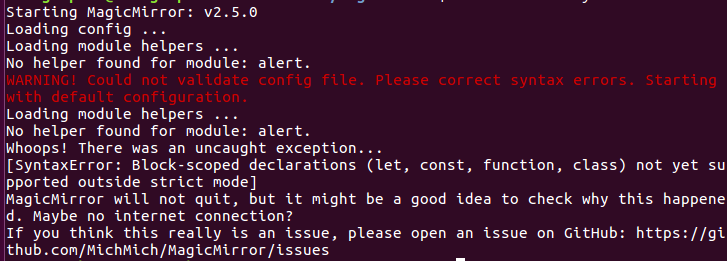
I followed @Mykle1 tutorial to create default config.js but this not works.
Any idea ? (My internet connection works)
Thanks.
-
@reitrac
Your config.js might have some misspell or wrong syntax. -
My config.js is by default :D
I just changed “en” by “fr”.I’ll try to find config.js on Git and come back to you.
Thanks.
EDIT :
I downloaded the latest config.js from : https://github.com/MichMich/MagicMirror/blob/master/config/config.js.sample
And not works :'( -
/* Magic Mirror Config Sample * * By Michael Teeuw http://michaelteeuw.nl * MIT Licensed. * * For more information how you can configurate this file * See https://github.com/MichMich/MagicMirror#configuration * */ var config = { address: "localhost", // Address to listen on, can be: // - "localhost", "127.0.0.1", "::1" to listen on loopback interface // - another specific IPv4/6 to listen on a specific interface // - "", "0.0.0.0", "::" to listen on any interface // Default, when address config is left out, is "localhost" port: 8080, ipWhitelist: ["127.0.0.1", "::ffff:127.0.0.1", "::1"], // Set [] to allow all IP addresses // or add a specific IPv4 of 192.168.1.5 : // ["127.0.0.1", "::ffff:127.0.0.1", "::1", "::ffff:192.168.1.5"], // or IPv4 range of 192.168.3.0 --> 192.168.3.15 use CIDR format : // ["127.0.0.1", "::ffff:127.0.0.1", "::1", "::ffff:192.168.3.0/28"], language: "en", timeFormat: 24, units: "metric", modules: [ { module: "alert", }, { module: "updatenotification", position: "top_bar" }, { module: "clock", position: "top_left" }, { module: "calendar", header: "US Holidays", position: "top_left", config: { calendars: [ { symbol: "calendar-check-o ", url: "webcal://www.calendarlabs.com/templates/ical/US-Holidays.ics" } ] } }, { module: "compliments", position: "lower_third" }, { module: "currentweather", position: "top_right", config: { location: "New York", locationID: "", //ID from http://bulk.openweathermap.org/sample/; unzip the gz file and find your city appid: "YOUR_OPENWEATHER_API_KEY" } }, { module: "weatherforecast", position: "top_right", header: "Weather Forecast", config: { location: "New York", locationID: "5128581", //ID from http://www.openweathermap.org/help/city_list.txt appid: "YOUR_OPENWEATHER_API_KEY" } }, { module: "newsfeed", position: "bottom_bar", config: { feeds: [ { title: "New York Times", url: "http://www.nytimes.com/services/xml/rss/nyt/HomePage.xml" } ], showSourceTitle: true, showPublishDate: true } }, ] }; /*************** DO NOT EDIT THE LINE BELOW ***************/ if (typeof module !== "undefined") {module.exports = config;} -
@reitrac
I can bet you have missed comma afterlanguage:"fr". 95% of syntax error was that thing in my case. :D -
@Mykle1 @Sean Didn’t works with the default config … I don’t know why.
-
Did you change the name of the config file from ‘config.js.sample’ to ‘config.js’ ?
-
@justjim1220 Yeah of course :)
I followed @Mykle1 tutorial.EDIT :
If can help, I’m using VirtualBox on MAC with UBUNTU 16.04 LTS
-
Hey,
i tried tu remove and reinstall MM.
Here is the new error :VirtualBox:~/MagicMirror$ node serveronly/ module.js:328 throw err; ^ Error: Cannot find module 'express' at Function.Module._resolveFilename (module.js:326:15) at Function.Module._load (module.js:277:25) at Module.require (module.js:354:17) at require (internal/module.js:12:17) at Object.<anonymous> (/home/monagraphic/MagicMirror/js/server.js:8:15) at Module._compile (module.js:410:26) at Object.Module._extensions..js (module.js:417:10) at Module.load (module.js:344:32) at Function.Module._load (module.js:301:12) at Module.require (module.js:354:17)Some one can help me ?
EDIT :
It works, i launch a second time “npm install”.


Hello! It looks like you're interested in this conversation, but you don't have an account yet.
Getting fed up of having to scroll through the same posts each visit? When you register for an account, you'll always come back to exactly where you were before, and choose to be notified of new replies (either via email, or push notification). You'll also be able to save bookmarks and upvote posts to show your appreciation to other community members.
With your input, this post could be even better 💗
Register Login