Read the statement by Michael Teeuw here.
MMM-MyCommute
-
@j.e.f.f Hey Jeff
can you add the time for the next metro/tram/bus ?
is it possible to catch the adress in the agenda ? and if its blank just used the definited adress in destination ? :-) -
@tidus5 I’ll have to see what the API gives me. Not sure that info is available.
I wrote a transit-specific module that does that but it is for TTC (Toronto transit). However it is based in the NextBus API which supports many systems. It could easily be modified to work with a number of transit systems. Which is yours?
-
@tidus5 I’ve added a param
showNextVehicleDeparturethat you can specify for destinations withmode:'transit'. This will show you the next available vehicle factoring your walking time to the stop. It will only show the departure time for the first vehicle on your route to save summary space (and really once you’ve departed, you’ll either make your connections on time or you won’t. So the departure time is kind of moot.) My thinking is that you’ll want to know of you have enough to walk to the stop to catch the next vehicle.There is a limit of 2500 requests per day to the Google API using the free service. Since each entry in your
destinationslist requires its own request, I’ve kept the poll frequency to a conservative 10 minute interval to avoid hitting this limit. As such, it is possible that you’ll see a next vehicle time that is unrealistic to walk to in time, or in some cases, the next vehicle time will be in the past. Keep it in mind that the next vehicle time may be a bit stale.The time is shown as follows (see the last entry labelled “Airport”):
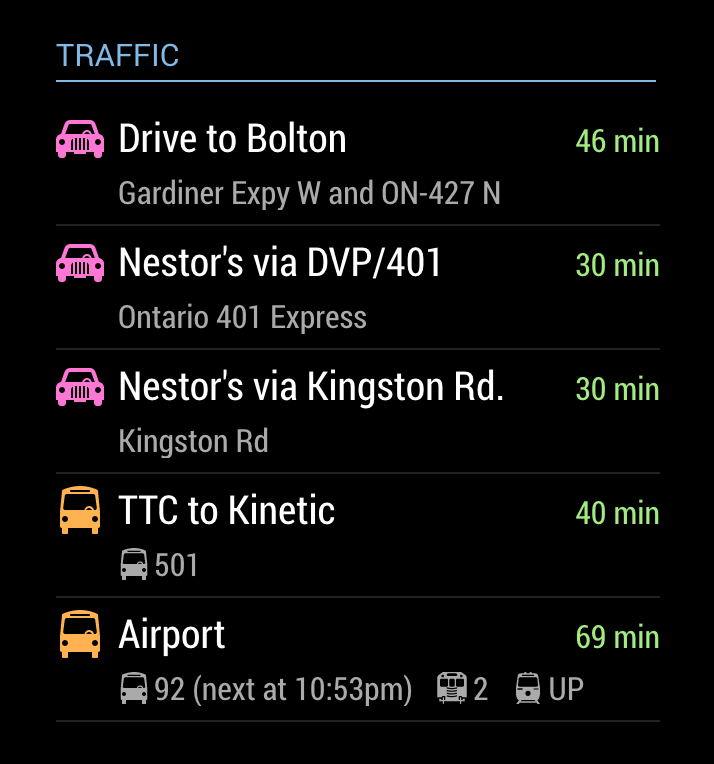
-
@j.e.f.f Perfect!!!
thanks :-)
-
Hi @j.e.f.f
Just wanted to say, thanks so much for spending your time building this module! I have just finished my MagicMirror build and this module is by far the best and most used. I love how much I’m able to customise it to thanks to your hard work.Now, I wondered if it was easy to add the following… My commute is always over an hour, would it be possible to format the commute time to show 1h 30 min rather than 90 min for example? It would still show just ‘min’ if under an hour (20 min for example).
If it’s not all that easy and you’d rather not alter the code, then that’s fine, I may have a bash at editing the code on my Pi myself.
Thanks again!
-
@jon11a It’s certainly possible. But it takes up considerably more space to render “1h 30 min” than it does to render “90 min”. The space that the travel time uses takes away from the space used for the text to its left. That is why I chose to render it that way. Even an extremely long commute of over 2 hours would only take up an extra 8 pixels or so. By doing it this way, it should be more or less the same width for everyone, with less chance of truncating the label.
If you want to change this yourself, it’s a fairly trivial change to the
formatTimefunction inMMM-MyCommute.js. Google returns the travel time in the number of seconds. I’ve just done a simple division by 60 to get the number of minutes. You can just do a little more math and re-jig the formatting as you’d like.Happy to hear that you like the module!
-Jeff
-
@j.e.f.f Thanks for your quick response Jeff. I thought that might be the reason behind your decision to just use mins. It does make sense to me.
I think I will have a go at changing mine, will be a good little challenge for me as I’m learning more and more programming skills!
Thanks again and I look forward to see what you come up with next ;)
-
@jon11a Fair warning: this module was also the result of me wanting to change a thing or two to suit my own needs ;). Before I knew I had something completely new! It shares little resemblance with the module I originally forked from mrx-work-traffic.
Have fun. I can’t wait to see how it evolves!
-Jeff
-
@j.e.f.f
Managed to do it and pretty pleased with myself :)Here’s what it looks like:
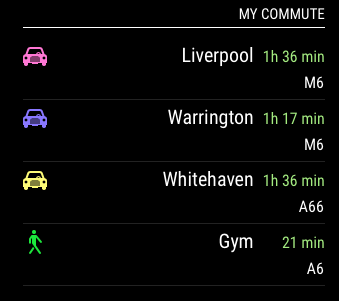
I had to edit the css file to move the destination-label slightly as you mentioned:
margin-right: 70px;I edited your formatTime function to format the time in hours and minutes or just minutes if it’s less than an hour in total.
Below is the code for that function with my bits added, I am sure it could be better but I think I did ok!formatTime: function(time, timeInTraffic) { var timeEl = document.createElement("span"); timeEl.classList.add("travel-time"); if (timeInTraffic != null) { var minutes = Math.floor(Number(timeInTraffic) /60); var h = Math.floor(minutes /60); var m = Math.floor(minutes %60); if (h == 0) { timeEl.innerHTML = m + " min"; } else { timeEl.innerHTML = h + "h " + m + " min"; } var variance = timeInTraffic / time; if (this.config.colorCodeTravelTime) { if (variance > this.config.poorTimeThreshold) { timeEl.classList.add("status-poor"); } else if (variance > this.config.moderateTimeThreshold) { timeEl.classList.add("status-moderate"); } else { timeEl.classList.add("status-good"); } } } else { var minutes = Math.floor(Number(time) /60); var h = Math.floor(minutes /60); var m = Math.floor(minutes %60); if (h == 0) { timeEl.innerHTML = m + " min"; } else { timeEl.innerHTML = h + "h " + m + " min"; } timeEl.classList.add("status-good"); }Thanks for your help Jeff, learned some more programming skills too so I’m happy! :)
-
startTime & endTime query.
I’ve tried setting these times up for the morning time before going to work and after testing it hides itself but it never re-appeared this morning?
Has anyone else had this issue?module: 'MMM-MyCommute', position: 'bottom_right', config: { showHeader: true, headerText: 'Traffic', apikey: 'API_KEY_FROM_GOOGLE', origin: 'My Address', startTime: '06:00', endTime: '09:00', destinations: [ etc...It would also be good if you could set it to run on Mon-Fri as well.
If not possible I could use the MMM-Scheduler to do this instead, it’s just a bit tidier in this module. -
This module is great, but it was nicer, to take starttime and endtime for the different destinations.
So, I will go to work in the morning, soIneed this only between 5.00 and 6.00 o’clock and if I will go to the salsa party I need this only in the evening. -
@joela85 I just did a quick test on my laptop by changing the clock to mover forward a day at a time, and I had the module disappear and reappear consistently. I’ve set my config to
startTime: '06:00'andendTime: '09:00'and I’ll let it run overnight to see if I can recreate your issue.I also like the Mon-Fri idea, as well as the individual time windows per destination. Will work on them over the next few days.
-
@Blackmirror I ran a test overnight and my module came back on when it should have. But I did realize there is a fundamental problem with how I’ve architected the data pull. Are you using two instances of this module? If so I’m thinking that may be causing problems and possibly yours. I’m going to write an update soon, and I’ll have you try again.
-
I just went back into my config and noticed on one of the times I used a semicolon instead of the colon. I must have looked at that 20 times and not noticed it. Maybe just needed some fresh eyes on it. Hopefully that will sort it. I only have one instance of this module.
-
@joela85 ha! I should have thought to ask for your config. In any case, I’ve pushed an update that fixes the support for multiple instances of the module.
Of note is that you now configure the header in the standard way instead using the “headerText” and “showHeader” configurations. I thought I needed to do it this way when showing and hiding, but it turned out not be the case. So if your config looked like this before:
    {
      module: 'MMM-MyCommute',
      position: 'top_left',
      classes: 'default everyone',
      config: {
        showHeader: true,
        headerText: 'Traffic',
        ...
      }
    }
change it to this:
   {
      module: 'MMM-MyCommute',
      position: 'top_left',
      header: 'Traffic',
      classes: 'default everyone',
      config: {
        ...
      }
    }
If you don’t want a header, then just omit it.
Will be working on configs for limiting to Mon-Fri and windowing for individual destinations next.
-
MMM-MyCommute has been updated with some new configuration options
-
You can now specify
hideDayswith a list of days during which the module is hidden. You specify an array of numbers, 0=Sunday, 6=Saturday. To hide it on weekends, for example, specifyhideDays: [0,6]. -
startTime,endTime, andhideDaysparameters are now available as options for each individual destination. It should be noted that these parameters are superseded by the same ones specified in the main config. That means that if the main config parameters cause the module to be hidden as a whole, none of the destinations will be listed, regardless of their window settings.
Thanks for all your suggestions! This has evolved into a very robust module and I’ve learned quite a bit in the process.
Enjoy!
-Jeff -
-
@j.e.f.f said in MMM-MyCommute:
If you don’t want a header, then just omit it.
Aha. Very nice. If you get the chance, please update the README with this information. It changed on me and I couldn’t figure it out for a while.
-
@j.e.f.f Nice, I will test it at the weekend.
-
Why isn’t this in the master list of modules at https://github.com/MichMich/MagicMirror/wiki/MagicMirror²-Modules
-
@alberttwong There are many MANY modules that aren’t in that list… just browse the Modules section of this forum and you’ll find lots.
I’m assuming the “master” list needs to be maintained by the author of MagicMirror, while any of us can post to the forum.
Does anyone know if the “master” list is even maintained anymore, and how we get it updated with the missing modules?

Hello! It looks like you're interested in this conversation, but you don't have an account yet.
Getting fed up of having to scroll through the same posts each visit? When you register for an account, you'll always come back to exactly where you were before, and choose to be notified of new replies (either via email, or push notification). You'll also be able to save bookmarks and upvote posts to show your appreciation to other community members.
With your input, this post could be even better 💗
Register Login