Read the statement by Michael Teeuw here.
Snilles Magic Mirror Project
-
Hi all!
Here is my Mirror so far…
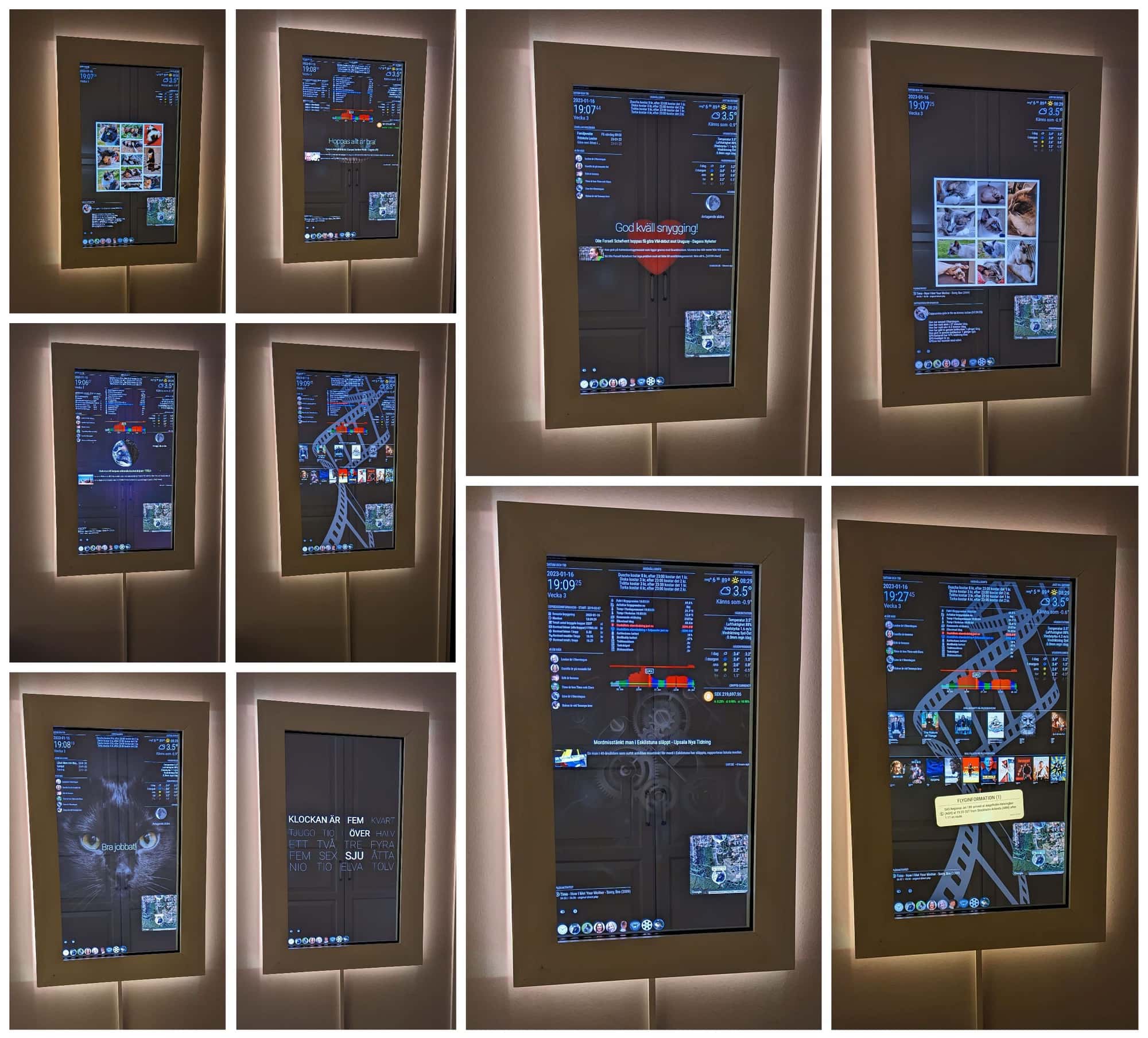
For more pictures and some building information se here.
I have added a comment on every picture in the gallery so you know what you are looking at. :)Update: 2026-08-10: The mirror has been “rebuilt” so that Home Assistant owns what is displayed.
Update: 2023-01-16: Updated almost all information about mirror functionality and additions.
Update: 2020-01-23: Video of some of the features…I’m still finding more use-cases for my Mirror, nowadays it is also heavily integrated with my Home Assistant…
Even my family think it’s useful now!Just so you know, my Mirror is NOT using a Raspberry PI any more, I switched over to a small NUC computer, the RPi is not powerful enough for all the stuff that’s going on here.
The Mirror has Mirror “Profiles” for each of us in the family, then also a “Weather”, “Work”, “Media” and “Clock” profile.
Both our cats have a profiles (because why not?) as well.
Mostly the profiles switches by time and day of the week. I’ll get in to the scheduling later. :)Short backstory. I live in the south of Sweden (in a small city called Åstorp) with my wife and daughter.
I work in Stockholm (the capital of Sweden). The distance between the cities are about 560 kilometer or 248 (US/UK) miles.
So, to get to work I fly. I do this two days a week (four flights). As you probably know flights
gets delayed from time to time and when this happens I don’t want my wife to worry (too much)
and I don’t want to have to text her for every change…So, to solve this, I opened a mail account for the mirror.
Then I registered an account using the mirrors mail on the site “Flight Aware”.
The site can send tracking information mails about (maximum 5) flights (airlines) for free!
Then I use node-red in HA (Home Assistant) to fetch the mail, parse it and present the latest information on a MMM-Memo.
This way my Wife only have to glance at the mirror to see if I’m going to be late or not. When I arrive at home (HA registers my presence) the Memo resets and gets hidden.Here are some scenarios when the Mirror is used:
• Any of the cats enters or leaves through the cat-door, a message is sent telling what cat went where (shown for 5 minutes)
• Any battery is low in any of my battery powered sensors in the house the leds around the Mirror will turn blue and a message telling what battery needs changing. (shown for 5 minutes) This will repet once every day until battery is replaced.
• When the “default” light turns on (from HA if time is right or from remote) a message will say “Lights…” (for 5 minutes).
• If temperature in the fridge or freezer is high the leds will turn red around the Mirror and a message will be displayed (for 5 minutes every 30 minutes until fixed).
• If a leakage is discovered under the sink or in the bathrooms pipe switch, leds will turn red and a message will be displayed (indefinitely until fixed).
• If any of my 3D-Printers starts to print, the Bed-Camera and status will show until print is done.
• If at night and all lights is out and any of the motion-tracker are triggerd in the house. The leds will glow (yellow) faintly so you can see.
• If the Vacuum Robot is cleaning, the map and status is shown until finished or paused.
• If a bird visits the Bird Buddy the latest picture (and guessed species) will show up on the Mirror.
• When I brew an Espresso, the total amount of brewed cups will show up in a message and when done brewing a new message show, wishing you to enjoy your coffee.
• The positions of our cats GPS necklaces updates every minute and gets shown on the “MMM-GoogleMaps-Tracking” module.
• The Mirror turns off the screen 00:15 all nights. It turns on again at 04:45 on Mondays and Wednesdays, the the other weekdays it turns on at 06:00 and on weekends it turns on at 07:00.
Most of the information shown on the Mirror is triggered from Home Assistant via notifications (using MMM-Remote-Control).Module classes:
• The modules with the “Default and Everyone” class are showed all the time (when not manually hidden).
• The modules in the “None” class are only shown manually or with triggered by events by the Mirror or HA.
• Each family member has a personal profile class (Erik, Camilla, Louise, Kakan and Cappuccino).
• Then I have a set of specific classes for specific “themes”, those are: Jobba (Work), Media, Klocka (clock) and Väder (Weather).
• Scheduled modules has it’s own class. This is for “single” day events. Like Halloween, Birthdays, Christmas and New Years Eve.
• Modules with no class defined but used in other ways is MMM-Remote-Control, MMM-ModuleScheduler and MMM-ProfileSwitcher.For a list of all modules see end of this post.
ModuleScheduler Information:
Some profiles switches and functions are controlled by the scheduler (MMM-ModuleScheduler).**Scheduling (updated 2026):** I no longer use `MMM-ModuleScheduler` at all — it is removed. Everything it did (screen on/off times, profile switching by time of day, and the per-module schedules) moved into a single Node-RED flow in Home Assistant, where the whole schedule is one editable table instead of two dozen cron strings.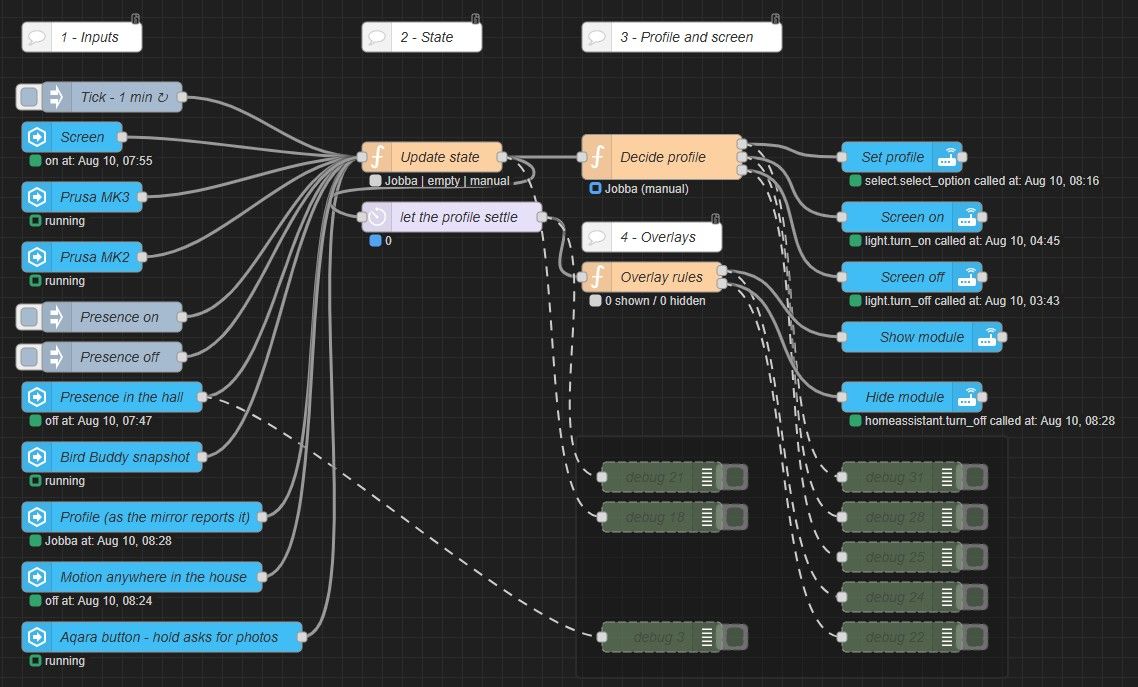
ProfileSwitcher Information:
• In the profile switcher (MMM-ProfileSwitcher) each profile has their own greeting and leave message.
• The personal profiles and "Clock" has a timeout of 5 minutes, after that the mirror goes back to the "default" profile, if triggered via MMM-TouchNavigation.
• The "Jobba" (Work), "Media" and "Väder" (Weather) profile does not have a time out, because it's suppose to be able to stay "all day" sometimes.
TouchNavigation Information:
• The "Text Clock" profile has a picture of an analog clock.
• The "Kakan" profile has a picture of Kakan (Cat).
• The "Cappuccino" profile has a picture of Cappuccino (Cat).
• Each family member (human) profile has the persons own picture on the button.
• The "Jobba" (Work) profile has a "gear" picture.
• The "Media" profile has a "Camera Roll" picture.
• The "Väder" (Weather) profile has a spinning globe (gif animation) picture.
Above the TouchNavigation I have the MMM-ModuleBar
It normally shows only two buttons. The first one is the “Hide all” function and the second one “expands” the MMM-ModuleBar. What’s really going on here is, when you press the “Expand” button, it hides the current ModuleBar and un-hides a second ModuleBar that contain the following buttons.ModuleBar Information (left to right):
• Show/Hide this MMM-ModuleBar module and the "other" one.
	module: "MMM-Modulebar"
	idnum: [56,57]
	symbol: "chevron-circle-left"
• Show the Bird Buddy last visitor Text and Picture MMM-homeassistant-sensors modules (from HA).
	module: "MMM-homeassistant-sensors"
	idnum: [54,55]
	symbol: "dove"
	symbol2: "eye-slash"
• Show/Hide the default Clock module.
	module: "clock"
	symbol: "bell"
	symbol2: "bell-slash"
• Show/Hide the default MMM-News module.
	module: "MMM-News"
	symbol: "fas fa-newspaper"
	symbol2: "far fa-newspaper"
• Show/Hide the MMM-MoonPhase module.
	module: "MMM-MoonPhase"
	symbol: "fas fa-moon"
	symbol2: "far fa-moon"
• Show/Hide the Cats location MMM-GoogleMaps-Tracking module, this shows the geographic location of our cats (from HA).
	module: "MMM-GoogleMaps-Tracking"
	symbol: "map-marked-alt"
	symbol2: "map"
• Show/Hide the MMM-homeassistant-sensors module showing the information local weather station (from HA).
	module: "MMM-homeassistant-sensors"
	idnum: 28
	symbol: "thermometer-three-quarters"
	symbol2: "thermometer-empty"
• Show/Hide the MMM-Globe3D module.
	module: "MMM-Globe"
	symbol: "globe-europe"
	symbol2: "globe-americas"
• Show/Hide the MMM-TextClock module.
	module: "MMM-TextClock"
	symbol: "comment"
	symbol2: "comment-slash"
• Show/Hide the default Weather module.
	module: "weather"
	symbol: "cloud"
	symbol2: "cloud-moon"
• Show/Hide the MMM-nixie-clock module.
	module: "MMM-nixie-clock"
	symbol: "eye"
	symbol2: "eye-slash"
• Show/Hide the MMM-cryptocurrency module.
	module: "MMM-cryptocurrency"
	symbol: "fab fa-bitcoin"
	symbol2: "fab fa-btc"
• Show/Hide the MMM-homeassistant-sensors module that show total Espresso cups/price/beans I have brewed in my Espresso Machine.
	module: "MMM-homeassistant-sensors"
	symbol: "mug-hot"
	symbol2: "coffee"
• Show/Hide the MMM-MotionEye module for the camera that show my Prusa i3 MK3 3D Printer bed.
	module: "MMM-MotionEye"
	idnum: 35
	symbol: "layer-group"
	symbol2: "toggle-off"
	showUrl: "http://10.0.0.112:8080/motioneye/1",
	hideUrl: "http://10.0.0.112:8080/motioneye/hide/1"
• Show/Hide  the MMM-MotionEye module for the camera that show my Prusa i3 MK2.5 3D Printer bed.
	module: "MMM-MotionEye"
	idnum: 36
	symbol: "layer-group"
	symbol2: "toggle-off"
	showUrl: "http://10.0.0.112:8080/motioneye/2",
	hideUrl: "http://10.0.0.112:8080/motioneye/hide/2"
Here are the defined classes and the modules they trigger.
Profile classes: {
	Eriks Modules: {
		MMM-Profilepicture - Personal background picture.
		Clock - The time (Default module).
		Compliments - Personal compliments (from specified json file).
		Weather - Local weather information at Mirrors location (Default module).
		Weather - Local weather forecast at Mirrors location (Default module).
		MMM-GoogleMaps-Tracking - Geolocation of our Cats.
		MMM-cryptocurrency - Current bitcoin price.
		MMM-homeassistant-sensors - Espresso Machine information.
		MMM-homeassistant-sensors - Local weather station information.
		MMM-homeassistant-sensors - Information about the House (humidity, temperature and more).
		MMM-Tibber - Information about price on electricity / hour.
		MMM-News - Latest news from Sweden.
	},
	Camillas Modules: {
		MMM-Profilepicture - Personal background picture.
		Clock - The time (Default module).
		Compliments - Personal compliments (from specified json file).
		Weather - Local weather information at Mirrors location (Default module).
		Weather - Local weather forecast at Mirrors location (Default module).
		MMM-GoogleMaps-Tracking - Geolocation of our Cats.
		MMM-MoonPhase - Current Moon phase.
		MMM-News - Latest news from Sweden.
		MMM-homeassistant-sensors - Local weather station information.
		MMM-homeassistant-sensors - Information about the family's whereabouts.
	},
	Louises Modules: {
		MMM-Profilepicture - Personal background picture.
		Clock - The time (Default module).
		Compliments - Personal compliments (from specified json file).
		Weather - Local weather information at Mirrors location (Default module).
		Weather - Local weather forecast at Mirrors location (Default module).
		MMM-GoogleMaps-Tracking - Geolocation of our Cats.
		MMM-MoonPhase - Current Moon phase.
		MMM-homeassistant-sensors - Today school lunch.
		MMM-homeassistant-sensors - Information about the family's whereabouts.
	},
	Jobbas Modules: {
		MMM-Profilepicture - Personal background picture.
		Clock - The time (Default module).
		Weather - Local weather information at Mirrors location (Default module).
		Weather - Local weather forecast at Mirrors location (Default module).
		MMM-JsonTable - Espresso Machine information.
		MMM-GoogleMaps-Tracking - Geolocation of our Cats.
		MMM-cryptocurrency - Current bitcoin price.
		MMM-homeassistant-sensors - Local weather station information.
		MMM-homeassistant-sensors - Information about the family's whereabouts.
		MMM-homeassistant-sensors - Information about the House (humidity, temperature and more).
		MMM-Tibber - Information about price on electricity / hour.
		MMM-News - Latest news from Sweden.
	},
	Medias Modules: {
		MMM-Profilepicture - Personal background picture.
		Clock - The time (Default module).
		Weather - Local weather information at Mirrors location (Default module).
		Weather - Local weather forecast at Mirrors location (Default module).
		MMM-TautulliLatest - Latest Movies and TV-Series added to my Plex Server.
		MMM-GoogleMaps-Tracking - Geolocation of our Cats.
		MMM-homeassistant-sensors - Local weather station information.
		MMM-homeassistant-sensors - Information about the family's whereabouts.
		MMM-homeassistant-sensors - Information about the House (humidity, temperature and more).
		MMM-Tibber - Information about price on electricity / hour.
	},
	Väders Modules: {
		MMM-Profilepicture - Personal background picture.
		Weather - Local weather information at Mirrors location (Default module).
		Weather - Local weather forecast at Mirrors location (Default module).
		MMM-Globe3D - Full disc 3D spinning globe with accurate weather clouds.
		MMM-MoonPhase - Current Moon phase.
		MMM-GoogleMaps-Tracking - Geolocation of our Cats.
		MMM-JsonTable - Espresso Machine information.
		MMM-homeassistant-sensors - Local weather station information.
		MMM-homeassistant-sensors - Information about the family's whereabouts.
		MMM-homeassistant-sensors - Information about the House (humidity, temperature and more).
		MMM-Tibber - Information about price on electricity / hour.
		MMM-News - Latest news from Sweden.
	},
	Kakan Modules: {
		MMM-Profilepicture - Personal Picture Collage.
		Clock - The time (Default module).
		Weather - Local weather information at Mirrors location (Default module).
		Weather - Local weather forecast at Mirrors location (Default module).
		MMM-GoogleMaps-Tracking - Geolocation of our Cats.
		MMM-homeassistant-sensors - Kakans information about active minutes, hours inside / outside and trips in / out through the Cat-door. GPS battery charge and GPS status.
	},
	Cappuccino Modules: {
		MMM-Profilepicture - Personal Picture Collage.
		Clock - The time (Default module).
		Weather - Local weather information at Mirrors location (Default module).
		Weather - Local weather forecast at Mirrors location (Default module).
		MMM-GoogleMaps-Tracking - Geolocation of our Cats.
		MMM-homeassistant-sensors - Cappuccino information about active minutes, hours inside / outside and trips in / out through the Cat-door. GPS battery charge and GPS status.
	},
	Default and Everyones Modules: {
		MMM-Memo - Displays memos (Used for displaying temporary information in my case).
		MMM-Modulebar - Bar with buttons for toggling (show/hide) other modules.
		MMM-TouchNavigation - Profile switching buttons.
	},
	Nones Modules: {
		Alert - Used for "urgent information".
		MMM-Remote-Control - For controlling the Mirror using notifications and Web-Meny.
		MMM-ProfileSwitcher - Handling the switching of the profiles.
		MMM-homeassistant-sensors - Prusa i3 MK3 (3D-Printer) printing information. Only visible when I'm printing.
		MMM-homeassistant-sensors - Prusa i3 MK2.5 (3D-Printer) printing information. Only visible when I'm printing.
		MMM-MotionEye - Displaying the Prusa i3 MK3 (3D-Printer) camera when in action (or using MMM-Modulebar).
		MMM-MotionEye - Displaying the Prusa i3 MK2.5 (3D-Printer) camera when in action (or using MMM-Modulebar).
		MMM-Modulebar - The "full" MMM-ModuleBar. Only visible when activating it from the "small" MMM-ModuleBar.
	}
}
Full module list with IDs and usage:
00 MMM-Remote-Control      17 MMM-JsonTable            34 MMM-homeassistant-sensors
01 MMM-ModuleScheduler *   18 MMM-homeassistant-sensors 35 MMM-homeassistant-sensors
02 MMM-ProfileSwitcher     19 MMM-TautulliLatest        36 MMM-homeassistant-sensors
03 MMM-Videoplayer         20 compliments               37 MMM-homeassistant-sensors
04 MMM-Profilepicture      21 compliments               38 MMM-Tibber
05 MMM-Profilepicture      22 compliments               39 MMM-anotherNewsFeed
06 MMM-Profilepicture      23 MMM-Weather-SMHI          40 MMM-Snow *
07 MMM-Profilepicture      24 MMM-homeassistant-sensors 41 MMM-Snow *
08 MMM-Profilepicture      25 MMM-cryptocurrency        42 MMM-Snow *
09 MMM-Profilepicture      26 MMM-Memo                  43 MMM-nixie-clock
10 MMM-Profilepicture      27 MMM-homeassistant-sensors 44 MMM-homeassistant-sensors
11 MMM-Profilepicture      28 MMM-MotionEye             45 MMM-homeassistant-sensors
12 MMM-Profilepicture      29 MMM-homeassistant-sensors 46 MMM-Modulebar (small)
13 MMM-Profilepicture      30 MMM-MotionEye             47 MMM-Modulebar (full)
14 alert                   31 MMM-Globe3D               48 MMM-TouchNavigation
15 MMM-GoogleMaps-Tracking 32 MMM-MoonPhase             49 MMM-ImmichSlideShow
16 clock                   33 MMM-TextClock             50 MMM-HomeAssistant

* = disabled
I don’t know if you noticed but the frame around the mirror is “changeable”. I thought if I can display different things on the screen, I should be able to change the physical appearance of the mirror as well without having to build a completely new mirror. So, the front frame can easily be removed by just pulling out the bottom part and lifting it up. I have made two different front frames (as you have seen in the pictures). But I’ll probably do another one in time. :)
Let me know if you want to know anything more. :)
Thank you all for helping out and being awesome!If you cant find it, make it and share it
MMM-homeassistant-sensors,MMM-Modulebar,MMM-Profilepicture,MMM-Videoplayer,MMM-TautulliLatest -
VERY impressed… WOW great work!
-
@cowboysdude Thank you! :)
If you cant find it, make it and share it
MMM-homeassistant-sensors,MMM-Modulebar,MMM-Profilepicture,MMM-Videoplayer,MMM-TautulliLatest -
-
@Mykle1 Thank you… :)
-
Really nice work! I would like to know some more about your hardware, especially mirror type (seller, price etc) and what type of touch panel you’re using.
Still in the planning stage of my build but since I’m doing all the software myself I still have some time to sort everything out. :D -
@grillchips Hi! Thank you. I’m using a Pilkington MirrorView mirror. It’s a 50/50 mirror (bought it through my work) and it work well when it’s normal lighting I think. If I open the door in the hallway and the sun shines in to the hallway it’s hard to see what’s on the screen.
Then I’m (for now) using a Raspberry Pi 3 and a IR Multitouch Overlay Frame to give the mirror “touch” capability. There where a bit of trickery to the setup of the IR-Frame, you can find the information in this thread.
Then I’m using a LPD8806 LED Strip to light up behind the frame. Here I’m for the moment using PixelWeb with Bibliopixel 2.x as a back end. It’s not fully integrated yet with the mirror software. I built a small sh script that sends a json string to PixelWebs (in official) API. :)Hehe, As you can imagine, it’s still a long way to go on the software part, you know how it is. There is always something that can get a little better… :)
I think that’s the important bits. Let me know if you want to know more. :)
-
Any chance we can get some close ups? :)
-
@cowboysdude Sure, what would you like to see? In the google gallery (the link above) there are lots of “close ups” but is it something in particular you are interested in?
If you cant find it, make it and share it
MMM-homeassistant-sensors,MMM-Modulebar,MMM-Profilepicture,MMM-Videoplayer,MMM-TautulliLatest -
@Snille Sorry didn’t see the link!! That looks awesome. The bottom is a touch menu If I"m thinking correctly?
Please do share how you have the LED’s working for backlight… I’m very interested in that! :)
-
Update: 2026-08-10: Below code and functions are all retierd. I’m using WLED now for controlling the leds (from HA as well). :)
@cowboysdude Thank you!! :) The LEDs you say. :) Ok, for the moment, the mirror is not “aware” of the leds. This is something I’m planing to implement. But as it works now I’m using PixelWeb with Bibliopixel 2.x as a back end. Then I’m using the below sh script to trigger different (predefined so far) animations.
#!/bin/bash
#-----------------------------------------------------------------------------
#
# Snilles MagicMirror Led Conrol Script.
# Use in conjunction with PixelWEB.
#
#-----------------------------------------------------------------------------
# Connfigure here!
# URL to PixelWEB API On the MM.
apiurl="http://x.x.x.x:8081/api";
# Default program if no argument is set.
defprog="back";
# Default red amount if non is set.
defred="45";
# Default green amount if non is set.
defgreen="30";
# Default blue amount if non is set.
defblue="0";
# Default brightness amount.
defamount="50";

## -------------------------- Dont edit below!! --------------------------- ##

while [[ $# -gt 0 ]] ; do
	case $1 in
		-h|-\?|--help)
			echo "Usage: mirrorleds.sh -p or --program [back, running, alarm, rainbow or thunder (rainbow and thunder needs no colors)] -r or -red [0-255] -g or --green [0-255] -b or --blue [0-255] -a or --amount [0-255]";
			exit;
			;;
		-p|--program)
			if [ -n "$2" ]; then
				program="$2"
				shift
			else
				program="$defprog"
			fi
			;;
		-r|--red)
			if [ -n "$2" ]; then
				if [[ "$2" == ?(-)+([0-9]) ]]; then
					if [ "$2" -gt "255" ]; then
						red="255"
					elif [ "$2" -lt "0" ]; then
						red="0"
					else
						red="$2"
					fi
					shift
				else
					red="$defred"
				fi
			fi
			;;
		-g|--green)
			if [ -n "$2" ]; then
				if [[ "$2" == ?(-)+([0-9]) ]]; then
					if [ "$2" -gt "255" ]; then
						green="255"
					elif [ "$2" -lt "0" ]; then
						green="0"
					else
						green="$2"
					fi
					shift
				else
					green="$defgreen"
				fi
			fi
			;;
		-b|--blue)
			if [ -n "$2" ]; then
				if [[ "$2" == ?(-)+([0-9]) ]]; then
					if [ "$2" -gt "255" ]; then
						blue="255"
					elif [ "$2" -lt "0" ]; then
						blue="0"
					else
						blue="$2"
					fi
					shift
				else
					blue="$defblue"
				fi
			fi
			;;
		-a|--amount)
			if [ -n "$2" ]; then
				if [[ "$2" == ?(-)+([0-9]) ]]; then
					if [ "$2" -gt "255" ]; then
						amount="255"
					elif [ "$2" -lt "0" ]; then
						amount="0"
					else
						amount="$2"
					fi
					shift
				else
					amount="$defamount"
				fi
			fi
			;;
	esac
	shift
done

# Default program if non was given.
if [ -z "$program" ]; then
	program="$defprog"
fi

# Default red amount if non was given.
if [ -z "$red" ]; then
	red="$defred"
fi

# Default green amount if non was given.
if [ -z "$green" ]; then
	green="$defgreen"
fi

# Default blue amount if non was given.
if [ -z "$blue" ]; then
	blue="$defblue"
fi

# Default amount if non was given.
if [ -z "$amount" ]; then
	amount="$defamount"
fi


# Compose the colors
colors="$red,$green,$blue";

# 22 Pixel Alarm
if [ "$program" == "alarm" ]; then
	curl -H "Content-Type: application/json" -X POST --data '{"action":"startAnim","config":{"id":"ColorChase","config":{"end":-1,"start":0,"width":22,"color":['$colors']},"run":{"amt":1,"fps":300,"seconds":null,"max_steps":0,"untilComplete":false,"max_cycles":1}}}' $apiurl;
fi

# Rainbowalarm (multi color spinning)
if [ "$program" == "rainbow" ]; then
	curl -H "Content-Type: application/json" -X POST --data '{"action":"startAnim","config":{"id":"ColorPattern","config":{"colors":[[255,0,0],[255,165,0],[255,255,0],[0,255,0],[0,0,255],[128,0,128]],"width":20},"run":{"amt":1,"fps":300,"seconds":null,"max_steps":0,"untilComplete":false,"max_cycles":1}}}' $apiurl;
fi

# 1 Running Pixel
if [ "$program" == "running" ]; then
	curl -H "Content-Type: application/json" -X POST --data '{"action":"startAnim","config":{"id":"ColorChase","config":{"end":-1,"start":0,"width":1,"color":['$colors']},"run":{"amt":1,"fps":40,"seconds":null,"max_steps":0,"untilComplete":false,"max_cycles":1}}}' $apiurl;
fi
# Backlight
if [ "$program" == "back" ]; then
	curl -H "Content-Type: application/json" -X POST --data '{"action":"startAnim","config":{"id":"ColorPattern","config":{"colors":[['$colors']],"width":1},"run":{"amt":1,"fps":1,"seconds":null,"max_steps":0,"untilComplete":false,"max_cycles":1}}}' $apiurl;
fi

# Thunder
if [ "$program" == "thunder" ]; then
	curl -H "Content-Type: application/json" -X POST --data '{"action":"startAnim","config":{"id":"WhiteTwinkle","config":{"max_led":null,"speed":2,"density":1,"max_bright":'$amount'},"run":{"amt":1,"fps":300,"seconds":null,"max_steps":0,"untilComplete":false,"max_cycles":1}}}' $apiurl;
fi

# Stop everything
if [ "$program" == "stop" ]; then
	curl -H "Content-Type: application/json" -X POST --data '{"action":"stopAnim"}' $apiurl;
fi

# Add a new line...
echo $"";
Then I’m using Alexa (for now) to trigger different animations (via the HA-Bridge server). But later on this will be triggered by a module that “picks up” other modules communication so I can animate the leds depending on for example weather events, calendar events, memo events or whatever I can figure out. :) I just have to convince my wife that animating the leds IS a good thing… :)
If you cant find it, make it and share it
MMM-homeassistant-sensors,MMM-Modulebar,MMM-Profilepicture,MMM-Videoplayer,MMM-TautulliLatest -
@Snille Awesome, Thank you!
-
I just added a quick comment on all the pictures in the gallery so you know what you are looking at. :)
If you cant find it, make it and share it
MMM-homeassistant-sensors,MMM-Modulebar,MMM-Profilepicture,MMM-Videoplayer,MMM-TautulliLatest -
@Snille That is just awesome! Thank you!
-
Like cowboysdude I totally missed the link to your google gallery. The build is very amazing, I am a bit jealous on the 3D printer :)
Very nice!
-
@yawns Thank you! :) I know the post is way to long, but when I see others builds, I always want to know how they did things. So I just included all the information at the top. So people don’t have to ask for it. :)
-
@Snille said in Snilles Magic Mirror Project:
I know the post is way to long, but when I see others builds, I always want to know how they did things. So I just included all the information at the top
In fact I read your post, I just did not notice the “see here” link under your photo :)
I do like to see how others created their mirror (or other things) -
@yawns Hehe, yes. If you are about to buy a 3D-Printer, I can recommend a PRUSA 3D-Printer. It’s my third printer and it’s by far the best one I have had (I built the first one myself). I’ve been 3D-Printing stuff for about 6 years and it’s great if you really want to get things done your “own” way. :) You can find some of the stuff I’ve done here.
If you cant find it, make it and share it
MMM-homeassistant-sensors,MMM-Modulebar,MMM-Profilepicture,MMM-Videoplayer,MMM-TautulliLatest -
@Snille
I just bought a house, currently there is no budget for a 3D printer or any other “toys”. But I will get one in the future. Thanks for the reccomondation -
@Snille said in Snilles Magic Mirror Project:
You can find some of the stuff I’ve done here.
That ball sculpture is crazy cool!!!



Hello! It looks like you're interested in this conversation, but you don't have an account yet.
Getting fed up of having to scroll through the same posts each visit? When you register for an account, you'll always come back to exactly where you were before, and choose to be notified of new replies (either via email, or push notification). You'll also be able to save bookmarks and upvote posts to show your appreciation to other community members.
With your input, this post could be even better 💗
Register Login