MagicMirror Forum
    • Recent
    • Tags
    • Unsolved
    • Solved
    • MagicMirror² Repository
    • Documentation
    • 3rd-Party-Modules
    • Donate
    • Discord
    • Register
    • Login
    A New Chapter for MagicMirror: The Community Takes the Lead
    Read the statement by Michael Teeuw here.

    MMM-forecast-io -- Localized up to the minute weather

    Scheduled Pinned Locked Moved Utilities
    127 Posts 36 Posters 221.8k Views 38 Watching
    Loading More Posts
    • Oldest to Newest
    • Newest to Oldest
    • Most Votes
    Reply
    • Reply as topic
    Log in to reply
    This topic has been deleted. Only users with topic management privileges can see it.
    • L Offline
      Littlejohn21
      last edited by

      @Mykle1 @strawberry-3-141 @yawns

      now im having an issue where it wont sit in the corner if that makes sense?it keeps a buffer only on the MMM-forecast-io all others are right agains the edge i installed

      body {
        margin: 0px;
        height: 100%;
        width: 100%;
      

      and that moved everything else to the edge but forcast-io stayed it even keeps a buffer when i relocate it to the other side of the screen…

      0_1504191718436_2017-08-31-110120_1016x1856_scrot.png

      sorry bout the phrase it was the first thing i figured out how to edit and since i’m making this for the wife well… figured i’d have fun with it :)

      Mykle1M 1 Reply Last reply Reply Quote 0
      • Mykle1M Offline
        Mykle1 Project Sponsor Module Developer @Littlejohn21
        last edited by

        @Littlejohn21 said in MMM-forecast-io -- Localized up to the minute weather:

        sorry bout the phrase

        LMFAO! That is PERFECT!

        Ok, so, in honor of your wife’s #@#'s, you can try this entry in your custom.css file. I assume you want to move the module to the right and up, so you only need margin-right: -40px; and margin-top: -40px;. Adjust those numbers accordingly until you get the result you want.

        .MMM-MODULENAME {
          margin-left: 0px;
          margin-right: -40px; 
          margin-top: -40px;
          margin-bottom: 0px;
        }

        Create a working config
        How to add modules

        1 Reply Last reply Reply Quote 0
        • pyrosmileyP Offline
          pyrosmiley
          last edited by

          Hey quick question: how do I change the color of the precipitation graph? I’ve got a decent amount of custom CSS that’s working (including other things for this module) but for the life of me I cannot seem to change this one element?
          Here’s what I’ve got going on for this module right now (more icon colors elsewhere, I gotta clean up the file!):

          .MMM-forecast-io .summary {color: #aaa;}
          
          .MMM-forecast-io .forecast-row .weathericon {color: #aaa}
          .MMM-forecast-io .wi-night-alt-cloudy {color: #1a659e}
          .MMM-forecast-io .wi-volcano {color: #8c2f39}
          
          .MMM-forecast-io .precipitation-graph {color: #1a659e;}
          
          .small.MMM-forecast-io .forecast {
            margin-right: 0px;
            margin-left: auto;
          }
          .small.MMM-forecast-io .summary {
            text-align: right;
          }
          

          I’m absolutely positive I’m missing something dumb here

          D 1 Reply Last reply Reply Quote 0
          • D Offline
            dmcinnes Module Developer @pyrosmiley
            last edited by

            @pyrosmiley Hello! The precipitation graph is created using an HTML Canvas so unfortunately the colors cannot be tweaked by CSS apart from the border. The Javascript will need to be modified to support additional colors. Here is where the color is set for the curve and further up it draws the horizontal lines and tick marks. Ideally these colors are configurable. I’ve added an issue to the repo to track it!

            I’m knee deep in another project, so if someone wants to take a crack at it, please be my guest :)

            pyrosmileyP 1 Reply Last reply Reply Quote 1
            • pyrosmileyP Offline
              pyrosmiley @dmcinnes
              last edited by

              @dmcinnes Oh, okay — that makes a lot of sense! Glad to know it’s not just me missing something. I’ll take a look at the html and see what I can do, thanks for pointing that out for me.

              1 Reply Last reply Reply Quote 1
              • M Offline
                mongo116 Module Developer @jinjirosan
                last edited by

                @jinjirosan Hi, have you made the changes available to download? Would like to give it a go as currently using a combination of the default weather and forecast-io.

                pyrosmileyP 1 Reply Last reply Reply Quote 1
                • B Offline
                  Basanth_Kumar
                  last edited by

                  Hello! as i am completely new to this MM…i am unable to where the icons images are placed…if anybody knows that,guide me , so that i want to change the UI for mine…

                  pyrosmileyP 1 Reply Last reply Reply Quote 0
                  • pyrosmileyP Offline
                    pyrosmiley @mongo116
                    last edited by

                    @mongo116 The changes were merged into the main branch of the module, so if you’re up to date, then you should be able to add ‘’’precipitationFillColor’’’ to your config. I added a description and some other info to the readme as well.

                    M 1 Reply Last reply Reply Quote 0
                    • pyrosmileyP Offline
                      pyrosmiley @Basanth_Kumar
                      last edited by

                      @Basanth_Kumar I’m on my phone so I can’t look up links very effectively, but there are a couple of guides on the forums that are good for learning how to setup your configuration file. The official guide on the github page is also pretty thorough. It definitely took some trial and error for me to get up and running (gotta pay attention to those commas!) but you’ll get it. Just follow those guides, and just change one little thing at a time so you can learn to see how it works — you’ll get the hang of it!

                      1 Reply Last reply Reply Quote 0
                      • M Offline
                        mongo116 Module Developer @pyrosmiley
                        last edited by

                        @pyrosmiley Thanks for that. What about the wind, and sunrise / sunset settings? Or were these never merged? Thanks…

                        pyrosmileyP 1 Reply Last reply Reply Quote 0
                        • pyrosmileyP Offline
                          pyrosmiley @mongo116
                          last edited by

                          @mongo116 sadly I don’t see that those were ever added in and it wasn’t me that did it. I have no idea what I’m doing but sometime soon I’ll see if I can figure it out? I also tried for that awhile back using CSS but didn’t get very far. If you get it let me know, and I’ll do the same!

                          1 Reply Last reply Reply Quote 0
                          • morozgrafixM Offline
                            morozgrafix Moderator
                            last edited by morozgrafix

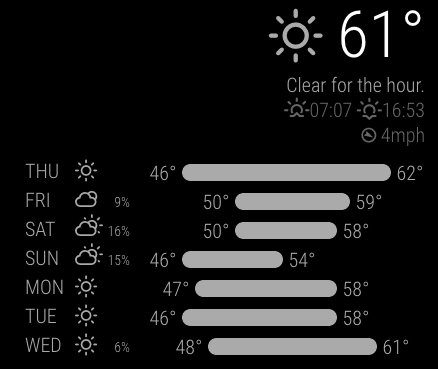
                            I’ve added some of those on my local branch a long time ago. Feel free to pick from there https://github.com/morozgrafix/MMM-forecast-io/commit/972201f64d432c3c0863a7d76364e7f8af1bb817 and https://github.com/morozgrafix/MMM-forecast-io/commit/13ff8b78c86dc0905e46c11702d7173571517e79

                            My fork is fairly old and hasn’t been synced in a while, though.

                            It looks like this:
                            0_1512084362862_c2a6ef7c-9b0a-4027-a60f-041280daee24-image.png

                            1 Reply Last reply Reply Quote 1
                            • pyrosmileyP Offline
                              pyrosmiley
                              last edited by

                              Very nice! I’ll definitely pull from that then

                              1 Reply Last reply Reply Quote 0
                              • R Offline
                                rak
                                last edited by rak

                                Hi guys,

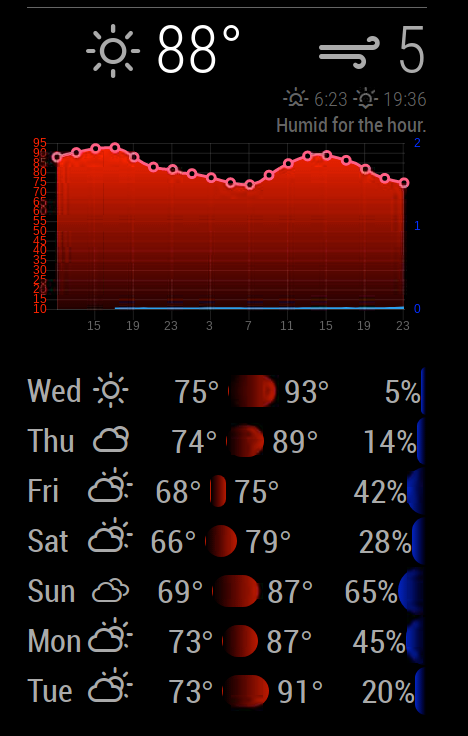
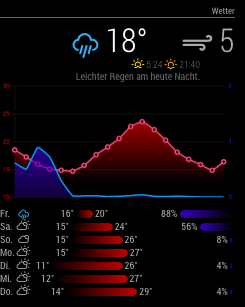
                                I like the concept of the bars for the min/max temperature very much. I wanted the look of the hourly temperature graph a bit more more modern and slick.

                                I sat down today and did some code magic. I am surprised how it went. The magicmirror is the first javescript project. So bear with me.

                                This is how it looks now.
                                0_1527880419978_72C1D4EB-B39E-400F-AD68-D5520107565F.png

                                I created a fork which I will clean up a bit in the next weeks. Today I am glad it works at all ,-)?

                                Enjoy.

                                Ralf

                                G twosquirrelsT 2 Replies Last reply Reply Quote 3
                                • G Offline
                                  grantc66 @rak
                                  last edited by

                                  @rak There seems to be a small error in the script creating the graph:

                                  // Init chart.js
                                  this.chart = new Chart(ctx, {
                                    type: 'line',
                                    data: data,
                                    options: options
                                  });
                                  

                                  Throws an uncaught reference error. Unfortunately I know absolutely nothing about js, can you let me know how to fix it.

                                  Ta

                                  1 Reply Last reply Reply Quote 0
                                  • R Offline
                                    rak
                                    last edited by

                                    You had the plugin before?

                                    Have you done this after switching to my fork? It should install chart.js as a dependency.

                                    npm install
                                    

                                    I hope this solves your problem. Let me know.

                                    G 1 Reply Last reply Reply Quote 0
                                    • idoodlerI Offline
                                      idoodler Module Developer @paulocarrasco
                                      last edited by

                                      @paulocarrasco Thats an easy one:) You are missing an , after 'my api key'.

                                      Here is the correct config:

                                      {
                                            module: 'MMM-forecast-io',
                                            position: 'top_right',  // This can be any of the regions.
                                            config: {
                                              // See 'Configuration options' for more information.
                                              apiKey: 'my api key', // Dark Sky API key.
                                              // Only required if geolocation doesn't work:
                                              latitude:   37.1468,
                                              longitude: -8.5846
                                            }
                                      },
                                      
                                      1 Reply Last reply Reply Quote 0
                                      • G Offline
                                        grantc66 @rak
                                        last edited by

                                        @rak Had the original working OK, tried to npm install chart.js in the MM root :(

                                        the npm install in the MMM-foecast.io directory fixed it. :)

                                        looks great, good work.

                                        thanks

                                        1 Reply Last reply Reply Quote 0
                                        • B Offline
                                          barnosch
                                          last edited by

                                          @rak
                                          Nice work. i just installed it and adjusted for fitting my mirror.

                                          Is it possible to shrink the height from the graph?
                                          or is it calculated from the width (400px) to keep its aspect ratio?

                                          1 Reply Last reply Reply Quote 0
                                          • R Offline
                                            rak
                                            last edited by

                                            Should be easy do adapt. I can check if the height is currently fixed or exposed in the config.js.

                                            1 Reply Last reply Reply Quote 0

                                            Hello! It looks like you're interested in this conversation, but you don't have an account yet.

                                            Getting fed up of having to scroll through the same posts each visit? When you register for an account, you'll always come back to exactly where you were before, and choose to be notified of new replies (either via email, or push notification). You'll also be able to save bookmarks and upvote posts to show your appreciation to other community members.

                                            With your input, this post could be even better 💗

                                            Register Login

                                            • 1
                                            • 2
                                            • 3
                                            • 4
                                            • 5
                                            • 6
                                            • 7
                                            • 5 / 7
                                            • First post
                                              Last post
                                            Enjoying MagicMirror? Please consider a donation!
                                            MagicMirror created by Michael Teeuw.
                                            Forum managed by Sam, technical setup by Karsten.
                                            This forum is using NodeBB as its core | Contributors
                                            Contact | Privacy Policy