Read the statement by Michael Teeuw here.
MMM-NOAA - Another Weather Module
-
@Pielo said in MMM-NOAA - Another Weather Module:
Hello, can anyone say me, why don’t show the weatherforecast?
Hallo, kann mir vielleicht jemand sagen, warum ich beim MMM-NOAA V3.0 Modul die Wettervorhersage nicht angezeigt bekomme? Kann es sein, das man die per Maus oder Touch erst öffnen muss? Kann man das irgendwo einstellen?
My config:
{
			module: 'MMM-NOAA3',
			position: 'top_right',
   			config: {
       				provider: "openweather", // From list above
       				apiKey: "0a1....92791........6debc26....7d",        // From one of the providers listed above
				airKey: "",
       				css: "NOAA3",                   // THIS MUST CONTAIN A CSS STYLE NAME
   				userlat: "50.65", //MUST HAVE BOTH
       				userlon: "11.4333"  //MUST HAVE BOTH
			}
    		},
lg Pielo
@Mykle1
Thanks for answare, look at this post please. Thank you very much. -
Thanks for answare. I have delete the modul, new installed and change the API Provider to from “openweather” to “weatherbit”. Its work fine, now. Thank you for helping.
-
@Pielo said in MMM-NOAA - Another Weather Module:
Thanks for answare. I have delete the modul, new installed and change the API Provider to from “openweather” to “weatherbit”. Its work fine, now. Thank you for helping.
No worries mate. Glad you got it working. I tested it just now with openweather and had the same issue as you. I’ll tell the author about it.
-
Hello,
I am interested in making Polish version.
Arek
-
@Lagmin said in MMM-NOAA - Another Weather Module:
I am interested in making Polish version.
Or, you could submit a translation file to the repo. This is the Spanish translation file. Replace the Spanish and you’re done.
{ "Rise":"Subir", "Set":"Abajo", "4 Day Forecast":"Pronóstico de 4 días", "Monday": "lunes", "Tuesday": "martes", "Wednesday": "miércoles", "Thursday": "jueves", "Friday": "viernes", "Saturday": "sábado", "Sunday": "domingo", "Hours of Light":"Ligero", "Last Updated": "Actualizado", "Today":"Hoy", "Mon":"Lun", "Tue":"Mar", "Wed":"Mie", "Thu":"Jue", "Fri":"Vie", "Sat":"Sab", "Sun":"Lun", "No Wind":"calma", "Humidity": "Húmedo", "Visibility":"Visible", "Pressure":"Presión", "Excellent":"Excelente", "Good":"Bueno", "Lightly Polluted":"Ligeramente Contaminado", "Moderately Polluted":"Moderadamente contaminado", "Heavily Polluted":"Altamente contaminado", "Forecast":"Pronóstico" } -
@Mykle1 said in MMM-NOAA - Another Weather Module:
{
“Rise”:“Subir”,
“Set”:“Abajo”,
“4 Day Forecast”:“Pronóstico de 4 días”,
“Monday”: “lunes”,
“Tuesday”: “martes”,
“Wednesday”: “miércoles”,
“Thursday”: “jueves”,
“Friday”: “viernes”,
“Saturday”: “sábado”,
“Sunday”: “domingo”,
“Hours of Light”:“Ligero”,
“Last Updated”: “Actualizado”,
“Today”:“Hoy”,
“Mon”:“Lun”,
“Tue”:“Mar”,
“Wed”:“Mie”,
“Thu”:“Jue”,
“Fri”:“Vie”,
“Sat”:“Sab”,
“Sun”:“Lun”,
“No Wind”:“calma”,
“Humidity”: “Húmedo”,
“Visibility”:“Visible”,
“Pressure”:“Presión”,
“Excellent”:“Excelente”,
“Good”:“Bueno”,
“Lightly Polluted”:“Ligeramente Contaminado”,
“Moderately Polluted”:“Moderadamente contaminado”,
“Heavily Polluted”:“Altamente contaminado”,
“Forecast”:“Pronóstico”
}Here you go, please update it and by the way, could you please tell me how to implement this language to my MagicMirror module?
{
“Rise”:“Wschód”,
“Set”:“Zachód”,
“4 Day Forecast”:“Prognoza na 4 dni”,
“Monday”: “Poniedziałek”,
“Tuesday”: “Wtorek”,
“Wednesday”: “Środa”,
“Thursday”: “Czwartek”,
“Friday”: “Piątek”,
“Saturday”: “Sobota”,
“Sunday”: “Niedziela”,
“Hours of Light”:“Godzin światła”,
“Last Updated”: “Ostatnio aktualizowane”,
“Today”:“Dzisiaj”,
“Mon”:“Pn”,
“Tue”:“Wt”,
“Wed”:“Śr”,
“Thu”:“Czw”,
“Fri”:“Pt”,
“Sat”:“Sb”,
“Sun”:“Nd”,
“No Wind”:“Bezwietrznie”,
“Humidity”: “Wilgotność”,
“Visibility”:“Widoczność”,
“Pressure”:“Ciśnienie”,
“Excellent”:“Doskonała”,
“Good”:“Dobra”,
“Lightly Polluted”:“Lekko zanieczyszczone”,
“Moderately Polluted”:“Średnio zanieczyszczone”,
“Heavily Polluted”:“Bardzo zanieczyszczone”,
“Forecast”:“Prognoza”
} -
@Lagmin edit config.js and set language: to the value u need. note that this is all of mm, some other things will need to be translated.
-
Thank you, it worked for my other modules.
For this module I have problem, it is showing only Rise, Daylight and Set. All other are ‘undefined’. Someone knows the solution?
Here is my config:
{ module: 'MMM-NOAA3', position: 'top_left', config: { provider: "openweather", // From list above apiKey: "key", // From one of the providers listed above airKey: "key", css: "NOAA4", // THIS MUST CONTAIN A CSS STYLE NAME userlat: "52.429248", //MUST HAVE BOTH userlon: "20.962540" //MUST HAVE BOTH } }, -
@Lagmin said in MMM-NOAA - Another Weather Module:
Here you go, please update it and by the way, could you please tell me how to implement this language to my MagicMirror module?
I forwarded to the author. He will add it to the module, at which time, you will have to run
git pullin the MMM-NOAA3 directory. Your config language should belanguage: "pl", -
pl file added for Polish translation. Thank you for taking the time to make it. As Mykle1 says do a ‘git pull’ in the MMM-NOAA3 directory.
-
No problem, not much time. Do you know maybe what can be a solution to my problem showing only 3 results, please?
-
@Lagmin said in MMM-NOAA - Another Weather Module:
Do you know maybe what can be a solution to my problem showing only 3 results, please?
Have you installed the dependencies?
-
@Mykle1 Ok, I got it, it is “working”.
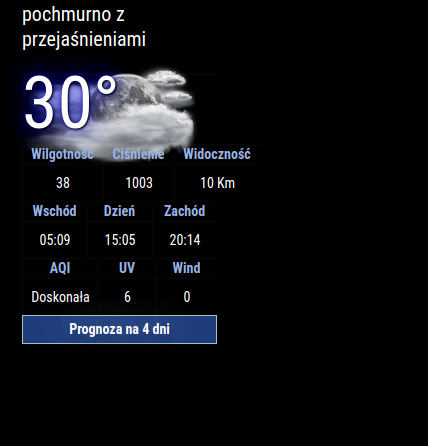
I used this simple config:module: 'MMM-NOAA3', position: 'top_left', config: { provider: "must be in quotes", // From list above apiKey: "YOUR API KEY", // From one of the providers listed above airKey: "YOUR API KEY", css: "NOAA3", // THIS MUST CONTAIN A CSS STYLE NAME userlat: "xxxx", //MUST HAVE BOTH userlon: "xxxx" //MUST HAVE BOTH } },But:
- I don’t have % for Humidity, inHg for Pressure…
- How I can translate WIND? I don’t have it in translation file (same for AQI, UV).
- I don’t have forecast for 4 days below.
Do you know what can be the problem?
-
I’m guessing that the data is not complete for all locations so you may not see % for Humidity, inHg for Pressure… or that information is not present in the data (for some reason).
How I can translate WIND? I don’t have it in translation file (same for AQI, UV).
You can add “Wind” to the translation file of your language and put in the translation. I’ve given an example below. Then send a PR to the author and he will add it to the repo.
"Sun":"Sun", "No Wind": "No Wind", "Wind": "Yours", "Humidity": "Humidity", -
Just spoke with the author. Some of the providers are not supplying the data they once were or they’ve changed the way they provide the data. This module uses several different providers so try another one and see if you get better results.
Keeping this module functioning using all the different providers must be a monumental task. It may take a long time for the author to fix any of it, assuming he has the time.
-
@Mykle1 Well I tried changing coordinates for our capital city of Poland - Warsaw, but it is still not showing forecast. I also tried to change for weatherbit (previously used openweather) but with weatherbit it doesn’t even show forecast - (Prognoza na 4 dni).
-
Yes, understood. I’m using my darksky api key until it is no longer valid. Like you, my OpenWeather api key doesn’t show the 4 day forecast. I spoke with the author and he is extremely busy with work so he doesn’t have much time to troubleshoot his modules. You can fork the repo and fix it if you like. :-)
-
@Mykle1 yeh hourly for 4 days, or daily for 7 days are in the openweather free apikey access, but ONLY by using the one all api
-
Yes, I know. I’m using it in my MMM-BMW-OW module. :-)
-
@Mykle1 I know. we did it at the same time.
was adding info for others


Hello! It looks like you're interested in this conversation, but you don't have an account yet.
Getting fed up of having to scroll through the same posts each visit? When you register for an account, you'll always come back to exactly where you were before, and choose to be notified of new replies (either via email, or push notification). You'll also be able to save bookmarks and upvote posts to show your appreciation to other community members.
With your input, this post could be even better 💗
Register Login