MagicMirror Forum
    • Recent
    • Tags
    • Unsolved
    • Solved
    • MagicMirror² Repository
    • Documentation
    • 3rd-Party-Modules
    • Donate
    • Discord
    • Register
    • Login
    A New Chapter for MagicMirror: The Community Takes the Lead
    Read the statement by Michael Teeuw here.

    MMM-NOAA - Another Weather Module

    Scheduled Pinned Locked Moved System
    690 Posts 77 Posters 2.9m Views 70 Watching
    Loading More Posts
    • Oldest to Newest
    • Newest to Oldest
    • Most Votes
    Reply
    • Reply as topic
    Log in to reply
    This topic has been deleted. Only users with topic management privileges can see it.
    • T Offline
      TokTias
      last edited by TokTias

      Hi !

      I am really gloing bananas here. I got several other MMM-modules running in my Ubuntu machine, but MMM-NOAA just won’t start. I get, depending on how I start MM :

      node serveronly
      Starting MagicMirror: v2.3.1
      Loading config ...
      Loading module helpers ...
      WARNING! Could not validate config file. Please correct syntax errors. Starting with default configuration.
      Loading module helpers ...
      Whoops! There was an uncaught exception...
      [SyntaxError: Block-scoped declarations (let, const, function, class) not yet supported outside strict mode]
      MagicMirror will not quit, but it might be a good idea to check why this happened. Maybe no internet connection?
      If you think this really is an issue, please open an issue on GitHub: https://github.com/MichMich/MagicMirror/issues
      

      Or

      npm start
      
      > magicmirror@2.3.1 start /home/ranix/MagicMirror
      > sh run-start.sh
      
      
      npm ERR! Linux 4.13.0-43-generic
      npm ERR! argv "/usr/bin/nodejs" "/usr/bin/npm" "start"
      npm ERR! node v4.2.6
      npm ERR! npm  v3.5.2
      npm ERR! code ELIFECYCLE
      npm ERR! magicmirror@2.3.1 start: `sh run-start.sh`
      npm ERR! Exit status 1
      npm ERR!
      npm ERR! Failed at the magicmirror@2.3.1 start script 'sh run-start.sh'.
      npm ERR! Make sure you have the latest version of node.js and npm installed.
      npm ERR! If you do, this is most likely a problem with the magicmirror package,
      npm ERR! not with npm itself.
      npm ERR! Tell the author that this fails on your system:
      npm ERR!     sh run-start.sh
      npm ERR! You can get information on how to open an issue for this project with:
      npm ERR!     npm bugs magicmirror
      npm ERR! Or if that isn't available, you can get their info via:
      npm ERR!     npm owner ls magicmirror
      npm ERR! There is likely additional logging output above.
      
      npm ERR! Please include the following file with any support request:
      npm ERR!     /home/ranix/MagicMirror/npm-debug.log
      

      I did not get any issues when running npm install, and as mentioned above, no issues with other modules.

      npm run config:check
      

      runs ok and I even removed my MM-instalaltion, reinstalled it and I tried a minimal config.js file like this :

      var config = {
      	address: "0.0.0.0",
      	port: 8070,
      	ipWhitelist: [],
      
      	language: "en",
      	timeFormat: 24,
      	units: "metric",
      
      	modules: [
      		{
      	    		module: 'MMM-NOAA',
      			position: 'top_center',
      			config:{
      				apiKey: '----',
      				airKey: '----',
      			},
      		},
      	]
      
      };
      
      /*************** DO NOT EDIT THE LINE BELOW ***************/
      if (typeof module !== "undefined") {module.exports = config;}
      

      And it just shows the errors as listed above.

      Is there anyone who can help me figure out what’s going south here before I have to give up ?

      Cheers & TIA !
      /T

      Mykle1M cowboysdudeC 2 Replies Last reply Reply Quote 0
      • Mykle1M Offline
        Mykle1 Project Sponsor Module Developer @TokTias
        last edited by

        @toktias said in MMM-NOAA - Another Weather Module:

        This may or may not be related but your node seems like it could be updated.

        Create a working config
        How to add modules

        T 1 Reply Last reply Reply Quote 0
        • cowboysdudeC Offline
          cowboysdude Module Developer @TokTias
          last edited by

          @toktias Sent you a PM…

          In reality all mirrors are different and from time to time these things happen :)

          1 Reply Last reply Reply Quote 0
          • T Offline
            TokTias @Mykle1
            last edited by TokTias

            @mykle1 Thanks, but as far as I can see, I got the latest version; “4.2.6~dfsg-1ubuntu4.1”. Or am I missing some new/hidden version out there ? :)

            Cheers !
            /T

            strawberry 3.141S 1 Reply Last reply Reply Quote 0
            • strawberry 3.141S Offline
              strawberry 3.141 Project Sponsor Module Developer @TokTias
              last edited by

              @toktias you are running node v4.2.6 the current version is v10.4.1 https://nodejs.org/en/

              Please create a github issue if you need help, so I can keep track

              T cowboysdudeC 2 Replies Last reply Reply Quote 3
              • T Offline
                TokTias @strawberry 3.141
                last edited by

                @strawberry-3-141
                Thanks for pointing me in the correct direction !
                My Linux-box was pointing to ppa:chris-lea/node.js as the source for Node.js, I removed that (reference and unistalled it) and installed per the intrucitons you linked to in your post above a voilá, MMM-NOAA works perfect now !

                Thanks a lot & Cheers !
                /T

                1 Reply Last reply Reply Quote 1
                • cowboysdudeC Offline
                  cowboysdude Module Developer @strawberry 3.141
                  last edited by

                  @strawberry-3-141 That’ll cause you some issues…

                  Mykle1M 1 Reply Last reply Reply Quote 0
                  • Mykle1M Offline
                    Mykle1 Project Sponsor Module Developer
                    last edited by

                    Uhh . . .

                    Create a working config
                    How to add modules

                    1 Reply Last reply Reply Quote 0
                    • Mykle1M Offline
                      Mykle1 Project Sponsor Module Developer @cowboysdude
                      last edited by

                      @cowboysdude

                      106.2k views!

                      There are so many things I want to say about that but I think I’ll just say “Well deserved and congrats!” :-)

                      Create a working config
                      How to add modules

                      1 Reply Last reply Reply Quote 0
                      • J Offline
                        jhujube
                        last edited by

                        Hi,

                        May be a stupid question, but with the new provider (weatherbit.io), where do i set my location? if this was set when i signed in for my apiKey, i didn’t enter any information to locate me…
                        Thanks in advance.

                        Mykle1M cowboysdudeC 2 Replies Last reply Reply Quote 0
                        • Mykle1M Offline
                          Mykle1 Project Sponsor Module Developer @jhujube
                          last edited by

                          @jhujube said in MMM-NOAA - Another Weather Module:

                          where do i set my location?

                          You don’t. The module is getting your location (geo-location or some such)

                          Create a working config
                          How to add modules

                          1 Reply Last reply Reply Quote 0
                          • cowboysdudeC Offline
                            cowboysdude Module Developer @jhujube
                            last edited by

                            @jhujube Correct it’s automatic Geo located :)

                            ‘some such’… LOL @Mykle1

                            Mykle1M 1 Reply Last reply Reply Quote 1
                            • Mykle1M Offline
                              Mykle1 Project Sponsor Module Developer @cowboysdude
                              last edited by

                              @cowboysdude said in MMM-NOAA - Another Weather Module:

                              ‘some such’… LOL

                              At least I wasn’t wrong this time. Go me! ;-)

                              Create a working config
                              How to add modules

                              1 Reply Last reply Reply Quote 1
                              • N Offline
                                nobita @cowboysdude
                                last edited by

                                @cowboysdude
                                from your module
                                Get your free API key fr https://www.weatherbit.io/api , Select the free plan

                                but
                                in config : {
                                apiKey: “YOUR API KEY”, // https://www.wunderground.com/weather/api select the middle plan

                                i confuse API Key fr weatherbit.io or wunderground

                                Mykle1M cowboysdudeC 2 Replies Last reply Reply Quote -1
                                • Mykle1M Offline
                                  Mykle1 Project Sponsor Module Developer @nobita
                                  last edited by

                                  @nobita said in MMM-NOAA - Another Weather Module:

                                  i confuse API Key fr weatherbit.io or wunderground

                                  weatherbit.io

                                  Create a working config
                                  How to add modules

                                  1 Reply Last reply Reply Quote 0
                                  • cowboysdudeC Offline
                                    cowboysdude Module Developer @nobita
                                    last edited by

                                    @nobita said in MMM-NOAA - Another Weather Module:

                                    @cowboysdude
                                    from your module
                                    Get your free API key fr https://www.weatherbit.io/api , Select the free plan

                                    but
                                    in config : {
                                    apiKey: “YOUR API KEY”, // https://www.wunderground.com/weather/api select the middle plan

                                    i confuse API Key fr weatherbit.io or wunderground

                                    Yes pretty sure the readme may still have some incorrect info… I’m just too busy to have time to fix everything at the moment. That was a change I had to make to basically just to keep NOAA and NOAA2 working…so the info can be wrong. Glad you’re asking questions!!! :)

                                    N 1 Reply Last reply Reply Quote 0
                                    • N Offline
                                      nobita @cowboysdude
                                      last edited by

                                      This post is deleted!
                                      N 1 Reply Last reply Reply Quote 0
                                      • N Offline
                                        nobita @nobita
                                        last edited by

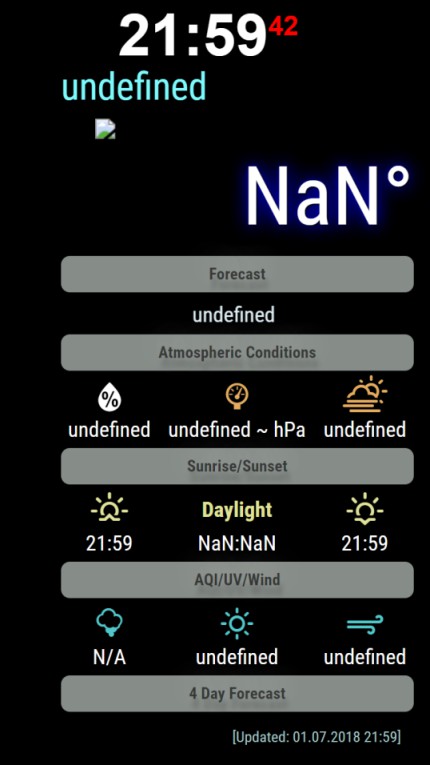
                                        @nobita 0_1530458175710_New Picture.jpg

                                        justjim1220J P 2 Replies Last reply Reply Quote 0
                                        • justjim1220J Offline
                                          justjim1220 Module Developer @nobita
                                          last edited by

                                          @nobita

                                          Need to see your config.js file…

                                          "Life's Too Short To Dance With Ugly People"
                                          Jim Hallock - 1995

                                          N 1 Reply Last reply Reply Quote 0
                                          • S Offline
                                            SoleLo
                                            last edited by

                                            This looks great I’m going to try and install now.

                                            Mykle1M 1 Reply Last reply Reply Quote 0

                                            Hello! It looks like you're interested in this conversation, but you don't have an account yet.

                                            Getting fed up of having to scroll through the same posts each visit? When you register for an account, you'll always come back to exactly where you were before, and choose to be notified of new replies (either via email, or push notification). You'll also be able to save bookmarks and upvote posts to show your appreciation to other community members.

                                            With your input, this post could be even better 💗

                                            Register Login

                                            • 1
                                            • 2
                                            • 28
                                            • 29
                                            • 30
                                            • 31
                                            • 32
                                            • 33
                                            • 34
                                            • 35
                                            • 30 / 35
                                            • First post
                                              Last post
                                            Enjoying MagicMirror? Please consider a donation!
                                            MagicMirror created by Michael Teeuw.
                                            Forum managed by Sam, technical setup by Karsten.
                                            This forum is using NodeBB as its core | Contributors
                                            Contact | Privacy Policy