Read the statement by Michael Teeuw here.
MMM-Lunartic
-
This is a quote from their website. Upper left of the page. https://www.usno.navy.mil/USNO/astronomical-applications/data-services
The USNO websites aa.usno.navy.mil, ad.usno.navy.mil, aristarchus.usno.navy.mil, maia.usno.navy.mil, rorf.usno.navy.mil, toshi.usno.navy.mil, and tycho.usno.navy.mil are undergoing modernization efforts. The expected completion of the work and the estimated return of service is Fall 2020, subject to change due to potential impacts of COVID-19.
-
I already feel a little sorry for the coronavirus. It always takes the blame for many things that cannot be done. [It’s a joke :face_with_stuck-out_tongue_winking_eye: ]
-
@qu1que said in MMM-Lunartic:
I already feel a little sorry for the coronavirus. It always takes the blame for many things that cannot be done. [It’s a joke :face_with_stuck-out_tongue_winking_eye: ]
EVERYONE blames the virus for all the things that they don’t do LOL I’m tired of it.
-
@Mykle1 Thanks for the News…hope it will work in 2021. :face_with_stuck-out_tongue_winking_eye:
-
@mykle1 Is this module working again or still down? thx
-
@trividar The module works fine if you use the moon pictures that comes with the installation (The temporary fix method). My country is blocked from the navy site so that never worked for me historically
-
@zoltan Thanks thank you for your answer, you are right the module works perfectly.
Just one more question, how can I set it up, that the information (just next full moon date) is unter the moon picture not on the left side inside the moon?
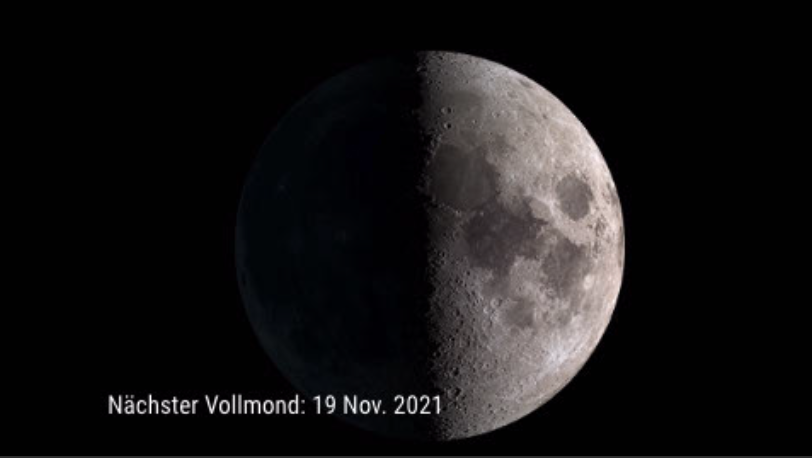
Thank you
-
@trividar I am not too sure on that one.
One thing that you can be on the lookout with this module is the following. There is two pictures missing if i remember correctly. You will have to edit your js file to fix this. just compare your available picture names with the names in the js file that is being called -
@trividar Still down…
-
Any updates or is there a way to pull from another source? Mine isn’t working…
-
@Mykle1 Hello there. I know that this is a very old topic but I want ask you something about a part of code you have inside this modules js and you have comment that we can copy paste this part of code into any module we want to control with voice. I mean this part of code:
  notificationReceived: function(notification, payload) {
        if (notification === 'HIDE_MOON') {
            this.hide(1000);
            //    this.updateDom(300);
        } else if (notification === 'SHOW_MOON') {
            this.show(1000);
            //   this.updateDom(300);
        }

    },
My question is that I must paste the code into the any module’s .js folder or somewhere else? If I paste it into the module’s .js folder won’t it be deleted after next update? Thank you in advance.
-
@Anthony he is not available currently. yes there is that risk. but you could fork the module repo, add that code to the module .js file , and submit a pull request back to the module author to get that code included.
-
@sdetweil Thank you for your rapid reply. This a very good tool for me where I am not familiar with coding. I will do it. Thank you again.
-
Super cool, def gonna check this out asap! Thanks for sharing.
-
I need to update this module. Is there a preferred way to do so?
-
@BD0G said in MMM-Lunartic:
update this module.
updating ANY/EVERY module is the same
cd ~/MagicMirror/modules/module_name
git pullif there is a package.json after git pull, do
npm install -
@sdetweil OK. Perfect. Been out of the game for a while so I might have known that but forgotten.
I ran into a commit changes or stash message.
pi@MagicMirror:~/MagicMirror/modules/MMM-Lunartic $ git pull
Updating c977e14…00655ab
error: Your local changes to the following files would be overwritten by merge:
MMM-Lunartic.js
Please commit your changes or stash them before you merge.
error: The following untracked working tree files would be overwritten by merge:
package.json
Please move or remove them before you merge.
AbortingJust sudo git pull ? Then since it mentions the package.json do an npm install?
-
@BD0G someone has edited the source file…
NEVER do this, as your changes WILL be lost
ALL configuration is done in config.jsgit diff
to detemine WHAT changes were made…
then to restore the file (and lose the changes)
git checkout MMM-Lunartic.js
same with package.json
-
@sdetweil pi@MagicMirror:~/MagicMirror/modules/MMM-Lunartic $ git diff
diff --git a/MMM-Lunartic.js b/MMM-Lunartic.js
index 1520d0a…df2718c 100644
— a/MMM-Lunartic.js
+++ b/MMM-Lunartic.js
@@ -38,9 +38,7 @@ Module.register(“MMM-Lunartic”, {
es: “translations/es.json”,
de: “translations/de.json”,
sv: “translations/sv.json”,-
nl: "translations/nl.json", -
gl: "translations/gl.json", -
ca: "translations/ca.json",
-
},nl: "translations/nl.json" };
@@ -50,16 +48,16 @@ Module.register(“MMM-Lunartic”, {
requiresVersion: “2.1.0”,// Set locale.-
this.url = "https://mykle.herokuapp.com/moon";
- // this.url = this.getUrl();
:
-
-
@BD0G no idea how it could get that way
the author is away right now…
so, try this
git stash
to save the two filesthen back to the original instructions




Hello! It looks like you're interested in this conversation, but you don't have an account yet.
Getting fed up of having to scroll through the same posts each visit? When you register for an account, you'll always come back to exactly where you were before, and choose to be notified of new replies (either via email, or push notification). You'll also be able to save bookmarks and upvote posts to show your appreciation to other community members.
With your input, this post could be even better 💗
Register Login