Read the statement by Michael Teeuw here.
-
Mmmm… I’m thinking MinnowBoard Turbot… Maybe? :)
-
@Sean what did you put in your mm.sh?
I can’t get the MM to run… I only get errors… :/ I’m on development branch…got this in the npm-debug.log:
cat npm-debug.log 0 info it worked if it ends with ok 1 verbose cli [ '/usr/bin/nodejs', '/usr/bin/npm', 'start' ] 2 info using npm@3.10.10 3 info using node@v6.11.2 4 verbose run-script [ 'prestart', 'start', 'poststart' ] 5 info lifecycle magicmirror@2.1.3-dev~prestart: magicmirror@2.1.3-dev 6 silly lifecycle magicmirror@2.1.3-dev~prestart: no script for prestart, continuing 7 info lifecycle magicmirror@2.1.3-dev~start: magicmirror@2.1.3-dev 8 verbose lifecycle magicmirror@2.1.3-dev~start: unsafe-perm in lifecycle true 9 verbose lifecycle magicmirror@2.1.3-dev~start: PATH: /usr/lib/node_modules/npm/bin/node-gyp-bin:/home/snille/MagicMirror/node_modules/.bin:/usr/local/bin:/usr/bin:/bin:/usr/local/games:/usr/games 10 verbose lifecycle magicmirror@2.1.3-dev~start: CWD: /home/snille/MagicMirror 11 silly lifecycle magicmirror@2.1.3-dev~start: Args: [ '-c', 'sh run-start.sh' ] 12 silly lifecycle magicmirror@2.1.3-dev~start: Returned: code: 1 signal: null 13 info lifecycle magicmirror@2.1.3-dev~start: Failed to exec start script 14 verbose stack Error: magicmirror@2.1.3-dev start: `sh run-start.sh` 14 verbose stack Exit status 1 14 verbose stack at EventEmitter. (/usr/lib/node_modules/npm/lib/utils/lifecycle.js:255:16) 14 verbose stack at emitTwo (events.js:106:13) 14 verbose stack at EventEmitter.emit (events.js:191:7) 14 verbose stack at ChildProcess. (/usr/lib/node_modules/npm/lib/utils/spawn.js:40:14) 14 verbose stack at emitTwo (events.js:106:13) 14 verbose stack at ChildProcess.emit (events.js:191:7) 14 verbose stack at maybeClose (internal/child_process.js:891:16) 14 verbose stack at Process.ChildProcess._handle.onexit (internal/child_process.js:226:5) 15 verbose pkgid magicmirror@2.1.3-dev 16 verbose cwd /home/snille/MagicMirror 17 error Linux 4.4.71+ 18 error argv "/usr/bin/nodejs" "/usr/bin/npm" "start" 19 error node v6.11.2 20 error npm v3.10.10 21 error code ELIFECYCLE 22 error magicmirror@2.1.3-dev start: `sh run-start.sh` 22 error Exit status 1 23 error Failed at the magicmirror@2.1.3-dev start script 'sh run-start.sh'. 23 error Make sure you have the latest version of node.js and npm installed. 23 error If you do, this is most likely a problem with the magicmirror package, 23 error not with npm itself. 23 error Tell the author that this fails on your system: 23 error sh run-start.sh 23 error You can get information on how to open an issue for this project with: 23 error npm bugs magicmirror 23 error Or if that isn't available, you can get their info via: 23 error npm owner ls magicmirror 23 error There is likely additional logging output above. 24 verbose exit [ 1, true ] -
-
Oh, when I tried it with the default “linaro” user it works… :) I used “my own” user at first… Now I’m going to add modules! :)
-
This post is deleted! -
Ah, just figured out how to rotate the screen. When logged in as “linaro”.
Open a terminal and do:cd ~ nano .xsessionrcPaste the following in the file and remove the # in front of the row (left or right) you want to rotate the screen. I am using left myself. :)
#!/bin/sh

## To rotate left enable below line.
xrandr --output HDMI-1 --rotate left

## To rotate right enable below line.
#xrandr --output HDMI-1 --rotate right
Reboot to test. :)
-
All the same modules installed and here is the “nmon” result…
To the left is the “Tinker Board” and to the right is the “Raspberry Pi 3”. :)
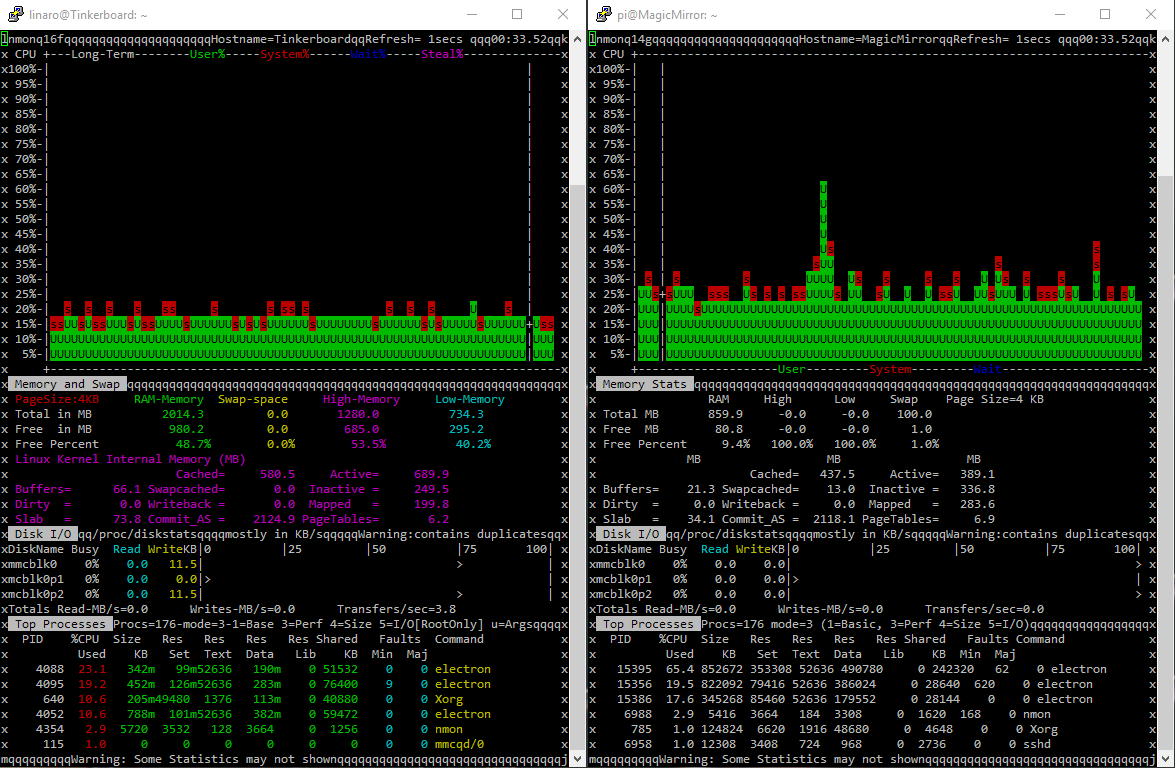
And here is the module list:
MMM-Chart MMM-Globe MMM-JSONStatusChecker MMM-Memo MMM-ModuleScheduler MMM-Modulebar MMM-MotionEye MMM-MyCommute MMM-ProfileSwitcher MMM-Profilepicture MMM-Remote-Control MMM-Sonos MMM-SystemStats MMM-TextClock MMM-TouchNavigation MMM-WunderGround MMM-cryptocurrency MMM-newsfeedtouch MMM-plex-recently-added calendar_monthly mm-hide-all mmm-suncalc -
@Snille impressive!
-
@Snille MMM-SystemStat should be modified for CPU temperature. ATB write cpu temp on different location.
-
@Sean Yes, I noticed. I actually disabled the MMM-SystemStats module for now. It’s complaining too much in the log. :)
-
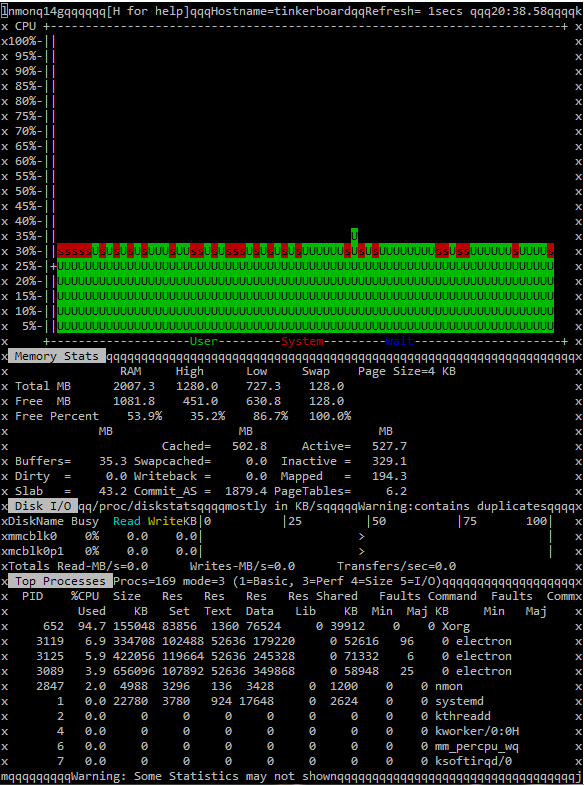
Hi again. Tried another OS called Armbian. I like the “looks” better to start with. So if you are going to use you Tinker Board for something else then being a MM. Maybe it’s a nicer alternative then TinkerOS. But for MM, it’s not. The over all CPU usage is even higher then on the RPi3… Tough, it seems to be X that’s hogging most of the CPU… It’s running XFCE instead of LXDE so, maybe that’s the reason…
If you want to play with even more OS:es you can find lot’s here.
-
@Snille Have you find
tvserviceequivalent? I cannot find how to turn on/off display programmatically on TB.
Willtvservicebuilding work? -
could use a hand as there doesn’t seem to be much support in the community which is odd!
Got one today, loaded a fresh sd card with a fresh install of their newest os and i can’t get it to boot! It swirls around and around for a while loading different things but eventually just crashing:/ Anyone else have this issue? Power supply?
-
@ranger33 maybe. Over 2.5A is recommended.
-
@Sean Oh, I missed your comment. I have not clue. :) Have not yet tested the turn off stuff. :)
-
@Snille I currently use
xset. it works well. -
Sean, how do you use xset for turning the display on and off? I have set up my tinker board and all works great but the display. I tried to set up a crontab scheduled job with python script but I cannot get it to work. I have a script with “xset dpms force off” in it and it works through cmd window, but I cannot get it to work on a schedule.
-
@jasondreher
Well, I didn’t try like that, but I think it is related to your python script. How about using shell script forxset dpms force off? -
have you guys also experienced problems with OpenGL? I used the standard MagicMirror install script and did not compile it from scratch:
everything works just fine, but ht pm2_error.log shows this and I assume performance could be increased by solving that
libGL error: MESA-LOADER: failed to retrieve device information libGL error: unable to load driver: rockchip_dri.so libGL error: driver pointer missing libGL error: failed to load driver: rockchip -
This post is deleted!


Hello! It looks like you're interested in this conversation, but you don't have an account yet.
Getting fed up of having to scroll through the same posts each visit? When you register for an account, you'll always come back to exactly where you were before, and choose to be notified of new replies (either via email, or push notification). You'll also be able to save bookmarks and upvote posts to show your appreciation to other community members.
With your input, this post could be even better 💗
Register Login