Read the statement by Michael Teeuw here.
MMM-Tools : System stat monitoring and commanding (ATB Supported)
-
@Sean said in MMM-Tools : System stat monitoring and commanding (ATB Supported):
see which error messages are thrown in your terminal console, and chromium dev console.
His problem might be the same as mine. My mirror is running MM 2.1.0 so your check stopped the module from loading.

Any chance you can add a PC option or move the check to MM version 2.1.0? I’m not really working with Pi’s anymore. A Windows PC dev machine, a Windows PC laptop and a laptop running uBuntu.
Nice work Sean!
-
@Mykle1 okay. You can just remove required version in module js file.
I cant be sure my module has any dependency to recent MM version. That code was just… habit? :)I think it could be alright without version. But I cannot test this night. Yup, here is midnight, after sleep, I’ll do that.
-
@Mykle1 maybe genuine Ububtu and Debian, I can add, but not sure. Windows… hmmm my last windows work was 15years ago. ;) I’m oldschooled.
-
@Sean said in MMM-Tools : System stat monitoring and commanding (ATB Supported):
@Mykle1 maybe genuine Ububtu and Debian, I can add, but not sure. Windows… hmmm my last windows work was 15years ago. ;) I’m oldschooled.
You aren’t missing anything LOL
-
@Sean said in MMM-Tools : System stat monitoring and commanding (ATB Supported):
You can just remove required version in module js file.
I commented out the version check but it still didn’t display on my Pi3B mirror. No errors, terminal or console
-
Worked fine on my mirror on a Pi3B. Just had to remove some of the final commas from the config
-
@krisalexroberts Thanks! I typed this example not by copy, so i did mistakes. I fixed it.
-
Same here. Redownloaded. Used the new settings. No bueno. Doesnt display
-
@Kimzer I cant figure out what is problem, more detailed info is needed.
- rpi model
- os
- your configuration values…
npm start devresult
…
-
@Sean
I have to go to work, Sean. I will post that info for you when I get home.
-
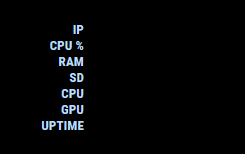
Tried this module, even with a default config it doesn’t seem to display any of the actual values, just the titles:
Running Rpi3 Raspian Jesse
No errors during startup:
Starting MagicMirror: v2.1.2
Loading config ...
Loading module helpers ...
No helper found for module: alert.
Initializing new module helper ...
Module helper loaded: updatenotification
No helper found for module: clock.
Initializing new module helper ...
Module helper loaded: calendar
Initializing new module helper ...
Module helper loaded: MMM-Tools
No helper found for module: compliments.
No helper found for module: currentweather.
No helper found for module: weatherforecast.
Initializing new module helper ...
Module helper loaded: newsfeed
All module helpers loaded.
Starting server on port 8080 ...
Server started ...
Connecting socket for: updatenotification
Connecting socket for: calendar
Starting node helper for: calendar
Connecting socket for: MMM-Tools
Connecting socket for: newsfeed
Starting module: newsfeed
Sockets connected & modules started ...
Launching application.
Create new calendar fetcher for url: http://www.calendarlabs.com/templates/ical/US-Holidays.ics - Interval: 300000
Create new news fetcher for url: http://www.nytimes.com/services/xml/rss/nyt/HomePage.xml - Interval: 300000
Use existing news fetcher for url: http://www.nytimes.com/services/xml/rss/nyt/HomePage.xml
Config used:
{
		  module: 'MMM-Tools',
		  position: 'bottom_right',
		  config: {
			device : "RPI", // "RPI" is also available
			refresh_interval_ms : 10000,
			warning_interval_ms : 1000 * 60 * 5,
			enable_warning : true,
			warning : {
			  CPU_TEMPERATURE : 65,
			  GPU_TEMPERATURE : 65,
			  CPU_USAGE : 75,
			  STORAGE_USED_PERCENT : 80,
			  MEMORY_USED_PERCENT : 80
			}
		  }
		},
-
@Sean
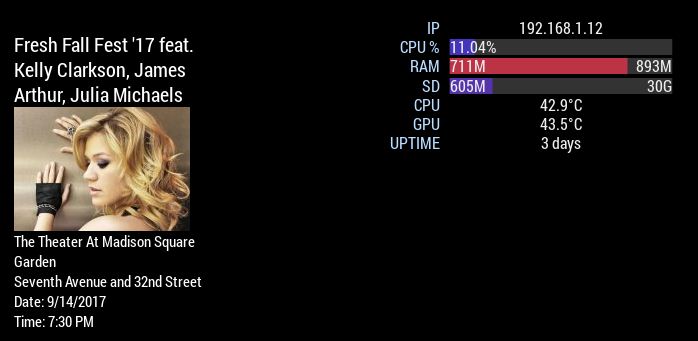
I just reinstalled MMM-Tool and it is working now. I don’t know why it didn’t work the first time. shrug
- Pi 3 Model B, 1GB, Hardware : BCM2709, Revision = a02082, (Sony, UK)
- Raspbian Jessie
{
  	module: 'MMM-Tools',
  	position: 'top_center',
  	config: {
		device : "RPI", // "RPI" is also available
	        refresh_interval_ms : 10000,
		warning_interval_ms : 1000 * 60 * 5,
		enable_warning : false,
		    warning : {
		    CPU_TEMPERATURE : 65,
		    GPU_TEMPERATURE : 65,
		    CPU_USAGE : 75,
		    STORAGE_USED_PERCENT : 80,
      		    MEMORY_USED_PERCENT : 80,
    	},
-
@randomnoise only label is displayed, when module is stopped before getting results of script execution of node_helper. Possible suspicious point is…
- module(including your other modules) has error, so front electron halts.
npm start dev, see the browser dev console. If there is no suspicious message(usually red lines), hmmmm… -
The issue seems pretty straightforward.
If i place it top_center. It works fine.
bottom_right (where i want it) without any other modules there, it displays the text only. No bars etc. If i re-add the module i already have there it doesnt show at all… -
@Kimzer that might be related with width vlaue. That might be not bug. I don’t assume how much width user assign to my module. So you could adjust your GOOD view with css by yourself. Give your favorite
widthormin-widthto the module in css.Anyway, someone could feel embarrassed with this inconvenient approach, I’ll add default min-width value in next commit.
Thanks for your advice. -
@Kimzer @Sean
Yup, can confirm it works just fine in top_left… my top left width happens to be manually set to be 480px due to another module I’m running so that’s probably why its happy now.
BTW I forgot to set to RPI, but it actually still worked just fine when set to ATB by default.
-
@randomnoise screen controlling and measuring temperatures are different between rpi and atb.
-
Probably not a bug at all, may be my custom css that is causing issues.
Tried min-width and width but really didnt fix anything. -
@Sean I’m not using the screen controls so that’s fair enough. I just compared the temp from MMM-Tools to that from MMM-system stats and yes you’re correct the values are wrong if I set the type to ATB. Forgive my rambling :)
-
@Kimzer ok, tomorrow i’ll try testing widely and can provide better settings. Sorry for inconvenience of all and thanks for your interesting. After work, I’ll post about that.




Hello! It looks like you're interested in this conversation, but you don't have an account yet.
Getting fed up of having to scroll through the same posts each visit? When you register for an account, you'll always come back to exactly where you were before, and choose to be notified of new replies (either via email, or push notification). You'll also be able to save bookmarks and upvote posts to show your appreciation to other community members.
With your input, this post could be even better 💗
Register Login