MagicMirror Forum
    • Recent
    • Tags
    • Unsolved
    • Solved
    • MagicMirror² Repository
    • Documentation
    • 3rd-Party-Modules
    • Donate
    • Discord
    • Register
    • Login
    A New Chapter for MagicMirror: The Community Takes the Lead
    Read the statement by Michael Teeuw here.

    MMM-WeatherChart

    Scheduled Pinned Locked Moved Utilities
    42 Posts 16 Posters 33.0k Views 15 Watching
    Loading More Posts
    • Oldest to Newest
    • Newest to Oldest
    • Most Votes
    Reply
    • Reply as topic
    Log in to reply
    This topic has been deleted. Only users with topic management privileges can see it.
    • G Offline
      gshimself @strawberry 3.141
      last edited by

      @strawberry-3.141
      Im no expert on reading the dev console but it seems to just update from cache after a while?

      Name: meteogram.png,
      initalator: mmm-weatherchart
      Time: 0ms
      Size: (From Cache)
      and it’s pileing up.

      On mmm-weatherchart.js it seems to update, every 15th secound but the chart does not.
      Im going to let it stay like this awhile and return.

      1 Reply Last reply Reply Quote 0
      • G Offline
        gshimself
        last edited by

        Yea, as I thought. The chart just piles up and doesn’t update. The script however does update.

        0_1471972815019_1.png

        paphkoP 1 Reply Last reply Reply Quote 0
        • paphkoP Offline
          paphko @gshimself
          last edited by

          @gshimself I added a dummy parameter (timestamp) to the image which should prevent caching. I’ll check that later today when I find some time.

          1 Reply Last reply Reply Quote 0
          • paphkoP Offline
            paphko
            last edited by

            The module appends ‘#’ to the image so that the browser does not cache the image. This works on my old version of the mirror but not on the new version 2. Quite strange…

            Fixed by replacing this part with ‘?’, at least for Chrome browser, the image is not cached any longer. @gshimself please pull changes and report wether it is also fixed for you.

            G 2 Replies Last reply Reply Quote 0
            • G Offline
              gshimself @paphko
              last edited by

              @paphko ¨Perfect! Will pull the latest version when I get home. I’ll get back to you during the evening.

              1 Reply Last reply Reply Quote 0
              • A Offline
                amanzimdwini
                last edited by

                I like it!
                Request: can you add a SCALE factor? Right now the image is considerably larger than I can accommodate… (yes, minor problem, I know). Maybe I have to mess with the custom.css?

                Anyway, apart from that small inconvenience, I like it.

                1 Reply Last reply Reply Quote 1
                • G Offline
                  gshimself @paphko
                  last edited by gshimself

                  @paphko Seems to be working fine now. Thank you for your help!
                  I guess that if I want 30min refreshrate it should be 60 * 30 * 1000,?

                  1 Reply Last reply Reply Quote 0
                  • paphkoP Offline
                    paphko
                    last edited by

                    @gshimself glad to hear that it’s fixed for you. Yes, because update interval must be specified in ms.

                    @amanzimdwini you could try to add a scale option, but I’m not sure how to properly implement it for both cases, with and without border. If you found a proper solution for it, tell me or create a pull request :-)

                    1 Reply Last reply Reply Quote 0
                    • R Offline
                      racampbellky
                      last edited by

                      Great module! Is there anyway to present in Fahrenheit?

                      paphkoP 1 Reply Last reply Reply Quote 1
                      • paphkoP Offline
                        paphko @racampbellky
                        last edited by

                        @racampbellky I don’t think so. But you may check the website of yr.no, maybe you find a setting to use Fahrenheit in that diagram: http://www.yr.no/place/United_States/New_York/New_York/hour_by_hour.html
                        If so, it should be possible.

                        1 Reply Last reply Reply Quote 0
                        • A Offline
                          AxLed Module Developer
                          last edited by

                          Hi,

                          i wanted to try the module today, but i dont work i get some error “del missing” or similar.
                          Could it be that there is the file package.json missing on the github link, as there are some depencies in node_helper.js

                          var http = require('http');
                          var fs = require('fs');
                          var del = require('del');
                          var request = require('request'); 
                          var NodeHelper = require("node_helper");
                          

                          Greets AxLED

                          1 Reply Last reply Reply Quote 0
                          • A Offline
                            AxLed Module Developer
                            last edited by

                            Hi,

                            found a solution myself, there is a fork of this module: https://github.com/szech/mmm-weatherchart

                            Installation:
                            cd ~/MagicMirror/modules
                            git clone https://github.com/szech/mmm-weatherchart.git
                            cd mmm-weatherchart
                            npm install

                            Greets

                            AxLED

                            M 1 Reply Last reply Reply Quote 0
                            • S Offline
                              Stellanova
                              last edited by

                              If you replace grayscale with hue-rotate(190deg) in the mmm-weatherchart.js. You get the colors partially back and still have whitelines.

                              if (this.config.negativeImage) {
                              img.style[“-webkit-filter”] = “invert(100%) hue-rotate(190deg)”;
                              }

                              1 Reply Last reply Reply Quote 0
                              • V Offline
                                Vauxdvihl
                                last edited by

                                @Stellanova said in MMM-WeatherChart:

                                img.style[“-webkit-filter”] = “invert(100%) hue-rotate(190deg)”;

                                Hi,
                                is there a possibility to increase the size?
                                Thanks a lot
                                Regards

                                1 Reply Last reply Reply Quote 0
                                • brobergB Offline
                                  broberg Project Sponsor
                                  last edited by

                                  @Vauxdvihl

                                  Yes, But it will get fuzzy since the original image is only 828 × 272 pixels in size.

                                  increase by 25%

                                  .MMM-WeaterChart img{
                                  width: 1035px !important;
                                  height: 340px !important;
                                  }
                                  

                                  (To be clear, this go in to the custom.css file, not changing the module files)

                                  1 Reply Last reply Reply Quote 0
                                  • V Offline
                                    Vauxdvihl
                                    last edited by

                                    @broberg
                                    hmm
                                    seems to me not working
                                    Strange is also that the editor does not “hightlight” the functions

                                    .mmm-weatherchart img{
                                    width: 1035px;
                                    height: 340px;
                                    }
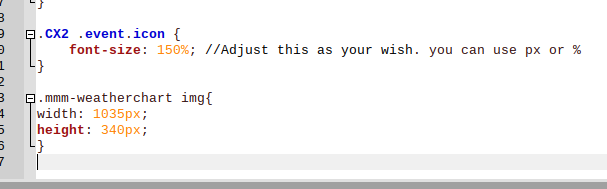
                                    

                                    0_1574449403301_4d768e6d-6e01-449f-b40f-a14661be7f96-grafik.png

                                    brobergB 1 Reply Last reply Reply Quote 0
                                    • brobergB Offline
                                      broberg Project Sponsor @Vauxdvihl
                                      last edited by

                                      @Vauxdvihl the module name is case sensitive

                                      So .mmm-weathermodule is not the same as .MMM-WeatherModule

                                      And you might have to add !important after the height and width for it to override the height specified in the module.

                                      1 Reply Last reply Reply Quote 0
                                      • V Offline
                                        Vauxdvihl
                                        last edited by

                                        @broberg
                                        Yes i know ;-)
                                        Look …i though it would be the correct way

                                        0_1574534798657_2a12f6fd-5946-4f6f-882d-506399174399-grafik.png

                                        brobergB 1 Reply Last reply Reply Quote 0
                                        • brobergB Offline
                                          broberg Project Sponsor @Vauxdvihl
                                          last edited by

                                          @Vauxdvihl

                                          It is, nevermind the above post then.

                                          but do try the !important addition, it is sometimes needed when the size is defined in the document and not in the css files.

                                          1 Reply Last reply Reply Quote 0
                                          • prototype0815P Offline
                                            prototype0815
                                            last edited by

                                            I need help with mmm-weatherchart:

                                            https://forum.magicmirror.builders/topic/12204/black-screen-when-insert-https-github-com-paphko-mmm-weatherchart/3

                                            S 1 Reply Last reply Reply Quote 0

                                            Hello! It looks like you're interested in this conversation, but you don't have an account yet.

                                            Getting fed up of having to scroll through the same posts each visit? When you register for an account, you'll always come back to exactly where you were before, and choose to be notified of new replies (either via email, or push notification). You'll also be able to save bookmarks and upvote posts to show your appreciation to other community members.

                                            With your input, this post could be even better 💗

                                            Register Login

                                            • 1
                                            • 2
                                            • 3
                                            • 2 / 3
                                            • First post
                                              Last post
                                            Enjoying MagicMirror? Please consider a donation!
                                            MagicMirror created by Michael Teeuw.
                                            Forum managed by Sam, technical setup by Karsten.
                                            This forum is using NodeBB as its core | Contributors
                                            Contact | Privacy Policy
