MagicMirror Forum
    • Recent
    • Tags
    • Unsolved
    • Solved
    • MagicMirror² Repository
    • Documentation
    • 3rd-Party-Modules
    • Donate
    • Discord
    • Register
    • Login
    A New Chapter for MagicMirror: The Community Takes the Lead
    Read the statement by Michael Teeuw here.

    MMM-xiaomi - Temperature and Humidity from your smarthome

    Scheduled Pinned Locked Moved Utilities
    142 Posts 28 Posters 239.3k Views 28 Watching
    Loading More Posts
    • Oldest to Newest
    • Newest to Oldest
    • Most Votes
    Reply
    • Reply as topic
    Log in to reply
    This topic has been deleted. Only users with topic management privileges can see it.
    • A
      Albert2002
      last edited by

      Am still impressed by your speed and your skill! Thank you for sharing your work with us!

      1 Reply Last reply
      Reply Quote 0
      • garblefluxG
        garbleflux Project Sponsor
        last edited by

        Hi Mirko3000,
        thank you! Great work.

        1 Reply Last reply
        Reply Quote 0
        • P
          pepebc
          last edited by

          Mirko3000,
          excellent module, I am about to receive the gateway. Now I have several RGB yelight bulbs and two Wi-Fi sockets.
          I hope you add someday the management of sockets and yeelight.
          At the moment I am managing it with scripts.

          1 Reply Last reply
          Reply Quote 0
          • S
            shgmongohh @Albert2002
            last edited by

            @Albert2002
            Hi,
            I have some problems to get the token. See my errors here.

            Can anybody help me with the token?

            Sebastian

            1 Reply Last reply
            Reply Quote 0
            • S
              shgmongohh
              last edited by

              I like to change the colour and the font size of the values in the css. But nothing change.

              Can anybody please explain, how to change?

              .xm-xiaomi .small {
                font-size: 24px;
              }
              
              .xm-xiaomi {
                  position: relative;
              }
              
              .xm-disabled {
                color: black;
              }
              
              .xm-icon {
                padding-left: 8px;
              }
              
              .xm-room-item {
                font-size: 22px;
                margin-bottom: -15px;
                z-index: 5;
              }
              
              .xm-room-title {
                display: inline-block;
                width: 40%;
                z-index: 5;
              }
              
              .xm-room-bars {
                display: inline-block;
                width: 60%;
                z-index: 5;
              }
              
              .xm-legend-temp {
                position: absolute;
                height: 100%;
                width: 3px;
                background-color: #FF1493;
                left: 9%;
                z-index: 0;
              }
              
              .xm-legend-humid {
                position: absolute;
                height: 100%;
                width: 3px;
                background-color: blue;
                left: 42%;
                z-index: 0;
              }
              
              
              .xm-room-container
              {
                  height: 100%; 
                  min-height: 100%;
                  height: 200px;
              }
              
              .xm-room {
                
                  width: 33.33%;
                  height: 33.33%;
                background-color: #228B22;
              }
              .xm-room-header {
                border-bottom-style : solid;
                border-width: 1px;
               margin: 5px;
               //padding: 5px;
              }
              .xm-left {
                float: left;
              }
              .xm-right {
                float: right;
              }
              .xm-room-temp-humid {
                 margin: 5px;
                 
              }
              .xm-room-temp {
                  float: left;
                  width: 50%;
                  padding-top:2px;
              }
              .xm-room-humid {
                  float: right;
                  width: 50%;
                  text-align: right;
                  padding-top:2px;
              }
              .xm-room-icons {
                 margin: 5px;
                 vertical-align: bottom;
                // height: 100%;
              }
              .xm-door-icon {
                float: left;
                width: 33%;
                padding-top:5px;
              }
              .xm-light-icon {
                float: left;
                width: 33%;
                text-align: center;
                padding-top:5px;
              }
              .xm-vent-icon {
                float: right;
                width: 33%;
                text-align: right;
                padding-top:5px;
              }
              
              1 Reply Last reply
              Reply Quote 0
              • M
                mirko3000
                last edited by

                Hi, sorry I did not reply to your last comment, did you solve the issues there?
                About the CSS: basically you are at the right spot, adjusting these values (e.g. font-size) should change font size. What did you edit exactly? Did you try restarting MM after the changes?

                S 1 Reply Last reply
                Reply Quote 0
                • B
                  blinky1989dk
                  last edited by yawns

                  This post is deleted!
                  1 Reply Last reply
                  Reply Quote 0
                  • B
                    barnosch
                    last edited by

                    @blinky1989dk said in MMM-xiaomi - Temperature and Humidity from your smarthome:

                    to my config file. that’s fine, but it can not connect to the gateway. but as soon as I add more then it will be the case
                    so when i restart it does not start up :( what can i do? some have some bids

                    sorry i have no idea, what you try to say with that sentence.

                    B 1 Reply Last reply
                    Reply Quote 0
                    • B
                      blinky1989dk @barnosch
                      last edited by

                      @barnosch my config file works. but as soon as i add mmm.xiaomi to config. then my config file does not work anymore and my mirror does not start up

                      1 Reply Last reply
                      Reply Quote 0
                      • Y
                        yawns Moderator
                        last edited by

                        Your config looks a bit misconfigured. Please remove these lines.

                        	config: {
                        		// See 'Configuration options' for more information.
                        	}
                        	},
                        

                        If this is still not working, then please paste your entire config.

                        B 1 Reply Last reply
                        Reply Quote 0
                        • B
                          blinky1989dk @yawns
                          last edited by

                          @yawns is dot work. so i had try to send config fil to you on pb

                          1 Reply Last reply
                          Reply Quote 0
                          • Y
                            yawns Moderator
                            last edited by

                            /* Magic Mirror Config Sample
                            
                            By Michael Teeuw http://michaelteeuw.nl
                            MIT Licensed.
                            */
                            var config = {
                            zoom: 0.6,
                            port: 8080,
                            ipWhitelist: ["127.0.0.1", "::ffff:127.0.0.1", "::1"], // Set [] to allow all IP addresses.
                            
                            language: "da",
                            timeFormat: 24,
                            units: "metric",
                            
                            modules: [
                            	{
                            		module: "alert",
                            	},
                            	{
                            		module: "clock",
                            		position: "top_left"
                            	},
                            	{
                            		module: 'MMM-WunderGround',
                            		position: 'top_right',
                            		config: {
                            			apikey: 'xxxxxxxxxxxxxxxxxxxxxx', // private; don't share!
                            			pws: 'pws:IVEJLE2', //culemborg
                            			hourly: '1',
                            			fctext: '1',
                            			fcdaycount: "5",
                            			fcdaystart: "0",
                            			hourlyinterval: "3",
                            			hourlycount: "2",
                            			alerttime: 10000,
                            			alerttruncatestring: "english:",
                            			roundTmpDecs: 1,
                            			UseCardinals: 0,
                            			layout: "vertical",
                            			iconset: "novaco",
                            			sysstat: 0
                            		}
                            	},
                            	{
                            		module: "MMM-xiaomi",
                            		position: "bottom_left",
                            		header: "Temperature / Humidity", // This is optional
                            		config: {
                            			gatewayIP: "192.168.10.170",
                            			gatewayToken: "xxxxxxxxxxxxxxxxxxx",
                            			showwindow: true,
                            			showVentilation: false,
                            			minTemperature: true,
                            			maxHumidity: true,
                            			showlights: true,
                            			rooms: [
                            			{ name: "test", sortOrder: 30, devices: ["158d0001b911b9"] },
                            			],
                            		}
                            	},
                            	],
                            	};
                            
                            /*************** DO NOT EDIT THE LINE BELOW ***************/
                            if (typeof module !== "undefined") {module.exports = config;}
                            

                            Please try again. I don’t know which text editor you used, but it is very important to only use these around strings:

                            • "
                            • ’

                            Do not use

                            • ‘
                            • “
                            • ”
                            B 2 Replies Last reply
                            Reply Quote 0
                            • S
                              shgmongohh @mirko3000
                              last edited by

                              @mirko3000
                              Yes, i solved the problem with the token.

                              to my css:
                              I add

                              .xm-xiaomi .small {
                                font-size: 24px;
                              }
                              

                              to get a bigger fonts.

                              I try to change the default colours e.g.

                              .xm-legend-temp {
                                position: absolute;
                                height: 100%;
                                width: 3px;
                                background-color: #FF1493;
                                left: 9%;
                                z-index: 0;
                              

                              And I want to have bigger figueres for temperature and humidity

                              .xm-room-temp-humid {
                                 margin: 10px;
                                 
                              }
                              
                              1 Reply Last reply
                              Reply Quote 0
                              • B
                                blinky1989dk @yawns
                                last edited by

                                @yawns okay THX. I Will try

                                1 Reply Last reply
                                Reply Quote 0
                                • B
                                  blinky1989dk @yawns
                                  last edited by

                                  This post is deleted!
                                  1 Reply Last reply
                                  Reply Quote 0
                                  • J
                                    joseska
                                    last edited by

                                    Hi… We have an error with door sensor. Not show icons on MM. I think that the config is ok

                                    {
                                    			module: 'MMM-xiaomi',
                                    			position: 'bottom_left',
                                    			header: 'Temperatura / Humedad',
                                    			config: {
                                    				gatewayIP: '192.168.1.103',
                                    				gatewayToken: 'xxxxxxxxxxxx872e8bc25e415a7005a2',
                                    				showWindow: true,
                                    				showVentilation: true,
                                    				showLights: false,
                                    				audioNotifications: true,
                                    				rooms: [
                                    					{ name: 'Salon', sortOrder: 10, devices: ['158d0001f531bf', '158d00020258f4'] }
                                    				]
                                    			}
                                    		},
                                    

                                    any idea???
                                    Thanks…

                                    M 1 Reply Last reply
                                    Reply Quote 0
                                    • M
                                      mirko3000 @joseska
                                      last edited by

                                      Hmm your config seems to be fine, make sure the IDs are ok, else it should work. Be aware that the icon only shows open window/doors, so if the door is closed you won’t see an icon.
                                      I suppose the temperature sensor is working fine?

                                      J 1 Reply Last reply
                                      Reply Quote 0
                                      • J
                                        joseska @mirko3000
                                        last edited by

                                        @mirko3000 Now Work… I don´t know why…
                                        simply copy again the id (the same) and change showVentilation: false (don´t have outdoor sensor) and work…

                                        sorry and thanks…

                                        1 Reply Last reply
                                        Reply Quote 0
                                        • S
                                          Smotx
                                          last edited by

                                          HI,

                                          Anyone know why MMM Xiaomi need aplay ?

                                          Error: Cannot find module 'node-aplay'
                                              at Module._resolveFilename (module.js:543:15)
                                              at Function.Module._resolveFilename (/home/pi/MagicMirror/node_modules/electron/dist/resources/electron.asar/common/reset-search-paths.js:35:12)
                                              at Function.Module._load (module.js:473:25)
                                              at Module.require (module.js:586:17)
                                              at require (internal/module.js:11:18)
                                              at Object.<anonymous> (/home/pi/MagicMirror/modules/MMM-xiaomi/node_helper.js:11:20)
                                              at Object.<anonymous> (/home/pi/MagicMirror/modules/MMM-xiaomi/node_helper.js:140:3)
                                              at Module._compile (module.js:642:30)
                                              at Object.Module._extensions..js (module.js:653:10)
                                              at Module.load (module.js:561:32)
                                          Whoops! There was an uncaught exception...


                                          Thanks

                                          1 Reply Last reply
                                          Reply Quote 0
                                          • S
                                            Smotx @mirko3000
                                            last edited by

                                            @mirko3000 said in MMM-xiaomi - Temperature and Humidity from your smarthome:

                                            I just recieved my order of another 6 window sensors yesterday :) But I really think they will shut this down soon, guess they (gearbest) are not paying any taxes at all…

                                            Working on the new version, this is what I have in mind:
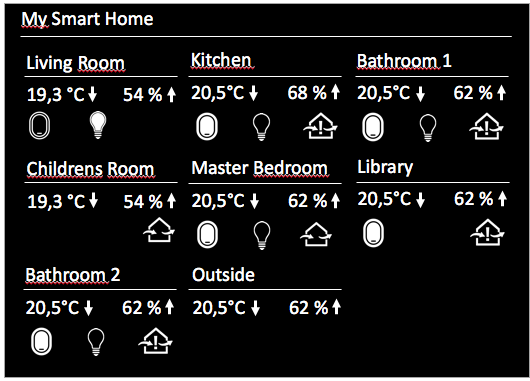
                                            0_1510134269455_Bildschirmfoto 2017-11-08 um 10.42.55.png

                                            How to have this screen ?

                                            E 1 Reply Last reply
                                            Reply Quote 0

                                            Hello! It looks like you're interested in this conversation, but you don't have an account yet.

                                            Getting fed up of having to scroll through the same posts each visit? When you register for an account, you'll always come back to exactly where you were before, and choose to be notified of new replies (either via email, or push notification). You'll also be able to save bookmarks and upvote posts to show your appreciation to other community members.

                                            With your input, this post could be even better 💗

                                            Register Login

                                            • 1
                                            • 2
                                            • 3
                                            • 4
                                            • 5
                                            • 6
                                            • 7
                                            • 8
                                            • 2 / 8
                                            • First post
                                              Last post
                                            Enjoying MagicMirror? Please consider a donation!
                                            MagicMirror created by Michael Teeuw.
                                            Forum managed by Sam, technical setup by Karsten.
                                            This forum is using NodeBB as its core | Contributors
                                            Contact | Privacy Policy