Read the statement by Michael Teeuw here.
My Magic Mirror - 100x70cm
-
Hi all,
Normally I don’t post a lot on forums…but I was so impressed by the Magic Mirror and thought I would share my (almost) final result so it can help others create their Magic Mirror.
I was looking for something completely different (how can I turn on the screen of my wall mounted Windows Tablets via Motion Detection) when I found the Magic Mirror and thought “WTF is this?! This is really cool! I need to get one now! Oh crap, it’s 2am…well let’s find out what I need and get everything tomorrow and build it!”.
This mirror is actually “version 2”, “version 1” was mounted in an Ikea poster frame and was not deep enough to mount everything in it, but I wanted to get some experience and still put the foil on it etc., the only thing was that 30min after hanging it on the wall, “version 1” came off the wall completely…fortunately the 23" screen was still fine, and because I was 100% sure I wanted to have this, I sat down and created a better one, one that actually stays on the wall! :)
Version 2 was actually really easy to built:
- 1 hour to finalize the whole idea
- 2 hours to get all the parts
- Next Day Delivery for the Mirror
- 2-3 hours to built everything
- 2 weeks to setup the actual Magic Mirror layout! :)
- 2 hours to create this topic :)
What parts did I need:
- Plexiglass Two-Way Mirror 1000x700x3mm (€120,-)
- Black vinyl for the back of the mirror (€15,-)
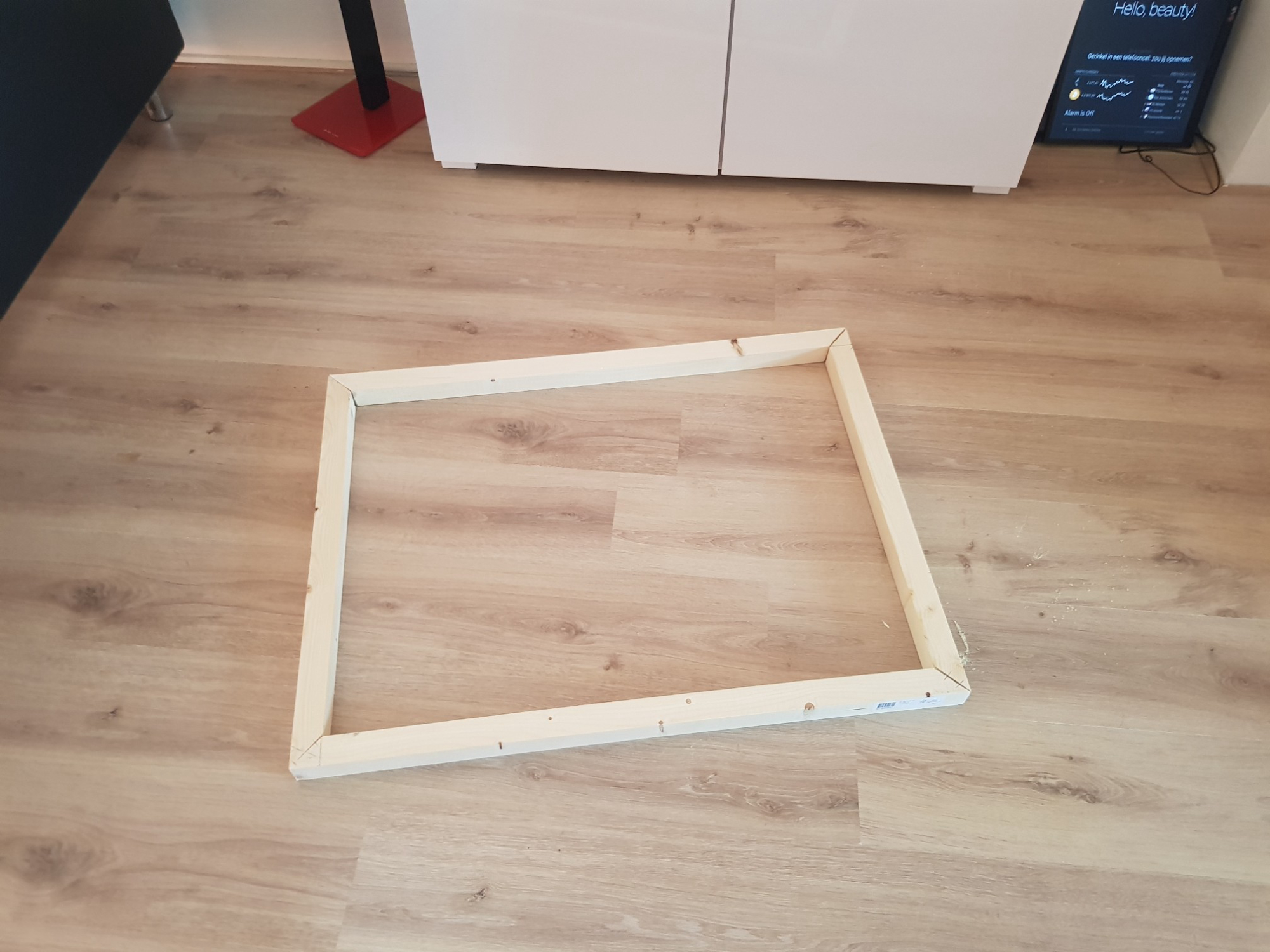
- Wood for the (90cmx58cm) frame; 2 pecies 2100x40x44mm (€8,-)
- 4 Caps for on top of the screws (€7,-)
- Some scews, tie-wraps, tape, cables, a power switch, 2 power sockets, etc. (€10,-)
- Raspberry Pi 3 + Micro SD + Charger (€50,-)
- Speakers (€12,-)
- 23" LG Screen
- Mouse and keyboard
- Some extra wires to get actually “+” and “-” and not only “+” behind the light socket!
The only real issues I had setting everything up (which I’ve read, others also experienced this), were:
- Lack of screenshots for some modules (a little bit of Googling sometimes helps find some)
- Lack in documentation for some modules (but nothing that couldn’t be solved without some forum topics)
- Some installed modules will run after I restarted the mirror, others really needed a reboot of the RPi (it took me some time to figure this out :) )
- CSS of one module, could screw up the CSS of other modules (i.e. MMM-MirrorMirrorOnTheWall messed up the CSS of the modules I have in the bottom_right)
So…what modules do I use (on the latest Raspbian Jessie):
calendar_monthly
MagicMirror-QuoteCatalog
MMM-Carousel
MMM-cryptocurrency
MMM-domoticz
MMM-Globe
MMM-Hue
MMM-KeyBindings
MMM-MirrorMirrorOnTheWall
MMM-MovieListings
MMM-MyCommute
MMM-NetworkScanner
MMM-ping
MMM-rainfc
MMM-Scrobbler
MMM-soccer
MMM-syslog
MMM-WunderGround
worldclock
I have setup the MMM-MirrorMirrorOnTheWall Skill which works fine, but I am also running Domoticz to control and monitor basically everything in my house and I am using HA Bridge so Alexa can talk to Domoticz to execute scripts etc. So, I have created a little script so I can also say things like “Alexa, turn on main/other mirror” or “Alexa, turn on/off camera 1/2” (Alexa talks to HA Bridge, HA Bridge talks to Domoticz, Domoticz executes the script (in this case it SSH into the Mirror and execute the script below)):
#!/bin/sh

if [ $1 = "on1" ]
then
DISPLAY=:0.0 /usr/bin/chromium-browser --kiosk 'http://192.168.1.30:8081' &
elif [ $1 = "on2" ]
then
DISPLAY=:0.0 /usr/bin/chromium-browser --kiosk 'http://192.168.1.31:8081' &
elif [ $1 = "off" ]
then
DISPLAY=:0.0 xdotool key ALT+F4
elif [ $1 = "rotate" ]
then
DISPLAY=:0.0 xdotool key Right
elif [ $1 = "main" ]
then
DISPLAY=:0.0 xdotool key Home
else
  echo "No option specified, Exiting..."
fi
exit
And here is a script I created to reinstall everything quickly for testing purposes:
#!/bin/sh

cd ~
bash -c "$(curl -sL https://raw.githubusercontent.com/MichMich/MagicMirror/master/installers/raspberry.sh)"
echo "Copying config files..."
cp ~/Documents/config.js ~/MagicMirror/config/
cp ~/Documents/custom.css ~/MagicMirror/css/
cd ~
echo "Installing Carousel and KeyBindings..."
cd ~/MagicMirror/modules/
git clone https://github.com/shbatm/MMM-Carousel.git
git clone https://github.com/shbatm/MMM-KeyBindings
cd ~/MagicMirror/modules/
echo "Installing My Commute and Soccer..."
git clone https://github.com/jclarke0000/MMM-MyCommute.git
cd MMM-MyCommute && npm install
cd ~/MagicMirror/modules/
git clone https://github.com/fewieden/MMM-soccer.git
cd MMM-soccer && npm install
echo "Installing WorldClock, Monthly Calendar and QuoteCatalog..."
cd ~/MagicMirror/modules/
git clone https://github.com/eouia/worldclock
git clone https://github.com/KirAsh4/calendar_monthly
git clone https://github.com/salpar/MagicMirror-QuoteCatalog.git
cd MagicMirror-QuoteCatalog && npm install
echo "Installing Domoticz, Globe and Hue..."
mkdir ~/MagicMirror/modules/MMM-domoticz
cd ~/MagicMirror/modules/MMM-domoticz
git clone https://github.com/M-Arvidsson/MMM-domoticz.git domoticz
cd ~/MagicMirror/modules/
git clone https://github.com/LukeSkywalker92/MMM-Globe.git
git clone https://github.com/MitchSS/MMM-Hue.git
echo "Installing CryptoCurrency and MovieListings..."
git clone https://github.com/matteodanelli/MMM-cryptocurrency.git
git clone https://github.com/Tueti/MMM-MovieListings.git
cd MMM-MovieListings && npm install
cd ~/MagicMirror/modules/
echo "Installing Wunderground, SysLog and RainForcast..."
git clone https://github.com/RedNax67/MMM-WunderGround.git
git clone https://github.com/paviro/MMM-syslog.git
git clone https://github.com/73cirdan/MMM-rainfc
echo "Installing SystemStatus and Network Scanner..."
git clone https://github.com/fewieden/MMM-ping.git
cd MMM-ping && npm install --productive
sudo chmod u+s /bin/ping
cd ~/MagicMirror/modules/
git clone https://github.com/ianperrin/MMM-NetworkScanner.git
cd MMM-NetworkScanner && npm install
echo "Installing Mirror Mirror On the Wall Skill..."
cp -R ~/MirrorMirrorOnTheWallSkill/MMM-MirrorMirrorOnTheWall/ ~/MagicMirror/modules/
cd ~
echo
echo "Now Reboot and everything should be working..."
echo
exit
I got my custom.css from here My First Magic Mirror, thanks @slametps .
And I made some small changes in the following files to get all the CSS working perfectly fine together:
- MagicMirror-QuoteCatalog.js (changed width and font size)
- MMM-MirrorMirrorOnTheWall.css (removed some CSS because it messed up MMM-soccer and MMM-MyCommute in the bottom_right)
- MMM-syslog.js (removed the header completely)
I will post some pictures off my Magic Mirror in the 2nd post and I will post my full config.js file (without private info) in the 3rd post, otherwise this post will really be too long!
Okay, this is it! I think I now gave you guys enough info to build an exact replica :)
@MichMich Wat een geweldig project, thanks!
-
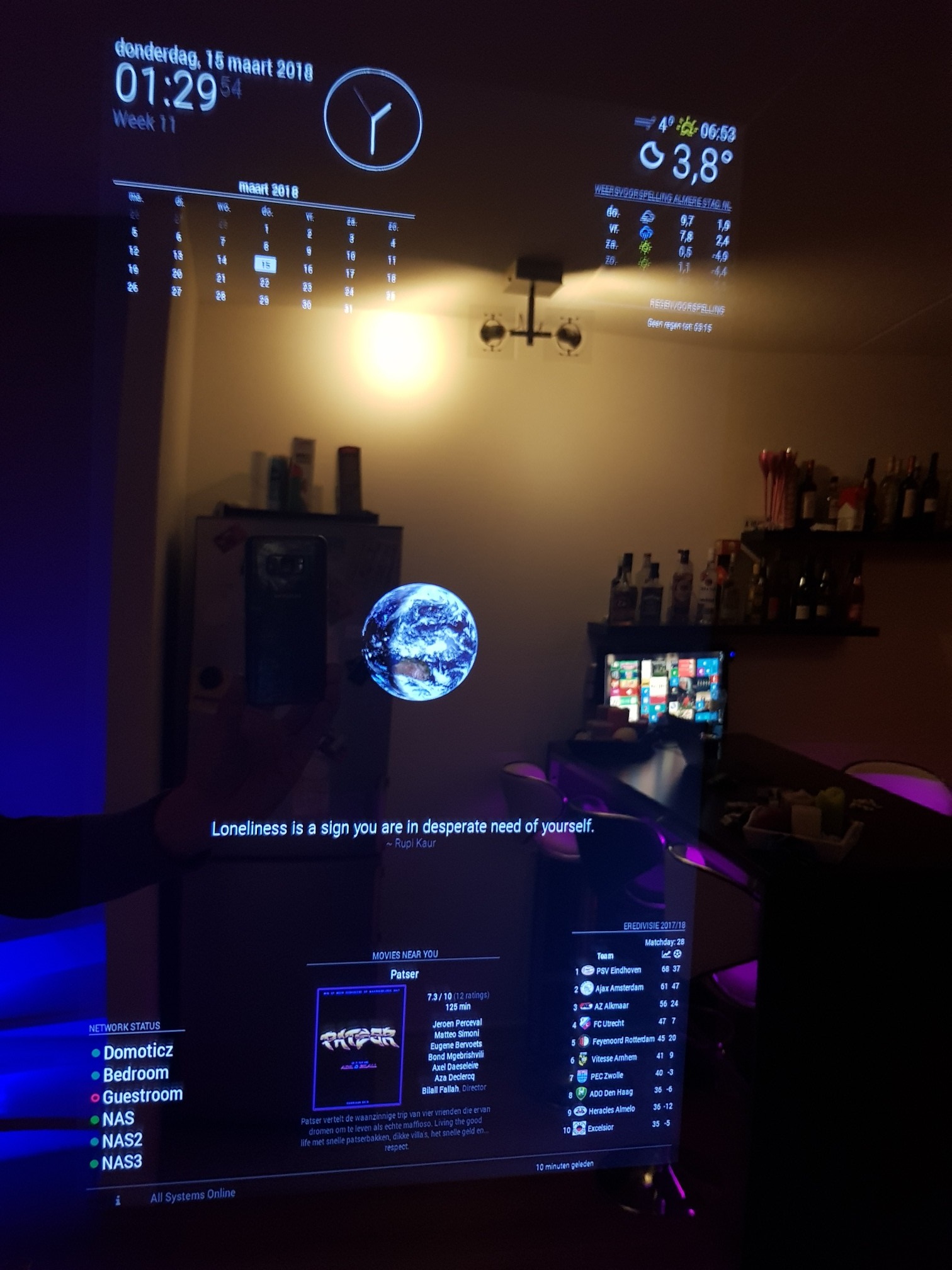
Here are the pictures:
The frame
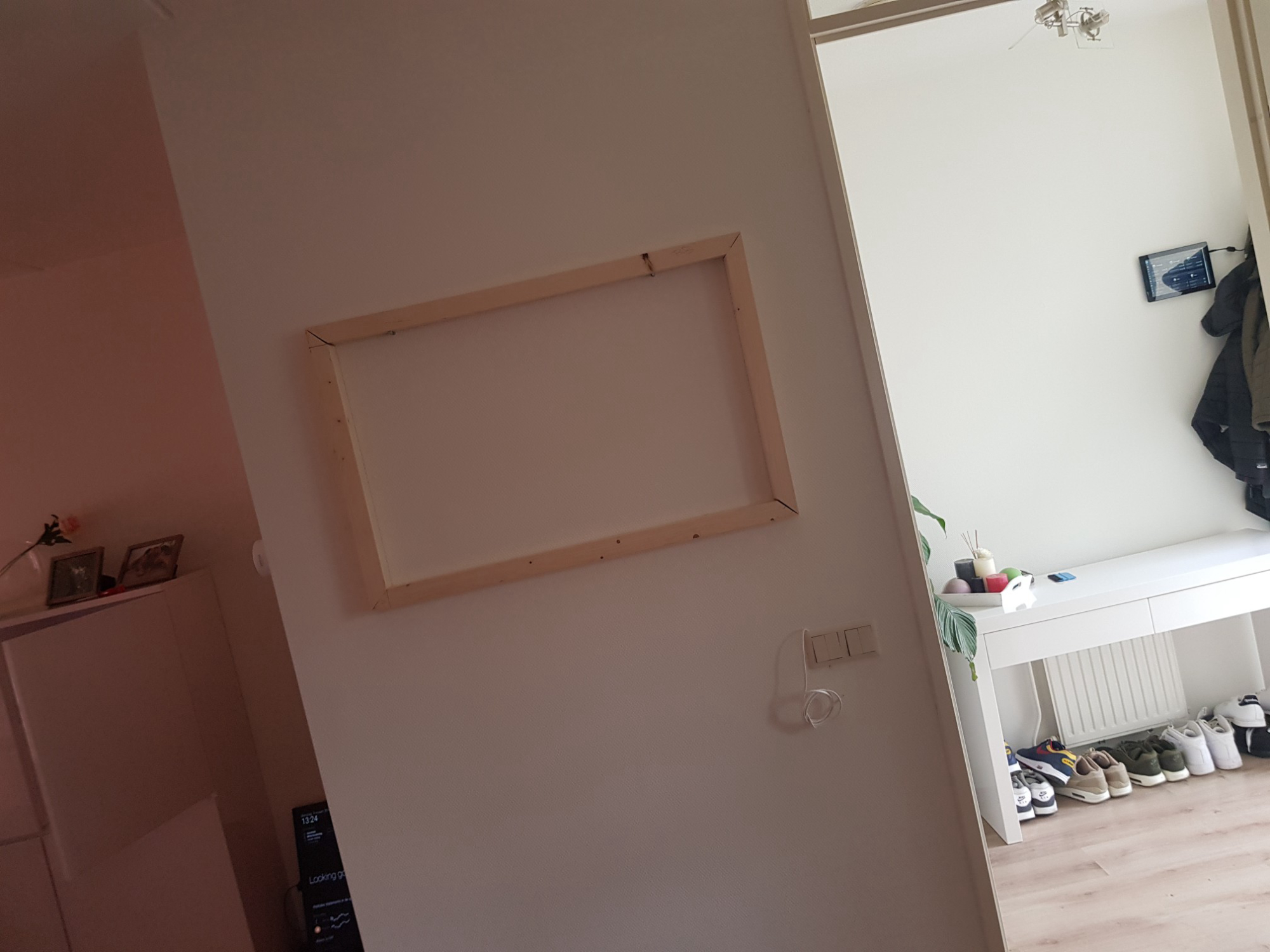
The frame mounted
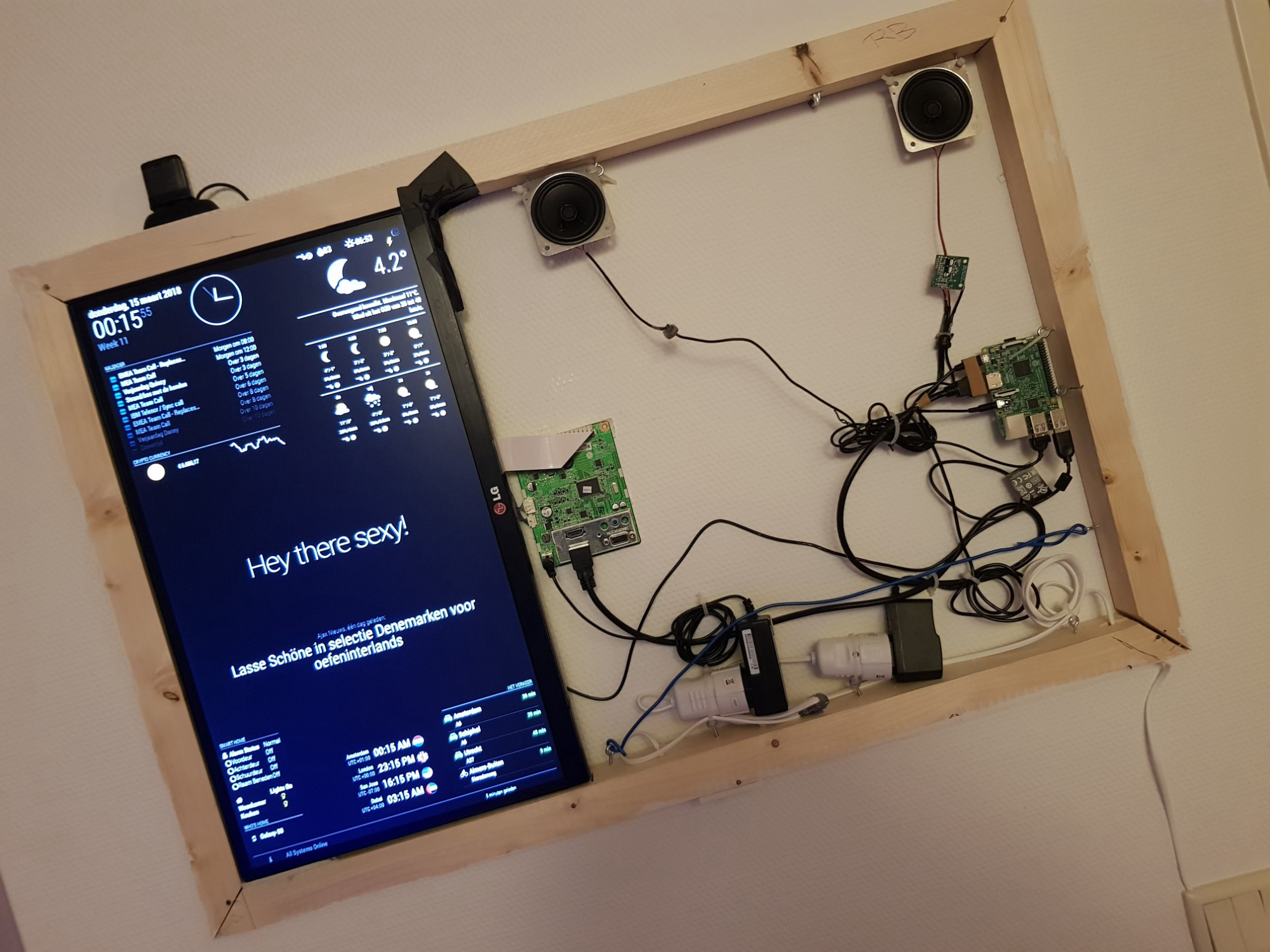
The frame mounted with everything in it
Shot from the right
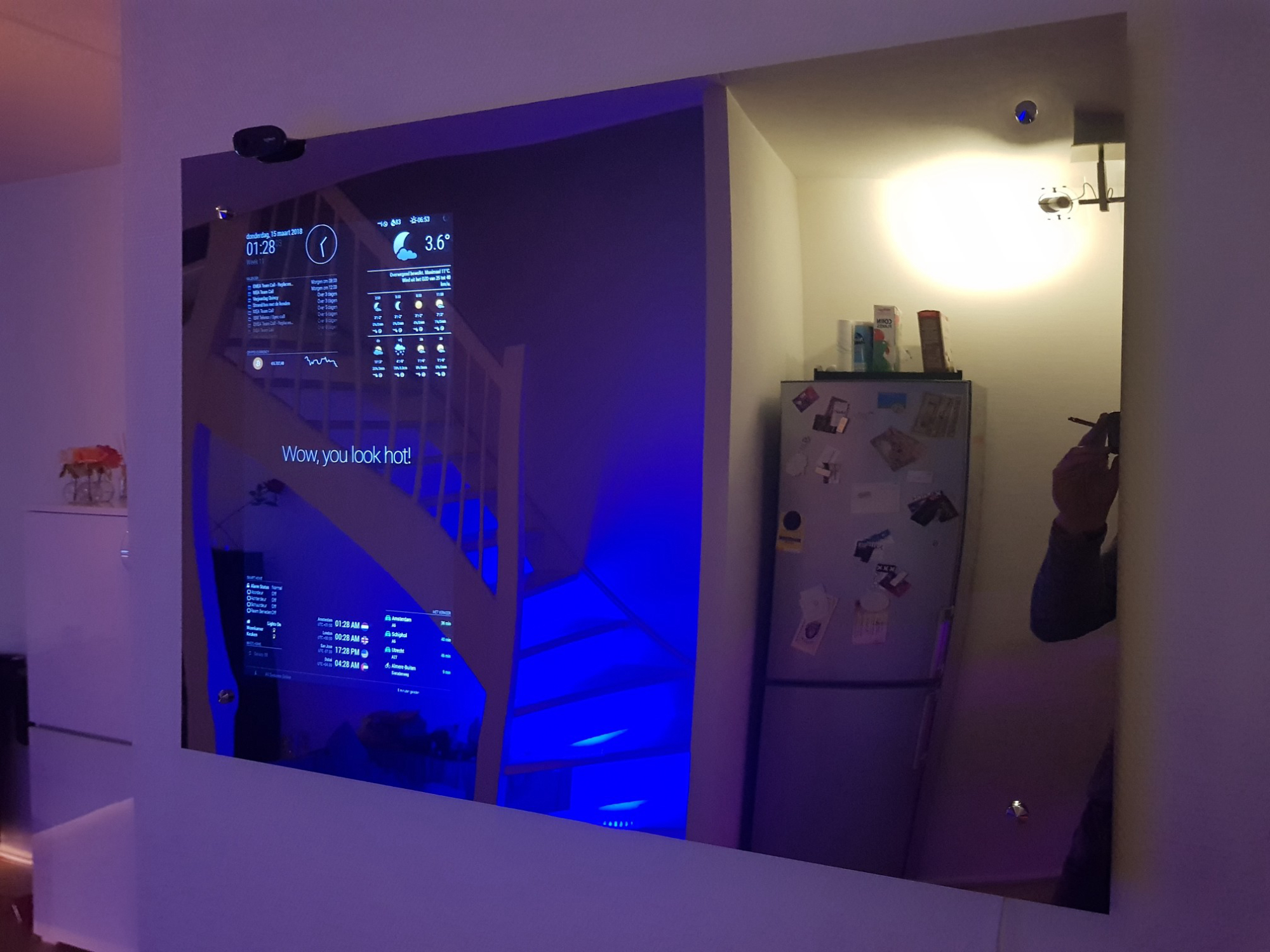
Shot from the left
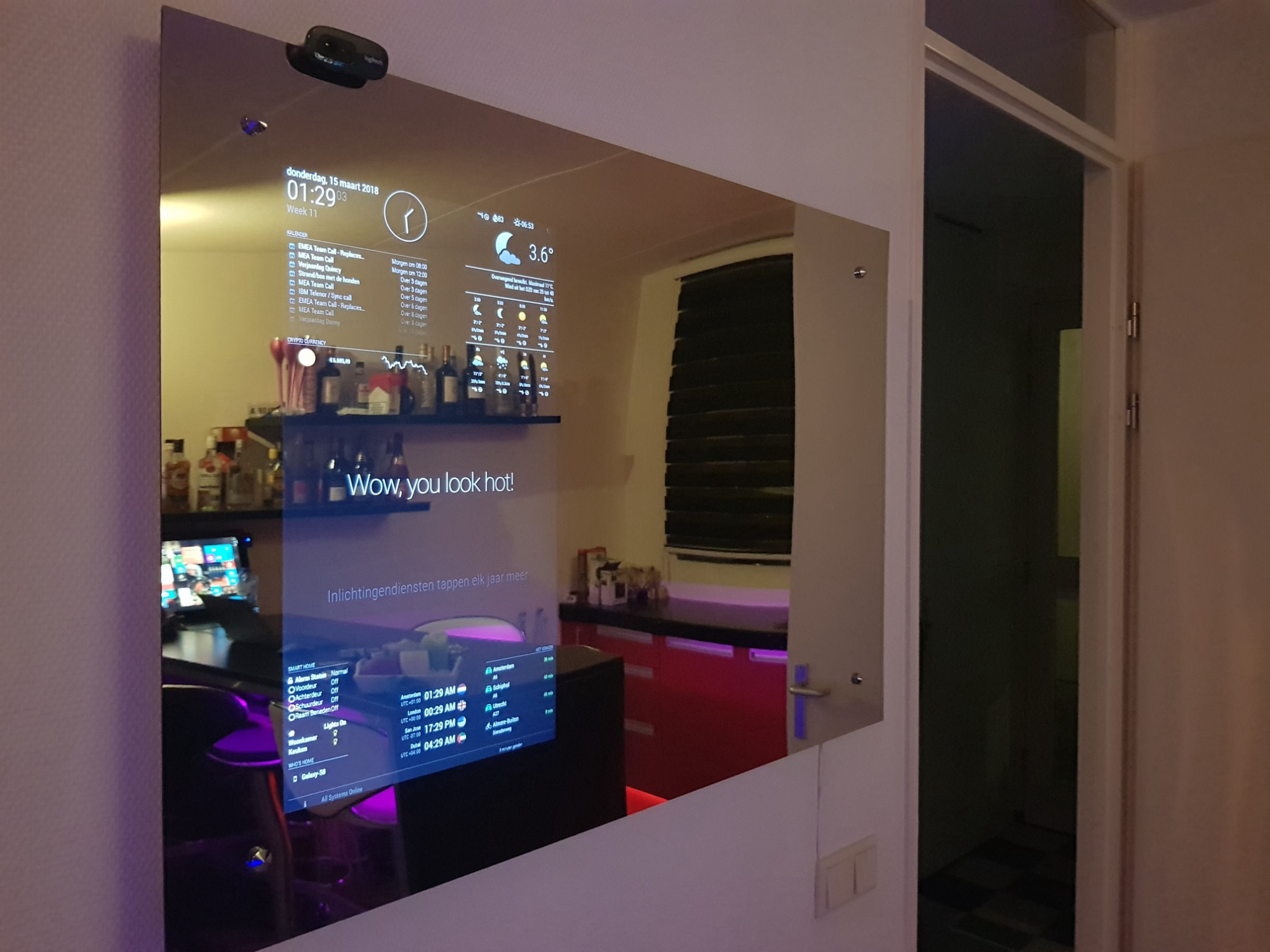
Main Mirror
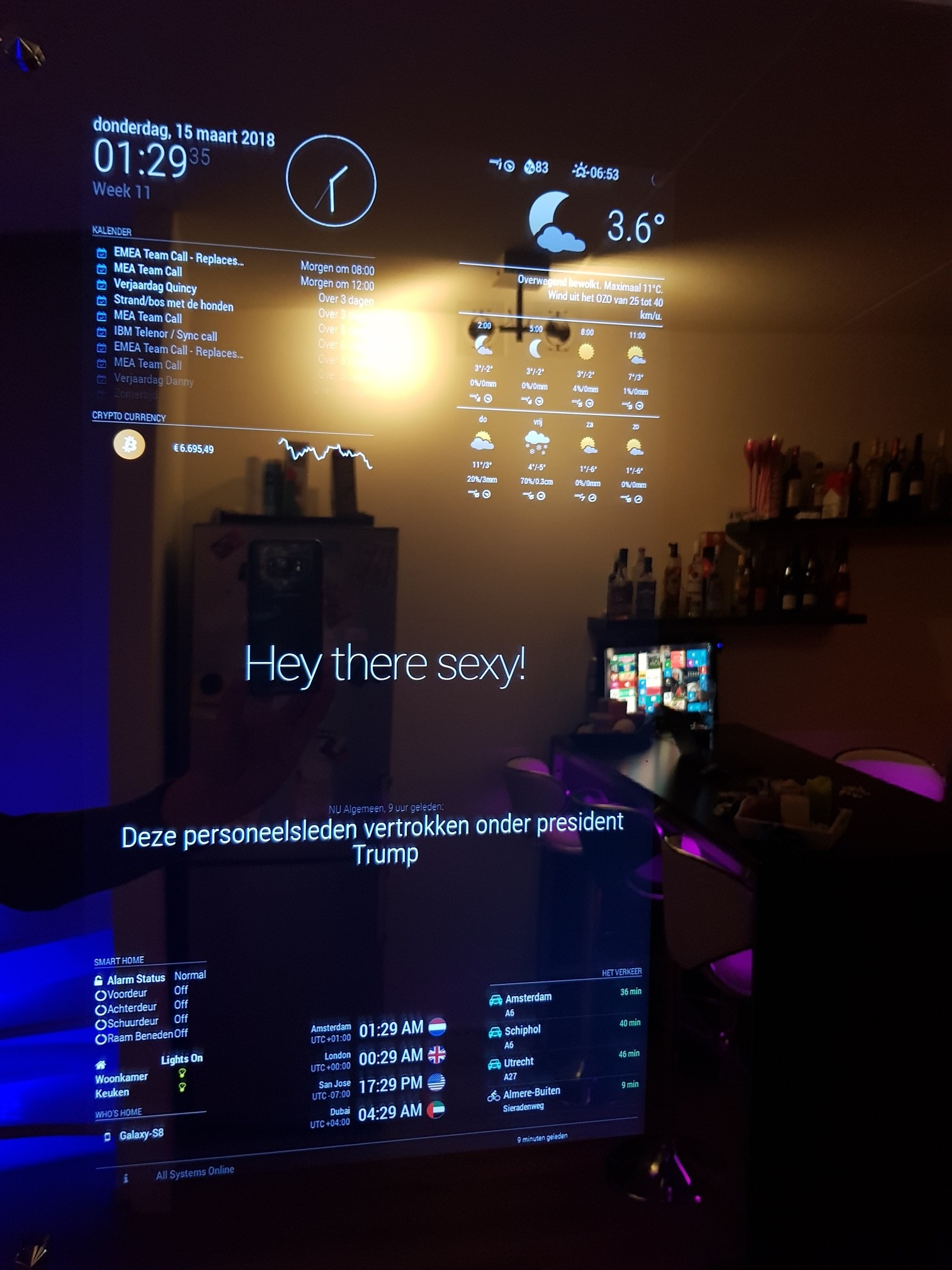
Other Mirror
-
Here is my full config.js file (without private info):
/* * The location of the module in which the module will be loaded. Possible values are top_ bar, top_left, top_center, top_right, upper_third, * middle_center, lower_third, bottom_left, bottom_center, bottom_right, bottom_bar, fullscreen_above, and fullscreen_below. * This field is optional but most modules require this field to set. Check the documentation of the module for more information. * Multiple modules with the same position will be ordered based on the order in the configuration file. */ var config = { address: "0.0.0.0", port: 8080, ipWhitelist: ["127.0.0.1", "::ffff:127.0.0.1", "::1", "192.168.1.11"], language: "nl", timeFormat: 24, units: "metric", modules: [ { module: 'MMM-Carousel', position: 'bottom_bar', // Only required to show navigation config: { transitionInterval: 0, ignoreModules: ['clock', 'alert'], mode: 'slides', showPageIndicators: true, showPageControls: true, slides: [ ['MMM-cryptocurrency', 'worldclock', 'MMM-WunderGround', 'MMM-MyCommute', 'MMM-MirrorMirrorOnTheWall', 'MMM-Hue', 'MMM-NetworkScanner', 'domoticz', 'MMM-syslog', 'alert', 'updatenotification', 'clock', 'calendar', 'compliments', 'newsfeed'], ['MMM-MovieListings', 'MMM-Scrobbler', 'MMM-ping', 'calendar_monthly', 'MMM-Globe', 'MMM-Tools', 'MMM-soccer', 'clock', 'MMM-syslog', 'alert', 'updatenotification', 'MagicMirror-QuoteCatalog', 'currentweather', 'weatherforecast', 'MMM-rainfc'] ], keyBindingsMode: "DEFAULT", keyBindings: { NextSlide: "ArrowRight", PrevSlide: "ArrowLeft", Slide0: "Home" } } }, { module: 'MMM-KeyBindings', config: { enableNotifyServer: false, enableMousetrap: true, } }, { module: "currentweather", position: "top_right", header: "", config: { location: "Almere Stad", locationID: "xxxxxxxx", //ID from http://www.openweathermap.org/help/city_list.txt appid: "xxxxxxxxxxxxxxxxxxxxxxxxx", decimalSymbol: "," } }, { module: "weatherforecast", position: "top_right", header: "Weersvoorspelling", config: { location: "Almere Stad", locationID: "xxxxxxxx", //ID from http://www.openweathermap.org/help/city_list.txt appid: "xxxxxxxxxxxxxxxxxxxxxxxxx", decimalSymbol: "," } }, { module: "alert", }, { module: "updatenotification", position: "top_bar" }, { module: "clock", position: "top_left", config: { displayType: "both", analogSize: "150px", analogFace: "simple", analogPlacement: "right", showWeek: "true" } }, { module: "calendar", header: "Kalender", position: "top_left", config: { calendars: [ { symbol: "calendar-check-o ", url: "webcal://ical.mac.com/ical/Dutch32Holidays.ics", }, { symbol: "calendar-check-o ", url: "https://.ics", }, { symbol: "calendar-check-o ", url: "https://basic.ics", }, { symbol: "calendar-check-o ", url: "https://calendar.ics", } ] } }, { module: "compliments", position: "middle_center" }, { module: 'MMM-MyCommute', header: 'Het Verkeer', position: 'bottom_right', config: { apikey: 'xxxxxxxxxxxxxxxxxxxxxxxxxxxxxxxxxxxxxxxxxxx', origin: 'xxxx, 1111 xx xxxx', startTime: '00:00', endTime: '23:59', // hideDays: [0,6], destinations: [ { destination: 'Amsterdam Centraal, Stationsplein, Amsterdam', label: 'Amsterdam', mode: 'driving', color: '#82E5AA' }, { destination: 'Schiphol Airport, Schiphol Boulevard, Amsterdam', label: 'Schiphol', mode: 'driving', color: '#82E5AA' }, { destination: 'Utrecht Centraal, Utrecht', label: 'Utrecht', mode: 'driving', color: '#82E5AA' }, { destination: 'Centrum Almere Buiten, Almere', label: 'Almere-Buiten', mode: 'bicycling' } ] } }, { module: 'MMM-domoticz/domoticz', header: 'Smart Home', position: 'bottom_left', config: { apiBase: "http://192.168.1.12", apiPort: "80", sensors: [ { idx: "71", //Device IDX symbolon: "fa fa-lock", //font-awesome icon if device is On symboloff: "fa fa-unlock-alt", //font-awesome icon if device is Off (this will also be used if it is a temperature-de hiddenon: true, //true = hide if device is on (default: false) hiddenoff: false, //frue = hide if device is off (default: false) customTitle: "Alarm Status", }, { idx: "235", symbolon: "fa fa-circle-o-notch fa-spin", symboloff: "fa fa-circle-o-notch", customTitle: "Voordeur", }, { idx: "252", symbolon: "fa fa-circle-o-notch fa-spin", symboloff: "fa fa-circle-o-notch", hiddenoff: false, customTitle: "Achterdeur", }, { idx: "257", symbolon: "fa fa-circle-o-notch fa-spin", symboloff: "fa fa-circle-o-notch", customTitle: "Schuurdeur", }, { idx: "262", symbolon: "fa fa-circle-o-notch fa-spin", symboloff: "fa fa-circle-o-notch", hiddenoff: false, customTitle: "Raam Beneden", }, ], } }, { module: 'MMM-Hue', position: 'bottom_left', config:{ bridgeip: "192.168.1.155", userid: "xxxxxxxxxxxxxxxxxx", colour: true } }, { module: 'MMM-NetworkScanner', header: "Who's Home", position: 'bottom_left', config: { devices: [ // { ipAddress: "github.com", name: "Github", icon: "globe"}, // { macAddress: "1a:1b:1c:1a:1b:1c", name: "Server", icon: "server"}, // { macAddress: "2a:2b:2c:2a:2b:2c", name: "Desktop", icon: "desktop"}, // { ipAddress: "10.1.1.10", name: "Laptop", icon: "laptop"}, { macAddress: "xx:xx:xx:xx:xx:xx", name: "Galaxy-S8", icon: "mobile"}, ], showUnknown: false, showOffline: true, keepAlive: 600, updateInterval: 300, } }, { module: "MMM-soccer", header: "", position: "bottom_right", config: { api_key: "xxxxxxxxxxxxxxxxxxxxxxxxxxxxxxxx", colored: "false", focus_on: "false", max_teams: "10", leagues: {"EREDIVISIE": 449}, show: "EREDIVISIE" } }, { module: 'MMM-ping', position: 'bottom_left', header: 'Network Status', config: { colored: 'yes', display: 'both', updateInterval: '5', font: 'medium', hosts: [ 'Domoticz', 'Bedroom', 'Guestroom', 'NAS', 'NAS2', 'NAS3' ] } }, { module: 'MMM-Globe', position: 'middle_center', config: { style: 'geoColor', imageSize: 200, ownImagePath:'', updateInterval: 10*60*1000 } }, { module: "MMM-cryptocurrency", header: "", position: "top_left", config: { currency: ["bitcoin"], conversion: "EUR", showUSD: false, headers: ['change24h', 'change1h', 'change7d'], displayType: "logo", coloredLogos: "true", showGraphs: true, fontSize: "medium" } }, { module: 'MMM-syslog', header: " ", position: 'bottom_bar', config: { max: "1", // format: ["DD:MM HH:mm"], types: {INFO: "dimmed", WARNING: "normal", ERROR: "bright"}, alert: "true" } }, { module: 'MagicMirror-QuoteCatalog', header: '', position: 'lower_third', config: { timeFormat: "20", fadeSpeed: "5" } }, { module: 'MMM-WunderGround', position: 'top_right', config: { apikey: 'xxxxxxxxxxxxxxxxxx', pws: 'pws:XXXXXX00', hourly: '1', fctext: '1', fcdaycount: "4", fcdaystart: "0", hourlyinterval: "3", hourlycount: "2", alerttime: 10000, alerttruncatestring: "english:", roundTmpDecs: 1, coloricon: true, daily:1, iconset: "colourful", UseCardinals: 0, layout: "horizontal", debug: 1, sysstat: 0 } }, { module: "MMM-rainfc", position: "top_right", header: "Regenvoorspelling", config: { lat: "52.39", lon: "5.29", width: 200, height: 100, lineWidth: 2, lineColor: "#e0ffe0", fillColor: "#e0ffe0", maxPower: 300, rainText: "Tot: ", noRainText: "Geen regen tot: ", nrOfTimeLabels: 5 // advised values: 2-5 } }, { module: "newsfeed", position: "lower_third", showSourceTitle: true, showPublishDate: true, config: { startTags: "['video','Video','VIDEO']", feeds: [ { title: "NU Algemeen", url: "http://www.nu.nl/rss/Algemeen" }, { title: "NU Internet", url: "http://www.nu.nl/rss/Internet" }, { title: "NU Sport", url: "http://www.nu.nl/rss/Sport" }, { title: "Ajax Nieuws", url: "http://ajax.netwerk.to/nieuws/rss.xml" }, { title: "Tweakers.net", url: "http://feeds.feedburner.com/tweakers/nieuws" }, ] } }, { module: 'MMM-MirrorMirrorOnTheWall', position: "middle_center", config: {} }, { module: 'calendar_monthly', position: 'top_left', config: { showHeader: "true", } }, { module: 'worldclock', position: 'bottom_center', header: '', config: { timeFormat: 'HH:mm A', //defined in moment.js format() style: 'left', //predefined 4 styles; 'top', 'left','right','bottom' clocks: [ { title: "Amsterdam", timezone: "Europe/Amsterdam", flag: "nl", }, { title: "London", timezone: "Europe/London", flag: "gb", }, { title: "San Jose", timezone: "America/Los_Angeles", flag: "us", }, { title: "Dubai", timezone: "Asia/Dubai", flag: "ae", }, ] } }, { module: 'MMM-MovieListings', position: 'bottom_center', config: { apiKey: 'xxxxxxxxxxxxxxxxxxxxxxxxxxxxx', region: 'NL', language: 'nl-NL', interface: 'poster', //'list', 'poster', 'detailed' includeMoviePlot: true, maxPlotLength: 198, header: 'Movies Near You', moviesPerPage: 0, refreshInterval: 1000 * 60 * 60 * 24, //Once a day baseUrl: 'https://api.themoviedb.org/3/movie/now_playing', animationSpeed: 2.5 * 1000, pageChangeInterval: 35 * 1000 } }, { module: 'MMM-Scrobbler', position: 'upper_third', config: { username: 'marcnlx', apikey: '1a71a102c5d07a998a44bd2d9dfaf513', //time interval to search for new song (every 15 seconds) updateInterval: 15 * 1000, //how often should we try to retrieve a song if not listening delayCount: 5, //time interval to search for new song if the 5 times not listening is received. //set this to the same number as updateInterval to ignore this option delayInterval: 120*1000, animationSpeed: 1000, showAlbumArt: true, showMetaData: true, //Determines the position of the meta text. Possible values: top, bottom, left, right alignment: "right", } }, ] }; /*************** DO NOT EDIT THE LINE BELOW ***************/ if (typeof module !== "undefined") {module.exports = config;} -
I’m impressed. A nice and clean build, well written documentation, some nice pictures to look at and everything with markups and such. Very well done, this is how more Showrooms should look like :)
-
@yawns said in My Magic Mirror - 100x70cm:
I’m impressed. A nice and clean build, well written documentation, some nice pictures to look at and everything with markups and such. Very well done, this is how more Showrooms should look like :)
Thanks! If you know how many hours I spent “extra” on my laptop because of not so well written documentation, no markups and such…I thought I would save everybody some time ;)
-
Yes, I can imagine that.
I guess the mirror glass is mounted directly on top of the frame, right? I cannot see any ventilation drills. Did/do you somehow monitor heat inside the frame? -
@yawns You are correct. It’s mounted directly on top of the frame.
I didn’t notice heat is really a problem, except a little bit for the monitor board…although it now has way more room to let air out then when the back part of the monitor was still on it!
I was thinking about drilling some holes in the top of the frame to let the hot air out. There is also a small gap between the frame and the wall itself. On the RPi you can monitor temp as follows:pi@mirror:~ $ vcgencmd measure_temp temp=54.7'C pi@mirror:~ $I use a small script that shows temperature, but also shows it in Domoticz and sends a Telegram notification if the temperature gets too high:
pi@mirror:~ $ ./myscripts/rpitemp.sh
Raspberry Pi Temperature (domoticz) is 54.6 °C
pi@mirror:~ $ cat ./myscripts/rpitemp.sh #!/bin/sh domoticzip=192.168.1.12 user=xxxx pass=xxxx tempidx=204 maxtemp=70 RED='\033[0;31m' NC='\033[0m' val_temp=`vcgencmd measure_temp | cut -c 6-9` val_temp2=`vcgencmd measure_temp | cut -c 6-9 | cut -c 1-2` curl -s 'http://'$user':'$pass'@'$domoticzip'/json.htm?type=command¶m=udevice&idx='$tempidx'&nvalue=0&svalue='$val_temp'' > /dev/null if [ $val_temp2 -gt $maxtemp ]; then echo "${RED}Raspberry Pi Temperature ($(hostname)) is $val_temp °C ${NC}" curl -s -X POST "https://api.telegram.org/botxxxxxxxxxxxxxxxxxxxxxxxxxxxx/sendMessage" -F chat_id=xxxxxxxx -F text="Raspberry Pi Temperature ($(hostname)) is $val_temp °C" else echo "Raspberry Pi Temperature ($(hostname)) is $val_temp °C" fi exit pi@mirror:~ $ -
Very nice job!
You live in the Netherlands, like me; can I ask you some questions by mail?
You have some things in your mirror that make me very curious how you did it!
Peter -
@Peter said in My Magic Mirror - 100x70cm:
Very nice job!
You live in the Netherlands, like me; can I ask you some questions by mail?
You have some things in your mirror that make me very curious how you did it!
PeterThanks! Yeah sure, no problem.
-
@marcnlx said in My Magic Mirror - 100x70cm:
the only thing was that 30min after hanging it on the wall, “version 1” came off the wall completely
This gave me a good laugh, thanks. :-)
I agree. Well thought out (the 2nd one), nicely executed, well documented, pictures and a story. I commend you. Fantastic! :-)
-
@Mykle1 said in My Magic Mirror - 100x70cm:
@marcnlx said in My Magic Mirror - 100x70cm:
the only thing was that 30min after hanging it on the wall, “version 1” came off the wall completely
This gave me a good laugh, thanks. :-)
I agree. Well thought out (the 2nd one), nicely executed, well documented, pictures and a story. I commend you. Fantastic! :-)
After I realized I could’ve expected this with “version 1” and saw the screen was still okay…same here :)
Thanks! I just created a post the way I personally like to read it ;) I spend at least a week setting up everything, testing things out, seeing the “please create config file” after a restart a million times after making a change and forgetting an { [ , ’ or " somewhere :)
I hope this will give people a bit of a Quick Start in configuring all modules and how I got everything working together ;) -
@marcnlx, well done and kudos to you on your magic mirror. I’m moving to a new place soon always have this thought that i want to build one of this bad boy as a home accessories. With you details guides of building the magic mirror is going to be very helpful and thanks for that.
you mind if i ping you separately if i hit the wall and hoping you can shed some lights.
-
@bellroy said in My Magic Mirror - 100x70cm:
@marcnlx, well done and kudos to you on your magic mirror. I’m moving to a new place soon always have this thought that i want to build one of this bad boy as a home accessories. With you details guides of building the magic mirror is going to be very helpful and thanks for that.
you mind if i ping you separately if i hit the wall and hoping you can shed some lights.
No problem…just ping me if you hit any issues.
-
@marcnlx firstly this mirror is awesome. How did you mount the mirror on the frame with it being bigger than the frame?
-
@solelo look at the pictures and you’ll see that is fitted with four screws to hold it to the frame :)
-
@broberg I did, did you just drill holes in the mirror also to hold it in place, I’m a little nervous to do that…
-
Very nice work. I like the look of your mirror and will try to make somethign similar.
May i ask if you have any advice on improvements since since then?
And also what is the purpose of the webcam on the mirror?
thnks in advance for your help
-
@marcnlx Well done, this looks amazing. Can I ask you from where did you ordered and which Plexiglass two way mirror ?
-
@marcnlx very nice build although I am very disappointed about the plexiglass price.
I paid € 130,00 for a Pilkington MirroView glass to cover the area of a 55" TV (and beyond)! 😬


Hello! It looks like you're interested in this conversation, but you don't have an account yet.
Getting fed up of having to scroll through the same posts each visit? When you register for an account, you'll always come back to exactly where you were before, and choose to be notified of new replies (either via email, or push notification). You'll also be able to save bookmarks and upvote posts to show your appreciation to other community members.
With your input, this post could be even better 💗
Register Login