MagicMirror Forum
    • Recent
    • Tags
    • Unsolved
    • Solved
    • MagicMirror² Repository
    • Documentation
    • 3rd-Party-Modules
    • Donate
    • Discord
    • Register
    • Login
    A New Chapter for MagicMirror: The Community Takes the Lead
    Read the statement by Michael Teeuw here.

    MMM-NetworkScanner

    Scheduled Pinned Locked Moved Utilities
    networkscannerstatusmac address
    117 Posts 32 Posters 233.2k Views 33 Watching
    Loading More Posts
    • Oldest to Newest
    • Newest to Oldest
    • Most Votes
    Reply
    • Reply as topic
    Log in to reply
    This topic has been deleted. Only users with topic management privileges can see it.
    • I Offline
      ianperrin @derek7467
      last edited by

      @derek7467

      If you can provide the arp-scan command for this, an option could be added to support it - once the current issues are fixed of course ;)

      Cc @bluedoors

      "Live as if you were to die tomorrow. Learn as if you were to live forever." - Mahatma Gandhi

      1 Reply Last reply Reply Quote 0
      • I Offline
        ianperrin @bminer1
        last edited by

        @bminer1, @binderth

        I’m going to be taking a look at the notifications functionally after the issues with the current release have been resolved.

        "Live as if you were to die tomorrow. Learn as if you were to live forever." - Mahatma Gandhi

        1 Reply Last reply Reply Quote 0
        • B Offline
          Blackmirror
          last edited by

          Nice to make a output gpio in this module, so I can installed a relais, to switch thinks on, only when I am in the house.

          1 Reply Last reply Reply Quote 0
          • zdenekZ Offline
            zdenek
            last edited by yawns

            I’ve also issue - “resident” doesn’t work for me:

            and here ic config:

            	       {
                  		module: 'MMM-NetworkScanner',
                    	position: 'bottom_right', 
                    	config: {
                        		devices: [
            	                    	{ macAddress: "ab:ab:ab:ab:ab:ab", name: "Mobile", icon: "server"},
                            	],
                        		showUnknown: false,
            			debug: false,
                        		showOffline: true,
                        		keepAlive: 60,
                        		updateInterval: 30,
                        		residents: "Mobile",
            			showLastSeen: true,
             	                occupiedCMD: {notification: 'REMOTE_ACTION', payload: {action: 'MONITORON'}},
                        		vacantCMD  : {notification: 'REMOTE_ACTION', payload: {action: 'MONITOROFF'}},
             			}        
                	      },
            

            any idea? module get started, Icon and name appers, but it’s still “grey” (like offline - wifi is on, I can see Raspberry and also Server on the same network via Fing)
            Tried also with IP - the same. Tried another device, the same. And arp-scan --localnet I can see the devices I want to monitor

            thanks for help
            Zdeněk

            Mykle1M 1 Reply Last reply Reply Quote 0
            • Mykle1M Offline
              Mykle1 Project Sponsor Module Developer @zdenek
              last edited by

              @zdenek said in MMM-NetworkScanner:

              any idea?

              you could use an earlier version that does work until this one gets fixed

              Create a working config
              How to add modules

              zdenekZ 1 Reply Last reply Reply Quote 0
              • zdenekZ Offline
                zdenek @Mykle1
                last edited by zdenek

                @Mykle1 thanks fir help. Stupid question - how? I can download source code of v0.0.1 and these files simply copy/paste to /home/pi/MagicMirror/modules/MMM-NetworkScanner folder? And subfolder node_modules leave as it is? If I did (and nothing else changed), module starts and on screen is just “Loading…” forever.

                MMM-NetworkScanner received SCAN_NETWORK
                MMM-NetworkScanner is scanning for mac addresses
                MMM-NetworkScanner received SCAN_NETWORK
                MMM-NetworkScanner is scanning for mac addresses
                MMM-NetworkScanner received SCAN_NETWORK
                MMM-NetworkScanner is scanning for mac addresses
                MMM-NetworkScanner received SCAN_NETWORK
                MMM-NetworkScanner is scanning for mac addresses
                MMM-NetworkScanner received SCAN_NETWORK
                MMM-NetworkScanner is scanning for mac addresses
                and it continue on the same way

                thanks, Zdeněk

                Mykle1M 1 Reply Last reply Reply Quote 0
                • Mykle1M Offline
                  Mykle1 Project Sponsor Module Developer @zdenek
                  last edited by

                  @zdenek said in MMM-NetworkScanner:

                  thanks fir help. Stupid question - how?

                  You can delete your existing MMM-NetworkScanner folder, seeing as it’s not working for you. Then go here, where you’ll find previous versions:
                  https://github.com/ianperrin/MMM-NetworkScanner/commits/master

                  I am using late January or earlier February. I can’t remember which and I’m not with my Pi right now. Note: I am using only IP addresses, not MAC addresses, but it works perfectly for me

                  Create a working config
                  How to add modules

                  zdenekZ 1 Reply Last reply Reply Quote 0
                  • zdenekZ Offline
                    zdenek @Mykle1
                    last edited by zdenek

                    @Mykle1 thanks. Module starts, but “residents” doesn’t work for me.

                    MMM-NetworkScanner is scanning for ip addresses
                    Recived payload: [ { ipAddress: ‘192.168.1.11’,
                    name: ‘Mobile’,
                    icon: ‘server’,
                    online: true,
                    lastSeen: ‘2017-04-28T12:50:02.107Z’ } ]

                    So, device is online, but in Raspberry is “NO DEVICE ONLINE”

                    in config is:
                    residents: “Mobile”,

                    if I turn on “show unknow”, it lists about 10 devices in my net, include MAC belongs to 192.168.1.11

                    one more thing - the time of “last seen” (lastSeen: ‘2017-04-28T12:50:02.107Z’) is 2 hours lower compared to system time. It’s cause of time zone+winter/summer time. How to avoid the thime difference?

                    Mykle1M 1 Reply Last reply Reply Quote 0
                    • Mykle1M Offline
                      Mykle1 Project Sponsor Module Developer @zdenek
                      last edited by Mykle1

                      @zdenek said in MMM-NetworkScanner:

                      Module starts, but “residents” doesn’t work for me.

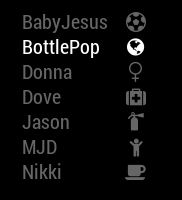
                      residents: [] belong inside the array. That is why residents: "Mobile", won’t work. However, I don’t fill the
                      residents:array at all, leaving it simply as, residents: [] See my config entry:

                      {
                      			disabled: f,
                              		module: 'MMM-NetworkScanner',
                              		position: 'top_left', 
                              		config: {
                      			debug: false,
                                  		devices: [
                                          	{ ipAddress: "192.168.1.2", name: "Dove", icon: "medkit"},
                      			{ ipAddress: "192.168.1.15", name: "BabyJesus", icon: "futbol-o"},
                                          	{ ipAddress: "192.168.1.8", name: "BottlePop", icon: "globe"},
                                          	{ ipAddress: "192.168.1.11", name: "Donna", icon: "venus"},
                      			{ ipAddress: "192.168.1.10", name: "Nikki", icon: "coffee"},
                      			{ ipAddress: "192.168.1.7", name: "Jason", icon: "fire-extinguisher"},
                      			{ ipAddress: "192.168.1.18", name: "MJD", icon: "child"}
                                      		],
                                  		showUnknown: false,
                                  		showOffline: true,
                      			showLastSeen: false,
                                  		keepAlive: 1200, // in seconds (20 min)
                                  		updateInterval: 30, // in seconds
                                  		residents: []
                      		}        
                       		},
                      

                      and the result:
                      0_1493433501717_scanner.JPG

                      I don’t know about your time issue, sorry.

                      Create a working config
                      How to add modules

                      zdenekZ 1 Reply Last reply Reply Quote 0
                      • zdenekZ Offline
                        zdenek @Mykle1
                        last edited by zdenek

                        @Mykle1 You are the best! Thanks. Finally it works. The problem was with the array. But see home page of module https://github.com/ianperrin/MMM-NetworkScanner - there is an example config and there is
                        residents: “Mobile”,
                        The only difference is that I’ve 1st icon and then name
                        The time difference i’ve to check. Thanks a lot
                        BTW, Hot to format text as code? If I tried the icon it place ```, than row
                        //my code
                        and again the same three signs. I tried to add row between the weird signs, but it’s normal text
                        Thanks

                        Mykle1M 1 Reply Last reply Reply Quote 0
                        • Mykle1M Offline
                          Mykle1 Project Sponsor Module Developer @zdenek
                          last edited by

                          @zdenek said in MMM-NetworkScanner:

                          The only difference is that I’ve 1st icon and then name

                          Yes, I’ve changed mine to suit my liking.

                          BTW, Hot to format text as code?

                          To display code, wrap it in one back tick character (for inline code) or three back ticks (for code blocks).Note that the back tick character isn’t the same as the single quote — ’ — mark; the back tick is located on the same key as the ~ on most keyboards.

                          Create a working config
                          How to add modules

                          zdenekZ 1 Reply Last reply Reply Quote 1
                          • zdenekZ Offline
                            zdenek @Mykle1
                            last edited by

                            @Mykle1 great, thanks. The last (I hope) question is about CSS - I would like to have online devices not white, but let say green. Or just “icon” to have green. Or just Name of device. (depends, what is easier) And the offline keep grey. Do you know, how to do that? Thanks

                            Mykle1M 1 Reply Last reply Reply Quote 0
                            • Mykle1M Offline
                              Mykle1 Project Sponsor Module Developer @zdenek
                              last edited by

                              @zdenek

                              I see you started another topic and are getting assistance there. :thumbsup_tone1:

                              Create a working config
                              How to add modules

                              zdenekZ 1 Reply Last reply Reply Quote 0
                              • zdenekZ Offline
                                zdenek @Mykle1
                                last edited by

                                @Mykle1 yep, sorry

                                Mykle1M 1 Reply Last reply Reply Quote 0
                                • Mykle1M Offline
                                  Mykle1 Project Sponsor Module Developer @zdenek
                                  last edited by Mykle1

                                  @zdenek said in MMM-NetworkScanner:

                                  @Mykle1 yep, sorry

                                  No worries. I’m glad you are getting the help you need.

                                  Peace

                                  Create a working config
                                  How to add modules

                                  1 Reply Last reply Reply Quote 0
                                  • zeularZ Offline
                                    zeular
                                    last edited by

                                    Hi
                                    I’ve been playing a bit with this now and my phones come and go all the time, I have tested keepAlive from 120 - 1200 and updateInterval at 10.
                                    My server that runs 24/7 also disappears sometimes (connected with cable).
                                    I’ve added everything with macAddress, IP doesn’t work for me…

                                    Mykle1M 1 Reply Last reply Reply Quote 0
                                    • Mykle1M Offline
                                      Mykle1 Project Sponsor Module Developer @zeular
                                      last edited by

                                      @zeular said in MMM-NetworkScanner:

                                      doesn’t work for me…

                                      Go up about 8 or 9 posts from here and you’ll see what I recommended to someone about using an earlier version.

                                      Create a working config
                                      How to add modules

                                      zeularZ 1 Reply Last reply Reply Quote 0
                                      • zeularZ Offline
                                        zeular @Mykle1
                                        last edited by

                                        @Mykle1 Aha, I thought the latest would work now.
                                        I’m now testing a version from early February, seems to work but I must have “showOffline: true” otherwise “No device online”.

                                        Mykle1M 1 Reply Last reply Reply Quote 0
                                        • Mykle1M Offline
                                          Mykle1 Project Sponsor Module Developer @zeular
                                          last edited by

                                          @zeular said in MMM-NetworkScanner:

                                          “showOffline: true” otherwise “No device online”.

                                          I use “showOffline: true” (see post above) so I don’t see that.

                                          Create a working config
                                          How to add modules

                                          zdenekZ 1 Reply Last reply Reply Quote 0
                                          • zdenekZ Offline
                                            zdenek @Mykle1
                                            last edited by

                                            @Mykle1 for me it works also weird. For my iPhone (7, latest iOS) and Samsung (Android - don´t knwo which version, but the latest supported by phone) it works perfect. But for iPhone (5S, lates iOS) of my wife it works “randomly”. When is she is at home, module sometimes detects her phone, sometimes not. Sometimes it works, but after some time it makes her phone oflline even she still at home, iPhone on wifi (if I run any app detecting devices in the same network - Fing on my iPhone - it detects her iP5S). Any idea?

                                            zeularZ Mykle1M 2 Replies Last reply Reply Quote 0

                                            Hello! It looks like you're interested in this conversation, but you don't have an account yet.

                                            Getting fed up of having to scroll through the same posts each visit? When you register for an account, you'll always come back to exactly where you were before, and choose to be notified of new replies (either via email, or push notification). You'll also be able to save bookmarks and upvote posts to show your appreciation to other community members.

                                            With your input, this post could be even better 💗

                                            Register Login

                                            • 1
                                            • 2
                                            • 3
                                            • 4
                                            • 5
                                            • 6
                                            • 4 / 6
                                            • First post
                                              Last post
                                            Enjoying MagicMirror? Please consider a donation!
                                            MagicMirror created by Michael Teeuw.
                                            Forum managed by Sam, technical setup by Karsten.
                                            This forum is using NodeBB as its core | Contributors
                                            Contact | Privacy Policy