Read the statement by Michael Teeuw here.
Changing icons of the modules Current Weather and Weather Forecast
-
@PhilReis said in Changing icons of the modules Current Weather and Weather Forecast:
I have add the other icons. But not all are properly positioned yet.
And a there is no icon for fog.
In the next few weeks I will position the icon correctly.
This solution is maybe not the best but it works!Picture:
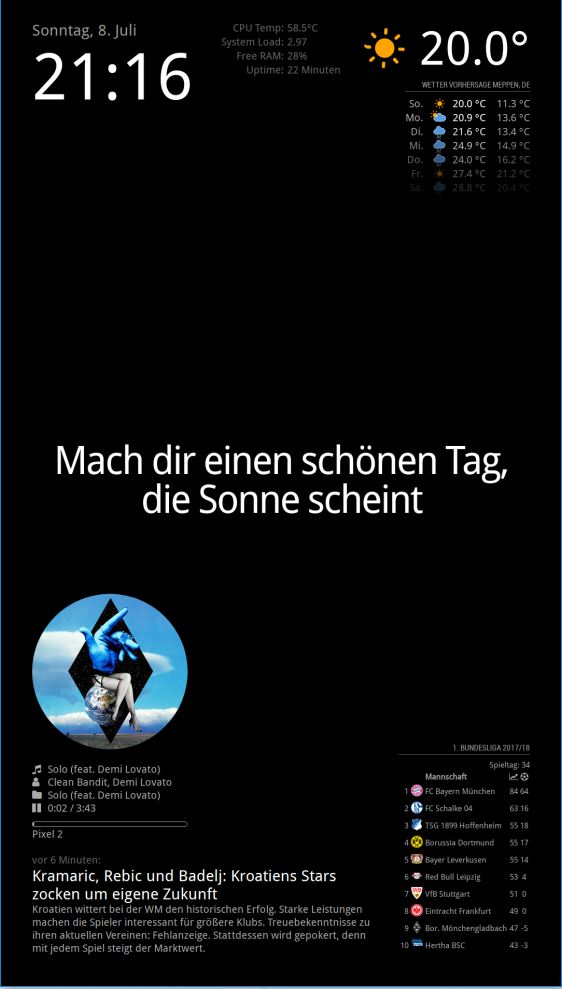
For this icons you need this icon package:
https://www.amcharts.com/free-animated-svg-weather-icons/Copy the icon from the folder “animated” to the folder “MagicMirror/css/icons”
Then you have to add this code to your “custom.css” file.
/* Aenderungen Wetter Icon */
/* Aenderungen aktuelles Wetter */

.currentweather .weathericon {
  position: absolute;
  z-index: 0;
  height: 200px;
  right: 180px;
  margin-top: -65px;
}

.currentweather .wi-day-sunny {
content: url("/css/icons/day.svg");
}

.currentweather .wi-day-cloudy {
content: url("/css/icons/cloudy-day-1.svg");
}

.currentweather .wi-rain {
content: url("/css/icons/rainy-6.svg");
}

.currentweather .wi-night-clear {
content: url("/css/icons/night.svg");
}

.currentweather .wi-night-cloudy {
content: url("/css/icons/cloudy-night-2.svg");
padding-right: 15px;
padding-top: 10px;
}

.currentweather .wi-cloudy {
content: url("/css/icons/cloudy.svg");
}

.currentweather .wi-showers {
content: url("/css/icons/rainy-7.svg");
}

.currentweather .wi-thunderstorm {
content: url("/css/icons/thunder.svg");
}

.currentweather .wi-snow {
content: url("/css/icons/snowy-6.svg");
}

.currentweather .wi-cloudy-windy {
content: url("/css/icons/cloudy-day-3.svg");
}

.currentweather .wi-night-rain {
content: url("/css/icons/rainy-6.svg");
}

.currentweather .wi-night-snow {
content: url("/css/icons/snowy-6.svg");
}

.currentweather .wi-night-thunderstorm {
content: url("/css/icons/thunder.svg");
}

.currentweather .wi-night-showers {
content: url("/css/icons/rainy-7.svg");
}

.currentweather .wi-fog {
content: url("/css/icons/cloudy.svg");
}

.currentweather .wi-night-alt-cloudy-windy {
content: url("/css/icons/cloudy-night-1.svg");
}

/* Aenderungen Wettervorhersage */

.weatherforecast .weathericon {
  position: absolute;
  left: 35px;
  z-index: 1;
  margin-top: -30px;
  height: 60px;
}

.weatherforecast .wi-day-sunny {
content: url("/css/icons/day.svg");
padding-left: 6px;
padding-top: 5px;
height: 50px;
}

.weatherforecast .wi-day-cloudy {
content: url("/css/icons/cloudy-day-1.svg");
}

.weatherforecast .wi-rain {
content: url("/css/icons/rainy-6.svg");
padding-left: 8px;
padding-top: 5px;
height: 45px;
}

.weatherforecast .wi-night-clear {
content: url("/css/icons/night.svg");
}

.weatherforecast .wi-night-cloudy {
content: url("/css/icons/cloudy-night-2.svg");
height: 50px;
padding-left: 5px;
padding-top: 7px;
}

.weatherforecast .wi-cloudy {
content: url("/css/icons/cloudy.svg");
}

.weatherforecast .wi-showers {
content: url("/css/icons/rainy-7.svg");
}

.weatherforecast .wi-thunderstorm {
content: url("/css/icons/thunder.svg");
}

.weatherforecast .wi-snow {
content: url("/css/icons/snowy-6.svg");
}

.weatherforecast .wi-cloudy-windy {
content: url("/css/icons/cloudy-day-3.svg");
height: 45px;
padding-left: 8px;
padding-top: 7px;
}

.weatherforecast .wi-night-rain {
content: url("/css/icons/rainy-6.svg");
padding-left: 8px;
padding-top: 5px;
height: 45px;
}

.weatherforecast .wi-night-snow {
content: url("/css/icons/snowy-6.svg");
}

.weatherforecast .wi-night-thunderstorm {
content: url("/css/icons/thunder.svg");
}

.weatherforecast .wi-night-showers {
content: url("/css/icons/rainy-7.svg");
}

.weatherforecast .wi-fog {
content: url("/css/icons/cloudy.svg");
}

.weatherforecast .wi-night-alt-cloudy-windy {
content: url("/css/icons/cloudy-night-1.svg");
height: 50px;
padding-left: 5px;
padding-top: 7px;
}
As I said not completely finished.
Hello anyone, if i have a icon packs named sun.mov, rain.mov, etc, can i put the pack in /css/icons and use the same code but changing the url (and maybe padding)?
fromcontent: url("/css/icons/day.svg"),tocontent: url("/css/icons/sun.mov");or i need something else?
i don’t know how coding :smiling_face_with_open_mouth_cold_sweat: -
@vinp said in Changing icons of the modules Current Weather and Weather Forecast:
My CPU goes through the roof when I tried these animated icons last night. Anyone else seeing high CPU usage with them ?
I added the ability to use animated icons in my weather module, and I, too, notice very high CPU usage, even though the animation code is purported to not be demanding of resources. I’m going to guess that SVG / Canvas animation on Electron running or on a Raspberry Pi (or both!) is not optimised to be as efficient as it could be.
If I have many icons animated at the same time and if I leave it running for days, eventually MM will freeze. CPU temp and usage goes up significantly until that happens.
-
@aecandroid - Please check out this guide on how to use the markdown features of the forum. Then go back and properly block out your config.js file. That will make debugging your code much easier.
-
-
@bhepler @Mykle1 My apologies. It was late last night and when I posted the code I saw it had created a block and I didn’t look at it closely. I have properly blocked out my config.js file below. Your help is greatly appreciated.
/* Magic Mirror Config Sample * * By Michael Teeuw http://michaelteeuw.nl * MIT Licensed. * * For more information how you can configurate this file * See https://github.com/MichMich/MagicMirror#configuration * */ var config = { address: "localhost", // Address to listen on, can be: // - "localhost", "127.0.0.1", "::1" to listen on loopback interface // - another specific IPv4/6 to listen on a specific interface // - "", "0.0.0.0", "::" to listen on any interface // Default, when address config is left out, is "localhost" port: 8080, ipWhitelist: ["127.0.0.1", "::ffff:127.0.0.1", "::1"], // Set [] to allow all IP addresses // or add a specific IPv4 of 192.168.1.5 : // ["127.0.0.1", "::ffff:127.0.0.1", "::1", "::ffff:192.168.1.5"], // or IPv4 range of 192.168.3.0 --> 192.168.3.15 use CIDR format : // ["127.0.0.1", "::ffff:127.0.0.1", "::1", "::ffff:192.168.3.0/28"], language: "en", timeFormat: 24, units: "metric", modules: [ { module: "alert", }, { module: "updatenotification", position: "top_bar" }, { module: "clock", position: "top_left" }, { module: "calendar", header: "UK Holidays", position: "top_left", config: { calendars: [ { symbol: "calendar-check-o ", url: "webcal://calendarlabs.com/ical-calendar/ics/75/UK_Holidays.ics" } ] } }, { module: 'MMM-TFL', position: 'bottom_right', // This can be any of the regions but works best on either side of the display config: { updateTime: 600000, modes: ['tube', 'overground', 'national-rail'], lines: ['c2c', 'bakerloo', 'central', 'district', 'hammersmith-city', 'jubilee', 'metropolitan', 'northern', 'piccadilly', 'victoria', 'waterloo-city'], } }, { units: "imperial", module: "currentweather", position: "top_right", config: { location: "London", locationID: "xxx", //ID from http://www.openweathermap.org/help/city_list.txt appid: "xxx" iconTable: { '01d': 'wi-day-sunny', '02d': 'wi-day-cloudy', '03d': 'wi-cloudy', '04d': 'wi-cloudy-windy', '09d': 'wi-showers', '10d': 'wi-rain', '11d': 'wi-thunderstorm', '13d': 'wi-snow', '50d': 'wi-fog', '01n': 'wi-night', '02n': 'wi-night-cloudy', '03n': 'wi-night-cloudy', '04n': 'wi-night-cloudy', '09n': 'wi-night-showers', '10n': 'wi-night-rain', '11n': 'wi-night-thunderstorm', '13n': 'wi-night-snow', '50n': 'wi-night-alt-cloudy-windy' } } }, { units: "imperial", module: "weatherforecast", position: "top_right", header: "Weather Forecast", config: { location: "London", locationID: "xxx", //ID from http://www.openweathermap.org/help/city_list.txt appid: "xxx" } }, { module: 'MMM-UKNationalRail', position: 'bottom_left', header: 'Departures', //Optional - delete this line to turn OFF the header completely config: { stationCode: 'xxx', // CRS code for station app_id: 'xxx', // TransportAPI App ID app_key: 'xxx', // TransportAPI App Key maxResults: 5, //Optional - Maximum results to display. showOrigin: false //Optional - Show the origin of the train in the table } }, ] }; /*************** DO NOT EDIT THE LINE BELOW ***************/ if (typeof module !== "undefined") {module.exports = config;} -
@j-e-f-f I also tried out your module for the weather. Looks neat! I also noticed that any animated image in any MM module spikes the CPU. I tried my best at looking at the Electron github project to see if there were any open or closed issues on it. I did not find much. I even tried upgrading my Electron to the latest stable version and that did not help much either.
-
@aecandroid said in Changing icons of the modules Current Weather and Weather Forecast:
@bhepler @Mykle1 My apologies. It was late last night and when I posted the code I saw it had created a block and I didn’t look at it closely. I have properly blocked out my config.js file below. Your help is greatly appreciated.
/* Magic Mirror Config Sample
 *
 * By Michael Teeuw http://michaelteeuw.nl
 * MIT Licensed.
 *
 * For more information how you can configurate this file
 * See https://github.com/MichMich/MagicMirror#configuration
 *
 */

var config = {
	address: "localhost", // Address to listen on, can be:
	                      // - "localhost", "127.0.0.1", "::1" to listen on loopback interface
	                      // - another specific IPv4/6 to listen on a specific interface
	                      // - "", "0.0.0.0", "::" to listen on any interface
	                      // Default, when address config is left out, is "localhost"
	port: 8080,
	ipWhitelist: ["127.0.0.1", "::ffff:127.0.0.1", "::1"], // Set [] to allow all IP addresses
	                                                       // or add a specific IPv4 of 192.168.1.5 :
	                                                       // ["127.0.0.1", "::ffff:127.0.0.1", "::1", "::ffff:192.168.1.5"],
	                                                       // or IPv4 range of 192.168.3.0 --> 192.168.3.15 use CIDR format :
	                                                       // ["127.0.0.1", "::ffff:127.0.0.1", "::1", "::ffff:192.168.3.0/28"],

	language: "en",
	timeFormat: 24,
	units: "metric",

	modules: [
		{
			module: "alert",
		},
		{
			module: "updatenotification",
			position: "top_bar"
		},
		{
			module: "clock",
			position: "top_left"
		},
		{
			module: "calendar",
			header: "UK Holidays",
			position: "top_left",
			config: {
				calendars: [
					{
						symbol: "calendar-check-o ",
						url: "webcal://calendarlabs.com/ical-calendar/ics/75/UK_Holidays.ics"
					}
				]
			}
		},
		 {
			       module: 'MMM-TFL',
			       position: 'bottom_right',    // This can be any of the regions but works best on either side of the display
			       config: {
				               updateTime: 600000,
				               modes: ['tube', 'overground', 'national-rail'],
				               lines: ['c2c', 'bakerloo', 'central', 'district', 'hammersmith-city', 'jubilee', 'metropolitan', 'northern', 'piccadilly', 'victoria', 'waterloo-city'],
				             }
			     },
		{
			units: "imperial",
			module: "currentweather",
			position: "top_right",
			config: {
				location: "London",
				locationID: "xxx",  //ID from http://www.openweathermap.org/help/city_list.txt
				appid: "xxx"
				iconTable: {
    					'01d': 'wi-day-sunny',
    					'02d': 'wi-day-cloudy',
    					'03d': 'wi-cloudy',
    					'04d': 'wi-cloudy-windy',
    					'09d': 'wi-showers',
    					'10d': 'wi-rain',
    					'11d': 'wi-thunderstorm',
    					'13d': 'wi-snow',
    					'50d': 'wi-fog',
    					'01n': 'wi-night',
    					'02n': 'wi-night-cloudy',
    					'03n': 'wi-night-cloudy',
    					'04n': 'wi-night-cloudy',
    					'09n': 'wi-night-showers',
    					'10n': 'wi-night-rain',
    					'11n': 'wi-night-thunderstorm',
    					'13n': 'wi-night-snow',
    					'50n': 'wi-night-alt-cloudy-windy'
				}

		}
		},
		{
			units: "imperial",
			module: "weatherforecast",
			position: "top_right",
			header: "Weather Forecast",
			config: {
				location: "London",
				locationID: "xxx",  //ID from http://www.openweathermap.org/help/city_list.txt
				appid: "xxx"
			}
		},
		{
					module: 		'MMM-UKNationalRail',
					position: 		'bottom_left',
					header:			'Departures',		//Optional - delete this line to turn OFF the header completely
					config: {
									stationCode: 		'xxx', 		// CRS code for station
									app_id: 			'xxx', 		// TransportAPI App ID
									app_key: 			'xxx', 		// TransportAPI App Key
									maxResults: 		5,  		//Optional - Maximum results to display.
									showOrigin: 		false   	//Optional - Show the origin of the train in the table
								}
				},
	]

};

/*************** DO NOT EDIT THE LINE BELOW ***************/
if (typeof module !== "undefined") {module.exports = config;}
I certainly would appreciate anyone’s help on this one.
-
@aecandroid - I’m not seeing anything obviously incorrect with your config. What behavior are you seeing that you wish to fix? Are you getting the module to display at all? Are you getting any modules to display at all? Are you just not getting the icons that you wish?
-
You are missing a comma in line
appidforcurrentweathermodulelocationID: "xxx", //ID from http://www.openweathermap.org/help/city_list.txt appid: "xxx", iconTable: { -
@bhepler when I add the iconTable it gives me the screen saying I need to add a config.js file or if one is already added, then to use the javascript line checker. If I delete the icon table, everything works fine.
-
@yawns too right you are my friend!! The smallest oversight messes up the whole game. Thank you!!
-
Hello everyone,
I was looking for some animated icons for weather forecast, however I did not find it very easily to change them. However I spent few hours of digging up to code and here is my approach for now. I know it’s definitely not the best or cleanest solution, but hey, Its working.
It uses CSS animations, I triet some tests with CPU usage and it looks usable for me on Raspi 3 b+. There are of course missing some of actual weather conditions, maybe I will try to mix some of them to create more variations.
To install these you need to add this code to custom.css
.icon {
    position: relative;
    display: inline-block;
    width: 14em;
    height: 0px;
    font-size: 0.8rem;
}

.cloud {
  position: absolute;
  z-index: 1;
  top: 50%;
  left: 50%;
  width: 3.6875em;
  height: 3.6875em;
  margin: -1.84375em;
  background: currentColor;
  border-radius: 50%;
  box-shadow:
    -2.1875em 0.6875em 0 -0.6875em,
    2.0625em 0.9375em 0 -0.9375em,
    0 0 0 0.375em #fff,
    -2.1875em 0.6875em 0 -0.3125em #fff,
    2.0625em 0.9375em 0 -0.5625em #fff;
}
.cloud:after {
  content: '';
  position: absolute;
  bottom: 0;
  left: -0.5em;
  display: block;
  width: 4.5625em;
  height: 1em;
  background: currentColor;
  box-shadow: 0 0.375em #fff;
}
.cloud:nth-child(2) {
  z-index: 0;
  background: #fff;
  box-shadow:
    -2.1875em 0.6875em 0 -0.6875em #fff,
    2.0625em 0.9375em 0 -0.9375em #fff,
    0 0 0 0.375em #fff,
    -2.1875em 0.6875em 0 -0.3125em #fff,
    2.0625em 0.9375em 0 -0.5625em #fff;
  opacity: 0.3;
  transform: scale(0.5) translate(6em, -3em);
  animation: cloud 4s linear infinite;
}
.cloud:nth-child(2):after { background: #fff; }

.sun {
  position: absolute;
  top: 50%;
  left: 50%;
  width: 2.5em;
  height: 2.5em;
  margin: -1.25em;
  background: currentColor;
  border-radius: 50%;
  box-shadow: 0 0 0 0.375em #fff;
  animation: spin 12s infinite linear;
}
.rays {
  position: absolute;
  top: -2em;
  left: 50%;
  display: block;
  width: 0.375em;
  height: 1.125em;
  margin-left: -0.1875em;
  background: #fff;
  border-radius: 0.25em;
  box-shadow: 0 5.375em #fff;
}
.rays:before,
.rays:after {
  content: '';
  position: absolute;
  top: 0em;
  left: 0em;
  display: block;
  width: 0.375em;
  height: 1.125em;
  transform: rotate(60deg);
  transform-origin: 50% 3.25em;
  background: #fff;
  border-radius: 0.25em;
  box-shadow: 0 5.375em #fff;
}
.rays:before {
  transform: rotate(120deg);
}
.cloud + .sun {
  margin: -2em 1em;
}

.rain,
.lightning,
.snow {
  position: absolute;
  z-index: 2;
  top: 50%;
  left: 50%;
  width: 3.75em;
  height: 3.75em;
  margin: 0.375em 0 0 -2em;
  background: currentColor;
}

.rain:after {
  content: '';
  position: absolute;
  z-index: 2;
  top: 50%;
  left: 50%;
  width: 1.125em;
  height: 1.125em;
  margin: -1em 0 0 -0.25em;
  background: #0cf;
  border-radius: 100% 0 60% 50% / 60% 0 100% 50%;
  box-shadow:
    0.625em 0.875em 0 -0.125em rgba(255,255,255,0.2),
    -0.875em 1.125em 0 -0.125em rgba(255,255,255,0.2),
    -1.375em -0.125em 0 rgba(255,255,255,0.2);
  transform: rotate(-28deg);
  animation: rain 3s linear infinite;
}

.bolt {
  position: absolute;
  top: 50%;
  left: 50%;
  margin: -0.25em 0 0 -0.125em;
  color: #fff;
  opacity: 0.3;
  animation: lightning 2s linear infinite;
}
.bolt:nth-child(2) {
  width: 0.5em;
  height: 0.25em;
  margin: -1.75em 0 0 -1.875em;
  transform: translate(2.5em, 2.25em);
  opacity: 0.2;
  animation: lightning 1.5s linear infinite;
}
.bolt:before,
.bolt:after {
  content: '';
  position: absolute;
  z-index: 2;
  top: 50%;
  left: 50%;
  margin: -1.625em 0 0 -1.0125em;
  border-top: 1.25em solid transparent;
  border-right: 0.75em solid;
  border-bottom: 0.75em solid;
  border-left: 0.5em solid transparent;
  transform: skewX(-10deg);
}
.bolt:after {
  margin: -0.25em 0 0 -0.25em;
  border-top: 0.75em solid;
  border-right: 0.5em solid transparent;
  border-bottom: 1.25em solid transparent;
  border-left: 0.75em solid;
  transform: skewX(-10deg);
}
.bolt:nth-child(2):before {
  margin: -0.75em 0 0 -0.5em;
  border-top: 0.625em solid transparent;
  border-right: 0.375em solid;
  border-bottom: 0.375em solid;
  border-left: 0.25em solid transparent;
}
.bolt:nth-child(2):after {
  margin: -0.125em 0 0 -0.125em;
  border-top: 0.375em solid;
  border-right: 0.25em solid transparent;
  border-bottom: 0.625em solid transparent;
  border-left: 0.375em solid;
}

.flake:before,
.flake:after {
  content: '\2744';
  position: absolute;
  top: 50%;
  left: 50%;
  margin: -1.025em 0 0 -1.0125em;
  color: #fff;
  list-height: 1em;
  opacity: 0.2;
  animation: spin 8s linear infinite reverse;
}
.flake:after {
  margin: 0.125em 0 0 -1em;
  font-size: 1.5em;
  opacity: 0.4;
  animation: spin 14s linear infinite;
}
.flake:nth-child(2):before {
  margin: -0.5em 0 0 0.25em;
  font-size: 1.25em;
  opacity: 0.2;
  animation: spin 10s linear infinite;
}
.flake:nth-child(2):after {
  margin: 0.375em 0 0 0.125em;
  font-size: 2em;
  opacity: 0.4;
  animation: spin 16s linear infinite reverse;
}


/* Animations */

@keyframes spin {
  100% { transform: rotate(360deg); }
}

@keyframes cloud {
  0% { opacity: 0; }
  50% { opacity: 0.3; }
  100% {
    opacity: 0;
    transform: scale(0.5) translate(-200%, -3em);
  }
}

@keyframes rain {
  0% {
    background: #0cf;
    box-shadow:
      0.625em 0.875em 0 -0.125em rgba(255,255,255,0.2),
      -0.875em 1.125em 0 -0.125em rgba(255,255,255,0.2),
      -1.375em -0.125em 0 #0cf;
  }
  25% {
    box-shadow:
      0.625em 0.875em 0 -0.125em rgba(255,255,255,0.2),
      -0.875em 1.125em 0 -0.125em #0cf,
      -1.375em -0.125em 0 rgba(255,255,255,0.2);
  }
  50% {
    background: rgba(255,255,255,0.3);
    box-shadow:
      0.625em 0.875em 0 -0.125em #0cf,
      -0.875em 1.125em 0 -0.125em rgba(255,255,255,0.2),
      -1.375em -0.125em 0 rgba(255,255,255,0.2);
  }
  100% {
    box-shadow:
      0.625em 0.875em 0 -0.125em rgba(255,255,255,0.2),
      -0.875em 1.125em 0 -0.125em rgba(255,255,255,0.2),
      -1.375em -0.125em 0 #0cf;
  }
}

@keyframes lightning {
  45% {
    color: #fff;
    background: #fff;
    opacity: 0.2;
  }
  50% {
    color: #0cf;
    background: #0cf;
    opacity: 1;
  }
  55% {
    color: #fff;
    background: #fff;
    opacity: 0.2;
  }
}
and change this file ~\MagicMirror\modules\default\currentweather\currentweather.js
/* global Module */ /* Magic Mirror * Module: CurrentWeather * * By Michael Teeuw http://michaelteeuw.nl * MIT Licensed. */ Module.register("currentweather",{ // Default module config. defaults: { location: false, locationID: false, appid: "", units: config.units, updateInterval: 10 * 60 * 1000, // every 10 minutes animationSpeed: 1000, timeFormat: config.timeFormat, showPeriod: true, showPeriodUpper: false, showWindDirection: true, showWindDirectionAsArrow: false, useBeaufort: true, appendLocationNameToHeader: false, useKMPHwind: false, lang: config.language, decimalSymbol: ".", showHumidity: false, degreeLabel: false, showIndoorTemperature: false, showIndoorHumidity: false, showFeelsLike: true, initialLoadDelay: 0, // 0 seconds delay retryDelay: 2500, apiVersion: "2.5", apiBase: "https://api.openweathermap.org/data/", weatherEndpoint: "weather", appendLocationNameToHeader: true, calendarClass: "calendar", onlyTemp: false, roundTemp: false, iconTable: { "01d": "wi-day-sunny", "02d": "wi-day-cloudy", "03d": "wi-cloudy", "04d": "wi-cloudy-windy", "09d": "wi-showers", "10d": "wi-rain", "11d": "wi-thunderstorm", "13d": "wi-snow", "50d": "wi-fog", "01n": "wi-night-clear", "02n": "wi-night-cloudy", "03n": "wi-night-cloudy", "04n": "wi-night-cloudy", "09n": "wi-night-showers", "10n": "wi-night-rain", "11n": "wi-night-thunderstorm", "13n": "wi-night-snow", "50n": "wi-night-alt-cloudy-windy" }, AnimatedIconTable: { "01d": "sunny", "02d": "cloudy", "03d": "cloudy", "04d": "cloudy", "09d": "sun-showers", "10d": "rain", "11d": "thunder-storm", "13d": "flurries", "50d": "cloudy", "01n": "sunny", "02n": "cloudy", "03n": "cloudy", "04n": "cloudy", "09n": "rainy", "10n": "rainy", "11n": "thunder-storm", "13n": "flurries", "50n": "cloudy" }, AnimatedIconTableInnerHTML: { "01d": '<div class="sun"><div class="rays"></div></div>', "02d": '<div class="cloud"></div><div class="cloud"></div>', "03d": '<div class="cloud"></div><div class="cloud"></div>', "04d": '<div class="cloud"></div><div class="cloud"></div>', "09d": '<div class="cloud"></div><div class="sun"><div class="rays"></div></div><div class="rain"></div>', "10d": '<div class="cloud"></div><div class="rain"></div>', "11d": '<div class="cloud"></div><div class="lightning"><div class="bolt"></div><div class="bolt"></div></div>', "13d": '<div class="cloud"></div><div class="snow"><div class="flake"></div><div class="flake"></div></div>', "50d": '<div class="cloud"></div><div class="cloud"></div>', "01n": '<div class="sun"><div class="rays"></div></div>', "02n": '<div class="cloud"></div><div class="cloud"></div>', "03n": '<div class="cloud"></div><div class="cloud"></div>', "04n": '<div class="cloud"></div><div class="cloud"></div>', "09n": '<div class="cloud"></div><div class="rain"></div>', "10n": '<div class="cloud"></div><div class="rain"></div>', "11n": '<div class="cloud"></div><div class="lightning"><div class="bolt"></div><div class="bolt"></div></div>', "13n": '<div class="cloud"></div><div class="snow"><div class="flake"></div><div class="flake"></div></div>', "50n": '<div class="cloud"></div><div class="cloud"></div>' }, }, // create a variable for the first upcoming calendar event. Used if no location is specified. firstEvent: false, // create a variable to hold the location name based on the API result. fetchedLocationName: "", // Define required scripts. getScripts: function() { return ["moment.js"]; }, // Define required scripts. getStyles: function() { return ["weather-icons.css", "currentweather.css"]; }, // Define required translations. getTranslations: function() { // The translations for the default modules are defined in the core translation files. // Therefor we can just return false. Otherwise we should have returned a dictionary. // If you're trying to build your own module including translations, check out the documentation. return false; }, // Define start sequence. start: function() { Log.info("Starting module: " + this.name); // Set locale. moment.locale(config.language); this.windSpeed = null; this.windDirection = null; this.windDeg = null; this.sunriseSunsetTime = null; this.sunriseSunsetIcon = null; this.temperature = null; this.indoorTemperature = null; this.indoorHumidity = null; this.weatherType = null; this.weatherTypeAnimated = null; this.weatherTypeAnimatedInnerHTML = null; this.feelsLike = null; this.loaded = false; this.scheduleUpdate(this.config.initialLoadDelay); }, // add extra information of current weather // windDirection, humidity, sunrise and sunset addExtraInfoWeather: function(wrapper) { var small = document.createElement("div"); small.className = "normal medium"; var windIcon = document.createElement("span"); windIcon.className = "wi wi-strong-wind dimmed"; small.appendChild(windIcon); var windSpeed = document.createElement("span"); windSpeed.innerHTML = " " + this.windSpeed; small.appendChild(windSpeed); if (this.config.showWindDirection) { var windDirection = document.createElement("sup"); if (this.config.showWindDirectionAsArrow) { if(this.windDeg !== null) { windDirection.innerHTML = " <i class=\"fa fa-long-arrow-down\" style=\"transform:rotate("+this.windDeg+"deg);\"></i> "; } } else { windDirection.innerHTML = " " + this.translate(this.windDirection); } small.appendChild(windDirection); } var spacer = document.createElement("span"); spacer.innerHTML = " "; small.appendChild(spacer); if (this.config.showHumidity) { var humidity = document.createElement("span"); humidity.innerHTML = this.humidity; var spacer = document.createElement("sup"); spacer.innerHTML = " "; var humidityIcon = document.createElement("sup"); humidityIcon.className = "wi wi-humidity humidityIcon"; humidityIcon.innerHTML = " "; small.appendChild(humidity); small.appendChild(spacer); small.appendChild(humidityIcon); } var sunriseSunsetIcon = document.createElement("span"); sunriseSunsetIcon.className = "wi dimmed " + this.sunriseSunsetIcon; small.appendChild(sunriseSunsetIcon); var sunriseSunsetTime = document.createElement("span"); sunriseSunsetTime.innerHTML = " " + this.sunriseSunsetTime; small.appendChild(sunriseSunsetTime); wrapper.appendChild(small); }, // Override dom generator. getDom: function() { var wrapper = document.createElement("div"); if (this.config.appid === "") { wrapper.innerHTML = "Please set the correct openweather <i>appid</i> in the config for module: " + this.name + "."; wrapper.className = "dimmed light small"; return wrapper; } if (!this.loaded) { wrapper.innerHTML = this.translate("LOADING"); wrapper.className = "dimmed light small"; return wrapper; } if (this.config.onlyTemp === false) { this.addExtraInfoWeather(wrapper); } var large = document.createElement("div"); large.className = "large light"; var weatherIcon = document.createElement("div"); weatherIcon.className = "icon " + this.weatherTypeAnimated; weatherIcon.innerHTML = this.weatherTypeAnimatedInnerHTML; large.appendChild(weatherIcon); //var weatherIconInside = document.createElement("div"); var degreeLabel = ""; if (this.config.units === "metric" || this.config.units === "imperial") { degreeLabel += "°"; } if(this.config.degreeLabel) { switch(this.config.units) { case "metric": degreeLabel += "C"; break; case "imperial": degreeLabel += "F"; break; case "default": degreeLabel += "K"; break; } } if (this.config.decimalSymbol === "") { this.config.decimalSymbol = "."; } var temperature = document.createElement("span"); temperature.className = "bright"; temperature.innerHTML = " " + this.temperature.replace(".", this.config.decimalSymbol) + degreeLabel; large.appendChild(temperature); if (this.config.showIndoorTemperature && this.indoorTemperature) { var indoorIcon = document.createElement("span"); indoorIcon.className = "fa fa-home"; large.appendChild(indoorIcon); var indoorTemperatureElem = document.createElement("span"); indoorTemperatureElem.className = "bright"; indoorTemperatureElem.innerHTML = " " + this.indoorTemperature.replace(".", this.config.decimalSymbol) + degreeLabel; large.appendChild(indoorTemperatureElem); } if (this.config.showIndoorHumidity && this.indoorHumidity) { var indoorHumidityIcon = document.createElement("span"); indoorHumidityIcon.className = "fa fa-tint"; large.appendChild(indoorHumidityIcon); var indoorHumidityElem = document.createElement("span"); indoorHumidityElem.className = "bright"; indoorHumidityElem.innerHTML = " " + this.indoorHumidity + "%"; large.appendChild(indoorHumidityElem); } wrapper.appendChild(large); if (this.config.showFeelsLike && this.config.onlyTemp === false){ var small = document.createElement("div"); small.className = "normal medium"; var feelsLike = document.createElement("span"); feelsLike.className = "dimmed"; feelsLike.innerHTML = this.translate("FEELS") + " " + this.feelsLike + degreeLabel; small.appendChild(feelsLike); wrapper.appendChild(small); } return wrapper; }, // Override getHeader method. getHeader: function() { if (this.config.appendLocationNameToHeader && this.data.header !== undefined) { return this.data.header + " " + this.fetchedLocationName; } if (this.config.useLocationAsHeader && this.config.location !== false) { return this.config.location; } return this.data.header; }, // Override notification handler. notificationReceived: function(notification, payload, sender) { if (notification === "DOM_OBJECTS_CREATED") { if (this.config.appendLocationNameToHeader) { this.hide(0, {lockString: this.identifier}); } } if (notification === "CALENDAR_EVENTS") { var senderClasses = sender.data.classes.toLowerCase().split(" "); if (senderClasses.indexOf(this.config.calendarClass.toLowerCase()) !== -1) { this.firstEvent = false; for (var e in payload) { var event = payload[e]; if (event.location || event.geo) { this.firstEvent = event; //Log.log("First upcoming event with location: ", event); break; } } } } if (notification === "INDOOR_TEMPERATURE") { this.indoorTemperature = this.roundValue(payload); this.updateDom(this.config.animationSpeed); } if (notification === "INDOOR_HUMIDITY") { this.indoorHumidity = this.roundValue(payload); this.updateDom(this.config.animationSpeed); } }, /* updateWeather(compliments) * Requests new data from openweather.org. * Calls processWeather on succesfull response. */ updateWeather: function() { if (this.config.appid === "") { Log.error("CurrentWeather: APPID not set!"); return; } var url = this.config.apiBase + this.config.apiVersion + "/" + this.config.weatherEndpoint + this.getParams(); var self = this; var retry = true; var weatherRequest = new XMLHttpRequest(); weatherRequest.open("GET", url, true); weatherRequest.onreadystatechange = function() { if (this.readyState === 4) { if (this.status === 200) { self.processWeather(JSON.parse(this.response)); } else if (this.status === 401) { self.updateDom(self.config.animationSpeed); Log.error(self.name + ": Incorrect APPID."); retry = true; } else { Log.error(self.name + ": Could not load weather."); } if (retry) { self.scheduleUpdate((self.loaded) ? -1 : self.config.retryDelay); } } }; weatherRequest.send(); }, /* getParams(compliments) * Generates an url with api parameters based on the config. * * return String - URL params. */ getParams: function() { var params = "?"; if(this.config.locationID) { params += "id=" + this.config.locationID; } else if(this.config.location) { params += "q=" + this.config.location; } else if (this.firstEvent && this.firstEvent.geo) { params += "lat=" + this.firstEvent.geo.lat + "&lon=" + this.firstEvent.geo.lon; } else if (this.firstEvent && this.firstEvent.location) { params += "q=" + this.firstEvent.location; } else { this.hide(this.config.animationSpeed, {lockString:this.identifier}); return; } params += "&units=" + this.config.units; params += "&lang=" + this.config.lang; params += "&APPID=" + this.config.appid; return params; }, /* processWeather(data) * Uses the received data to set the various values. * * argument data object - Weather information received form openweather.org. */ processWeather: function(data) { if (!data || !data.main || typeof data.main.temp === "undefined") { // Did not receive usable new data. // Maybe this needs a better check? return; } this.humidity = parseFloat(data.main.humidity); this.temperature = this.roundValue(data.main.temp); this.fetchedLocationName = data.name; this.feelsLike = 0; if (this.config.useBeaufort){ this.windSpeed = this.ms2Beaufort(this.roundValue(data.wind.speed)); } else if (this.config.useKMPHwind) { this.windSpeed = parseFloat((data.wind.speed * 60 * 60) / 1000).toFixed(0); } else { this.windSpeed = parseFloat(data.wind.speed).toFixed(0); } // ONLY WORKS IF TEMP IN C // var windInMph = parseFloat(data.wind.speed * 2.23694); var tempInF = 0; switch (this.config.units){ case "metric": tempInF = 1.8 * this.temperature + 32; break; case "imperial": tempInF = this.temperature; break; case "default": var tc = this.temperature - 273.15; tempInF = 1.8 * tc + 32; break; } if (windInMph > 3 && tempInF < 50){ // windchill var windChillInF = Math.round(35.74+0.6215*tempInF-35.75*Math.pow(windInMph,0.16)+0.4275*tempInF*Math.pow(windInMph,0.16)); var windChillInC = (windChillInF - 32) * (5/9); // this.feelsLike = windChillInC.toFixed(0); switch (this.config.units){ case "metric": this.feelsLike = windChillInC.toFixed(0); break; case "imperial": this.feelsLike = windChillInF.toFixed(0); break; case "default": var tc = windChillInC + 273.15; this.feelsLike = tc.toFixed(0); break; } } else if (tempInF > 80 && this.humidity > 40){ // heat index var Hindex = -42.379 + 2.04901523*tempInF + 10.14333127*this.humidity - 0.22475541*tempInF*this.humidity - 6.83783*Math.pow(10,-3)*tempInF*tempInF - 5.481717*Math.pow(10,-2)*this.humidity*this.humidity + 1.22874*Math.pow(10,-3)*tempInF*tempInF*this.humidity + 8.5282*Math.pow(10,-4)*tempInF*this.humidity*this.humidity - 1.99*Math.pow(10,-6)*tempInF*tempInF*this.humidity*this.humidity; switch (this.config.units){ case "metric": this.feelsLike = parseFloat((Hindex - 32) / 1.8).toFixed(0); break; case "imperial": this.feelsLike = Hindex.toFixed(0); break; case "default": var tc = parseFloat((Hindex - 32) / 1.8) + 273.15; this.feelsLike = tc.toFixed(0); break; } } else { this.feelsLike = parseFloat(this.temperature).toFixed(0); } this.windDirection = this.deg2Cardinal(data.wind.deg); this.windDeg = data.wind.deg; this.weatherType = this.config.iconTable[data.weather[0].icon]; this.weatherTypeAnimated = this.config.AnimatedIconTable[data.weather[0].icon]; this.weatherTypeAnimatedInnerHTML = this.config.AnimatedIconTableInnerHTML[data.weather[0].icon]; var now = new Date(); var sunrise = new Date(data.sys.sunrise * 1000); var sunset = new Date(data.sys.sunset * 1000); // The moment().format('h') method has a bug on the Raspberry Pi. // So we need to generate the timestring manually. // See issue: https://github.com/MichMich/MagicMirror/issues/181 var sunriseSunsetDateObject = (sunrise < now && sunset > now) ? sunset : sunrise; var timeString = moment(sunriseSunsetDateObject).format("HH:mm"); if (this.config.timeFormat !== 24) { //var hours = sunriseSunsetDateObject.getHours() % 12 || 12; if (this.config.showPeriod) { if (this.config.showPeriodUpper) { //timeString = hours + moment(sunriseSunsetDateObject).format(':mm A'); timeString = moment(sunriseSunsetDateObject).format("h:mm A"); } else { //timeString = hours + moment(sunriseSunsetDateObject).format(':mm a'); timeString = moment(sunriseSunsetDateObject).format("h:mm a"); } } else { //timeString = hours + moment(sunriseSunsetDateObject).format(':mm'); timeString = moment(sunriseSunsetDateObject).format("h:mm"); } } this.sunriseSunsetTime = timeString; this.sunriseSunsetIcon = (sunrise < now && sunset > now) ? "wi-sunset" : "wi-sunrise"; this.show(this.config.animationSpeed, {lockString:this.identifier}); this.loaded = true; this.updateDom(this.config.animationSpeed); this.sendNotification("CURRENTWEATHER_DATA", {data: data}); }, /* scheduleUpdate() * Schedule next update. * * argument delay number - Milliseconds before next update. If empty, this.config.updateInterval is used. */ scheduleUpdate: function(delay) { var nextLoad = this.config.updateInterval; if (typeof delay !== "undefined" && delay >= 0) { nextLoad = delay; } var self = this; setTimeout(function() { self.updateWeather(); }, nextLoad); }, /* ms2Beaufort(ms) * Converts m2 to beaufort (windspeed). * * see: * http://www.spc.noaa.gov/faq/tornado/beaufort.html * https://en.wikipedia.org/wiki/Beaufort_scale#Modern_scale * * argument ms number - Windspeed in m/s. * * return number - Windspeed in beaufort. */ ms2Beaufort: function(ms) { var kmh = ms * 60 * 60 / 1000; var speeds = [1, 5, 11, 19, 28, 38, 49, 61, 74, 88, 102, 117, 1000]; for (var beaufort in speeds) { var speed = speeds[beaufort]; if (speed > kmh) { return beaufort; } } return 12; }, deg2Cardinal: function(deg) { if (deg>11.25 && deg<=33.75){ return "NNE"; } else if (deg > 33.75 && deg <= 56.25) { return "NE"; } else if (deg > 56.25 && deg <= 78.75) { return "ENE"; } else if (deg > 78.75 && deg <= 101.25) { return "E"; } else if (deg > 101.25 && deg <= 123.75) { return "ESE"; } else if (deg > 123.75 && deg <= 146.25) { return "SE"; } else if (deg > 146.25 && deg <= 168.75) { return "SSE"; } else if (deg > 168.75 && deg <= 191.25) { return "S"; } else if (deg > 191.25 && deg <= 213.75) { return "SSW"; } else if (deg > 213.75 && deg <= 236.25) { return "SW"; } else if (deg > 236.25 && deg <= 258.75) { return "WSW"; } else if (deg > 258.75 && deg <= 281.25) { return "W"; } else if (deg > 281.25 && deg <= 303.75) { return "WNW"; } else if (deg > 303.75 && deg <= 326.25) { return "NW"; } else if (deg > 326.25 && deg <= 348.75) { return "NNW"; } else { return "N"; } }, /* function(temperature) * Rounds a temperature to 1 decimal or integer (depending on config.roundTemp). * * argument temperature number - Temperature. * * return string - Rounded Temperature. */ roundValue: function(temperature) { var decimals = this.config.roundTemp ? 0 : 1; return parseFloat(temperature).toFixed(decimals); } }); -
@santiago5 oooooh I have the same question, is there a way to implement the .mov icons? If yes, how? THX
-
Here is a perfect collection of https://templatefor.net/free-weather-icons-sets/
-
Nice set up here, tried out the code and worked the first time. My only issue is I am only getting 3 days showing in the forecast. I tried adding “maxNumberOfDays: 5,” but nothing happened… Any idea what it could be?
				{
			module: "currentweather",
			position: "top_right",
			config: {
				onlyTemp:true,
				maxNumberOfDays: 5,
				location: "Swissvale",
				locationID: "5215064", //ID from http://bulk.openweathermap.org/sample/city.list.json.gz; unzip the gz file and find your city
				appid: "appid"
			}
		},
		{
			module: "weatherforecast",
			position: "top_right",
			header: "Weather Forecast",
			config: {
				maxNumberOfDays: 5,
				location: "Swissvale",
				locationID: "5215064", //ID from http://bulk.openweathermap.org/sample/city.list.json.gz; unzip the gz file and find your city
				appid: "appid"
			}
		},
Still new here, so let me know if you need me to provide any thing else.
Skol
-
@Genosphere try the fix that @oemel09 mentioned here and see if that fixes the number of days issue
-
@Wenike Perfect fix! Well it does what it needs to anyway. haha
Skol!
-
hello @santiago5 @trividar can you send me a link from the icon, which you want to implemented?
-
@PhilReis I wrote you a direct message.
-
Hello everyone, I put a message on this forum and I hope it is still active… I am trying to change the icons of the original weather module and it does not work, I created an “icons” file "in the css folder I made a git clone of the link address for the animated modules, I copied the lines in the custom.css file and despite all this the icons on the mirror remain identical, if you could Helping me would be really nice, thank you

Hello! It looks like you're interested in this conversation, but you don't have an account yet.
Getting fed up of having to scroll through the same posts each visit? When you register for an account, you'll always come back to exactly where you were before, and choose to be notified of new replies (either via email, or push notification). You'll also be able to save bookmarks and upvote posts to show your appreciation to other community members.
With your input, this post could be even better 💗
Register Login