MagicMirror Forum
    • Recent
    • Tags
    • Unsolved
    • Solved
    • MagicMirror² Repository
    • Documentation
    • 3rd-Party-Modules
    • Donate
    • Discord
    • Register
    • Login
    A New Chapter for MagicMirror: The Community Takes the Lead
    Read the statement by Michael Teeuw here.

    [Remote-Control] Shutdown, Configure and Update your MagicMirror

    Scheduled Pinned Locked Moved System
    274 Posts 78 Posters 872.7k Views 77 Watching
    Loading More Posts
    • Oldest to Newest
    • Newest to Oldest
    • Most Votes
    Reply
    • Reply as topic
    Log in to reply
    This topic has been deleted. Only users with topic management privileges can see it.
    • J Offline
      Jopyth Moderator @AAPS
      last edited by Jopyth

      @fox I like the idea. Added it to my list.

      @AAPS Don’t know the reason for the “false” error messages, yet. Running commands would be nice, however without proper authentication, guests can just do whatever they want on your Raspberry and therefore potentially on your entire network. At the moment the stuff they can do is much more limited.

      Helpful sticky: How to troubleshoot

      A 1 Reply Last reply Reply Quote 0
      • A Offline
        AAPS @Jopyth
        last edited by

        @Jopyth You’re completely right! I didn’t even think of anybody else trying to mess with it.

        1 Reply Last reply Reply Quote 0
        • O Offline
          ottobot
          last edited by

          Let me start by saying “sorry”. My brain is all over the place right now, but I had a question.

          I want to make a few mirrors for friends and family and use your module to make things simpler for them since they basically only now how to facebook and snapchat on their phones.

          Would it be possible to set up a simple service in raspbian that would wait for an app to request an IP from the pi. Then the pi would broadcast its IP. The app would take the IP and automagically input it into the address bar and connect to the pi so that they could shutdown the pi properly from your module?

          I really couldn’t code my way out of a paper bag, but I know there are websites that can create simple apps(I’m about too look at appmakr after I send this).

          J 1 Reply Last reply Reply Quote 0
          • J Offline
            Jopyth Moderator @ottobot
            last edited by Jopyth

            @ottobot This is why I initially made my module display the URL on the mirror (if the module is visible). No need for an app here. The functionality itself could be refined, since it apparently does not work 100% of the time.

            Helpful sticky: How to troubleshoot

            O J 2 Replies Last reply Reply Quote 1
            • O Offline
              ottobot @Jopyth
              last edited by

              @Jopyth Yeah, I figure I’ll walk them through everything over the phone once they get them. I’ll just have them make a bookmark of the page. I guess if their IP changes they’ll call me telling me the page stopped working.

              1 Reply Last reply Reply Quote 0
              • J Offline
                janner6
                last edited by

                This is my first download and what a module! Fantastic work so much easier to control the power to the mirror.

                Mykle1M 1 Reply Last reply Reply Quote 0
                • Mykle1M Offline
                  Mykle1 Project Sponsor Module Developer @janner6
                  last edited by

                  @janner6 said in [Remote-Control] Shutdown, Configure and Update your MagicMirror:

                  This is my first download and what a module! Fantastic work so much easier to control the power to the mirror.

                  A “must have” module, without a doubt. :thumbsup_tone1:

                  Create a working config
                  How to add modules

                  J 1 Reply Last reply Reply Quote 0
                  • J Offline
                    janner6 @Mykle1
                    last edited by

                    @Mykle1 recommend any other module?

                    Mykle1M 1 Reply Last reply Reply Quote 0
                    • Mykle1M Offline
                      Mykle1 Project Sponsor Module Developer @janner6
                      last edited by

                      @janner6 said in [Remote-Control] Shutdown, Configure and Update your MagicMirror:

                      recommend any other module?

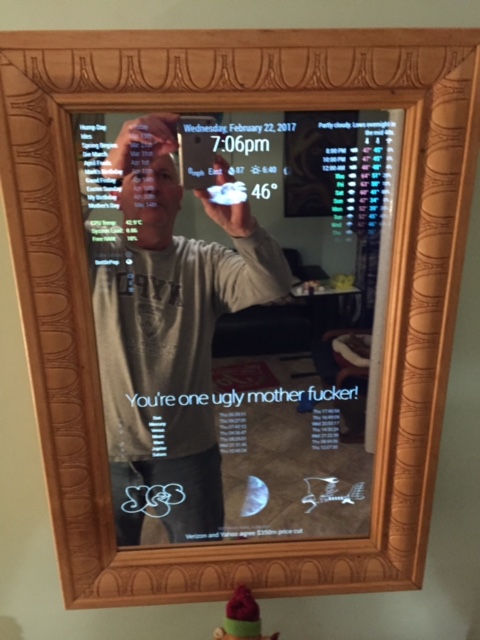
                      Sure, since you’re asking. These three I could not do without

                      MMM-Simple-Logo - Bottom left and bottom right
                      MMM-Globe - Bottom middle, in between the two SimpleLogo pictures
                      MMM-WunderGround - Top right and top middle, under the clock
                      0_1488836229689_IMG_2158.JPG

                      Create a working config
                      How to add modules

                      1 Reply Last reply Reply Quote 0
                      • J Offline
                        janner6 @Jopyth
                        last edited by

                        @Jopyth hi, sorry to hijack this answer but I was hoping for some advice please? When I installed the MMM-remote I left the configure URL to be displayed on the screen. Unfortunately though I can’t remove it now? Even when I deselect it from the configuration website it will not go away?

                        Any ideas?

                        yawnsY 1 Reply Last reply Reply Quote 0
                        • yawnsY Offline
                          yawns Moderator @janner6
                          last edited by

                          @janner6
                          did you remove or comment the position attribute?

                          {
                              module: 'MMM-Remote-Control'
                              // uncomment the following line to show the URL of the remote control on the mirror
                              // , position: 'bottom_left'
                              // you can hide this module afterwards from the remote control itself
                          },
                          
                          J 1 Reply Last reply Reply Quote 0
                          • J Offline
                            janner6 @yawns
                            last edited by

                            @yawns I totally forgot about this, thanks for the reminder. Exactly what I wanted.

                            1 Reply Last reply Reply Quote 0
                            • SnilleS Offline
                              Snille Module Developer
                              last edited by Snille

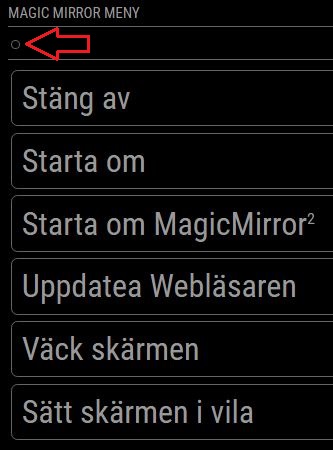
                              @Jopyth I have lost the “Back” button on my remote see pic…
                              Update: Just realized I have actually lost all the “icons”… :)
                              I’m on the “development” branch (both on the mirror and on your module).

                              I have recently reinstalled my mirror (today actually) but before that it worked…
                              Have I missed something?
                              0_1490124914596_backmissing.jpg

                              If you cant find it, make it and share it!
                              Modules: MMM-homeassistant-sensors, MMM-Modulebar, MMM-Profilepicture, MMM-Videoplayer

                              strawberry 3.141S 1 Reply Last reply Reply Quote 0
                              • strawberry 3.141S Offline
                                strawberry 3.141 Project Sponsor Module Developer @Snille
                                last edited by

                                @Snille the icons got removed on the dev branch you have to run npm install in the magicmirror directory

                                Please create a github issue if you need help, so I can keep track

                                SnilleS 1 Reply Last reply Reply Quote 0
                                • SnilleS Offline
                                  Snille Module Developer @strawberry 3.141
                                  last edited by

                                  @strawberry-3.141 Hmm… Can’t get it to work… Even deleted the “node_modules” before doing npm install in the mm dir, then also went in to the “vendor” dir and did the same… Still no pictures in the remote… However, I do get the “fontawesome” icons on other modules (my own included) so the pictures are there. :)

                                  If you cant find it, make it and share it!
                                  Modules: MMM-homeassistant-sensors, MMM-Modulebar, MMM-Profilepicture, MMM-Videoplayer

                                  strawberry 3.141S 1 Reply Last reply Reply Quote 0
                                  • strawberry 3.141S Offline
                                    strawberry 3.141 Project Sponsor Module Developer @Snille
                                    last edited by

                                    @Snille https://github.com/Jopyth/MMM-Remote-Control/blob/master/remote.html#L10 uses the old path

                                    Please create a github issue if you need help, so I can keep track

                                    SnilleS 1 Reply Last reply Reply Quote 0
                                    • SnilleS Offline
                                      Snille Module Developer @strawberry 3.141
                                      last edited by

                                      @strawberry-3.141 Oh! :) That’s why… Thank you.

                                      If you cant find it, make it and share it!
                                      Modules: MMM-homeassistant-sensors, MMM-Modulebar, MMM-Profilepicture, MMM-Videoplayer

                                      1 Reply Last reply Reply Quote 0
                                      • ? Offline
                                        A Former User
                                        last edited by

                                        Hey @Jopyth,

                                        really like your module. By now, it works really cool with the standard definition. Now I try to hide single modules and I’m not so deep into configuring it.

                                        Would you mind, to post a minimal example of your config file with the calendar show / hide example you have posted with gifs at the top?

                                        That would be just perfect so I can see, how it’s working.

                                        Thanks a lot
                                        Patrick

                                        1 Reply Last reply Reply Quote 0
                                        • M Offline
                                          McSorley
                                          last edited by

                                          Just installed it and its working a treat! Thank you.

                                          1 Reply Last reply Reply Quote 0
                                          • K Offline
                                            kurt
                                            last edited by

                                            @Jopyth
                                            strawberry helped me a lot! to install your modul and it works fine, just starting to play around with it. to install moduls in the future without taking care about missing kommas or [ or { or making mistakes by copying scripts, is a imendous help for people like me, who is absolut new to this javascriptpythonworld.
                                            So thanks a lot and cheers
                                            by now everything is running fine
                                            Kurt

                                            1 Reply Last reply Reply Quote 0

                                            Hello! It looks like you're interested in this conversation, but you don't have an account yet.

                                            Getting fed up of having to scroll through the same posts each visit? When you register for an account, you'll always come back to exactly where you were before, and choose to be notified of new replies (either via email, or push notification). You'll also be able to save bookmarks and upvote posts to show your appreciation to other community members.

                                            With your input, this post could be even better 💗

                                            Register Login

                                            • 1
                                            • 2
                                            • 7
                                            • 8
                                            • 9
                                            • 10
                                            • 11
                                            • 12
                                            • 13
                                            • 14
                                            • 9 / 14
                                            • First post
                                              Last post
                                            Enjoying MagicMirror? Please consider a donation!
                                            MagicMirror created by Michael Teeuw.
                                            Forum managed by Sam, technical setup by Karsten.
                                            This forum is using NodeBB as its core | Contributors
                                            Contact | Privacy Policy


