Read the statement by Michael Teeuw here.
Unable to install dependencies, NPM install not working
-
When I installed MM2 it gave me an error saying “unable to install dependencies!” Then when I ran NPM install it gave me a list of errors.
npm WARN deprecated electron-prebuilt@1.4.3: electron-prebuilt has been renamed to electron. For more details, see http://electron.atom.io/blog/2016/08/16/npm-install-electron
npm ERR! Linux 4.1.19-v7+
npm ERR! argv “/usr/local/bin/node” “/usr/local/bin/npm” “install”
npm ERR! node v4.0.0
npm ERR! npm v3.10.8
npm ERR! file /home/pi/.npm/electron-download/3.0.1/package/package.json
npm ERR! code EJSONPARSEnpm ERR! Failed to parse json
npm ERR! No data, empty input at 1:1
npm ERR!
npm ERR! ^
npm ERR! File: /home/pi/.npm/electron-download/3.0.1/package/package.json
npm ERR! Failed to parse package.json data.
npm ERR! package.json must be actual JSON, not just JavaScript.
npm ERR!
npm ERR! This is not a bug in npm.
npm ERR! Tell the package author to fix their package.json file. JSON.parsenpm ERR! Please include the following file with any support request:
npm ERR! /home/pi/MagicMirror/npm-debug.log -
Interesting… was trying to install it on my windows computer to test some modules and was getting the same error… no idea…
-
Weird, I cannot find a solution to this, I have updated NPM and NodeJS, but not of any use
-
Seems to be specific to Electron having been updated (as the WARNing implies.) Feel free to direct any flogging that way …
-
@KirAsh4 Can we find out, which version is compatible, and set that? I am experiencing a similar error after chaging to the development branch, but maybe it is unrelated to this specific problem. But I do not know which version of electron I had previously.
-
Look in your
~pi/.electronfolder. There should be old(er) versions downloaded there. Mine lists two:pi@magicmirror:~/.electron $ ls -al total 67944 drwxr-xr-x 2 pi pi 4096 May 24 23:54 ./ drwxr-xr-x 24 pi pi 4096 Oct 10 02:09 ../ -rw-r--r-- 1 pi pi 34490964 May 2 20:52 electron-v0.37.8-linux-arm.zip -rw-r--r-- 1 pi pi 35072121 May 24 23:54 electron-v1.1.2-linux-arm.zipAs of right now, my mirror is running v1.1.2 - I haven’t updated in about a week. How you go about (re)installing that one however … I’ll leave that as an exercise for the user. :) Mainly because right now I don’t have the time to figure it out. One possible place to start is also looking in the
.npmfolder for the older stuff:pi@magicmirror:~ $ ls -l .npm/electron-prebuilt .npm/electron-prebuilt: total 32 drwxr-xr-x 4 pi pi 4096 May 24 23:50 ./ drwxr-xr-x 509 pi pi 20480 Jul 1 02:40 ../ drwxr-xr-x 3 pi pi 4096 May 2 20:50 0.37.8/ drwxr-xr-x 3 pi pi 4096 May 24 23:50 1.1.2/ -
After I get back from my 5 day vacation :)
-
@cowboysdude, I don’t know who gave you permission to take a vacation, but they need to be fired. First thing you will need to do when you return.
-
I re-installed magic mirror and got this above the unable to install dependencies error
npm WARN deprecated electron-prebuilt@1.4.3: electron-prebuilt has been renamed to electron. For more details, see http://electron.atom.io/blog/2016/08/16/npm-install-electron
npm ERR! Linux 4.1.19-v7+
npm ERR! argv “/usr/local/bin/node” “/usr/local/bin/npm” “install”
npm ERR! node v4.0.0
npm ERR! npm v3.10.8
npm ERR! file /home/pi/.npm/extract-zip/1.5.0/package/package.json
npm ERR! code EJSONPARSEnpm ERR! Failed to parse json
npm ERR! No data, empty input at 1:1
npm ERR!
npm ERR! ^
npm ERR! File: /home/pi/.npm/extract-zip/1.5.0/package/package.json
npm ERR! Failed to parse package.json data.
npm ERR! package.json must be actual JSON, not just JavaScript.
npm ERR!
npm ERR! This is not a bug in npm.
npm ERR! Tell the package author to fix their package.json file. JSON.parsenpm ERR! Please include the following file with any support request:
npm ERR! /home/pi/MagicMirror/npm-debug.log
Unable to install dependencies! -
Could that be related to the npm install issue?
-
It looks like I’m having the same problem. Trying to manually install on a Pi 1…
33914 error electron-prebuilt@1.4.3 postinstall:
node install.js
33914 error Exit status 1
33915 error Failed at the electron-prebuilt@1.4.3 postinstall script.
33915 error This is most likely a problem with the electron-prebuilt package,
33915 error not with npm itself.
33915 error Tell the author that this fails on your system:
33915 error node install.js
33915 error You can get their info via:
33915 error npm owner ls electron-prebuilt
33915 error There is likely additional logging output above.
33916 error System Linux 4.4.21+
33917 error command “/usr/bin/nodejs” “/usr/bin/npm” “install”
33918 error cwd /home/pi/MagicMirror
33919 error node -v v0.10.29
33920 error npm -v 1.4.21
33921 error code ELIFECYCLE -
Im on a pi 2 B
-
Yesterday i perform a install for MM². I get step by step from a user who made an InstallGuide.
And finaly the same error as shown below. I’ve buy the complete Hardware for the Mirror. The frame are handmade an looks fine. But the Software goes wrong. There should be a project for the incomming autumn here in Germany. I hope that any can fix this problem and tell us.I used a RaspberryPi 3 with Jessie
Greetings from North of Germany
-
@FlorianRD did you use this tutorial? https://forum.magicmirror.builders/topic/236/complete-setup-tutorial
you forgot to append your errors
-
Yes i am use this tutorial.
Here the errors:
pi@raspberrypi:~/MagicMirror $ npm start
magicmirror@2.0.0 start /home/pi/MagicMirror
electron js/electron.jsnpm ERR! Linux 4.4.23-v7+
npm ERR! argv “/usr/bin/nodejs” “/usr/bin/npm” “start”
npm ERR! node v6.9.0
npm ERR! npm v3.10.8
npm ERR! code ELIFECYCLE
npm ERR! magicmirror@2.0.0 start:electron js/electron.js
npm ERR! Exit status 1
npm ERR!
npm ERR! Failed at the magicmirror@2.0.0 start script ‘electron js/electron.js’.
npm ERR! Make sure you have the latest version of node.js and npm installed.
npm ERR! If you do, this is most likely a problem with the magicmirror package,
npm ERR! not with npm itself.
npm ERR! Tell the author that this fails on your system:
npm ERR! electron js/electron.js
npm ERR! You can get information on how to open an issue for this project with:
npm ERR! npm bugs magicmirror
npm ERR! Or if that isn’t available, you can get their info via:
npm ERR! npm owner ls magicmirror
npm ERR! There is likely additional logging output above.npm ERR! Please include the following file with any support request:
npm ERR! /home/pi/MagicMirror/npm-debug.log -
@FlorianRD, did you run
npm installfrom within the MagicMirror folder? -
@MichMich I seem to be having the same problem as folks above. Whenever I try
npm installfrom inside the MM folder, the electron installation either stalls or fails. -
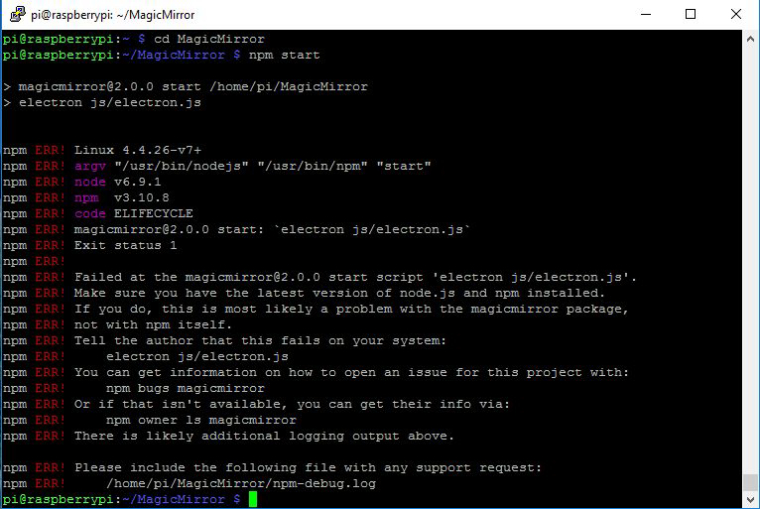
@MichMich, yes i did run npm install. I’ve just finished a new installation of this project.
Step by step by the tutorial. And, same problem.electron-v1.3.8-linux-arm.zip is in /.electron folder
-
Did the
npm installfinish without issues? -
Sounds strange but did set a system time?
Sometimes it’s messing around without.




Hello! It looks like you're interested in this conversation, but you don't have an account yet.
Getting fed up of having to scroll through the same posts each visit? When you register for an account, you'll always come back to exactly where you were before, and choose to be notified of new replies (either via email, or push notification). You'll also be able to save bookmarks and upvote posts to show your appreciation to other community members.
With your input, this post could be even better 💗
Register Login