MagicMirror Forum
    • Recent
    • Tags
    • Unsolved
    • Solved
    • MagicMirror² Repository
    • Documentation
    • 3rd-Party-Modules
    • Donate
    • Discord
    • Register
    • Login
    A New Chapter for MagicMirror: The Community Takes the Lead
    Read the statement by Michael Teeuw here.

    [MMM-Remote-Control](v2-dev) Extensible REST API, Dynamic Menus, and Socket Communications, plus other updates

    Scheduled Pinned Locked Moved Development
    76 Posts 13 Posters 68.4k Views 13 Watching
    Loading More Posts
    • Oldest to Newest
    • Newest to Oldest
    • Most Votes
    Reply
    • Reply as topic
    Log in to reply
    This topic has been deleted. Only users with topic management privileges can see it.
    • S Offline
      shbatm Module Developer @dazza120
      last edited by

      @dazza120 Sorry, I’ve been away. What are you lost with? Can I help point you in the right direction?

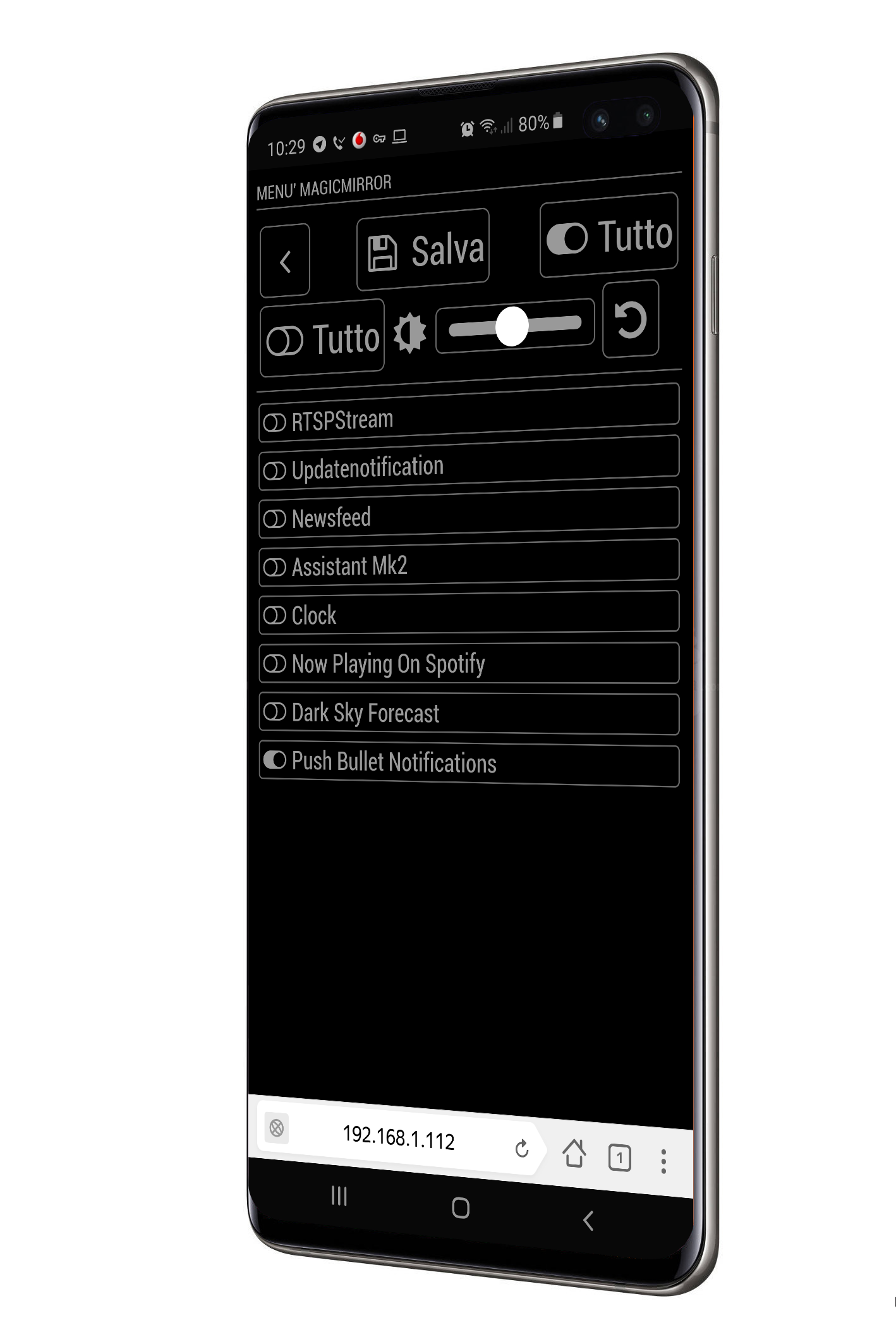
      If you’re just looking to install this version, see a couple posts up. For the most part it functions just like the other version, but adds a lot of advanced control features on top–like controlling your mirror from a browser or home automation controller (via API) or adding module control menus to the existing “/remote.html” page.

      Cr4z33C 1 Reply Last reply Reply Quote 0
      • R Offline
        robiv8
        last edited by

        Is there any way to track traffic from remote control Nothing is visible in pm2 logs.
        A kind debuging or like.
        Alert it does not work. It comes the OK for transmit but nothing appears. Restart works and also monitor ON OFF.
        But the browser does not refresh again.
        Everything works as long as I only have the sample config.
        But as soon as I have several other modules running (Page-Selector, Buttons, DWD-Warn-Wetter, PublicTransportHafas, etc.), it is no longer possible.
        I would like to know what blocks the module.

        S 1 Reply Last reply Reply Quote 0
        • S Offline
          shbatm Module Developer @robiv8
          last edited by

          @robiv8 I don’t have a debug mode, but you can try adding:

          console.log(notification, payload); to Line #988 of node_helper.js to print all notifications received by the back-end from other modules; or console.log(query) to Line #644. If you are using the API, you should be getting a response back in the browser or Postman.

          Looking at your list, I have a sneaking suspicion that Page-Selector is causing the issues, just because it may be inadvertently suspending the module. If you troubleshoot and find that to be the case, and can’t find a work around with that module, you can try using MMM-Carousel w/ Navigation which is what Page-Selector was originally based off of. I know there is an option in that module to “exclude” a module from being suspended.

          R 2 Replies Last reply Reply Quote 0
          • R Offline
            robiv8 @shbatm
            last edited by

            @shbatm
            Thanks for your explanation
            I will try it tonight and then report it.

            And yes, I also suspect that it is the page selector.
            Whereby I set “Alert, notification, buttons and podcast2” to exclude. And nevertheless.
            I’ll take a look.

            1 Reply Last reply Reply Quote 0
            • Cr4z33C Offline
              Cr4z33 @shbatm
              last edited by Cr4z33

              @shbatm I’ve done the Italian translation if you want to add it. ;)

              https://www.dropbox.com/s/u8hwhecv0exrmcj/it.json?dl=0

              S 1 Reply Last reply Reply Quote 0
              • R Offline
                robiv8 @shbatm
                last edited by

                @shbatm
                are you sure with console.log(notification, payload); to Line #988
                my node_helper.js is going only to line 958

                S 1 Reply Last reply Reply Quote 0
                • S Offline
                  shbatm Module Developer @Cr4z33
                  last edited by

                  @cr4z33 thanks! I’ll add it when I get a chance.

                  1 Reply Last reply Reply Quote 0
                  • S Offline
                    shbatm Module Developer @robiv8
                    last edited by shbatm

                    @robiv8 make sure your are on the develop branch (git checkout develop from a command line inside the module folder).

                    https://github.com/shbatm/MMM-Remote-Control/blob/develop/node_helper.js#L988

                    R 1 Reply Last reply Reply Quote 0
                    • R Offline
                      robiv8 @shbatm
                      last edited by

                      This post is deleted!
                      1 Reply Last reply Reply Quote 0
                      • R Offline
                        robiv8
                        last edited by

                        OK So i can see that:

                        REMOTE_CLIENT_CONNECTED {}
                        0|mm  | REMOTE_ACTION { data: 'translations' }
                        0|mm  | REMOTE_ACTION { action: 'SHOW_ALERT',
                        0|mm  |   type: 'alert',
                        0|mm  |   title: 'Test',
                        0|mm  |   message: 'This is a test text',
                        0|mm  |   timer: '4' }
                        

                        but nothing happened!
                        The Devtools says:

                        alert is suspended.
                        updatenotification is suspended.
                        

                        so I mean you are right with MMM-Page-Selector
                        Good to know on the one hand,
                        but on the other SHIT
                        I spent a lot of time making it look and working with the page selector.
                        Now I can start over :-(

                        1 Reply Last reply Reply Quote 0
                        • R Offline
                          robiv8
                          last edited by robiv8

                          One more question!
                          Now I have 6 pages that I use with physical buttons.
                          If I restart the setup now with Carousel which example am I taking?
                          Global, Positional or Slides

                          I found it out myself. :-)

                          Thank you

                          1 Reply Last reply Reply Quote 0
                          • Cr4z33C Offline
                            Cr4z33 @shbatm
                            last edited by Cr4z33

                            @shbatm I need to replace the monitor ON / OFF commands with these TV ones from the package ‘cec-client’.

                            Where do I have to look at?

                            TV ON:
                            echo on 0 | cec-client -s -d 1

                            TV OFF:
                            echo standby 0 | cec-client -s -d 1

                            TV Status:
                            echo pow 0 | cec-client -s -d 1

                            Cr4z33C 1 Reply Last reply Reply Quote 0
                            • swvalentiS Offline
                              swvalenti Project Sponsor @shbatm
                              last edited by swvalenti

                              @shbatm said in [MMM-Remote-Control](v2-dev) Extensible REST API, Dynamic Menus, and Socket Communications, plus other updates:

                              @nobita said in [MMM-Remote-Control](v2-dev) Extensible REST API, Dynamic Menus, and Socket Communications, plus other updates:

                              I have to Remove from jopyth or not

                              You can checkout my fork/branch without removing @Jopyth’s by adding a remote:

                              $ cd ~/MagicMirror/modules/MMM-Remote-Control
                              $ git remote add shbatm https://github.com/shbatm/MMM-Remote-Control.git
                              $ git fetch shbatm
                              $ git checkout -b shbatm-develop shbatm/develop
                              $ npm install
                              

                              After that you can switch back and forth using git checkout master and git checkout shbatm-develop

                              @shbatm
                              I followed this and I am on the dev branch but when I launch the remote in browser I don’t see any of the added features?

                              S 1 Reply Last reply Reply Quote 0
                              • S Offline
                                shbatm Module Developer @swvalenti
                                last edited by

                                @swvalenti Most of the changes are in the background with the API and are enabled by default, but the new front-end features have to be turned on in your config:

                                {
                                    module: 'MMM-Remote-Control'
                                    // uncomment the following line to show the URL of the remote control on the mirror
                                    // , position: 'bottom_left'
                                    // you can hide this module afterwards from the remote control itself
                                    config: {
                                        customCommand: {},  // Optional, See "Using Custom Commands" below
                                        customMenu: "custom_menu.json", // Optional, See "Custom Menu Items" below
                                        showModuleApiMenu: true, // Optional, Enable the Module Controls menu
                                        pm2ProcessName: "mm",  // Optional, if you don't use the default PM2 process, provide the name here.
                                        apiKey: "",         // Optional, See API/README.md for details
                                    }
                                },
                                
                                Cr4z33C 1 Reply Last reply Reply Quote 0
                                • Cr4z33C Offline
                                  Cr4z33 @shbatm
                                  last edited by

                                  @shbatm please see my post. ;)

                                  1 Reply Last reply Reply Quote 0
                                  • swvalentiS Offline
                                    swvalenti Project Sponsor
                                    last edited by

                                    I am unable to switch back to master after git checkout master in the $ cd ~/MagicMirror/modules/MMM-Remote-Control what am I doing wrong?

                                    S 1 Reply Last reply Reply Quote 0
                                    • Cr4z33C Offline
                                      Cr4z33 @Cr4z33
                                      last edited by Cr4z33

                                      @cr4z33 said in [MMM-Remote-Control](v2-dev) Extensible REST API, Dynamic Menus, and Socket Communications, plus other updates:

                                      @shbatm I need to replace the monitor ON / OFF commands with these TV ones from the package ‘cec-client’.

                                      Where do I have to look at?

                                      TV ON:
                                      echo on 0 | cec-client -s -d 1

                                      TV OFF:
                                      echo standby 0 | cec-client -s -d 1

                                      TV Status:
                                      echo pow 0 | cec-client -s -d 1

                                      @shbatm so I found out by myself the lines to edit in node_helper.js.

                                      I can succesfully turn off the TV by using the remote module, but for some unknown reason I can’t turn it on… :thinking_face:
                                      Running the command from the terminal works perfectly.

                                      S 1 Reply Last reply Reply Quote 0
                                      • S Offline
                                        sdetweil @swvalenti
                                        last edited by

                                        @swvalenti what does the command say? also do git branch to see what branch you are on

                                        Sam

                                        How to add modules

                                        learning how to use browser developers window for css changes

                                        swvalentiS 1 Reply Last reply Reply Quote 0
                                        • swvalentiS Offline
                                          swvalenti Project Sponsor @sdetweil
                                          last edited by

                                          @sdetweil on the dev branch below is the error

                                          git checkout master
                                          error: pathspec ‘master’ did not match any file(s) known to git.

                                          S 1 Reply Last reply Reply Quote 0
                                          • S Offline
                                            sdetweil @swvalenti
                                            last edited by

                                            @swvalenti ok, what does git branch say

                                            Sam

                                            How to add modules

                                            learning how to use browser developers window for css changes

                                            swvalentiS 1 Reply Last reply Reply Quote 0

                                            Hello! It looks like you're interested in this conversation, but you don't have an account yet.

                                            Getting fed up of having to scroll through the same posts each visit? When you register for an account, you'll always come back to exactly where you were before, and choose to be notified of new replies (either via email, or push notification). You'll also be able to save bookmarks and upvote posts to show your appreciation to other community members.

                                            With your input, this post could be even better 💗

                                            Register Login

                                            • 1
                                            • 2
                                            • 3
                                            • 4
                                            • 2 / 4
                                            • First post
                                              Last post
                                            Enjoying MagicMirror? Please consider a donation!
                                            MagicMirror created by Michael Teeuw.
                                            Forum managed by Sam, technical setup by Karsten.
                                            This forum is using NodeBB as its core | Contributors
                                            Contact | Privacy Policy