@Smedegaard
Can you please post the output of
tail -f ~/.pm2/logs/MagicMirror-out-0.log
and
tail -f ~/.pm2/logs/MagicMirror-error-0.log
AxLED
@Smedegaard
Can you please post the output of
tail -f ~/.pm2/logs/MagicMirror-out-0.log
and
tail -f ~/.pm2/logs/MagicMirror-error-0.log
AxLED
@zolabus
Yes there is a module, check MMM-MyCommute.
AxLED
it is not easy to give support, with this less informations.
As you send me .xml files some days ago, i saw some minor errors in your config.js
Can you please also answer my question:
Playing does not work, is selecting DB-SERVICE-NEXT (PREV) working?
To help you further i need some screenshots of the module on your mirror and some logs (pm2 or from the browser by using F12).
AxLED
@marc-malus
There is Not always the need to use update dom, you can manipulate the content afterwards. See Internet for Dom.
AxLED
@Cr4z33
Can you show me the MMM-Dreambox Part of your config and some logs?
Playing does not work, is selecting DB-SERVICE-NEXT (PREV) working?
AxLED
@Cr4z33
As you have MMM-Remote-Control installed you can test MMM-Dreambox with MMM-Remote-Control first, to make sure it works at all. (Requirement: Your mirror is reachable by browser in the same network). Open browser and enter (without the spaces around &):
http://yourmmip:8080/remote?action=NOTIFICATION & notification=DB-SERVICE-NEXT (for selecting next service)
http://yourmmip:8080/remote?action=NOTIFICATION & notification=DB-SERVICE-PREV (for selecting prev.service)
http://yourmmip:8080/remote?action=NOTIFICATION & notification=DB-PLAY (for start streaming)
http://yourmmip:8080/remote?action=NOTIFICATION & notification=DB-STOP (for stop streaming)
Hint: HD Services need MPG License so maybe start with SD services.
You can also try the dev branch, as this is the newer one with more functions.
AxLED
@evroom
here are some questions:
to 1: apibouquet expects a number (integer) and in java it starts with 0. If i use the xml-sample file of /web/getallservices you send me its in your case as follows:
0: Favourites (TV)
1: Nederland (TV)
2: Duitsland (TV)
to 2: i cant reproduce this behavior
to 3 & 4: try disabling some other modules, to find out if there is a intolerance beetween modules.
AxLED
@evroom
In your feature request, you wanted to select a bouquet (if there is more than one):
Okay.
Let’s say I have the bouquet “MagicMirror (TV)”, could there be an option to use this one, instead of the default “Favourites (TV)” ?
I assume “Favourites (TV)” is the default.
Please check the dev branch of my module.
git clone --branch dev https://github.com/Ax-LED/MMM-Dreambox.git in your modules folderRegards
AxLED
Hi,
i was annoyed to, that MMM-Podcast stops working, so i made a “quick & dirty” replacement.
[card:Ax-LED/MMM-Podcast2]
Difference to MMM-Podcast:
Goodies:
BUTTON_PRESSED to use the module, so not much changes in your config.js neccessarynpm install is requiredNote:
AxLED
@robiv8
There is missing a config for “Button_Pressed”, but this doesnt matter right now, the module seems to be broken because of the yahoo API. I opened an issue for the module.
How many buttons are connected to your pi?
Axled
@robiv8
Do you only select page6 with your buttons? For playing a video with MMM-Podcast you need 2 things:
BUTTON_PRESSED to MMM-Podcast (see line 77 https://github.com/PtrBld/MMM-Podcast/blob/master/MMM-Podcast.jsAxLED
Hi, if the to monitors are close together you can still view 2 different shows :-) .
I checked your 4 feature requests and added 2 of them in the module.
For the other two i can not promise, if they will be implemented.
AxLED
@evroom
Good to hear you had success and thanks for your challenge with more than one bouquet 😂, helped debugging the module.
AxLED
@evroom
Here is a screenshot of my Mirror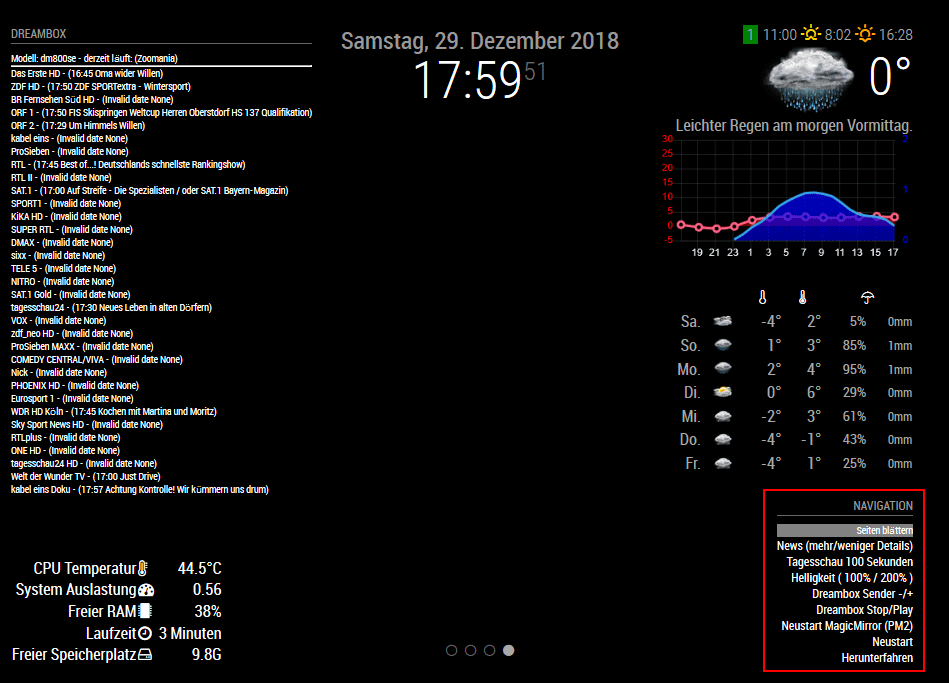
I have a PIR-Sensor (for turning screen on/off) and a rotary encoder connected (to the GPIO PINs of the Pi).
In the bottom right corner you see my “first” module MMM-Navigate which interacts with the rotary encoder.
So depending on the navigation menu i am able to:
AxLED
@Cr4z33
You should be able to send notifications by voice commands also.
AxLED
@Cr4z33
I dont know if it makes sense, to use a favorite list of services/stations/channels that wont fit on the screen of MM, as the list is to long.
Start streaming can be done by selecting one service/station/channel (by using yourmmip:8080/remote?action=NOTIFICATION¬ification=DB-SERVICE-NEXT for example) and than start streaming by (yourmmip:8080/remote?action=NOTIFICATION¬ification=DB-PLAY).
Do you have MMM-Remote-Control installed?
Se my previous answer to evroom.
AxLED
@evroom
How do you plan to interact with your MM?
I have a rotary encoder. Buttons or touch is also fine.
For the beginning you can use MMM-Remote-Control to send notifications.
I have to complete my Readme, that the sample links only work with MMM-Remote-Control
So install MMM-Remote-Control, open an browser, modify the links matching to your environment and you should be able to select channels and stream them.
Important: Try with SD Channels first, as for HD channels the mpg2 codec is needed.
AxLED
@cr4z33 said in [MMM-Dreambox] to connect a Dreambox or a Enigma2 Receiver (like VU or VU+) to MagicMirror and stream stations via omxplayer:
@axled OK gimme a minute and I send them.
@Cr4z33
Thanks for your files, one a fast view you also have more than one bouquet in “getallservices”, so my last fix should work for you also.
Try agit pull (master repository).
AxLED
@evroom said in [MMM-Dreambox] to connect a Dreambox or a Enigma2 Receiver (like VU or VU+) to MagicMirror and stream stations via omxplayer:
I sent the files
@evroom
Thanks for the files, i checked them and found an Error in MMM-Dreambox.js
My “getallservices” xml only has one “bouquet”, so i checked only for one.
As your “getallservices” xml has three “bouquets” i changed the code.
If you do a git pull (master repository) it should work.
So far i decided only to show the services/stations/channels of the first bouquet only, (userbouquet.favourites.tv) in your case.
AxLED