@zachlan I haven’t seen this, but I wonder if there is a throttling by the Wunderground API? Does it properly reload after a reboot?
B
Offline
A New Chapter for MagicMirror: The Community Takes the Lead
Read the statement by Michael Teeuw here.
Read the statement by Michael Teeuw here.
Posts
-
RE: Weather not updating periodically
-
RE: Motion Detection with RaspiCam, Non-Module version
Update: Having PM2 monitor the motion process seems to work quite well. However, I have now discovered that there is a memory leak somewhere in all of this. Using the MMM-SystemStats module, I can watch free memory trickle down throughout the day.
I’ve configured the Pi to reboot early each morning. That’s not an ideal situation, but it seems to have solved the problem. Good enough for me! And more importantly, good enough for the gift recipient.
-
RE: Touchscreen not working in MM - MM freezing one's a day
@chrisyy The cursor being hidden is done through a CSS line. That’s probably not the issue.
I know that @broberg was having issues with click events not firing due to z-order issues. Perhaps this discussion will point you down the correct path.
-
RE: SetUp Mic to use MMM-Voice-Control or other voice control modules
@FullOfOrange Have you tried starting MM in dev mode and looking at the console logs?
npm start dev -
RE: Instead of mirror using Glass
@russwu83 Yes, it could. If you have the tools, cut a hole in the top of your desk that is slightly smaller than the size of your monitor. Perhaps 1cm smaller in every dimension. Use a router to expand the hole to the size of your monitor, set to the depth of monitor thickness + glass thickness. Then reset the depth to the thickness of your glass and expand beyond the monitor size to the size of your glass.
This design lets the monitor rest upon a shelf of whatever desktop surface you’re using, supported around the edge. The glass rests upon the shelf and the monitor, supported on all sides plus supported throughout by the monitor. And it’s all flush with the surface.
-
RE: Unable to install dependencies!
Two questions: What version of the Raspberry Pi are you running and are you using the Raspian Lite version?
-
RE: Making text etc clickable
You’ll probably want to create a customized version of the Newsfeed module. The part of the code that actually puts the text on the screen is in the
newsfeed.jsfile, specifically in thegetDom: function() {...}portion of the code.If you look at it, it’s already creating a
<DIV>element and changing the innerHTML to the value of the title from the newsfeed (line 149)title.innerHTML = this.newsItems[this.activeItem].title;It should be relatively easy to modify this area of the code to add the anchor tag & url. -
RE: My Mirror From Thailand.The Student can do it. at piriyalai school phrae.
Great work! Those look very clean. Can you show us pictures of the back?
-
RE: How to implement specific module?
@Jeff Installing new modules is a pretty easy process. In general, it goes like this:
- Navigate to the modules directory at
~/MagicMirror/modules - Download the module code using git:
git clone [url] - Run any commands that the module requires. This will vary by module
- Update the
config.jsfile to configure the new module. There should be an example in the module readme.sudo nano ~/MagicMirror/config/config.js - Restart your mirror so the new configuration will be implemented.
npm restart
- Navigate to the modules directory at
-
RE: Sorry for this...
Ley @Leotrap. Welcome!
To answer your questions:
- Yes
- Yes
- Yes
I use IntelliJ IDEA on Windows 10 to modify my config file via a shared folder on the Pi. But you can certainly upload any script to your Pi with WinSCP or other similar program. Dreamweaver should be just fine. The MagicMirror code is mostly Javascript. Since it’s interpreted code and not compiled, you shouldn’t have to worry about whatever tool you use to modify the script files.
Yes, you can use Chrome to test your output. At the top of the
config.jsfile will be the port that the mirror will be accessible. Just point your Chrome browser tohttp://[raspberry IP address]:[port]/and you’ll see the interface in your web browser. -
RE: Brackets
@dpoleon Home Depot or any hardware store should have heavy duty interior angle brackets that will do the trick.
If you look at my mirror, you can see the aluminum brackets holding the wooden channels for my monitor. The one at the lower left corner is fairly visible. Something like that should be right up your alley.
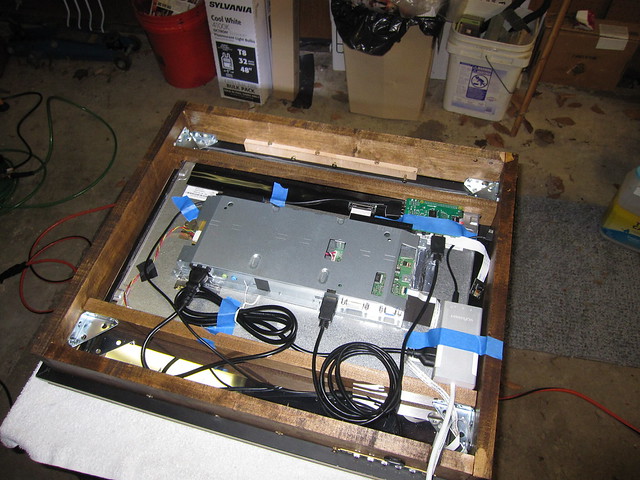
-
RE: Ornate Awesomeness
Fantastic work. Great job on sourcing the parts.
-
RE: EoF's Touch Screen Magic Mirror (95% Completed)
@sorpionking674 He said it was a resistive touch panel, so I suspect not.
-
RE: Magic Mirror on Budget
@xenioPL You have a couple options. I used an acrylic from www.tapplastics.com in my mirror. It was much cheaper than an equivalent glass mirror.
I have a roll of the one-way mirror film, which is probably your cheapest option. It just requires more care when you apply it than a glass or acrylic piece. On the positive side, you can use regular glass with the film, which makes sourcing easier.
I bought the one-way film from Amazon.
-
RE: Newsfeed is not loading
I copied your module configuration and found a couple things. It looks like you may be having a character set issue. It may just be an artifact of the copy & paste. But here’s what I found:
- You need to use the single quote character around your text values.
module: 'newsfeed. I’m not sure what character is in there, but my system didn’t like it. - The
showSourceTitleandshowPublishDatevariables are not part of theconfig: {...}section, so the closed curly brace (}) needs to be moved up 2 lines to just after the closed bracket (]). - I think that once you make these changes, you’ll have to bounce the magic mirror process to get the content to show up. I was able to see the module, and received no errors, but the content didn’t load.
- You need to use the single quote character around your text values.
-
RE: Error on start
@04housemat What version of the Pi do you have and how did you install MagicMirror?
While you’re at it, head over www.openweathermap.com and 1) get an API key, and 2) find the location # for where you wish to see the current weather conditions and forecast. These need to go into the
config.jsfile. -
RE: Motion Detection with RaspiCam, Non-Module version
I believe I have it cracked. The white screen was due to MMAL Motion crashing whilst writing a frame to disk. When Motion crashes, it apparently jacks up the video output.
My current solution is to use PM2 to monitor the motion process and restart it when necessary. I’m testing now. If it works for a few more days I’ll report back.
Adding motion to PM2:
pm2 start motion. Be sure that the motion is not configured to run as a daemon (first option in config file). -
RE: MMM-voice
@wjdw87 - Looking at the
dependencies.shfile, the line it’s failing on isif sudo apt-get install bison libasound2-dev autoconf automake libtool python-dev swig python-pip -y ;If “command not found” is your error message, it looks like
apt-getis not installed on your Mac.