MagicMirror Forum
    • Recent
    • Tags
    • Unsolved
    • Solved
    • MagicMirror² Repository
    • Documentation
    • 3rd-Party-Modules
    • Donate
    • Discord
    • Register
    • Login
    1. Home
    2. clakkentt
    3. Posts
    A New Chapter for MagicMirror: The Community Takes the Lead
    Read the statement by Michael Teeuw here.
    C
    Offline
    • Profile
    • Following 0
    • Followers 0
    • Topics 2
    • Posts 20
    • Groups 0

    Posts

    Recent Best Controversial
    • RE: MMM-MPlayer

      @evroom

      pi-mirr+ 25230 22066 53 11:17 ? 00:00:03 mplayer -noborder -monitoraspect 0 -vf rotate=-1 -geometry 450:100 -xy 352 288 rtsp://admin:password@192.168.0.85:554/cam/realmonitor?channel=1&subtype=1

      Sorry for the delay in replying, I don’t get e-mail notices when someone replies to my posts.

      posted in Utilities
      C
      clakkentt
    • RE: MMM-MPlayer

      @hrmax23
      I don’t know why but the MPlayer header show up in the latest MMM-MPlayer update, at least in my setup, it does not show up in the previous version. I upgraded and then downgraded.

      posted in Utilities
      C
      clakkentt
    • RE: MMM-MPlayer

      @hrmax23
      Sorry I just got notified of your reply.

      I set the taskbar height to 0 and autohide. I don’t remember the exact steps I took

      posted in Utilities
      C
      clakkentt
    • RE: MMM-MPlayer

      @plainbroke

      No, I have the window in the middle of the screen, something like x: 450, y: 100

      posted in Utilities
      C
      clakkentt
    • RE: MMM-MPlayer

      @sdetweil

      I don’t know if this is the cause but I am using vcgencmd to turn the display off and on and to do that I had to disable vc4-kms-v3d

      posted in Utilities
      C
      clakkentt
    • RE: MMM-MPlayer

      @sdetweil

      Yes, when the MPlayer RTSP stream is running

      posted in Utilities
      C
      clakkentt
    • RE: MMM-MPlayer

      @sdetweil

      The desktop taskbar. On the raspberry the bar at the top of the screen.

      posted in Utilities
      C
      clakkentt
    • RE: MMM-MPlayer

      @sdetweil
      Yes the problem is the same. I initially had MM running on a rpi3, when I installed MMM-MPlayer, I noticed the taskbar showing every time there was a feed showing.
      I started from scratch on an rpi4 and saw no problem but when I transferred the card to the rpi3 the issue came up again.

      Since I wanted to keep using the rpi3 for the MagicMirror I solved the problem by making the taskbar 0 pixels in height.

      posted in Utilities
      C
      clakkentt
    • RE: MMM-MPlayer

      Just a comment

      I am using MagicMirror on a pi using bullseye 32bit.

      When using a rpi4 everything works fine. When I transfer the sd card to a rpi3 every time the MPlayer shows a live feed the desktop taskbar shows up, when MPlayer is switching between feeds the taskbar is not visible.

      This is probably due to my specific choice of settings but just thought it might help someone.

      posted in Utilities
      C
      clakkentt
    • RE: MMM-Openhab header color

      @sdetweil

      There is a css file in MM, but I still can’t figure out how to make it “work”

      
      .MMM-Openhab {
      	width: 400px;
      	height: 700px;
      	margin-right: 0px;
      	margin-left: 0px;
      	margin-top: 0px;
      }
      
      .MMM-Openhab .header {
        color: red;               /* Header color. Default is red. */
      }
      
      .MMM-Openhab .ifr {
       	width: 400px;
      	height: 680px;
      }
      
      I changed the red to different colors both in hex and by their name and restarted MM but the header is still red.
      
      Is there something, apart from restarting MM, that needs to be done to have the module accept the new color?
      
      posted in Utilities
      C
      clakkentt
    • RE: MMM-Openhab header color

      @sdetweil

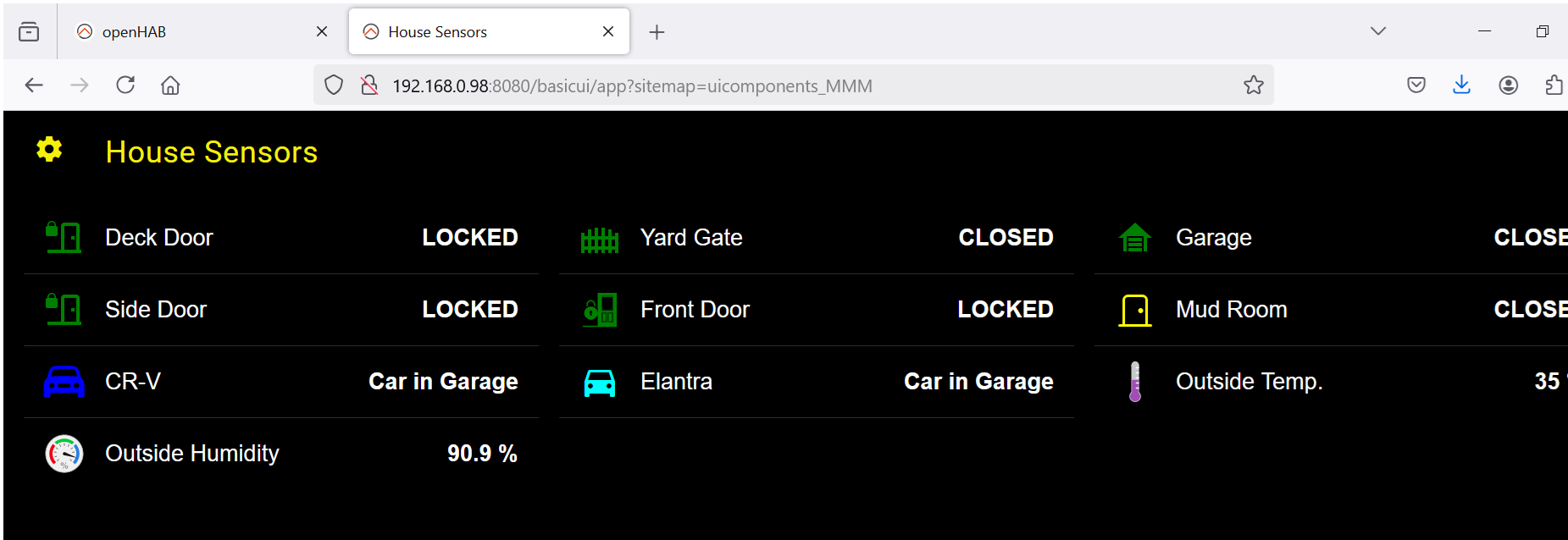
      It’s interesting. I changed the header color in the .css file and after a reboot it shows up correctly when I render the page from openhab

      house sensors.png

      However in MM the cog wheel and House Sensors still shows in red. So that color must be set somewhere in the MMM-Openhab config files
      I’ll take another look

      posted in Utilities
      C
      clakkentt
    • RE: MMM-Openhab header color

      @sdetweil

      But the i-frame properties must come from somewhere, the title in the i-frame is red

      This is the css file that is referenced

      
      /* =================================== HEADER FARBE */
      .mdl-layout__header {
        background-color: #000000 !important;
        color: red !important;
      }
      
      .mdl-layout {
        background-color: #000000 !important;
      }
      
      /* =================================== HINTERGRUND FARBE  */
      
      /*  HINTERGRUND STEUERELEMENTE */
      .page-content {
        background-color: #000000 !important;
      }
      /*  HINTERGRUND Links/Rechts Wrapper */
      .mdl-color--grey-100 {
        background-color: #000000 !important;
      }
      
      /* =================================== STEUERELEMENTE LINE-HEIGHT */
      
      /* ZEILENHÖHE */
      html.ui-layout-condensed .mdl-form__row {
          height: 45px;
      }
      
      /* =================================== STEUERELEMENTE FARBE  */
      
      /* STEUERELEMENTE - HINTERGRUND FARBE  */
      .mdl-color--white {
          background-color: #000000 !important;
      }
      /* STEUERELEMENTE - TEXT FARBE  */
      .mdl-color-text--grey-700 {
          color: #f4f00c !important;
      }
      /* STEUERELEMENTE - Zwischenstriche Farbe */
      .mdl-form__row {
          border-bottom: 1px solid #2d2d2d;
      }
      .mdl-form__label {
          color: #ffffff !important;
      }
      .mdl-form__control {
          color: #ffffff !important;
      }
      
      
      /* =================================== SWITCH FARBE OFF */
      
      /* SWITCH Button Farbe */
      .mdl-switch__thumb {
        background-color: #fff;
      }
      /* SWITCH Button Track */
      .mdl-switch__track {
          background: #9b4f4f;
      }
      /* SWITCH Button Button-Farbe */
      .mdl-switch__thumb {
        background: #5b5757;
      }
      
      /* =================================== SWITCH FARBE ON */
      /* SWITCH Button Button-Farbe */
      .mdl-switch.is-checked .mdl-switch__thumb {
          background: #d8d8d8;
      }
      /* SWITCH Button Track-Farbe*/
      .mdl-switch.is-checked .mdl-switch__track {
          background: #66d693;
      }
      /* =================================== FRAME Rundungen */
      
      /* Fenster / Abschnitt Rundungen */
      .mdl-form {
        /*+border-radius: 10px;*/
        -moz-border-radius: 3px;
        -webkit-border-radius: 3px;
        -khtml-border-radius: 3px;
        border-radius: 3px;
      }
      
      /* =================================== BUTTON FARBE - OFF */
      
      /* BUTTON SELECTED */
      BUTTON.mdl-button--accent {
        border: 1px solid #5ddd90;
        /*+box-shadow: 0px 0px !important;*/
        /*-moz-box-shadow: 0px 0px !important;
        -webkit-box-shadow: 0px 0px !important;
        box-shadow: 0px 0px !important;*/
        background-color: #333 !important;
        color: #5ddd90 !important;
      }
      /* =================================== BUTTON FARBE - ON */
      
      /* BUTTON DESELECTED */
      .mdl-form__setpoint BUTTON, .mdl-form__rollerblind BUTTON, .mdl-form__buttons BUTTON {
        color: white;
        background-color: #545454;
        /*+border-radius: 5px;*/
        -moz-border-radius: 2px;
        -webkit-border-radius: 2px;
        -khtml-border-radius: 2px;
        border-radius: 2px;
      }
      
      /* =================================== BUTTON FARBE - HOVER */
      
      /* BUTTON HOVER FARBE */
      BUTTON.mdl-button:hover {
        background-color: #5ddd90;
      }
      and this is the html file that Openhab uses
      
      
      posted in Utilities
      C
      clakkentt
    • RE: MMM-Openhab header color

      @sdetweil
      Thanks, I already tried that, the MMM-Openhab module is (or at least it seems to me) based on an i-frame. There is no header or anything configurable in MM

      That is why my first attempt was to modify the css file (MMM-Style.css) that MMM-Openhab uses inside Openhab to render the page.

      posted in Utilities
      C
      clakkentt
    • MMM-Openhab header color

      Re: MMM-Openhab

      Has anyone been able to change the color of the sitemap title that MMM-Openhab displays in the magicmirror?

      I tried changing the color in the header section of the MMM-Style.css file in the Openhab/HTML/css folder but no luck

      /* =================================== HEADER FARBE */
       .mdl-layout__header {
        background-color: #000000 !important;
        color: #f4f00c !important;
      }
      
      I also tried editing the magicmirror custom.css file adding
      
      .MMM-Openhab header{
      color: #f4f00c
      }
      
      But again no change
      
      Thank you 
      
      posted in Utilities
      C
      clakkentt
    • RE: MagicMirror on secondary monitor

      @BKeyport The pi I mentioned is a pi 3 with a single HDMI that I now have in the mirror. I am hoping to eliminate that and use a desktop computer that runs 24/7 to run MM on the mirror monitor as the second one.

      posted in Troubleshooting
      C
      clakkentt
    • RE: MagicMirror on secondary monitor

      @sdetweil

      It’s not a matter of clearing the screen so I can use the mirror, rather it i about not wasting energy on a monitor when most of the time we are not there.

      I am going to try a two step process, stop MM, then turn off the monitor and on the reverse start the monitor and then start MM

      Thanks again

      posted in Troubleshooting
      C
      clakkentt
    • RE: MagicMirror on secondary monitor

      @sdetweil Thank you, I was hoping to have just one computer with the home automation software and MM but i guess I will have to keep a pi exclusively for MM.

      posted in Troubleshooting
      C
      clakkentt
    • MagicMirror on secondary monitor

      Re: Magic mirror with 2 displays

      System HP desktop with DP and HDMI outputs
      OP: Ubuntu 22

      I want to run MagicMirror in a system with 2 monitors, showing MagicMirror on monitor 2
      I also want to turn off the second monitor when we are not near.
      I can turn the second monitor off and on using xrandr
      I can start MagicMirror on monitor two using the electronPosition option in the config file

      The problem is that when I turn off the second monitor MagicMirror “moves” to the main monitor which I don’t want.

      I read about using the display variable to direct the output to the second monitor but I have no idea how to setup the display:0 and display:1 variables to point to the two monitors and I don’t even know if this will keep MM from moving to monitor 1 when I turn off monitor 2

      Has anyone done this and have a solution or any hints?

      Thank you

      Carlos
      posted in Troubleshooting
      C
      clakkentt
    • RE: MMM-Openhab

      @sdetweil Thank you for the guide. The properties of the elements I want to change seem to come from a material design style sheet .scss from the website hosting the webpage that is displayed in MagicMirror . Way above my level.
      I’ll have to live with the current font size

      Thanks again

      posted in Utilities
      C
      clakkentt
    • RE: MMM-Openhab

      Hi

      Does anyone know how to change the font size in MMM-Openhab?

      I have tried modifying every CSS and HTML style file and nothing seems to make a difference.

      Thank you

      posted in Utilities
      C
      clakkentt
    • 1 / 1