@sdetweil with the script from you
 H
Offline
H
Offline
A New Chapter for MagicMirror: The Community Takes the Lead
Read the statement by Michael Teeuw here.
Read the statement by Michael Teeuw here.
Posts
-
V2.31.0 unable to start
After upgrade to v2.31.0 MM will not start.
PM2 doesn’t show errors, but with NPM START I become this error:[2025-04-10 19:35:00.301] [LOG] Sockets connected & modules started ... Invalid MIT-MAGIC-COOKIE-1 key [873086:0410/193500.307514:ERROR:ozone_platform_x11.cc(245)] Missing X server or $DISPLAY [873086:0410/193500.308038:ERROR:env.cc(258)] The platform failed to initialize. Exiting. /home/pi/MagicMirror/node_modules/electron/dist/electron exited with signal SIGSEGVI did a new install of MM, same error.
-
RE: I am looking for a working PIR Modul/function
@Klinge
I had the same issue with MMM-Universal-Pir.
The maker had made a comment ABOUT It in the readme, with the correct commands after mine e-mail.
Read the readme and you are How to do. -
RE: MMM-MyHomeWizard
@sdetweil In the netherlands, we do have that!
Fortunately, otherwise I would not have been able to write this MagicMirror module ;-) -
MMM-MyHomeWizard
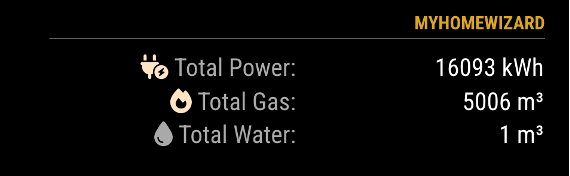
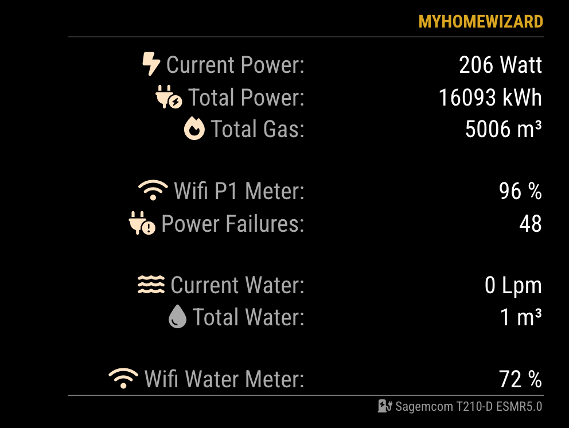
MMM-MyHomeWizard is a MagicMirror module that shows the information from the HomeWizard P1 meter and/or the HomeWizard WaterMeter.
The HomeWizard P1 Meter gives you detailed insight into your gas consumption, electricity consumption and solar surplus.
The HomeWizard Watermeter gives you live insight into your water consumption.Homepage: MMM-MyHomeWizard
-
RE: Switch URL based on value
@sdetweil
Meanwhile I was doing this, and I found the error (stupid me)start: function () { Log.info("Starting module: " + this.name); requiresVersion: "2.9.0"; // Set locales if (this.config.P1_IP != null) { this.urlP1 = "http://" + this.config.P1_IP + "/api/v1/data/"; } else { this.urlP1 = "https://dummyjson.com/c/7e24-36ab-48e0-a96d"; } if (this.config.WM_IP != null) { this.urlWM = "http://" + this.config.WM_IP + "/api/v1/data/"; } else { this.urlWM = "https://dummyjson.com/c/704a-9a96-4845-bc72"; } // this.urlP1 = "http://" + this.config.P1_IP + "/api/v1/data/"; // this.urlWM = "http://" + this.config.WM_IP + "/api/v1/data/"; this.MHW_P1 = []; // <-- Create empty MHW_P1 array this.MHW_WM = []; // <-- Create empty MHW_WM array this.scheduleUpdate(); // <-- When the module updates (see below) },The line with "requiresVersion: “2.9.0”; " was ending with an “,” instead of “;”
without the “if” statement, I don’t get a failure with a “,”
So changed it now into “;” and everythins seems to work.
I continue testing.@MMRIZE Thanks for the alternative way. I’m going to look into it.
So with the “promise” statement, it looks like I can eleminate the node_helper.js -
RE: Switch URL based on value
@sdetweil
In the console - sources it says:Uncaught SyntaxError: Unexpected token 'if' -
RE: Switch URL based on value
// Default values defaults: { P1_IP: null, // IP Address P1 Meter WM_IP: null, // IP Address Water Meter maxWidth: "500px", // Max width wrapper extraInfo: false, // Show extra information showFooter: false, // Show footer (name Power Meter) currentPower: true, // Show current power usage initialLoadDelay: 1000, updateInterval: 10000 // Every 10 seconds }, -
Switch URL based on value
In the script it will assume you have 2 different IP addresses to query an URL.
1 IP for the HomeWizard P1 meter
1 IP for the HomeWizard Water Meter
This is because I like to show the information of both in 1 script. Everything works fine if both are used, but when someone only has the P1 meter, the IP for the Water Meter is not used and results in a console fetch error (normal behavior)[ERROR] Error: TypeError: fetch failed at node:internal/deps/undici/undici:13178:13 at process.processTicksAndRejections (node:internal/process/task_queues:95:5) { [cause]: Error: getaddrinfo ENOTFOUND null at GetAddrInfoReqWrap.onlookupall [as oncomplete] (node:dns:120:26) { errno: -3008, code: 'ENOTFOUND', syscall: 'getaddrinfo', hostname: 'null' } }Is there a way to switch URL in case one of both URL are NULL? I’ve tried, but it doesn’t work with if-else
start: function () { Log.info("Starting module: " + this.name); requiresVersion: "2.9.0", // Set locales if (this.config.P1_IP != null) { this.urlP1 = "http://" + this.config.P1_IP + "/api/v1/data/"; } else { this.urlP1 = "https://dummyjson.com/c/7e24-36ab-48e0-a96d"; } if (this.config.WM_IP != null) { this.urlWM = "http://" + this.config.WM_IP + "/api/v1/data/"; } else { this.urlWM = "https://dummyjson.com/c/704a-9a96-4845-bc72"; } this.MHW_P1 = []; // <-- Create empty MHW_P1 array this.MHW_WM = []; // <-- Create empty MHW_WM array this.scheduleUpdate(); // <-- When the module updates (see below) }, -
RE: Multiple URL Querys to fill JSON
@sdetweil Thnx, you helped me a lot!!
-
RE: Multiple URL Querys to fill JSON
@sdetweil Wow, it works!
Just checking, it has to be done in node_helper and the MMM-Module? -
RE: Multiple URL Querys to fill JSON
@sdetweil I’ve changed it into this, but still only result from the WaterMeter and not the P1 meter
socketNotificationReceived: function(notification, payload) { if (notification === "MHWP1_RESULT") { // this notification doesn't come back on error.. this.processMHW_P1(payload); this.updateDom(this.config.initialLoadDelay); } else if (notification === "MHWWM_RESULT") { // this notification doesn't come back on error.. this.processMHW_WM(payload); this.updateDom(this.config.initialLoadDelay); } }, -
Multiple URL Querys to fill JSON
I hope I describe it correct and you understand what I mean.
I’m writing a new module which has to display the information from 2 different URL’s.
When I query them seperate than everythink works OK.
But I want to do query from URL-1 to JSON (MHW-P1) and URL-2 to JSON (MHW-WM).Is this possible and how?
This is what I’ve came up with, but it doesn’t work.node_helper.js
// P1 Meter section
//
getMHW_P1: function(urlP1) {
        // Make a GET request using the Fetch API for the P1 Meter
        fetch(urlP1)
          .then(response_P1 => {
            if (!response_P1.ok) {
              console.error('MMM-MyHomeWizard: Network response was not ok');
            }
            return response_P1.json();
          })

          .then(result_P1 => {
            // Process the retrieved user data
            console.log(result_P1); // Remove trailing slashes to display data in Console for testing
            this.sendSocketNotification('MHWP1_RESULT', result_P1);
          })

          .catch(error => {
            console.error('Error:', error);
          });
  },

  socketNotificationReceived: function(notification, payload_P1) {
            if (notification === 'GET_MHWP1') {
            this.getMHW_P1(payload_P1);
            }
  },

  // Water Meter Section
  //
  getMHW_WM: function(urlWM) {
        // Make a GET request using the Fetch API for the Water Meter
        fetch(urlWM)
          .then(response_WM => {
            if (!response_WM.ok) {
              console.error('MMM-MyHomeWizard: Network response was not ok');
            }
            return response_WM.json();
          })

          .then(result_WM => {
            // Process the retrieved user data
            console.log(result_WM); // Remove trailing slashes to display data in Console for testing
            this.sendSocketNotification('MHWWM_RESULT', result_WM);
          })

          .catch(error => {
            console.error('Error:', error);
          });
  },

  socketNotificationReceived: function(notification, payload_WM) {
            if (notification === 'GET_MHWWM') {
            this.getMHW_WM(payload_WM);
            }
  },
MMM-MyModules.js
// <-- P1 Meter Section --> // This processes your data P1 Meter processMHW_P1: function(data_P1) { this.MHW_P1 = data_P1; console.log(JSON.stringify(this.MHW_P1)); // uncomment to see if you're getting data (in dev console) this.loaded = true; }, // this tells module when to update scheduleUpdate: function() { setInterval(() => { this.getMHW_P1(); this.getMHW_WM(); }, this.config.updateInterval); this.getMHW_P1(); this.getMHW_WM(); var self = this; }, // this asks node_helper for data getMHW_P1: function() { this.sendSocketNotification('GET_MHWP1', this.urlP1); }, // this gets data from node_helper socketNotificationReceived: function(notification_P1, payload_P1) { if (notification_P1 === "MHWP1_RESULT") { // this notification doesn't come back on error.. this.processMHW_P1(payload_P1); this.updateDom(this.config.initialLoadDelay); } }, //<-- Water Meter Section --> // This processes your data Water Meter processMHW_WM: function(data_WM) { this.MHW_WM = data_WM; console.log(JSON.stringify(this.MHW_WM)); // uncomment to see if you're getting data (in dev console) this.loaded = true; }, /* // this tells module when to update scheduleUpdate: function() { setInterval(() => { this.getMHW_WM(); }, this.config.updateInterval); this.getMHW_WM(); var self = this; }, */ // this asks node_helper for data getMHW_WM: function() { this.sendSocketNotification('GET_MHWWM', this.urlWM); }, // this gets data from node_helper socketNotificationReceived: function(notification_WM, payload_WM) { if (notification_WM === "MHWWM_RESULT") { // this notification doesn't come back on error.. this.processMHW_WM(payload_WM); this.updateDom(this.config.initialLoadDelay); } }, I hope somebody can help me with this. I'm not a programmer, but I try to do my best ;-) -
RE: Homewizard P1 meter
@htilburgs
Currently I’ve installed it with a work-around. -
RE: Homewizard P1 meter
I try to install with
git pull https://github.com/Hoaxr/MMM-HomeWizard.gitThis failes. i got errors
remote: Counting objects: 100% (24/24), done. remote: Compressing objects: 100% (22/22), done. remote: Total 24 (delta 6), reused 12 (delta 0), pack-reused 0 (from 0) Unpacking objects: 100% (24/24), 7.95 KiB | 232.00 KiB/s, done. From https://github.com/Hoaxr/MMM-HomeWizard * branch HEAD -> FETCH_HEAD hint: You have divergent branches and need to specify how to reconcile them. hint: You can do so by running one of the following commands sometime before hint: your next pull: hint: hint: git config pull.rebase false # merge hint: git config pull.rebase true # rebase hint: git config pull.ff only # fast-forward only hint: hint: You can replace "git config" with "git config --global" to set a default hint: preference for all repositories. You can also pass --rebase, --no-rebase, hint: or --ff-only on the command line to override the configured default per hint: invocation. fatal: Need to specify how to reconcile divergent branches. -
RE: Get the correct JSON data
@sdetweil Thanks, that works!
Now I can really see what I’m doing. -
RE: Get the correct JSON data
@sdetweil said in Get the correct JSON data:
let foovar = payload.liveweer[0]
Is there a simple way to check what is in foovar?
-
RE: Get the correct JSON data
@sdetweil said in Get the correct JSON data:
coverts directly into js with the same structure
I will try tonight. I’m at work (yeh right ;-) right now.
-
RE: Get the correct JSON data
@sdetweil
As I told you I have to figure out how. I always have problems with understanding how JSON works. But no problem, it keeps me of the streets.
I haven’t been active for the last 3 years, but now I’ve found time and trying to complete / change some modules.
But thanks for you help.