Always glad to help out!
A New Chapter for MagicMirror: The Community Takes the Lead
Read the statement by Michael Teeuw here.
Read the statement by Michael Teeuw here.
 Offline
Posts
-
RE: Calendar Font Size
And, you can remove this entry in your custom.css…
.calendar {
 width: 375px;
 font-size: 200px;
 line-height: 40px;
}
:upside-down_face:
-
RE: Calendar Font Size
OK, add the following to your config.js…
tableClass: "large",like this…
{
    module: "calendar",
    header: "iCloud Calendar",
    position: "top_center",
    config: {
        tableClass: "large",
	calendars: [
	    {
	        symbol: "calendar-check-o ",
		url: " "
	    }
	]
    }
},
you can change a lot of the defaults in the config…
defaults: {
		maximumEntries: 10, // Total Maximum Entries
		maximumNumberOfDays: 365,
		displaySymbol: true,
		defaultSymbol: "calendar-alt", // Fontawesome Symbol see http://fontawesome.io/cheatsheet/
		displayRepeatingCountTitle: false,
		defaultRepeatingCountTitle: "",
		maxTitleLength: 50,
		wrapEvents: false, // wrap events to multiple lines breaking at maxTitleLength
		fetchInterval: 30 * 60 * 1000, // Update every 30 minutes.
		animationSpeed: 2000,
		fade: false,
		urgency: 7,
		timeFormat: "relative",
		dateFormat: "MMM Do",
		fullDayEventDateFormat: "MMM Do",
		getRelative: 6,
		fadePoint: 0.25, // Start on 1/4th of the list.
		hidePrivate: false,
		hideOngoing: false,
		colored: true,
		coloredSymbolOnly: true,
		tableClass: "large",
		calendars: [
			{
				symbol: "calendar",
				url: "http://www.calendarlabs.com/templates/ical/US-Holidays.ics",
			},
		],
		titleReplace: {
			"De verjaardag van ": "",
			"'s birthday": ""
		},
		broadcastEvents: true,
		excludedEvents: []
	},
I hope this is what you’re looking for. :winking_face:
-
RE: Calendar Font Size
Hmmm, let me play with it on my end.
I’ll be right back in a few minutes. -
RE: Calendar Font Size
Like this…
.calendar {
 width: 375px;
font-size: 2em;
line-height: 2.5em;
}
OR…
.calendar {
 width: 375px;
font-size: 35px;
line-height: 40px;
}
And you are missing the ‘;’ after ‘width: 375px’
-
RE: Calendar Font Size
@deroptiker86 said in Calendar Font Size:
.calendar {
width: 375px
}Add the following to the above…
font-size: 2em;
line-height: 2.5em;
OR…
font-size: 35px;
line-height: 40px;
Then, play with the numbers to get it how you want it.
-
RE: Real Time ECG
If you get this figured out, I would be totally interested!!!
-
RE: I fried my Raspberry Pi 3 model b+...
eBay, Amazon, etc.
Google it!I found this…
https://www.st.com/content/st_com/en/search.html#q=BUZ GP 748-t=products-page=1
Hope This Helps!
-
RE: Should I Customise the Modules or?
It just depends on the modules or how many modules you are planning to use…
The modules that rely on pics and images, or video, or music, or streaming will need all the RAM and CPU you can get!
-
RE: Calendar Font Size
Add this from the calendar.css to your custom.css…
.calendar .symbol {
  padding-left: 0;
  padding-right: 10px;
  font-size: 80%;
  vertical-align: top;
}

.calendar .symbol span {
  display: inline-block;
  -ms-transform: translate(0, 2px); /* IE 9 */
  -webkit-transform: translate(0, 2px); /* Safari */
  transform: translate(0, 2px);
}

.calendar .title {
  padding-left: 0;
  padding-right: 0;
}

.calendar .time {
  padding-left: 30px;
  text-align: right;
  vertical-align: top;
}
then you can change the font size from there.
Go to your clock.js file and look for this section…
/************************************
		 * Create wrappers for DIGITAL clock
		 */

		var dateWrapper = document.createElement("div");
		var timeWrapper = document.createElement("div");
		var secondsWrapper = document.createElement("sup");
		var periodWrapper = document.createElement("span");
		var weekWrapper = document.createElement("div")
		// Style Wrappers
		dateWrapper.className = "date normal xlarge bolder";
		timeWrapper.className = "time bright large bolder";
		secondsWrapper.className = "dimmed";
		weekWrapper.className = "week dimmed medium"
change the sizes of the date and time here. You can use the sizes as defined in your main.css file…
.xsmall {
  font-size: 15px;
  line-height: 20px;
}

.small {
  font-size: 20px;
  line-height: 25px;
}

.medium {
  font-size: 30px;
  line-height: 35px;
}

.large {
  font-size: 65px;
  line-height: 65px;
}

.xlarge {
  font-size: 75px;
  line-height: 75px;
  letter-spacing: -3px;
}
Hope this helps!
-
RE: How to change icons
search fontawesome in google. It shows all the available icons.
as far as changing the icon for your calendar, try this…
in your config.js file, you need to add this line in the config section of your calendar…
defaultSymbol: "calendar", // Fontawesome Symbol see http://fontawesome.io/cheatsheet/the following defaults cand be changed in this section as well…
maximumEntries: 10, // Total Maximum Entries
		maximumNumberOfDays: 365,
		displaySymbol: true,
		defaultSymbol: "calendar", // Fontawesome Symbol see http://fontawesome.io/cheatsheet/
		displayRepeatingCountTitle: false,
		defaultRepeatingCountTitle: "",
		maxTitleLength: 25,
		wrapEvents: false, // wrap events to multiple lines breaking at maxTitleLength
		fetchInterval: 5 * 60 * 1000, // Update every 5 minutes.
		animationSpeed: 2000,
		fade: true,
		urgency: 7,
		timeFormat: "relative",
		dateFormat: "MMM Do",
		fullDayEventDateFormat: "MMM Do",
		getRelative: 6,
		fadePoint: 0.25, // Start on 1/4th of the list.
		hidePrivate: false,
		hideOngoing: false,
		colored: false,
		coloredSymbolOnly: false,
		tableClass: "small",
		calendars: [
			{
				symbol: "calendar",
				url: "http://www.calendarlabs.com/templates/ical/US-Holidays.ics",
			},
		],
		titleReplace: {
			"De verjaardag van ": "",
			"'s birthday": ""
		},
		broadcastEvents: true,
		excludedEvents: []
	},
Feel free to ask if there is anything you don’t quite understand… :winking_face:
-
RE: Run MM on Ubuntu 16 VM
Thanks, that worked!!!
:winking_face: :winking_face: :smiling_face: :smiling_face: :grinning_face_with_smiling_eyes: :grinning_face_with_smiling_eyes: :smiling_face_with_sunglasses: :smiling_face_with_sunglasses: -
RE: MMM-EARTH - config options
Actually, no, not for Lucy, That is well explained! :winking_face:
I’m referring to the MMM-page-selector
But I switched to MMM-pages which is way better explained and much easier to use!
(Thanks @edward-shen for making it so easy and well explained!!! :winking_face: )
-
RE: MMM-NOAA - Another Weather Module
I’m assuming with the upvote that it worked for you?
-
RE: MMM-EARTH - config options
I am needing some assistance with setting up pages… cant seem to figure out what I’m doing wrong, keeps showing all the modules on the main page and it doesn’t change when I change the pages… maybe you could point me in the right direction???
-
RE: MMM-Jnews
You know I just had to give you some sh** a little bit.
It is a nice module, as I suspected, no way to get local news without making some changes to your code.
I really like the set up though.
Great job! (as usual!) :grinning_face: :grinning_face: :grinning_face:
-
RE: Run MM on Ubuntu 16 VM
Still getting this…
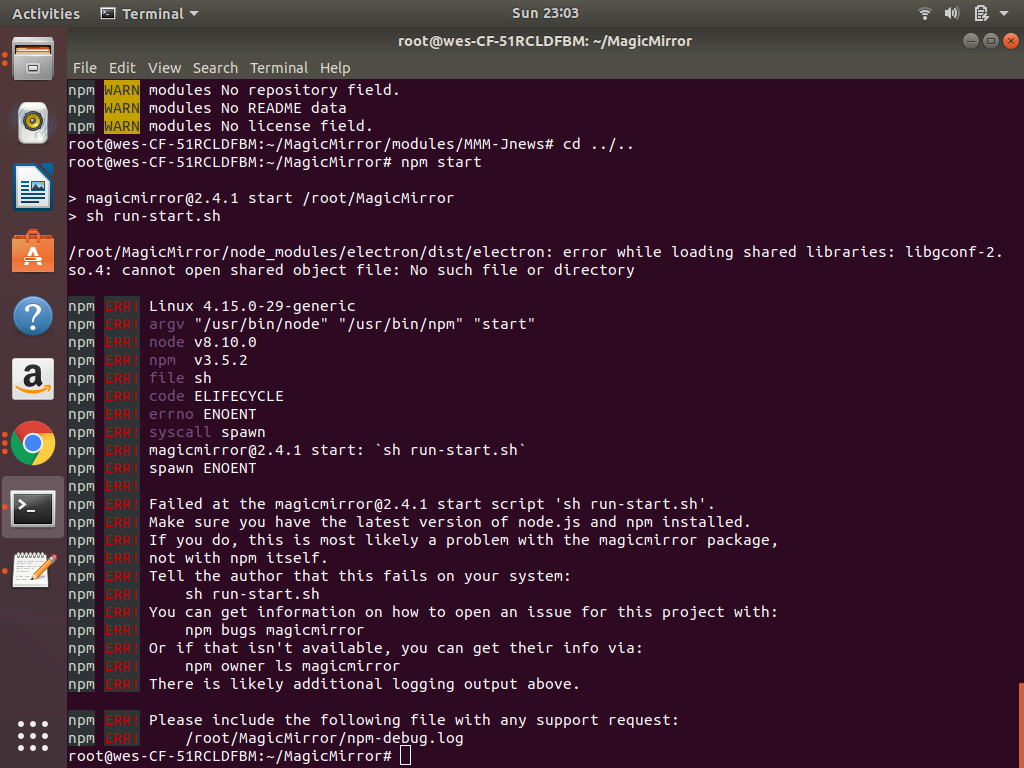
doesn’t matter if i’m in Ubuntu 16.04 OR 18.04
and it doesn’t matter if I’m in home directory OR the root directory…is there a different way to run MM other than ‘npm start’?
-
RE: MMM-NOAA - Another Weather Module
try adding the following in the config.js
langTrans: "en",example…
{
    module: 'MMM-NOAA',
    config: {
        langTrans: "en",
	apiKey: "YOUR API KEY",
	airKey: "YOUR API KEY"
}
},
Not really sure it will work, but I will try it on mine in a little while and let you know if it does.
If you try it before I get back on here, let me know if it did work or not. -
RE: MMM-Jnews
This might be a dumb question…
Why am I needing the API for wunderground??? -
RE: MMM-Jnews
TOTALLY AWESOME!!!
Hoping it works with my little podunk towns newspaper! BWAHAHAHAHA! :face_with_stuck-out_tongue_winking_eye: :face_with_stuck-out_tongue_winking_eye: :face_with_stuck-out_tongue_winking_eye: