MagicMirror Forum
    • Recent
    • Tags
    • Unsolved
    • Solved
    • MagicMirror² Repository
    • Documentation
    • 3rd-Party-Modules
    • Donate
    • Discord
    • Register
    • Login
    1. Home
    2. lavolp3
    3. Posts
    A New Chapter for MagicMirror: The Community Takes the Lead
    Read the statement by Michael Teeuw here.
    Offline
    • Profile
    • Following 0
    • Followers 11
    • Topics 38
    • Posts 892
    • Groups 3

    Posts

    Recent Best Controversial
    • RE: Calendar showing 12h time format instead of 24h

      Well I have found the problem.
      But it seems to have been resolved with a recent code update

      For those interested:

      getLocaleSpecification: function(timeFormat) {
      		switch (timeFormat) {
      		case 12: {
      			return { longDateFormat: {LT: "h:mm A"} };
      			break;
      		}
      		case 24: {
      			return { longDateFormat: {LT: "HH:mm"} };
      			break;
      		}
      		default: {
      			return { longDateFormat: {LT: moment.localeData().longDateFormat("LT")} };
      			break;
      		}
      		}
      	},
      

      For case 24 The longDateFormat: hh:mm was wrong. It needs to be HH:mm.
      As said, was already changed.
      Thanks @MichMich

      posted in Troubleshooting
      lavolp3L
      lavolp3
    • RE: Default Calender relative removes start time

      @cptkex
      Aha! The “dateheaders” option is quite new and I haven’t seen that before. Will check that out as well

      posted in Troubleshooting
      lavolp3L
      lavolp3
    • RE: Syntax Errorn in Config.js

      @cyrus1337 If you’re really into the magicmirror stuff, it might be worth the time to do a little javascript training. There are courses all around the net, I’m currently doing some courses that have been offered for free on udemy.
      https://www.udemy.com/javascriptfundamentals/

      It may help a lot with not too much effort.

      posted in Troubleshooting
      lavolp3L
      lavolp3
    • RE: Default Calender relative removes start time

      @cptkex That’s an interesting question!
      I’m working on manipulating the calendar and moment.js as well.

      The line you are looking for is line 302

      timeWrapper.innerHTML = this.capFirst(moment(event.startDate, "x").fromNow());
      

      .fromnow() creates the “in five hours” entry. You would have to stuff the beginning time into that, maybe it would work like this:

      timeWrapper.innerHTML = this.capFirst(moment(event.startDate, "x").fromNow()) + moment(event.startDate).format('HH:mm');
      

      This could work…

      In your calendar, do you really have this entry?
      “Meeting 25th november in five hours - 1800”

      Because then it seems you have already manpulatied the entry to also show the date!?

      posted in Troubleshooting
      lavolp3L
      lavolp3
    • RE: Syntax Errorn in Config.js

      @cyrus1337 I think this command is also included in the README of MM.
      But it may be worth setting up a list. Don’t know. Maybe I’ll try :-)

      Your shutdown command is the one I would use as well.
      There are different commands giving the same result. The one you mentioned is the one mostly recommended.

      posted in Troubleshooting
      lavolp3L
      lavolp3
    • RE: Move from Raspberry Pi3 to Pi3b+ ??

      You need a rather new stretch image on the pi3b+, otherwise it will not work.
      The PI3b+ does not boot with jessie images or older ( i THINK < July 2017) stretch images

      Im my opinion it’s better to install raspbian and magic mirror and all the modules manually and then copy config.js and custom.css.

      You could also try to copy the whole modules folder…
      But please consider that if you just copy over the module folders, you might get problems with npm searching for dependencies that are not there anymore.
      Therefore I would suggest the longer but safe way…

      posted in Hardware
      lavolp3L
      lavolp3
    • RE: Syntax Errorn in Config.js

      @sollekram Next time, it’s advisable to run

      npm run config:check
      

      This will tell you the errors.

      You can then e.g.

      sudo nano -c config.js
      

      to have the line numbers in nano and look up the lines.

      posted in Troubleshooting
      lavolp3L
      lavolp3
    • RE: MMM-Remote-Control works on Remote Interface but not on Mirror

      @5m3d1n4 What is not working on the mirror itself? The Remote-control interface or the Mirror itself? DId not become clear to me.

      posted in Troubleshooting
      lavolp3L
      lavolp3
    • RE: Deutsche Anleitung MagicMirror auf RaspberryPi 3

      @35110 Bist du sicher dass alle Geräte im gleichen Netzwerk sind, oder hast du den Spiegel oder andere in einem Subnetz? Vielleicht kann es daran liegen!?

      posted in General Discussion
      lavolp3L
      lavolp3
    • RE: Deutsche Anleitung MagicMirror auf RaspberryPi 3

      @35110 Hallo zusammen, sorry ich habe dieses Thema lange übersehen.
      Also, bei der “address” in der config sollte 0.0.0.0 angegeben werden. Diese Angabe ist vonnöten um dem MagicMirror zu sagen auf welchen Adressen er lauschen soll. 0.0.0.0 sagt “alle”. Aus einem Grund der mir noch nicht klar ist, funktioniert das System nicht wenn man die Standrrdeinstellung"localhost" beibelässt.

      Die Whitelist kann eigentlich auch keinen Einfluss haben, denn dort wird geregelt welche Geräte Zugriff auf Port 8080 bekommen. z.B. über den browser eines Computers.

      Hier mal meine config, die funktioniert

      var config = {
      port: 8080,
      address: "0.0.0.0",
      ipWhitelist: [],
      //ipWhitelist: ["80.157.5.50", "192.168.1.21", "::fff:0.0.0.0/1", "::fff:128.0.0.0/2", "::ffff:192.168.1.1/2$
      //ipWhitelist: ["80.157.5.50", "::fff:0.0.0.0/1", "::ffff:192.168.1.1/24", "::fff:128.0.0.0/2", "::fff:192.0$
                                                                     // or add a specific IPv4 of 192.168.1.5 :
                                                                     // ["127.0.0.1", "::ffff:127.0.0.1", "::1", "$
                                                                     // or IPv4 range of 192.168.3.0 --> 192.168.3$
                                                                     // ["127.0.0.1", "::ffff:127.0.0.1", "::1", "$
      
      
      language: 'de',
      timeFormat: 24,
      units: 'metric',
      zoom: 0.7,
      
          {
              module: 'MMM-NetworkScanner',
              classes: 'small',
              position: 'top_left',
              config: {
                  devices: [
                      { macAddress: "mac-address", name: "Dachboden", icon: "server"},
                      { macAddress: "mac-address", name: "Krachmacher", icon: "desktop"},
                      { macAddress: "mac-address", name: "Handy", icon: "mobile"},
                      { macAddress: "mac-address", name: "Handy", icon: "mobile"},
                      { macAddress: "mac-address", name: "Drucker", icon: "print"},
                  ],
                  //showUnknown: false,
                  showOffline: true,
                  //keepAlive: 300,
                  updateInterval: 5,
                  //residents: 'Mobile',
              }
          },

      
      posted in General Discussion
      lavolp3L
      lavolp3
    • RE: Scrolling rather than Carousel mode...

      @mykle1
      I wonder what exactly the problem is. The pi can handle videos with high quality formatting, it can handle games fluently to some degree so the Pi itself should be able to handle a scrolling element.
      Is it electron?
      Is it the javascript handling itself?
      Does anybody know?

      posted in Requests
      lavolp3L
      lavolp3
    • Calendar showing 12h time format instead of 24h

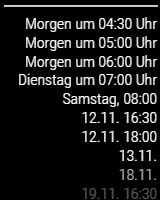
      In my calendar module, all entries in the range two days from now are shown with “tomorrow/day after tomorrow at XX:00”, but the time is shown with 12h time format, although in MagicMirror config timeFormat is set to 24.

      I presume the reason is a function in calendar.js: in case the day of the event is < currentdate - 2 the event is derived from moment.calendar()

      if (event.startDate - now < 2 * oneDay) {
      	// This event is within the next 48 hours (2 days)
      	if (event.startDate - now < this.config.getRelative * oneHour) {
      	        // If event is within 6 hour, display 'in xxx' time format or moment.fromNow()
      		timeWrapper.innerHTML = this.capFirst(moment(event.startDate, "x").fromNow());
      	} else {
      	        // Otherwise just say 'Today/Tomorrow at such-n-such time'
      		timeWrapper.innerHTML = this.capFirst(moment(event.startDate, "x").calendar());
      	}
      

      0_1541361649708_17412b76-328a-4c7f-bfb9-0fd3ef744245-image.png
      E.g., first entry should be “Morgen um 16:30”

      The moment.calendar() function is used nowhere else in the module.

      I haven’t noticed this behaviour before, so I’m not sure if I have triggered this somehow or if it has been there before.

      Does anyone have a clue what the problem is?

      posted in Troubleshooting
      lavolp3L
      lavolp3
    • RE: Black screen after starting

      @cyrus1337 said in Black screen after starting:

      But do not I have to enter the IP to run the Remte Module or the MMM NetworkScanner?

      The “listening” address in the config does not affect the behaviour of the other modules. It does not determine the IP of your mirror!
      The other modules get the mirror’s IP from somewhere else, don’t worry.
      The address e’re talking about here is there to determine on which network device to listen (if I understand correctly!).
      0.0.0.0 specifies “use them all”
      You won’t do any harm using that.

      posted in Troubleshooting
      lavolp3L
      lavolp3
    • RE: NPM security warnings on fresh install

      @awsoo But you know that you cannot run the MagicMirror on a Raspbian Lite System per se?
      You need the x server and a desktop environment.

      posted in Bug Hunt
      lavolp3L
      lavolp3
    • RE: NPM security warnings on fresh install

      @macko76 I have gotten the same problems just today, however not with a really fresh install.

      You COULD do an

      npm audit
      

      and see the audit report.
      You will find in the report what to do to resolve a number of issues. Look into the headers of the tables

      Also,

      npm audit fix
      

      should resolve some of these.

      HOWEVER!!!, one major issue for example (spectron) is a dependency of electron, and I wouldn’t recommend touching these without being clear about the risk that you could destroy your running system.
      So make a backup and be careful!
      I resolved nearly all issues and it’s still running but for obvious reasons I can’t recommend…

      posted in Bug Hunt
      lavolp3L
      lavolp3
    • RE: package-lock.json How to commit?

      Same issue, haven’t seen that before.
      Anyone an idea?

      posted in Troubleshooting
      lavolp3L
      lavolp3
    • RE: PM2 error

      Have you tried reinstalling pm2 or installing the latest version?

      sudo npm install pm2@latest -g
      

      I can’t find the line mentioned in the file /usr/lib/node_modules/pm2.
      So better reinstall I guess…

      posted in Troubleshooting
      lavolp3L
      lavolp3
    • RE: Weekdays in standard calendar module

      @lavolp3 OK, for those who are interested I have managed to implement it myself locally into calendar.js

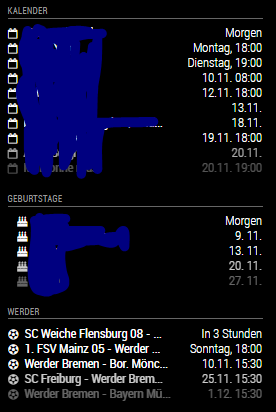
      You can see that “urgency” dates are now shown as weekdays (in the first calendar) and not as relative ones. I have added a further variable “urgencyStyle” to choose between relative (“in xx days”) and absolute (“xday”) dates as soon as urgency hits.

      (0_1540996456699_1658f9a8-ad7c-4f8a-bb4a-e2bc0a6f4050-image.png

      Still working on the git workflow and creating a PR. Git is a monster :-)

      posted in Requests
      lavolp3L
      lavolp3
    • RE: Black screen after starting

      Also, it’s always important to check the config file. Do a

      npm run config:check
      

      inside the MagicMirror folder.
      And then, I would always test to just restart it, last time I had the problem it was magically solved by this

      pm2 restart mm
      
      posted in Troubleshooting
      lavolp3L
      lavolp3
    • Weekdays in standard calendar module

      Hi all!
      I’m using the standard calendar module and am looking for a way to show the next days as absolute week days.
      So, instead of the option “relative” which shows something like “in 2 days” I’d like to show " Wednesday" and the time.
      I can’t find it as an option in the module. Anyone got an idea?
      Thanks!

      posted in Requests
      lavolp3L
      lavolp3
    • 1 / 1