MagicMirror Forum
    • Recent
    • Tags
    • Unsolved
    • Solved
    • MagicMirror² Repository
    • Documentation
    • 3rd-Party-Modules
    • Donate
    • Discord
    • Register
    • Login
    1. Home
    2. lavolp3
    3. Posts
    A New Chapter for MagicMirror: The Community Takes the Lead
    Read the statement by Michael Teeuw here.
    Offline
    • Profile
    • Following 0
    • Followers 11
    • Topics 38
    • Posts 892
    • Groups 3

    Posts

    Recent Best Controversial
    • RE: DailyDilbert

      @maximillium I did it like this but had to search for a while as well.

      You can put this in your custom.css and use whatever value you prefer

      .MMM-DailyDilbert #dilbert-content {
        width: 900px;
      }
      

      A tip if you’re interested:
      If you open the mirror in your browser (I’m using chrome mirror_ip:8080) and open the developer’s console with F12 you can see all the css involved (in the “styles” tab). Then you can right-click on the image and press “investigate” or whatever it’s called in english and you can see all the css affecting this picture. You can even toggle properties on/off live. Just discovered all the possibilites with this function working on this problem.

      posted in Requests
      lavolp3L
      lavolp3
    • RE: MMM-Tools : System stat monitoring and commanding (ATB Supported)

      @sean Also, I think you could cut the line so the dash, or in your case the dot, does not appear.
      If I find the time I’ll send a PR.

      posted in System
      lavolp3L
      lavolp3
    • RE: MMM-Tools : System stat monitoring and commanding (ATB Supported)

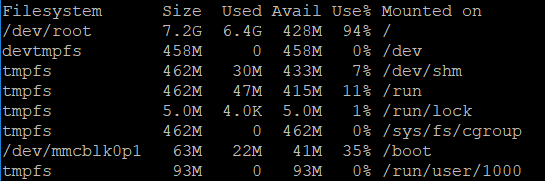
      I think you need to use sudo du -hs / instead of du -hs to show usage of all folders. This shows me the 6.5G my system is using instead of the 1.5G which is not enough and supposedly only valid for part of the system.

      posted in System
      lavolp3L
      lavolp3
    • RE: MMM-Tools : System stat monitoring and commanding (ATB Supported)

      @Sean Hi Sean,
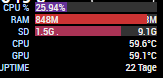
      the module does not show correct values for SD card space for me.
      Actual values:
      0_1539591563535_d0ced4d6-6142-4912-b89b-5992871c112d-image.png

      Shown values:
      0_1539591612744_1d87abff-1bb9-4159-abf3-6bd16f7b6a22-image.png

      Any idea?

      posted in System
      lavolp3L
      lavolp3
    • RE: MMM-SystemStats (cpu temp/load, fre ram ...)

      @sean ooooh that looks good!

      posted in Utilities
      lavolp3L
      lavolp3
    • RE: MMM-SystemStats (cpu temp/load, fre ram ...)

      Hello @BenRoe
      I have this module installed for some time and was always wondering how to interprete the “System load” part.
      Now I finally did a bit of research and am still wondering why this value is used. Why is it such an imprtant value for you?

      Also, I’m trying to implement “sd card usage”. I think it’s a quite important value (since my card is quite full :-))

      posted in Utilities
      lavolp3L
      lavolp3
    • RE: MagicMirror Image von Heise

      @Merlin_1970
      “Nun blinken nur die LED’s und nichts passiert, nur leider weiß ich nicht warum…”

      Es ist wichtig WIE die LEDs blinken. Blinkt die grüne oder die rote und wie?
      Es gibt da Codes um zu sehen was nicht passt.
      Ansonsten würde ich dir ratenden Weg über das offizielle raspbian und die Installation wie sie von MichMich beschrieben ist zu gehen.

      Ich GLAUBE dass das Problem darin liegt, dass du versuchst das Jessie-Image von Heise auf einem Pi 3B+ laufen zu lassen. Für den Pi 3B+ sollte man das Stretch image nehmen. Evtl läuft das Heise Image gar nicht auf einem Pi 3B+. Die Beschreibung von Heise bezieht sich auf einen Pi 3B.

      posted in General Discussion
      lavolp3L
      lavolp3
    • RE: MMM-AVStock

      @Sean Thanks for doing this! Was already looking for some time for exactly this!

      posted in Productivity
      lavolp3L
      lavolp3
    • RE: Deutsche Anleitung MagicMirror auf RaspberryPi 3

      Hi 35110,
      ich habe das NetworkScanner Modul am laufen aber lasse momentan nur anzeigen welches Gerät im Netzwerk ist. Hatte aber keine Probleme bei den EInstellungen.
      Kannst gerne deine config hier oder per PN posten, dann schaue ich sie mir an.

      Zum PIR Modul: Ich werde mich nächste WOche während meines Urlaubs dran setzen.
      Gibt es schon irgendwo ein deutsches Tutorial? Sonst poste ich die Erklärung einfach hier.

      posted in General Discussion
      lavolp3L
      lavolp3
    • RE: ,Change Fonts

      Better use an absolute path (as you did oiginally) instead of the relative one philreis suggested

      @font-face {
        font-family: "MyFont";
        font-style: normal;
        font-weight: 100;
        src:
          local("SF-Pro-Display-Light"),
          url("/home/pi/.fonts/SF-Pro-Display-Light.otf") format("truetype");
      }
      

      The path philreis suggested cannot work as it is.

      posted in Custom CSS
      lavolp3L
      lavolp3
    • RE: Deutsche Anleitung MagicMirror auf RaspberryPi 3

      @35110 Hallo 35110

      ich habe auch einen PIR Sensor installiert nach Anleitungen aus diesem Forum, der github Seite von MMM-PIR-Sensor und ein bisschen google-Suche nach der Verdrahtung.
      Da gibt es bei Eingabe von Raspberry Pi PIR eine Menge Ergebnisse.
      Ich kann mich auch an einer deutschen Erklärung versuchen falls es noch keine gibt.

      Ich weiß nicht ob du das Problem oben schon gelöst hast, aber es trat bei mir auf als ich versucht habe per config.txt den OpenGL-Treiber zu aktivieren.
      Das sollte man rückgängig machen und den Treiber (oder den Fake-Treiber) per raspi-config aktivieren. Dann hat es bei mir geklappt.

      posted in General Discussion
      lavolp3L
      lavolp3
    • RE: MagicMirror freezes in a very odd way

      So I have a solution for now.
      I had the fake kms driver enabled for OpenGL. Mirror worked with these for some time but at some point not anymore.
      Going back to legacy drivers solved the issue for now…

      posted in Troubleshooting
      lavolp3L
      lavolp3
    • RE: MagicMirror freezes in a very odd way

      Thanks for the help @Mykle1
      Updating node didn’t solve the issue.

      But I saw that the SD card is full.
      Freed a bit of space but it didn’t help yet.
      Will also change the sd card.

      Any more ideas, anyone?

      Thanks!

      posted in Troubleshooting
      lavolp3L
      lavolp3
    • MagicMirror freezes in a very odd way

      Hi all,

      I have a strange behaviour with my MM v. 2.4.1 running on a Raspberry Pi 3.
      When I start it seems to load correctly (since it shows all modules correctly), but then never updates anymore. All modules stay in their states.

      The pm2 logs give some strange message

      0|mm       | > magicmirror@2.4.1 start /home/pi/MagicMirror
      0|mm       | > sh run-start.sh
      0|mm       | npm
      0|mm       |  ERR! code ELIFECYCLE
      0|mm       | npm ERR! errno 1
      0|mm       | npm
      0|mm       |  ERR! magicmirror@2.4.1 start: `sh run-start.sh`
      0|mm       | npm ERR! Exit status 1
      0|mm       | npm
      0|mm       |  ERR!
      0|mm       | npm ERR! Failed at the magicmirror@2.4.1 start script.
      0|mm       | npm ERR!
      0|mm       |  This is probably not a problem with npm. There is likely additional logging output above.
      0|mm       | npm ERR! A complete log of this run can be found in:
      0|mm       | npm
      0|mm       | ERR!     /home/pi/.npm/_logs/2018-08-24T19_20_52_299Z-debug.log
      PM2        | App [mm] with id [0] and pid [23999], exited with code [1] via signal [SIGINT]
      PM2        | Starting execution sequence in -fork mode- for app name:mm id:0
      PM2        | App name:mm id:0 online
      

      Although I can see the display, it seems to restart again and again.
      And now it gets even more strange:
      When I stop the pm2 process (pm2 stop mm) the electron window does not close.
      And when I try to start the magic with the shell script manually (sh run-start.sh) it gives

      run-start.sh: 4: run-start.sh: electron: not found
      

      ???
      electron is obviously installed.

      Does anyone have a clue?

      npm v 6.4.0
      node v 6.14.4

      posted in Troubleshooting
      lavolp3L
      lavolp3
    • RE: upgrade to 2.4.1problems and solutions

      @richland007 said in upgrade to 2.4.1problems and solutions:

      i think it has to do with the settings on the Open GL when you tweak the Rpi settings
      Denis

      A lot of people recently had issues with OpenGL.
      Do you only get a black sceen? Turn OpenGL off then. You don’t need it necessarily. For me it worked again afterwards. Still thinking about how to be able to activate OpenGL.

      And: If you need help, it is better to get into more detail first hand.

      posted in Troubleshooting
      lavolp3L
      lavolp3
    • RE: An error is spamming my terminal

      You need to disable one module at a time and find out the source module for this error.
      If you’ve identified it, go to the github page and send an issue.

      I also had an error of this type some time ago. Trying to remember what I did to get rid of this…

      posted in Troubleshooting
      lavolp3L
      lavolp3
    • RE: Autostart woes

      I’d recommend trying to do it again using the description by MichMich
      https://github.com/MichMich/MagicMirror/wiki/Auto-Starting-MagicMirror

      It is crystal clear from what I see, also describes what to do.

      "the doc for ‘pm2 startup’ doesn’t help me…
      ‘will give you the command u need to execute’

      execute when, how? if unattended, who is ‘you’?"

      No offense, but btoh the doc and your terminal will show you exactly what to do. Copy a line of text the terminal throws out and execute it again.

      That’s the reason I’d suggest to do it again with a bit more patience. :-)

      posted in Troubleshooting
      lavolp3L
      lavolp3
    • RE: Can i remove the Logo of Magic Mirror In start?

      @postremalone There is an OS to be started first and that takes most of the time. You possibly can optimise that, just google something like “booting raspbian faster”.
      Then, if you use pm2 as the manager, from my experience it takes some time until it loads MM. Maybe there is some other faster way, e.g. starting electron directly after the booting process via rc.local

      posted in Troubleshooting
      lavolp3L
      lavolp3
    • Fifa World Cup overview

      So, as far as I can see, we don’t have any proper FIFA World Cup module yet, do we? And it starts TOMORROW!
      I would have loved to see a solution showing some kind of iframe with the overview over the complete screen. Or at least show the playing plan in the center frame.

      But I can’t program one. It’s a pity…

      posted in Requests soccer world cup sport
      lavolp3L
      lavolp3
    • 1 / 1