@vandy2424
Try ‘localhost’ or real IP instead of ‘0.0.0.0’.
M
Offline
A New Chapter for MagicMirror: The Community Takes the Lead
Read the statement by Michael Teeuw here.
Read the statement by Michael Teeuw here.
Posts
-
RE: node_helper.js is not working?
-
RE: node_helper.js is not working?
@vandy2424
I think websocket issue would be the reason. Can you confirm whether other node_helper dependent module(e.g. default calendar module) works other than MMM-DynamicWeather?Usually, websocket could be broken by firewall setting, port problem, network quality or by old library, oand many various reasons. Anyway when websocket is broken once, socketNotification will not work.
-
RE: node_helper.js is not working?
@vandy2424
If websocket is closed, the path between module and node_helper might be broken. May that be the reason or clue. But very unusual thing. ATM I cannot guess what happened. -
RE: node_helper.js is not working?
@vandy2424
Is there any suspicious log in your terminal and front dev-console both? What they said? -
RE: MMM-CalendarExt3Agenda - Can I Make it show more events?
@Kelemvor
To make things simpler, Let’s clear the condition;- What is your expectation?
- Are there
missingevents which have to be shown but not? For example, there had to be 3 events on today but only 2 events shown?- on which day it happens? everyday? or some specific day?
- on which calendar does it happen? randomly? or some specific calendar?
- Or any suspicious symptoms or evidence of those missed events?
- Are you suspecting
hidden(not missing) events or days at the end(bottom) of the module’s view?- You expect 10 days but only 7 days are shown…?
- Are there
- What is your expectation?
-
RE: MMM-CalendarExt3 not loading events
@carefreepineappl
CX3 doesn’t employnode_helper.jsso there is no log on yourbackend-sidedlog, onlyfrontend-sidedlog (in your browser dev console) is used.If you want to deliver your
frontend logto your general backend, consider to useMMM-LogExt(https://github.com/MMRIZE/MMM-LogExt) -
RE: MMM-CalendarExt3Agenda Only loading a few items.
@schwarem
That’s not your or your RPI’s fault. :)With your previous log image, at least 7 calendars had to be parsed. The first calendar (12 events) was fetched on 11:06:27, and the last calendar(93 events) was fetched on 11:06:40. These 7 calendars need almost 13 seconds to parse completely.
But CX3* would appear after 5 seconds(by default) from the first fetching. Nobody can’t foresee when the last calendar will finish the fetching (or even whether it is complete or not). So CX3* will wait a few seconds and then show only the events from the current aggregated regardless of whether some unfetched calendars remain.
CX2 parsed events of the calendar by itself so it could know whether all events were fetched or not.(At least I made so), but CX3 doesn’t parse the calendar, only using the feed from another module. That’s the difference.
No worry. Until the next cycle(defined by
refreshInterval), the unfetched calendars would be fetched until then. In the followingrefreshInterval, your missing events will be shown adequately.Or, increase
waitFetchto wait more seconds for more calendars to fetch. -
RE: MMM-CalendarExt3Agenda Only loading a few items.
@schwarem said in MMM-CalendarExt3Agenda Only loading a few items.:
Below is the screenshot. It is loading everything, but not displaying in CalendarExt3. I also noticed in the debug console there was the message below. I don’t know what it means.
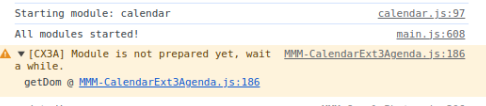
Not error, just info. You can ignore it.
-
RE: MMM-CalendarExt3Agenda Only loading a few items.
@schwarem
Only events from some specific calendars seem being missed.
Usually, that case happens when CX3* will be displayed before all the calendars’ fetching is completed.
Give enoughwaitFetchof CX3*'s config. By default, it would be5000ms(5 sec). I think10_000or something may be enough for you.
Generally, 5 seconds is enough for most of the environment, but in some low-powered devices, too many calendars or events, slow internet speed or many various other reasons could make the case. -
RE: MMM-CalendarExt3Agenda - Can I Make it show more events?
@Kelemvor
Maybe your event provider (default calendar) may broadcast limited number of events.- Check
maximumEntries,maximumNumberOfDaysof default Calendar module.
And also, To get enough range of days for events;
- Check
endDayIndexof CX3A module.
To extend physical height of area;
- override
.CX3A .agenda { max-height : 600px; }to what you want. (If you setnone, It might be extended automatically, I think, not tested…)
- Check
-
RE: After updating MMM-CalendarExt3, the data is no longer updated
@Sam-0
Are you sure whether default calendar is not updating events? How do you know?If what you mean is;
- when you add a new event in your Calendar APP (Google calendar or Apple Calendar, Outlook, whatever), then, that new event doesn’t appear in MM’s default calendar module soon(maybe 10minutes?), and when only after reboot, it would be displayed;
=> Usually that would be related withfetchIntervalof calendar module. Are you sure yours is not this case?
- when you add a new event in your Calendar APP (Google calendar or Apple Calendar, Outlook, whatever), then, that new event doesn’t appear in MM’s default calendar module soon(maybe 10minutes?), and when only after reboot, it would be displayed;
-
RE: MMM-CalendarEx3 use description instead of summary of ics file
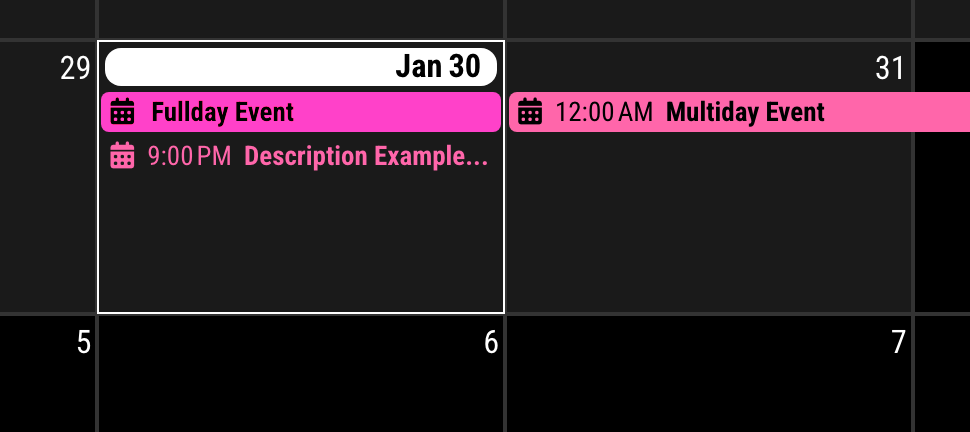
/* MMM-CalendarExt3 config in config/config.js */
...
config: {
	eventTransformer: (event) => {
		if (event.calendarName === 'test' && event.description) { // If event is from 'test' calendar and has description,
			event.title = event.description
		}
		return event;
	}
        ...
9:00 PM event was originally titled as ‘Singleday Event’
-
RE: MMM-CalendarEx3 use description instead of summary of ics file
-
RE: Module list updates since the middle of December
@KristjanESPERANTO
Hmmm… archived means not only abandoned. In some case, it is just freezing. -
RE: MMM-CalendarExt3 color formatting
@jlward73
https://github.com/MMRIZE/MMM-LogExt
You can track Frontend logs and notifications in the backend log with ease. -
RE: MMM-CalendarExt3 color formatting
@jlward73
About the style of event;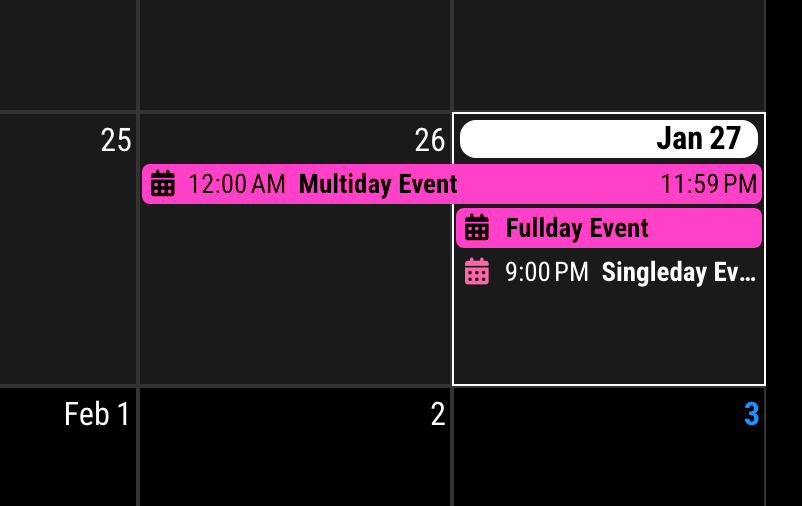
The default styles are like these;
- Singleday Event (start and end in one day)
- symbol :
calendarColor - text : white (
defaultColor) - background : none
- symbol :
- Fullday Event & Multiday Event
- background :
calendarColor - symbol & text : white or black (
oppositeColor) /oppositeColoris calculated bycalendarColorto get more visibility by contrast.
- background :
So, I think you are asking
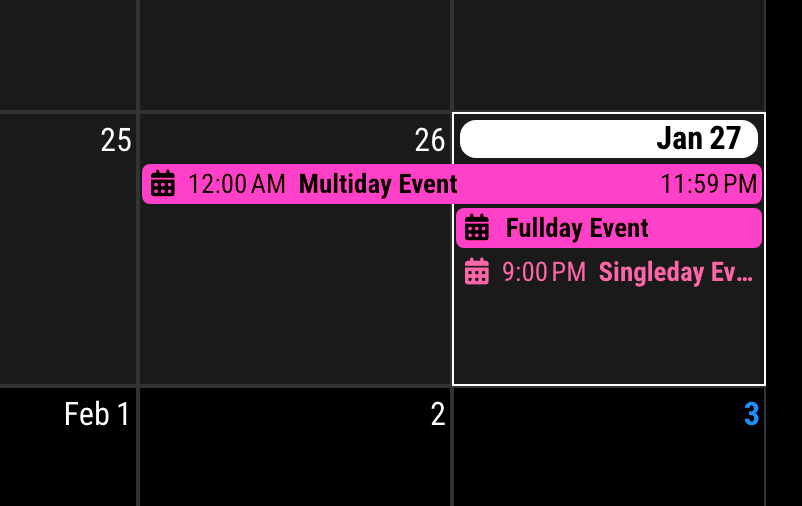
text of singleday event. To be honest, I don’t like the colorful text, so it is not considered in the default style.However, of course, you can override it.
/* In your custom.css */
.CX3 .event.singleday .headline .title,
.CX3 .event.singleday .headline .time {
  color: var(--calendarColor);
}
Then you can get this.
- Singleday Event (start and end in one day)
-
RE: MMM-CalendarExt3 color formatting
@jlward73
Unfortunately, default calendar module doesn’t broadcast custom color of events, only transfer original color assigned in calendar. Shamed.
Instead you can transform events in CX3 itself. -
RE: MMM-YouTube
@hogedir @Shinigami
I didn’t test all the feature, but still working as expected in MM 2.26.

Tested config is here;
{ module: "MMM-YouTube", position: "top_right", config: { defaultQuality: "default", width: "400px", height: "300px", onStartPlay: { type: "id", id: "UOxkGD8qRB4", shuffle: true, loop: false, autoplay: true, }, } }, -
RE: MMM-CalendarExt3 issue Loading / Showing the calendar on Windows
@sdetweil
I was happy to use a new featuretoSortedbut ppl may have trouble with compatibility issue. I’ll provide fallback codes in the next update. -
RE: MMM-CalendarExt3 issue Loading / Showing the calendar on Windows
@JackHammer325 said in MMM-CalendarExt3 issue Loading / Showing the calendar on Windows:
TypeError: original.map(…).toSorted is not a function
Sorry for the late reply.
This error message is caused by using an old browser or not supported.
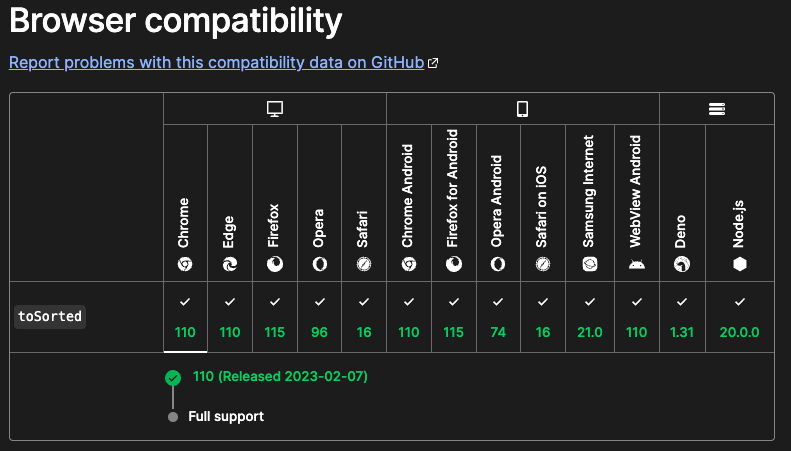
If you are usingChromeorChromium, it’s version should be newer than v110( - released, 2023-02-07, Current version is v120). Or for other browser, See above picture.