Houston, TX checking in. From rural Pennsylvania though.
 P
Offline
P
Offline
A New Chapter for MagicMirror: The Community Takes the Lead
Read the statement by Michael Teeuw here.
Read the statement by Michael Teeuw here.
Posts
-
RE: Where are you from?
-
RE: MMM-Scrobble question - confused re: API
@ChrisEW Absolutely! Glad to help.
-
RE: MMM-Scrobble question - confused re: API
@ChrisEW Ah, gotcha! You don’t need a new config.js file at all. The lines of code from the MMM-Scrobbler readme get copied and pasted into your main config file that you changed to set up the MagicMirror in the first place — that’s how it knows to look for the modules that you’ve downloaded to the ‘’’/modules/‘’’. That file is where you put in your information and set up all your modules, including this one.
If you need help with the config file, there are several very comprehensive guides around these forums that should help.
-
RE: MMM-Scrobble question - confused re: API
@ChrisEW Is your issue with getting up and running to track with LFM? If so, the next step depends on what you’re using to listen to music. It will work with just about anything, and you can use several at once! You just have to point each music player/service at last.fm so that it can actually get the data. This page is your friend when it comes to that.
For iTunes, you have to download the desktop program from that page and install it. It’ll scrobble anything playing from iTunes as you go, and will scrobble plays from an ipod/iphone whenever you sync it with your computer.
For Spotify, it’s actually all built-in already! In each player you use (e.g. the Desktop player and the mobile app), go to the preferences, and under the “Social” section is a spot to sign in to LFM. Just do that and voilà! It will automatically update LFM as long as you’re not in a Private Session.
-
RE: MMM-Scrobble question - confused re: API
-
RE: MMM-MyCommute
@j.e.f.f Yeah, that makes sense, although won’t that only let me do it with a single destination? I have four I’m trying to track, so for the second instance I need to essentially have four origins and a single destination.
-
RE: MMM-MyCommute
I have kind of a weird question, but I haven’t had a chance to poke around and try for myself yet and I’m coming up on when I promised I’d have things done…
Is it particularly possible to reverse the module? I’m assuming I’d need a second instance with the modified code, but I’d like travel times to various places in the morning, and then midday it would switch to the travel times back home from those same spots. In my mind it seems like it might be as simple as swapping the parameters in the getData (or equivalent) function for making the API call, but I’m not entirely sure.
Does that seem about right? If it entails major code restructuring then I may just abort mission, but if not, that’d be a really cool feature to have since people are in and out of my house all over the day.
-
RE: Fitbit
For a little ways now, I’ve been running into an issue where, after running for a day or so, the module stops being able to update. It seems that it’s failing --for some odd reason-- to write the new Refresh Token, so when the Access token is expired, it needs to be re-authorized. I’ve looked through the code and I don’t know a whole lot but I cannot figure out why it’s doing what it’s doing. For now, I have this shell script set to run every night, and that seems to keep it running well enough. I’m sure there’s a better way but until I can get around to learning more, the kludgy way will do.
#!/bin/bash

export DISPLAY=:0
pm2 stop MagicMirror
python  ~/MagicMirror/modules/MMM-fitbit/python/setupAccess.py
killall chromium-browser
pm2 start MagicMirror

exit 0
The first line is there so that it can be run manually over SSH. I did have to log in manually once, but I just told chromium to remember me, so now I don’t have to do anything to re-grant access.
If anyone has a better fix, I’d love to hear your thoughts!
-
RE: MMM-Scrobble question - confused re: API
@ChrisEW As those are designed for a type of application other than this, it doesn’t really matter. If the form is fussy, you can use any valid URL for either. I use
http://10.0.0.1/as the Callback URL, andhttp://www.google.comfor the App Homepage.The idea is just that the Callback URL is a place to point users after they’ve signed in via the pretty-looking web login, and the Homepage is just where people can find about about the app. Since you’re not making an app or directing other users to login, it doesn’t make one iota of a difference.
-
RE: Screencast with mobile
That’s a cool idea! As far as I can tell there’s nothing like it at the moment, but I did some some cursory googling and, while I’m far out of my range of expertise, it looks like you might be able to use something like this homebrew chromecast receiver and use somehow display it in an iFrame, which there are several modules for. I’m not sure how it’d work with various size constraints, but from what I’ve found, that’s the most promising option.
If you’re on iOS, there’s maybe something you could do with either Airserver or Reflector 2 (which is what I use). Either way, it may actually be easier to have a separate machine running whatever is receiving the content and then streaming it to one of the streaming video player modules. Heads-up though, that’ll likely require some horsepower on the server you’re doing it with, or you’re liable to end up with some real frustrating latency.
However you end up going, please post updates – this is a really cool idea and I’d like very much to see how it works out!
-
RE: Thermostat...
@j.e.f.f @cowboysdude Just a quick heads-up: I have a very basic homebridge setup and while it works very well as intended, all it really does is provide a HomeKit interface for stuff that doesn’t have one. For automation or remote access, you’ll still need to have a spare iPad or an Apple TV.
As I do not, I’m actually in the process of trying to decide about setting up OpenHAB or Home Assisstant, which act more as a stand-alone hub for getting smart home stuff to play together. Both will also work with nearly any smart thermostat out there.
-
RE: Thermostat...
I have two nests, and tbh I can’t fully recommend them. My friend LOVES her Ecobee— take a look at those.
-
RE: MMM-Todoist - Your todoist tasks on your mirror
Not a dumb question, don’t worry! Oauth2 can be super confusing, and everyone does it a little differently which is… frustrating at best.
The
Access Tokenyou need is the 3rd one, what they refer to as yourTest Tokenon the page. (The idea behind this is that with OA2, each would-be client has to use its ID and Secret to ask for specific account access for each account it wants to see. They basically did that process for you once, for testing or personal things like this that only need your account.)You don’t need to worry about the OAuth redirect URL or the App Service URL. I have each filled with
http://127.0.0.1but I don’t think either are required at all.Hopefully this gets you up and running!
-
RE: MMM-Nest
@onetwankyfive Quick update:
I basically took your advice to use crazy negative CSS margins and it worked beautifully! I’m not actually sure how to address only one instance of a Thing in CSS so what I ended up doing was to clone the module into Nest2, and then used the CSS to bump that up next to the original. Sadly the headers don’t display leading spaces so I can’t really fix the alignment of the second instance but beyond that it looks pretty great!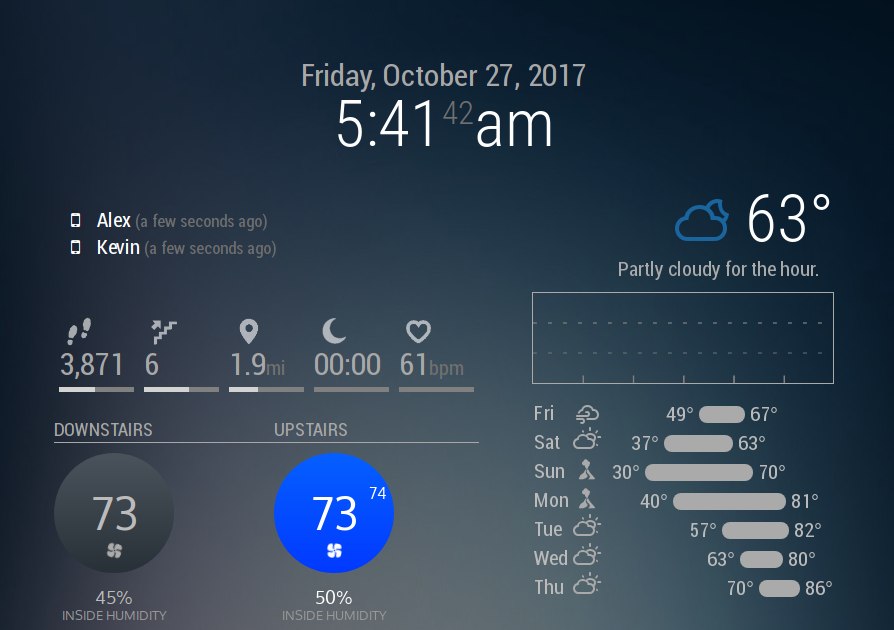
Not sure if anyone else wanted to do this and wasn’t sure how, but in case there is someone: The duplicated Nest2 module can be found linked above. I’ll try my best to keep it up-to-date with the original, but in case I haven’t gotten to it yet it should be easy to do yourself – all I did was add a
2next to every instance of the wordNest. Then I just added the following to Nest2.css, but you can even just add it to your custom CSS:.MMM-Nest2 { margin-top: -211px; margin-bottom: 65px; margin-left: 220px; }That theoretically should automatically line it up right? It looks a little janky when the MM app is loading but it all works out fine for me. It also is set to use a different font but I made sure to have it fall back on Roboto.
For anyone smarter/better at computer than me, if there’s a way to achieve this without a whole forked module, let me know! Simpler is better!
-
RE: MMM-forecast-io -- Localized up to the minute weather
@dmcinnes Oh, okay — that makes a lot of sense! Glad to know it’s not just me missing something. I’ll take a look at the html and see what I can do, thanks for pointing that out for me.
-
Auto-hide module when another un-hides?
I’m setting up a small screen displaying my currently scrobbling music, but as the Scrobbler module hides itself when nothing is playing, I thought it might be nice to show an image (my artist cloud generated by this wonderful tool for the curious). I have both modules working just fine separately, but it’d be dope if I could get the Scrobbler module to hide the Images Module when it wants to be active.
This seems like something I should be able to so with the Remote Control/ModuleScheduler/Profile Switcher modules, but I just can’t quite figure it out.
-
RE: MMM-forecast-io -- Localized up to the minute weather
Hey quick question: how do I change the color of the precipitation graph? I’ve got a decent amount of custom CSS that’s working (including other things for this module) but for the life of me I cannot seem to change this one element?
Here’s what I’ve got going on for this module right now (more icon colors elsewhere, I gotta clean up the file!):.MMM-forecast-io .summary {color: #aaa;} .MMM-forecast-io .forecast-row .weathericon {color: #aaa} .MMM-forecast-io .wi-night-alt-cloudy {color: #1a659e} .MMM-forecast-io .wi-volcano {color: #8c2f39} .MMM-forecast-io .precipitation-graph {color: #1a659e;} .small.MMM-forecast-io .forecast { margin-right: 0px; margin-left: auto; } .small.MMM-forecast-io .summary { text-align: right; }I’m absolutely positive I’m missing something dumb here
-
RE: [Remote-Control] Shutdown, Configure and Update your MagicMirror
So, I’m having a really unexpected bug, where this module somehow negates my custom CSS for the header color of all modules. No idea how/why, but when the page first loads, it’s fine, but as the last of the modules (including this one) load and are activated, the color suddenly snaps back to the default
#aaa.I know for certain it’s this module, since disabling it in the config fixed the header issue. I think this was introduced in the newest update, but I’m not 100% for-sure positive. I do know it started right around the most recent release date though.
-
RE: Ghost Overlay / OMXPlayerTransparency
@jasondreher
I use the MMM-htmlvideo module for it. Webm seems to work best for me as a format to reduce choppiness but even then it’s certainly not perfect. This module is great though! -
RE: Ghost Overlay / OMXPlayerTransparency
@pyrosmiley said in Ghost Overlay / OMXPlayerTransparency:
@Reotch2 If you’re still shooting for this, I HIGHLY recommend using ffmpeg to convert the clip to .webm format, which was developed for web streaming video — it’s crazy efficient with file size and perfect for this type of thing. If you’ve never used ffmpeg before it can be daunting, but the gist of what you do is ‘’’ffmpeg -i .mp4 -o .webm’’’ and then let it do its thing. It may take some googling to get exactly the settings you want but a basic conversion should do pretty well for you.
Good luck!
Formatting got messed up on my phone but the ffmpeg command is ffmpeg -i input.mp4 -o output.webm
It should work just fine, I literally did it for my mirror today.