MagicMirror Forum
    • Recent
    • Tags
    • Unsolved
    • Solved
    • MagicMirror² Repository
    • Documentation
    • 3rd-Party-Modules
    • Donate
    • Discord
    • Register
    • Login
    • Profile
    • Following 0
    • Followers 1
    • Topics 29
    • Posts 450
    • Groups 1
    R Offline
    1. Home
    2. rkorell
    3. Posts
    A New Chapter for MagicMirror: The Community Takes the Lead
    Read the statement by Michael Teeuw here.

    Posts

    Recent Best Controversial
    • RE: CSS modifications on a module which has no own css styles?

      @sdetweil said in CSS modifications on a module which has no own css styles?:

      you cannot target the ‘text’ itself…

      Yes, understood.
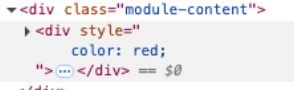
      What I cannot understand and what doesn’t work for me is exactly this, what you (formerly) asked and demosntrated in your last post: touch this div -part…
      what you DO have:

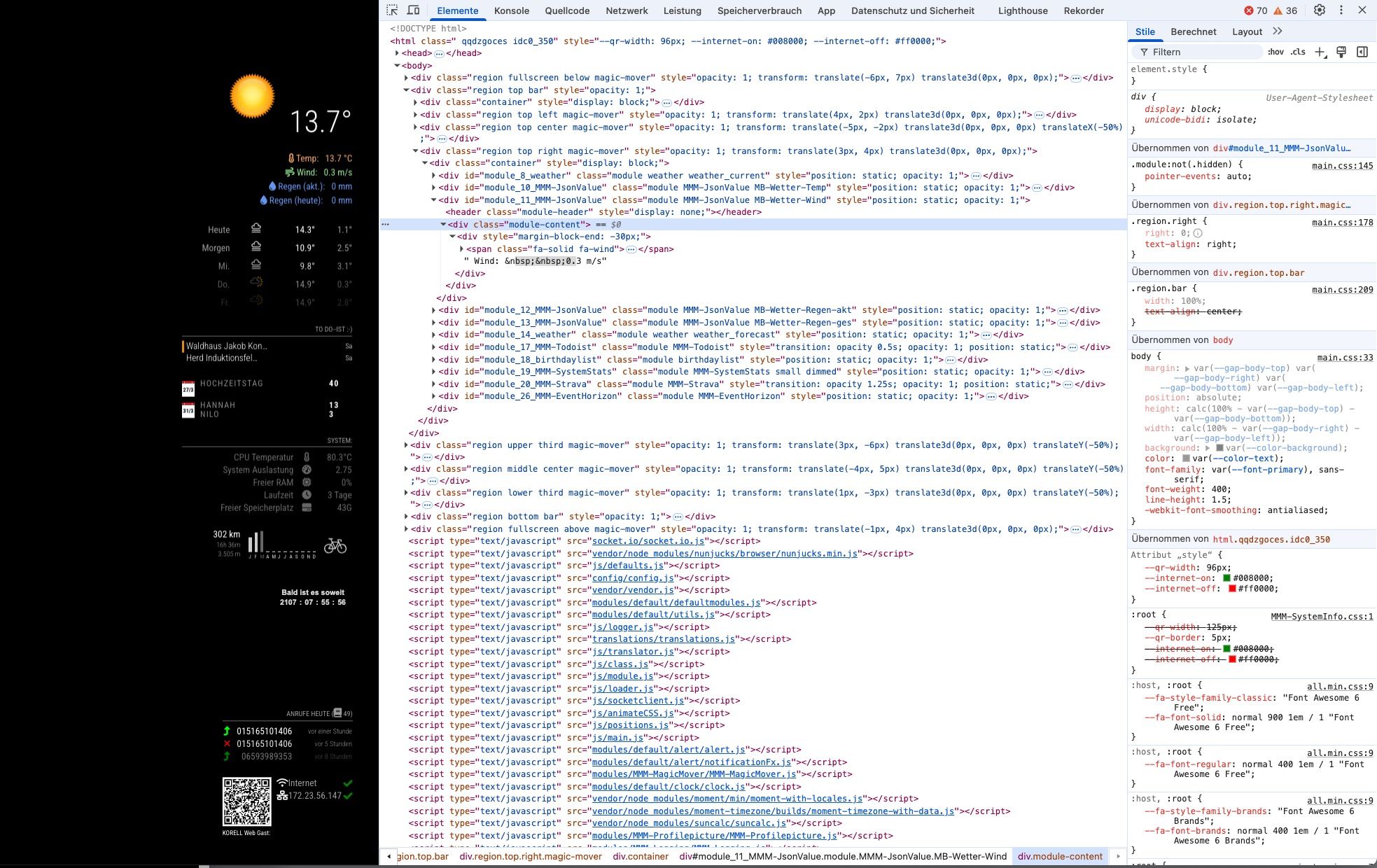
      ScreenFloat Bildschirmfoto von Google Chrome am 24_03_2025, 16_01_53 24_03_2025, 16-01-53.jpg

      I do NOT have ! (for whatever reason!)
      I have the

       <div class="module-content">
      

      the following

      <div style" color: red;">
      

      is not present in my developer’s console:

      ScreenFloat Bildschirmfoto von Google Chrome am 24_03_2025, 16_04_05 24_03_2025, 16-04-05.jpg

      ???

      Greetings,
      Ralf

      posted in Custom CSS
      R
      rkorell
    • RE: CSS modifications on a module which has no own css styles?

      @sdetweil said in CSS modifications on a module which has no own css styles?:

      SO close…

      :-)

      You’ve made my day!
      THANKS a LOT!!!

      posted in Custom CSS
      R
      rkorell
    • RE: CSS modifications on a module which has no own css styles?

      @sdetweil said in CSS modifications on a module which has no own css styles?:

      dev window to override the blue to red

      I guess your own CSS modification has enabled this…
      Without this the entry #text doesn’t have any opportunity to change anything…

      posted in Custom CSS
      R
      rkorell
    • RE: CSS modifications on a module which has no own css styles?

      @sdetweil
      Unfortunately

      
      .MB-Wetter-Temp .module-content div {
      color: "fuchsia";
      }


      doesn’t work :-(

      May you are much faster than me?
      If you mind to try MMM-JsonValue with this

      		{   /// WIND
      			module: "MMM-JsonValue",
      			position: "top_right",
      			classes: "MB-Wetter-Wind",
      			disabled: false,
      			config: {
      				apiBase: 'https://api.weather.com/v2/pws/observations/current?stationId=IGEROL23&format=json&units=m&numericPrecision=decimal&apiKey=e0658025e8d74a2da58025e8d70a2ddf',
      				method: "GET",
      				title: "", // Widget Title, set to null if not needed
      				icon: "fa-solid fa-wind", // Font Awesome icon, displayed before any text, set to null if not needed
      				prefix: "  Wind:  ", //   "Quote: \"" ---  Text displayed before the value, can be a blank String ""
      				suffix: " m/s", // "\" (from https://api.quotable.io/random)" ----- Text displayed after the value, can be a blank String ""
      				jsonPath: "$.observations[:1].metric.windSpeed", // value in the json to display, the module use https://github.com/dchester/jsonpath for parsing. Note: if $ is not the first character in your path, it will be added for backward-compatibility reason.
      
      				refreshInterval: 5 * 1000 * 60, // refresh every 5 minutes
      				debug: false,
      				skipPadding: false, // yo can un-comment this line if you want to display a related value below; using a second instance.
      			}
      		 },		 
      

      code snippet in config.js …
      Gives you the windspeed on my weather station monitored by wunderground …

      Thanks again !
      Ralf
      posted in Custom CSS
      R
      rkorell
    • RE: CSS modifications on a module which has no own css styles?

      @sdetweil Ahhhh…
      THIS “bottom” …
      Sorry for misinterpreting this.
      Will try your suggestion.

      posted in Custom CSS
      R
      rkorell
    • RE: CSS modifications on a module which has no own css styles?
      #module_10_MMM-JsonValue > div:nth-child(2) {
         color: "fuchsia";
      }


      Doesn’t work, either :-(

      posted in Custom CSS
      R
      rkorell
    • RE: CSS modifications on a module which has no own css styles?

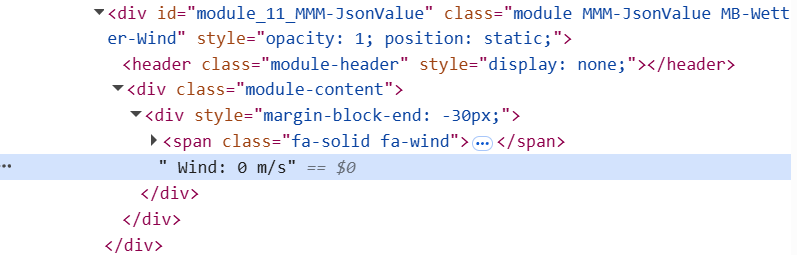
      @sdetweil said in CSS modifications on a module which has no own css styles?:

      where does it open

      <div module>
      <div class "module content">
      <div Style "margin-block-end">
        <span class> font-awesome-picture
      " HERE THE TEXT"
      </div>
      </div>
      </div>
      

      Screenshot 2025-03-23 203611.png
      The " <div class “module content”> " is identified by
      "#module_10_MMM-JsonValue > div:nth-child(2) " (for the first instance of module)
      second and following instances are counted up consecutively
      "#module_11_MMM-JsonValue > div:nth-child(2) "
      "#module_12_MMM-JsonValue > div:nth-child(2) "
      "#module_13_MMM-JsonValue > div:nth-child(2) "

      posted in Custom CSS
      R
      rkorell
    • RE: CSS modifications on a module which has no own css styles?

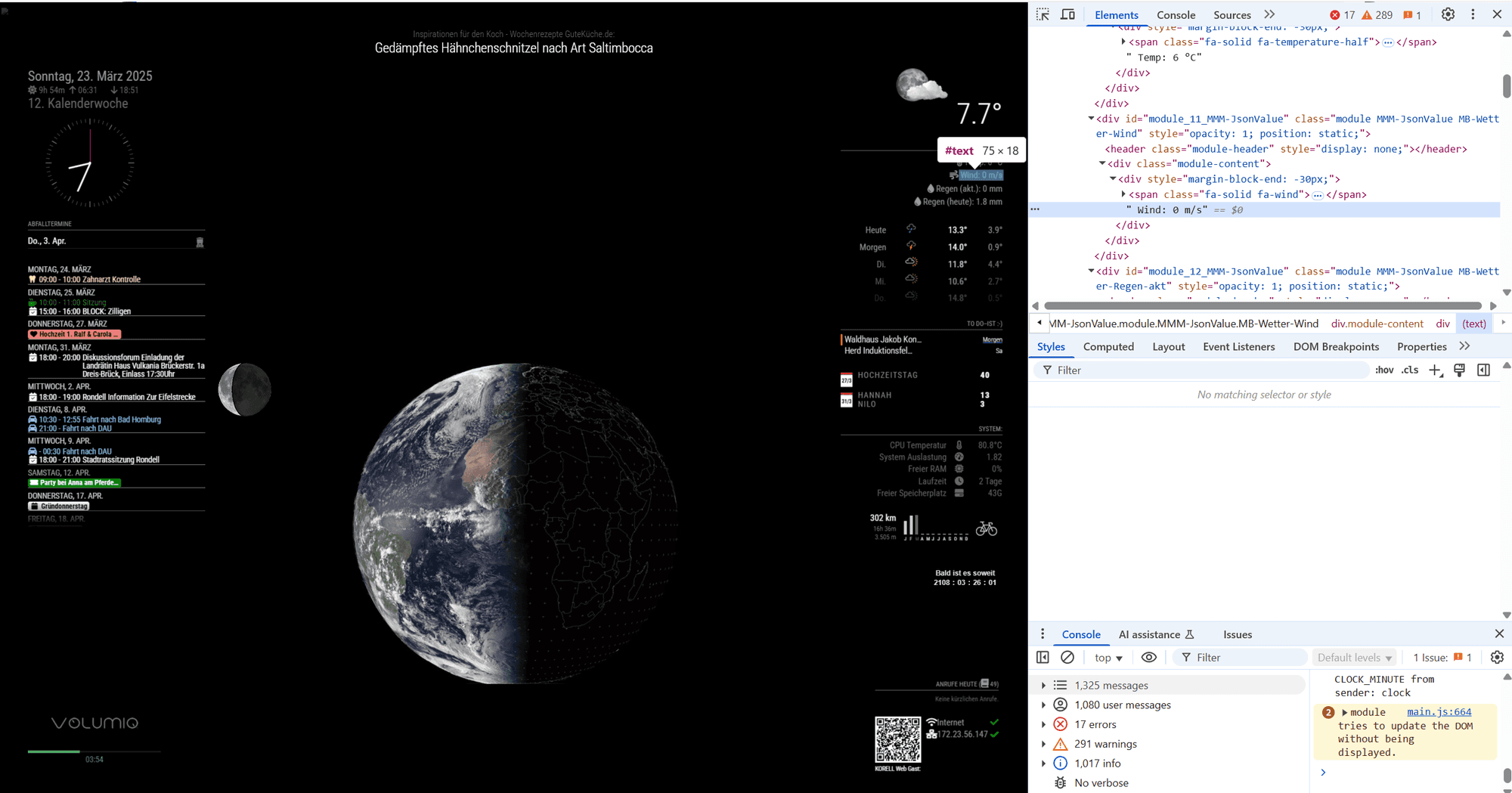
      @rkorell Screenshot 2025-03-23 203408.png
      This same in Chrome

      posted in Custom CSS
      R
      rkorell
    • RE: CSS modifications on a module which has no own css styles?

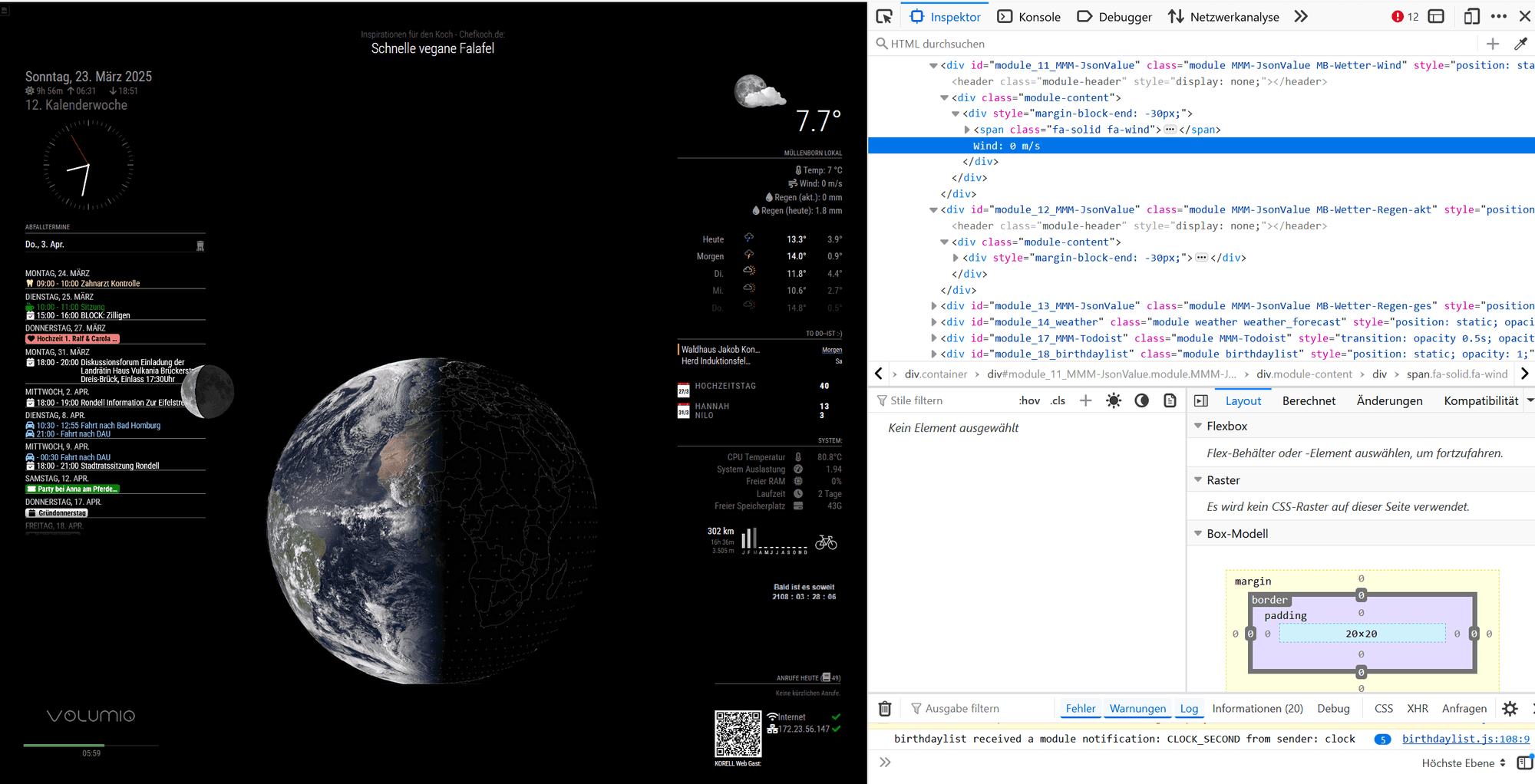
      Screenshot 2025-03-23 203204.png
      This is complete view in Firefox Browser

      posted in Custom CSS
      R
      rkorell
    • RE: CSS modifications on a module which has no own css styles?

      @sdetweil unfortunately your suggestion doesn’t work…
      And I cannot see anything “at the button” ?

      Defnitely no “selector clause prototype”

      posted in Custom CSS
      R
      rkorell
    • RE: CSS modifications on a module which has no own css styles?

      @sdetweil would this work with the classes name as well?

      posted in Custom CSS
      R
      rkorell
    • RE: CSS modifications on a module which has no own css styles?

      @sdetweil ,
      Dear Sam,
      yes, I know and the selector clause is exactly what I’m struggling to find.
      I’ve managed to see several clauses like your example with “nth-child” and several wild namings in other cases.
      But in th given case I cannot “pick” the clause.

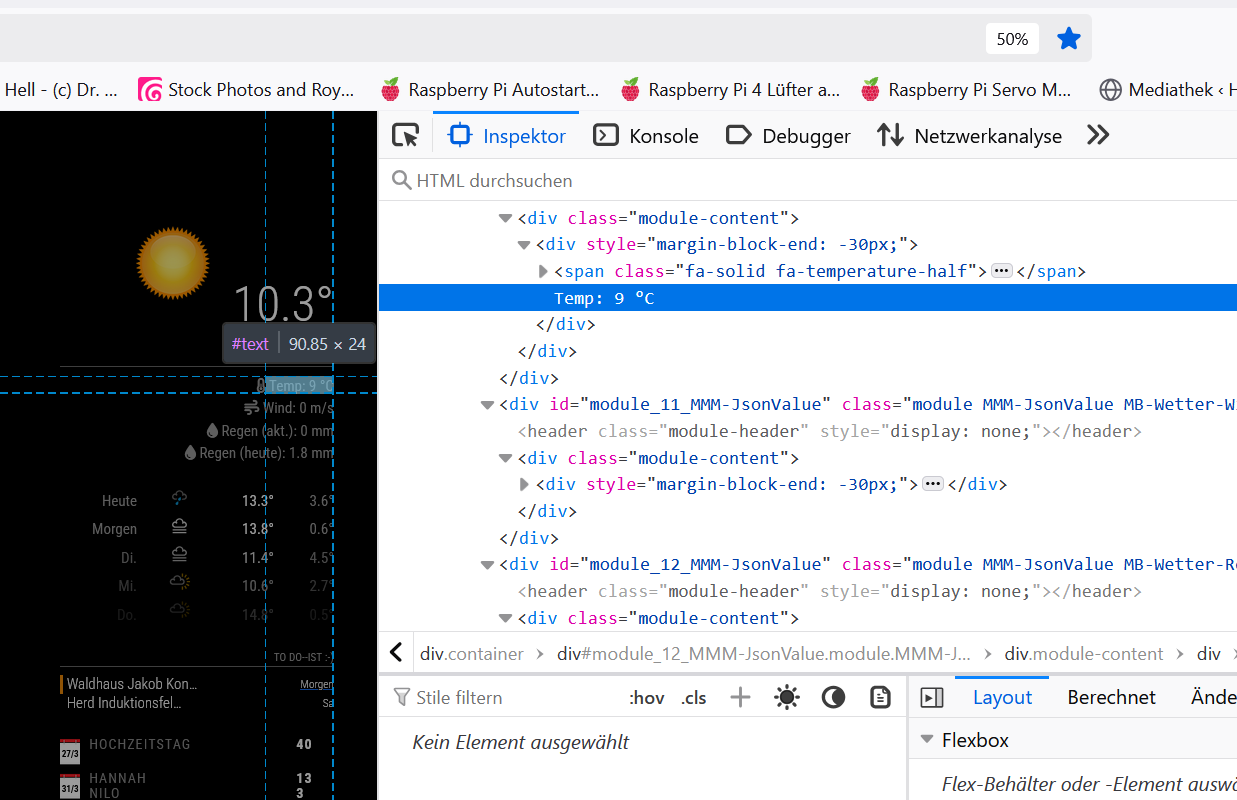
      If I select the text in developer console (see image) “Kein Element ausgewählt” which tranlates to “no element selected”.
      Consecutively it is not possible to extract the “inner HTML” or even the “CSS Path” - which in other circumstances is offered via right mouse context-menu…

      So how can I figure out the selector clause?

      Thanks!
      Ralf

      posted in Custom CSS
      R
      rkorell
    • CSS modifications on a module which has no own css styles?

      Hi CSS gurus,
      I’ve found a nice module which is really useful and displays some JSON information on my MagicMirror (“MMM-JsonValue”).

      I would like to change the color of the text for this module (do be precise: four different colors for four different instances of same module (module allows multiple instances).

      Unfortunately there is absolutely no CSS definition within this module.
      The developer console didn’t show (for me!) anything, either (“no element selected”).
      The hovered text which I mean is attributed as “#text”:

      Screenshot 2025-03-23 190754.png

      I differentiated the module-instances by assigning classes to them.
      Is there any way to address the color of these text-entries per defined class?

      One of these classes is “MB-Wetter-Temp” so I’ve tried:

      .MB-Wetter-Temp body {
        color: "fuchsia";
      }
      and
      .MB-Wetter-Temp .text {
        color: "fuchsia";
      }


      and several iterations but nothing works.
      Any hint for me?

      Thanks a lot in advance!

      Regards,
      Ralf

      posted in Custom CSS
      R
      rkorell
    • RE: HEIC and MMM-ImagesPhotos

      @sdetweil HEIC is the Apple iOS version of HEIF (=High Efficiency Image Format) …

      posted in Troubleshooting
      R
      rkorell
    • RE: MMM-FRITZ-Box-Callmonitor-py3 and MMM-Callmonitor-Current-Call

      @xIExodusIx Dear Carsten,
      quick feedback for you: Just installed your newest version.
      And - to my big surprise - it works like I would like to have…
      I only have installed "MMM-FRITZ-Box-Callmonitor-py3 " - to be 100% clear, may there is the difference.
      But with only this module incoming calls are displayed/signalled (grey’ish / white color) and the message box disappears either when the call is taken or if the caller hangs up.
      This exactly is what I would like to have.
      You definitely have done something magical because the initial code holds the message box until call is ended.
      THANKS!!!

      You ARE a coder :-)

      Warmest greetings to Hamburg (as your git-account now reveals),
      Ralf

      For the CSS stuff - my apologies…
      I cannot guide here, as well. I’ve seen your color coding in dependency from call-type.
      I GUESS you can solve this with case-dependent CSS-attributes and so avoid the complete “switch”-clause.
      But this is far beyond my own capabilities - may Sam (@sdetweil ) can lead through this…

      posted in Utilities
      R
      rkorell
    • RE: MMM-FRITZ-Box-Callmonitor-py3 and MMM-Callmonitor-Current-Call

      @xIExodusIx It’s good practise to keep style information not in the *.js code but in the CSS file of module - than everybody can make persistent changes to style related issues in custom.css which will not been overwritten by module updates…

      Warm regards,
      Ralf

      posted in Utilities
      R
      rkorell
    • RE: MMM-FRITZ-Box-Callmonitor-py3 and MMM-Callmonitor-Current-Call

      @xIExodusIx Thanks again, this helps!
      Regards,
      Ralf

      posted in Utilities
      R
      rkorell
    • RE: MMM-FRITZ-Box-Callmonitor-py3 and MMM-Callmonitor-Current-Call

      @xIExodusIx Dear Carsten, this is awesome!
      Thanks a LOT!
      Currently - in my installation - the Info Box which is signalling the call is not a „message-box“ and disappears when call is ended.
      Did you modify this -then I would hesitate to install newest version…
      Thanks a lot for your effort!
      Warmest regards,
      Ralf

      posted in Utilities
      R
      rkorell
    • RE: MMM-FRITZ-Box-Callmonitor-py3 and MMM-Callmonitor-Current-Call

      @xIExodusIx
      Carsten, as you stated, you cannot code - than this is really awsome!!!
      Congratulations.
      Did you maanage as well to let the message box disappear whan call is in progress?

      Do you have pushed your modified code to github?

      To my last posting: In fact there is NO occurance of “py3_drtorchwood” in ANY of my files …
      So I will simply ignore the error message.

      Warmest regards and chapeau !!!

      Ralf

      posted in Utilities
      R
      rkorell
    • RE: Which solution for touching screen?

      @sdetweil , @com1cedric , yes, that’s what I would have suggested as well - use

      Option "TransformationMatrix" "0 -1 1 1 0 0 0 0 1"
      

      or similar in /usr/share/X11/xorg.conf.d/40-libinput.conf …

      Regards,
      Ralf

      posted in Forum
      R
      rkorell
    • 1
    • 2
    • 13
    • 14
    • 15
    • 16
    • 17
    • 22
    • 23
    • 15 / 23