You will have had your files on the OS X computer, then OS X automatically makes these .AppleDouble files.
Search your Magic Mirror completely for these files and delete them.
These can be safely deleted.
R
Offline
A New Chapter for MagicMirror: The Community Takes the Lead
Read the statement by Michael Teeuw here.
Read the statement by Michael Teeuw here.
Posts
-
RE: MM Error - .AppleDouble and UnhandledPromiseRejectionWarning
-
node serveronly
When I start with this “node serveronly” I become this:
WARNING! Could not load config file. Starting with default configuration. Error found: Error: The module ‘/home/pi/MagicMirror/modules/MMM-Buttons/node_modules/epoll/build/Release/epoll.node’
was compiled against a different Node.js version using
NODE_MODULE_VERSION 57. This version of Node.js requires
NODE_MODULE_VERSION 59. Please try re-compiling or re-installing
the module (for instance, usingnpm rebuildornpm install).How to fix this?
Thanks -
RE: Node Serveronly - Internet Connection
Does the host of the Magic Mirror (in my case a raspberry pi) load all the data for the module
i mean Yes -
RE: DIY Full Length SmartMirror
Please put your pictures here and not in FB. Not all people are in FB ;-)
-
RE: a question about MMM-Remote-Control
Thanks shbatm
I just installed (your) MMM remote control.
Then, of course, the config.js steadily expanded.
I do not know where to adjust this (using the module_identifier)But this is coming:
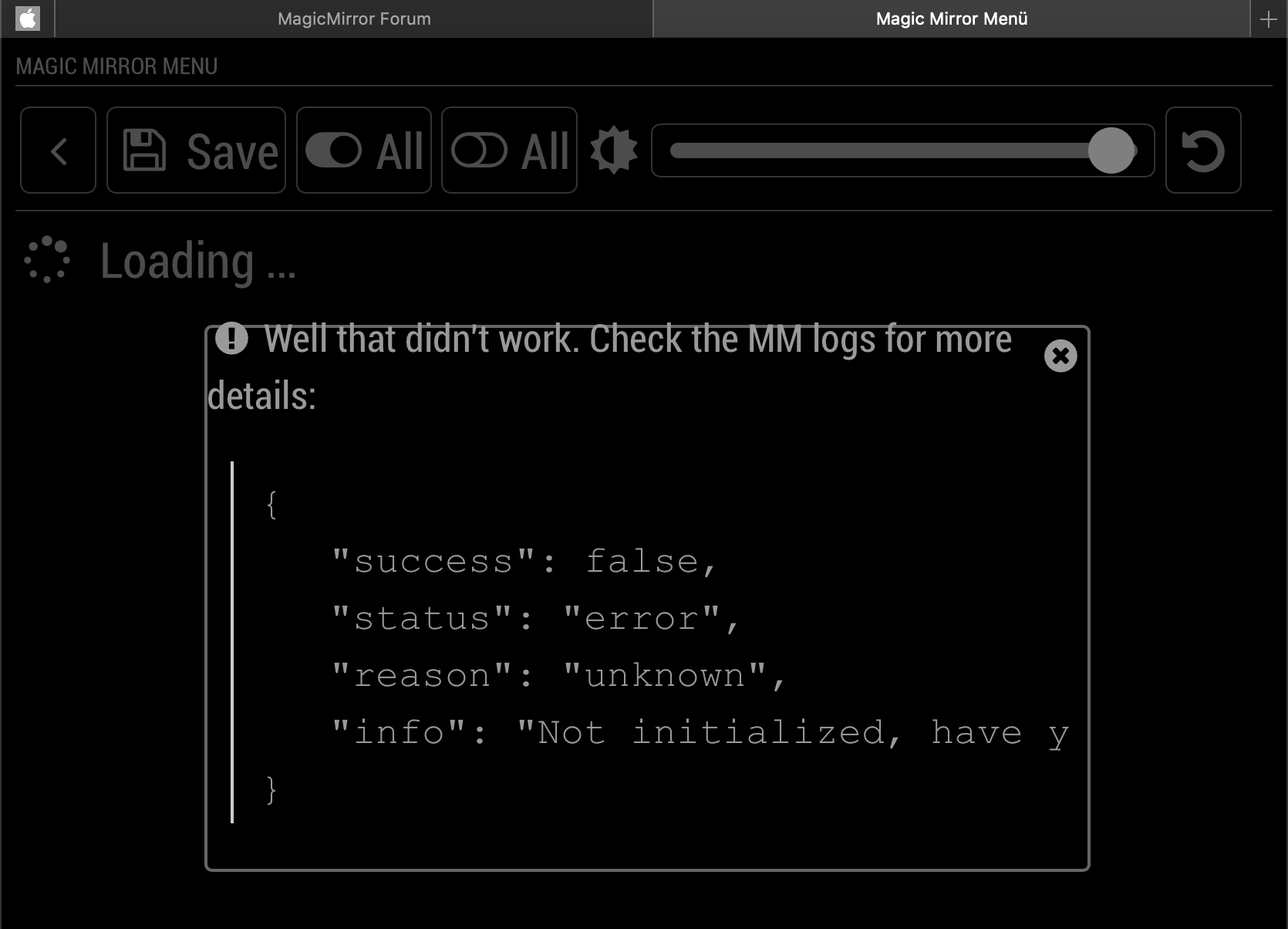
How I initialized? -
a question about MMM-Remote-Control
Maybe someone here knows and can explain it to me.
Whenever you change the order of modules in config.js or add/remove modules, the indices of the modules change. Therefore the hidden/shown status of modules might not be correctly applied. If this happens, simply reconfigure and save it again.
I don’t understand this:
How and what I must reconfigure?
I use the MMM-Remote-Control from shbatmThanks
-
RE: Could use some assistance setting up MMM-Carousel w/ Navigation and understanding the architecture
This is my config for test.
{
            module: 'MMM-Carousel',
            position: 'bottom_bar', // Required only for navigation controls
            config: {
                transitionInterval: 0,
                showPageIndicators: true,
                showPageControls: false,
                ignoreModules: ['MMM-Podcast2', 'alert', 'MMM-Buttons', 'MMM-Remote-Control', 'MMM-Remote-Control-Repository'],
                mode: 'slides',
                slides: {
                    main: [{name:'clock', carouselId: "1"}],
                    "2": ['MMM-DarkSkyForecast', 'newsfeed'],
                    "3": ['MMM-DWD-WarnWeather'],
                    "4": ['MMM-DarkSkyForecast', 'newsfeed'],
                    "5": ['MMM-DWD-WarnWeather'],
                    "6": ['MMM-DarkSkyForecast', 'newsfeed']
                }
            }
        },
and this the two modules
{
module: "clock",
name: "AnalogClock",
position: "middle_center",
config: {
carouselId: "1",
showDate: false,
displayType: 'analog',
analogSize: '540px',
analogFace: 'face-001',
secondsColor: '#FF0000',
analogPlacement: 'top'
}
},
{
module: "clock",
name: "AnalogClock2",
position: "middle_center",
config: {
carouselId: "2",
showDate: false,
displayType: 'analog',
analogSize: '570px',
analogFace: 'face-001',
secondsColor: '#FF0000',
analogPlacement: 'top'
}
},
but the clock is only visible on page 6?
And the main page is completely missing!
I am confused :thinking_face:But then I tried the following:
instead of
main: [{name:‘clock’, carouselId: “1”}],
I put this
“1”: [{name:‘clock’, carouselId: “1”}],And what should I say! It works. :smiling_face_with_open_mouth:
-
RE: [MMM-Remote-Control](v2-dev) Extensible REST API, Dynamic Menus, and Socket Communications, plus other updates
One more question!
Now I have 6 pages that I use with physical buttons.
If I restart the setup now with Carousel which example am I taking?
Global, Positional or Slides
I found it out myself. :-)Thank you
-
RE: [MMM-Remote-Control](v2-dev) Extensible REST API, Dynamic Menus, and Socket Communications, plus other updates
OK So i can see that:
REMOTE_CLIENT_CONNECTED {}
0|mm  | REMOTE_ACTION { data: 'translations' }
0|mm  | REMOTE_ACTION { action: 'SHOW_ALERT',
0|mm  |   type: 'alert',
0|mm  |   title: 'Test',
0|mm  |   message: 'This is a test text',
0|mm  |   timer: '4' }
but nothing happened!
The Devtools says:alert is suspended. updatenotification is suspended.so I mean you are right with MMM-Page-Selector
Good to know on the one hand,
but on the other SHIT
I spent a lot of time making it look and working with the page selector.
Now I can start over :-( -
RE: [MMM-Remote-Control](v2-dev) Extensible REST API, Dynamic Menus, and Socket Communications, plus other updates
@shbatm
are you sure with console.log(notification, payload); to Line #988
my node_helper.js is going only to line 958 -
RE: [MMM-Remote-Control](v2-dev) Extensible REST API, Dynamic Menus, and Socket Communications, plus other updates
@shbatm
Thanks for your explanation
I will try it tonight and then report it.And yes, I also suspect that it is the page selector.
Whereby I set “Alert, notification, buttons and podcast2” to exclude. And nevertheless.
I’ll take a look. -
RE: [MMM-Remote-Control](v2-dev) Extensible REST API, Dynamic Menus, and Socket Communications, plus other updates
Is there any way to track traffic from remote control Nothing is visible in pm2 logs.
A kind debuging or like.
Alert it does not work. It comes the OK for transmit but nothing appears. Restart works and also monitor ON OFF.
But the browser does not refresh again.
Everything works as long as I only have the sample config.
But as soon as I have several other modules running (Page-Selector, Buttons, DWD-Warn-Wetter, PublicTransportHafas, etc.), it is no longer possible.
I would like to know what blocks the module. -
RE: [MMM-OnScreenMenu] Simple On-Screen Menu for controlling the MagicMirror²
Thanks for the explanation
-
RE: I am stuck need help
@dcarls91 said in I am stuck need help:
In your config fil are missing a lot of , and ]
check this -
RE: How to remotely add long links?
in terminal
ssh pi@youripadressand then with nano or install mc
-
RE: MMM Remote Controle - starting issus
@robiv8 said in MMM Remote Controle - starting issus:
You are right! 1 close brace are to muchAnd comma missing:
This{ module: ‘MMM-Remote-Control’ , position: ‘bottom_left’ },or this
{
                module: ‘MMM-Remote-Control’,
  		position: ‘bottom_left’
  		},
is the same.
-
RE: MMM Remote Controle - starting issus
@ernst-jan said in MMM Remote Controle - starting issus:
 {
 		module: ‘MMM-Remote-Control’
 		// uncomment the following line to show the URL of the remote control on the mirror
 		position: ‘bottom_left’
 		// you can hide this module afterwards from the remote control itself
 		}
 		},
i am missing a semilicon
type this
, position: ‘bottom_left’