MagicMirror Forum
    • Recent
    • Tags
    • Unsolved
    • Solved
    • MagicMirror² Repository
    • Documentation
    • 3rd-Party-Modules
    • Donate
    • Discord
    • Register
    • Login
    1. Home
    2. shbatm
    3. Posts
    A New Chapter for MagicMirror: The Community Takes the Lead
    Read the statement by Michael Teeuw here.
    S
    Offline
    • Profile
    • Following 0
    • Followers 3
    • Topics 12
    • Posts 208
    • Groups 1

    Posts

    Recent Best Controversial
    • RE: MMM-RTSPStream Snapshot image resolution appears low, and blurry.

      Some options I’ve thought about or tried but did not fully implement:

      1. node_helper grabs image and saves to disk, front end grabs the image. This was the first method, but I went away from it because it involves (a) repeatedly writing to the SD card and (b) requires two timed actions to stay relatively in sync (front and back end).
      2. Directly accessing the image from camera via the front end. Works for some, and would also allow MJPEG streams to be used, but for certain cameras this gives a CORS violation error. This is what I did in my Octoprint module.
      3. Use an iframe overlay/underlay in the same position as the canvas tag, and then same as #2. Should get around CORS and would be the best option that I know of, just haven’t gone back and implemented.
      posted in Troubleshooting
      S
      shbatm
    • RE: MMM-RTSPStream Snapshot image resolution appears low, and blurry.

      Sorry you’re having issues. To give a brief background: showing snapshots instead of video was an afterthought in this module. I created the module because there were modules to show MJPEG streams and to show snapshots, but nothing that could play the video from an RTSP source which is what my cameras put out. I added snapshots in because the original ffmpeg version was a CPU and RAM hog and I needed to show something when I didn’t need to stream the video (sounds like the situation described above). Now fast-forward a year, and I’ve found that all I really need for my main mirror is snapshots. :(

      Anyways, when I added the snapshots to get around some CORS issue I was having, the module grabs the snapshots from the node_helper.js on the “server” end, converts the jpeg to base64 and sends over the socket to the front end/browser, where it draws the image on the canvas (relevant code) trying to make use of the same elements which the original ffmpeg version used to draw the video on the canvas. I am sure this is not the most efficient or best way to render the images correctly which I’m sure is why you’re seeing some quality issues.

      If you guys want to take a look at the code and have a solution, I’d be happy to accept a PR and correct the problem.

      posted in Troubleshooting
      S
      shbatm
    • RE: [MMM-RTSPStream] - Video Streaming from Live Feeds & Security Cameras

      @epi My fault: for command line you have to fix the window command line argument:
      ... --win 800,421,1120,661 ... or ... --win '800 421 1120 661' ... and I think put the URL in quotes.

      You can test it without that whole argument (should play full screen). This is what I meant in #2 above. Here’s some combos to try:

      # Option 1 -- Should be full screen (if it works):
      omxplayer --avdict rtsp_transport:tcp --live --video_queue 4 --fps 30 "rtsp://192.168.2.237:554/user=USERNAME&password=PASSWORD&channel=1&stream=0.sdp"
      # Option 2:
      omxplayer --avdict rtsp_transport:tcp --live --video_queue 4 --fps 30 "rtsp://192.168.2.237:554/user=USERNAME&password=PASSWORD&channel=1&stream=0"
      # Option 3 Sub-stream:
      omxplayer --avdict rtsp_transport:tcp --live --video_queue 4 --fps 30 "rtsp://192.168.2.237:554/user=USERNAME&password=PASSWORD&channel=1&stream=1.sdp"
      # Option 4 UDP:
      omxplayer --live --video_queue 4 --fps 30 "rtsp://192.168.2.237:554/user=USERNAME&password=PASSWORD&channel=1&stream=0.sdp"
      
      posted in Utilities
      S
      shbatm
    • RE: [MMM-RTSPStream] - Video Streaming from Live Feeds & Security Cameras

      @epi said in [MMM-RTSPStream] - Video Streaming from Live Feeds & Security Cameras:

      /user=USERNAME&password=PASSWORD&channel=1&stream=0.sdp

      Looking at the logs it looks like it’s trying to launch everything correctly. Just to confirm:

      1. The stream works correctly in VLC using the URL you have above.
      2. Since you’re using OMXPlayer – you are testing on the mirror with the RPi connected (not with VNC/Remote Desktop, etc). You won’t see playback from OMXPlayer on anything but the monitor connected to the RPi.

      You can try:

      1. Make sure the stream works with OMXPlayer by testing with the command line (shut down Magic Mirror first):
        omxplayer --avdict rtsp_transport:tcp --win 800, 421, 1120, 661 --live --video_queue 4 --fps 30 rtsp://192.168.2.237:554/user=USERNAME&password=PASSWORD&channel=1&stream=0.sdp
        
      2. Test the above with and without .sdp at the end of the path. I noticed in your log above for some reason it didn’t pass the extension .sdp. I don’t know if this is the issue or not. You can also try without the --win argument to test it full screen.
      3. Using UDP instead of TCP, put protocol: "udp" in your stream config (to test from command line, remove the rtsp_transport:tcp argument.
      4. Using stream=1 to test the lower resolution sub-stream. Sometimes OMXPlayer just refuses to do anything (without any errors) if it doesn’t have enough video memory–I’ve only seen it happen trying to play 3 streams at once though.
      5. Try adding a ? at the end of the stream url. Just something I saw while googling your url format to find out what kind of camera you have.
      posted in Utilities
      S
      shbatm
    • RE: MMM-KeyBindings: Control your mirror with Amazon Fire Stick Remote and Generic Keyboard Inputs

      @jchenaud I am away right now and will take a closer look at your issue when I am back in town.

      posted in Utilities
      S
      shbatm
    • RE: MMM-KeyBindings: Control your mirror with Amazon Fire Stick Remote and Generic Keyboard Inputs

      @rak Have you tried pairing the remote using the Bluetooth menu/GUI on the desktop?

      posted in Utilities
      S
      shbatm
    • RE: [MMM-RTSPStream] - Video Streaming from Live Feeds & Security Cameras

      @evroom said in [MMM-RTSPStream] - Video Streaming from Live Feeds & Security Cameras:

      I guess the MMM-RTSPStream.css is a place to start

      @evroom – First of all welcome to the community.

      You should be able to do what you’re asking by manipulating the CSS (or another way I’ll mention below).

      For CSS:

      First, you should put all customizations in the ~/MagicMirror/css/custom.css file so they don’t get overwritten by any module or MagicMirror updates.

      Try adding this to custom.css:

      .MMM-RTSPStream .innerWrapper {
          float: left;
      }
      

      Without float (original):
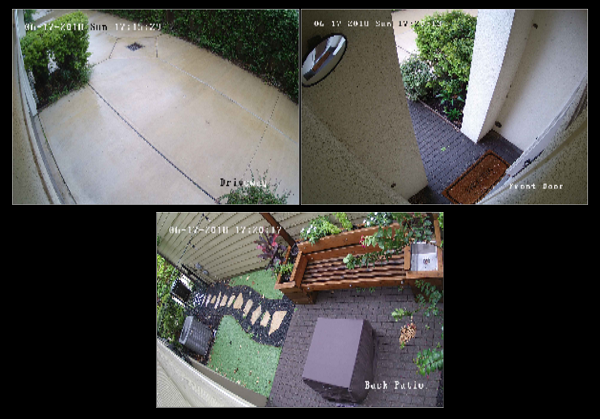
      0_1529274362847_Capture.PNG

      With float (and reducing the size of the other two streams by half and the moduleWidth settings in my config):
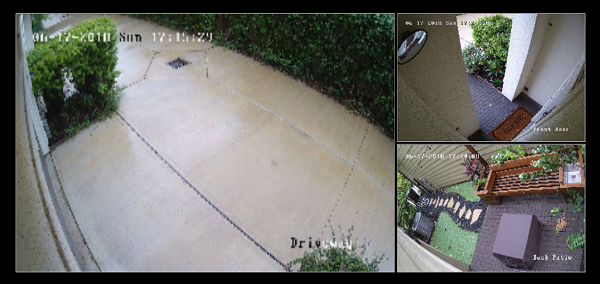
      0_1529274464031_Capture2.PNG

      Background if needed for further changes: the MMM-RSTPStream draws all of the streams inside of a single, outerdiv with the "MMM-RTSPStream wrapper" classes. Each stream consists of an "MMM-RTSPStream innerWrapper"-classed div block which contains all the controls, canvas, and screenshot for each stream. This is the tag you’ll need to manipulate to get it to do what you want. If you need to override one particular stream’s size/container, you can reference it in CSS by using it’s ID, which ends in the stream number. For example, something like this:

      #iw_stream1 {
          width: 123px;
      }
      

      Additional option If you’re using Raspberry Pi directly attached to the monitor and using OMXPlayer to play the streams, you can also turn off the borders and send exact sizes and locations for each stream on the monitor using the absPosition parameter. See the README on GitHub for more details. This will break any thumbnail or remote playback, though.
      posted in Utilities
      S
      shbatm
    • RE: Module Position

      @maxbachmann -

      This version of the MMM-Carousel module can move modules to different position on different “slides” – the slides can be changed automatically (interval based) or manually (keyboard/navigation buttons) or via Socket Notifications.

      See the very bottom of the README file for how to set it up in your config.

      posted in Development
      S
      shbatm
    • RE: Double power supply, different output, for RPI and screen controller

      @emlowe said in Double power supply, different output, for RPI and screen controller:

      the controller itself may have a 5v output already on it that you can use.

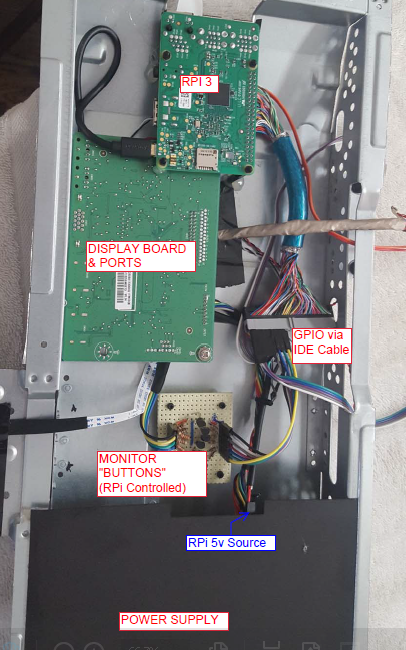
      I’ve actually used this method on one of my Mirrors before – the driver board for my 27" monitor actually runs the controls on 5VDC and has a 5A polyfuse – I embedded the PI completely inside the back of the monitor housing and just tapped into this power supply to power it.

      (one of these days I’ll get a chance to post the full build details)
      0_1523304101315_Capture.PNG

      Another method that I’ve used on a separate project is to buy a cigarette lighter USB charger and use that to convert the 12VDC to the 5VDC for the Pi – something similar to one of these.

      posted in Hardware
      S
      shbatm
    • RE: Double power supply, different output, for RPI and screen controller

      Find a good 12VDC power supply that fits the needs of your display and then look on eBay or AliExpress for a 5V Buck Converter similar to one of these below – this would allow you to drop the 12V down to 5V for the RPi:

      AliExpress USB Style

      AliExpress Soldier Type

      posted in Hardware
      S
      shbatm
    • RE: [MMM-RTSPStream] - Video Streaming from Live Feeds & Security Cameras

      @nagaculun You’ll have to set the width and height of the stream manually because and OMXPlayer should resize the video for you. It’s a bit trial and error, but you should be able to get it lined up very close.

      Refer to the README and the moduleOffset module setting and width, height, and absPosition stream settings.

      Let me know if you have issues getting it to work.

      posted in Utilities
      S
      shbatm
    • RE: Could use some assistance setting up MMM-Carousel w/ Navigation and understanding the architecture

      @beeficecream - Welcome to the project and I’m glad you got it working. I just wanted to leave this here for anyone who needs it in the future:

      To use multiple instances of the same module with Carousel w/ Navigation:
      This example allows for 2 different style clocks on different slides:

      In the OTHER module’s config, add a CarouselId variable:

      {
              module: "clock",
              position: "middle_center",
              config: {
                  carouselId: "1",
                  displayType: "both"
              }
          }, {
              module: "clock",
              position: "top_left",
              config: {
                  carouselId: "2",
              }
          },
      

      In the MMM-Carousel config slides section, instead of just "clock", use {name:"clock", carouselId:"1"}

          ...
          mode: 'slides',
          slides: [
              [   {name:'clock', carouselId: "1"} ],
              [   {name:'clock', carouselId: "2"}, 'calendar', 'MMM-WunderGround', 'newsfeed' ] ]
          ...
      

      You can also use the same object format to move a module around for different slides or change the sizes. See https://github.com/shbatm/MMM-Carousel#example---advanced-slides-carousel for details.

      posted in Troubleshooting
      S
      shbatm
    • RE: [MMM-RTSPStream] - Video Streaming from Live Feeds & Security Cameras

      @Vauxdvihl – when you open the stream in your browser, do you need any special plugins to view it?

      Without digging too deep, it looks like this is a MJPEG stream, which can be viewed without any special software in the browser. For these kind of streams it’s easiest to just use the MMM-iframe module to show the stream.

      If you don’t want to show the controls the page generates, you can find the link directly to the camera image by viewing the source of the camera stream page.

      posted in Utilities
      S
      shbatm
    • RE: [MMM-OnScreenMenu] Simple On-Screen Menu for controlling the MagicMirror²

      @M1K3rSz – Glad you tried it! Sorry you ran into some trouble.

      To get the monitor back on:

      1. Via ssh: tvservice --preferred && sudo chvt 6 && sudo chvt 7
        • Sets the HDMI output back on to preferred settings, then changes the virtual terminal off of then back on to the desktop channel. This is the same command that most modules that turn on the monitor uses.
      2. Via notification sent from another module, such as MMM-Remote-Control:
        • Notification: ‘ONSCREENMENU_PROCESS_ACTION’,
          Payload: { actionName:‘monitorOn’ }

      The Monitor Off menu item is best used when you have another module that wakes up the mirror (PIR sensor, button, etc.).

      posted in Utilities
      S
      shbatm
    • RE: [MMM-OnScreenMenu] Simple On-Screen Menu for controlling the MagicMirror²

      New version posted with expanded options:

      Version 0.1.3

      • Added menu options for minimizing, toggle fullscreen mode, opening DevTools, stopping MM via PM2,
      • Added delayed menu items (e.g. call a function after a certain timeout–like to turn off the mirror after X seconds)
      • Added external control of the menu/functions from other modules via notifications–includes the ability to call any function the module knows how to handle, even if it’s not in the menu. This lets you use modules like MMM-Buttons or MMM-MPR121 to control the menu.

      See the full details of everything the menu can do on the GitHub README:

      [card:shbatm/MMM-OnScreenMenu]

      Remember to re-run npm install after updating:

      cd ~/MagicMirror/modules/MMM-OnScreenMenu
      git pull
      npm install
      
      posted in Utilities
      S
      shbatm
    • RE: MMM-RTSPStream dosent work in my case

      @alverman – I’m the creator of the module and I wanted to apologize, I’ve been working on other projects and not following this forum very closely the past few months. I’m glad you got everything solved, I’m sorry I wasn’t able to assist.

      In the future, if you have any issues with one of the modules I created, please tag me (@shbatm) or open an issue on the module’s Issue page at github.com so I get a notification and will be happy to assist.

      posted in Troubleshooting
      S
      shbatm
    • RE: [octomirror-module] Monitor & Control an OctoPrint 3D Printer Server

      @barnosch - it’s on the To-do list.

      For now, try setting the height/width in your custom.css file with something like:

      div.octomirror-module img {
          height: 150px;
          width: 150px;
      }
      

      EDIT: Removed the > in the selector line above.

      posted in Productivity
      S
      shbatm
    • RE: [octomirror-module] Monitor & Control an OctoPrint 3D Printer Server

      @barnosch: Made some more changes:

      • Implemented MM Translations and added English and what I could of German.
      • Added most recent nozzle & bed target & actual temperatures – can be enabled/disabled with showTemps config option.
      • Added option to hide the file, time, and temps when the printer is offline – can be enable/disabled with showDetailsWhenOffline option.

      You’ll have to move your lines around again after you update it–for now, anyway–I’m adding “Add Stylesheet and auto format for width” to my to-do list for the module, as well as hide camera window when not printing.

      posted in Productivity
      S
      shbatm
    • RE: [octomirror-module] Monitor & Control an OctoPrint 3D Printer Server

      @barnosch Yep! Done! Pull the updated version and add showStream: false to your config.

      Also FYI – right now I only include the information useful to me, but the module interacts with the full OctoPrint API, so if there’s something else you’d like to see, or want to customize how it’s displayed, please let me know!

      API Reference – http://docs.octoprint.org/en/master/api/push.html

      posted in Productivity
      S
      shbatm
    • [octomirror-module] Monitor & Control an OctoPrint 3D Printer Server

      Description:

      Monitor & Control an OctoPrint 3D Printer Server. Originally created by @DongerZonnie, expanded & updated by @shbatm

      The module will allow you to:
      View a live feed of the raspicam stream
      Start and stop prints
      View G-Code viewer
      Manually control the printer
      Recieve live updates on printer status

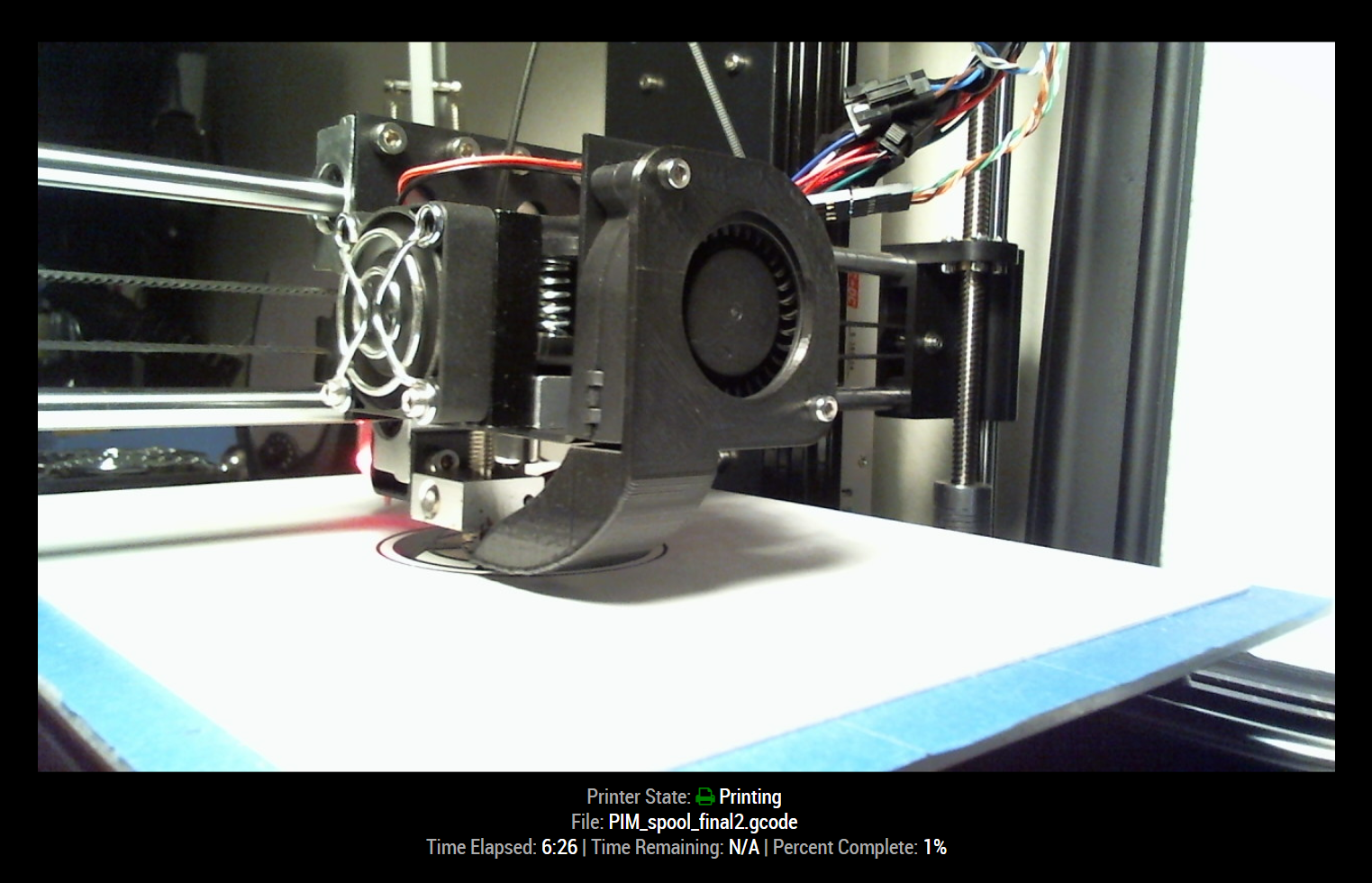
      Screenshots:

      Download:

      [card:shbatm/octomirror-module]


      Version 1.0.4

      • Implemented translations feature and added English & German
      • Added ability to show most recent temperatures
      • Added ability to hide additional details when the printer is offline.

      Version 1.0.3

      • Added options to disable camera feed and customize stream URL.

      Version 1.0.2

      • Refactored to use OctoPrint Client JS library and provide live updates via SockJS connection.
      posted in Productivity
      S
      shbatm
    • 1 / 1