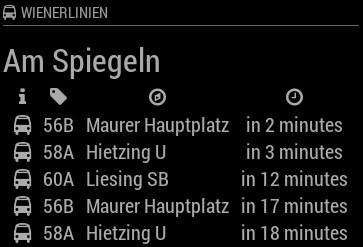
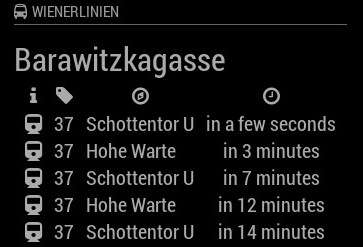
@spedja nice timing :) I received my API token this afternoon, will look into this the next days and hopefully can get around the metro problem
A New Chapter for MagicMirror: The Community Takes the Lead
Read the statement by Michael Teeuw here.
Read the statement by Michael Teeuw here.
 Offline
Posts
-
RE: MMM-WienerLinien
-
RE: MMM-Fuel
After @ostfilinchen reported an issue with missing leading zeros for some postcodes, I contacted the API provider but didn’t receive any response. So i fixed it myself.
[card:fewieden/MMM-Fuel]
-
RE: Add module reference to alerts
@MichMich In my oppinion it’s not a good idea to mess around with other modules variables. If someone has a better approach just let me now, but it would work without changes to the core at the moment.
-
RE: Add module reference to alerts
@MichMich z-Index didn’t work for me, but with the following code I could achieve what I was trying to do.
MM.getModules().enumerate((module) => { if(module.name === 'alert'){ module.alerts["MMM-AlarmClock"].ntf.addEventListener("click", ()=>{this.resetAlarmClock();}); } }); -
Module will not render
Hey mates,
I just wanted to share my experience on this, it took me ages to fix it and drove me nuts.
Make sure you don't call updateDom in a function you're calling in the modules start method.Otherwise the core tries to update a module which is not even rendered and you will get a Black Screen.
-
Add module reference to alerts
Hey guys,
I recently worked on
[card:fewieden/MMM-AlarmClock]
and stumbled on a problem. I want to support normal devices and touch screen devices. Non touch screen is working fine already,
but there’s a problem for the touch screen mode. I added a button but when I fire an alert from the default alert module, there will be an overlay, so my button will not be clickable. To get around this, I thought about adding a reference to an alert, so I can query the alert of my module and give it a click event.My thought was to change this https://github.com/MichMich/MagicMirror/blob/master/modules/default/alert/alert.js#L91 to
message += "<span data-sender='" + sender.name + "' class='thin' style='font-size:22px;line-height: 30px;'>" + params.message + "</span>";What are your thoughts on this?
-
RE: Trafficmaps
@wscheer Quote from the readme
Whenever your module need to be updated, call the updateDom(speed) method. It requests the MagicMirror core to update it's dom object. If you define the speed, the content update will be animated, but only if the content will realy change.So i guess your html looks all the time the same, so there is probably no real update of the dom. I suggest to try to add an timestamp somewhere and see if it gets updated then -
RE: Unable to sendSocketNotification from node_helper to Module
@jc21 If I’m right you must start the connection from the module, but can’t test it right now
MMM-IFTTT.js
start: function() {
        this.sendSocketNotification('START', {message: 'start connection'});
},

socketNotificationReceived: function(notification, payload) {
        if (notification === 'MSG'){
            Log.info(payload);
        }
    },
node_helper.js
const NodeHelper = require('node_helper'); module.exports = NodeHelper.create({ start: function() { console.log('[IFTTT] Starting node_helper'); }, socketNotificationReceived: function(notification, payload) { if (notification === 'START'){ setTimeout(() => { this.sendSocketNotification('MSG', {message: 'test'}); }, 10000); } }, }); -
RE: Unable to sendSocketNotification from node_helper to Module
@jc21 did you try the common way?
this.sendSocketNotification('MSG', 'Hello World');and in the module itself
socketNotificationReceived: function(notification, payload){ if(notification === 'MSG'){ Log.info(payload); } } -
RE: City of Vienna - Public Transport Realtime Monitor
@cpramhofer Thanks for the offer, but I’m not located in Austria :D
-
RE: Debugging
@BenRoe quote from the readme
The Magic Mirror contains a convenience wrapper for logging. Currently, this logger is a simple proxy to the original console.log methods. But it might get additional features in the future. The Loggers is currently only available in the core module file (not in the node_helper).so everything you have experinced is as it should beinstead of logging in the node_helper directly you could send the string, objects, etc. to your module and use the logger there to view it in the browsers console
-
RE: MMM-ip
based on @shashank’s request there is a new version, where you can define which network interface (wireless, ethernet or both) you want to display
WARNING: one config attribute changed it’s name for those who update
[card:fewieden/MMM-ip]
-
RE: NHL Module
@bobbob601 i will wait for the live service to return the original data and then I will see what suits the best to make it as similar as possible to the nfl one
-
RE: setTimeout called only once in node_helper.js
@bobbob601 a timeout is only fired once, what you want is an interval so replace setTimeout with setInterval
-
RE: Blank white display on local machine (pi)
there are already built tts and stt modules for magicmirror²
-
RE: MMM-WienerLinien
@spedja I experienced the different results as well. I don’t know why, but for every metro station I tried, I got no departureTimes at all, so I guess you can used it for bus and tram only. Maybe the metro has no departureTimes because they drive so often, therefore an API documentation would be nice