A New Chapter for MagicMirror: The Community Takes the Lead
Read the statement by Michael Teeuw here.
  • mmm assistant mk2

    112
    0 Votes
    112 Posts
    53k Views
    D
    @mcretu Hi . Lost in the Post. I think you refer to youtube not being displayed. If that is the case, as @Bugsounet keeps saying (he said it to me about this…), red the wiki. It’s all there. you need to change the config.js in config as follows: https://github.com/bugsounet/MMM-Assistant2Display/wiki/Configuration Assistant2Display need electron special configuration for web link displaying and Youtube functionality start of the config.js configuration file var config = { address: "localhost", electronOptions: { webPreferences: { webviewTag: true } }, port: 8080, ... address should be localhost for playing YouTube video electronOptions is need if you want to display the link and Cast module
  • Cannot run "MMM-Face-Reco-DNN" with "MMM-GoogleAssistant"

    1
    0 Votes
    1 Posts
    333 Views
    K
    Hello everyone First of all Thank you so much for this amazing system, it is amazing to see what beautiful things you can do with it, many thanks to all the developers. I’m new here so I apologize if the question is unclear or my English is not the best. The system works on RPI4 4GB When I ask a question the google assistant it’s responds very slowly, sometimes getting stuck and not understanding what I asked, but when I remove the MMM-Face-Reco-DNN from theconfig.js then google assistant works perfectly without any problems. i have the same problem with the older module MMM AssistantMk2 i can’t see any error when run npm run start dev Does anyone have the same problem? I am attaching logs that can help you help me, thank you very much in advance kobi pi@raspberrypi:~/MagicMirror $ npm run start dev > magicmirror@2.11.0 start /home/pi/MagicMirror > DISPLAY="${DISPLAY:=:0}" ./node_modules/.bin/electron js/electron.js "dev" [2020-06-06 01:45:36.510] [LOG] Starting MagicMirror: v2.11.0 [2020-06-06 01:45:36.517] [LOG] Loading config ... [2020-06-06 01:45:36.522] [LOG] Loading module helpers ... [2020-06-06 01:45:36.527] [LOG] No helper found for module: alert. [2020-06-06 01:45:36.568] [LOG] Initializing new module helper ... [2020-06-06 01:45:36.569] [LOG] Module helper loaded: updatenotification [2020-06-06 01:45:36.570] [LOG] No helper found for module: clock. [2020-06-06 01:45:36.993] [LOG] Initializing new module helper ... [2020-06-06 01:45:36.994] [LOG] Module helper loaded: calendar [2020-06-06 01:45:36.995] [LOG] No helper found for module: compliments. [2020-06-06 01:45:37.024] [LOG] Initializing new module helper ... [2020-06-06 01:45:37.025] [LOG] Module helper loaded: newsfeed [2020-06-06 01:45:38.150] [LOG] Initializing new module helper ... [2020-06-06 01:45:38.151] [LOG] Module helper loaded: MMM-GoogleAssistant [2020-06-06 01:45:38.151] [LOG] All module helpers loaded. [2020-06-06 01:45:38.284] [LOG] Starting server on port 8080 ... [2020-06-06 01:45:38.300] [LOG] Server started ... [2020-06-06 01:45:38.301] [LOG] Connecting socket for: updatenotification [2020-06-06 01:45:38.302] [LOG] Connecting socket for: calendar [2020-06-06 01:45:38.303] [LOG] Starting node helper for: calendar [2020-06-06 01:45:38.303] [LOG] Connecting socket for: newsfeed [2020-06-06 01:45:38.304] [LOG] Starting module: newsfeed [2020-06-06 01:45:38.304] [LOG] Connecting socket for: MMM-GoogleAssistant [2020-06-06 01:45:38.305] [LOG] Sockets connected & modules started ... [2020-06-06 01:45:38.405] [LOG] Launching application. [2020-06-06 01:45:43.204] [LOG] Create new calendar fetcher for url: http://www.calendarlabs.com/ical-calendar/ics/76/US_Holidays.ics - Interval: 300000 [2020-06-06 01:45:43.268] [LOG] Create new news fetcher for url: http://www.nytimes.com/services/xml/rss/nyt/HomePage.xml - Interval: 300000 [2020-06-06 01:45:43.426] [LOG] [ASSISTANT] MMM-GoogleAssistant Version: 2.0.0 [2020-06-06 01:45:43.430] [LOG] [SNOWBOY] Model selected: jarvis [2020-06-06 01:45:43.435] [LOG] [SNOWBOY] snowboy v1.5.0 Initialized... [2020-06-06 01:45:43.450] [LOG] [ASSISTANT] RECIPE_LOADED: with-MMM-TelegramBot.js [2020-06-06 01:45:43.452] [LOG] [ASSISTANT] Google Assistant is initialized. [2020-06-06 01:47:08.720] [LOG] Shutting down server... [2020-06-06 01:47:08.721] [LOG] Stopping module helper: updatenotification [2020-06-06 01:47:08.722] [LOG] Stopping module helper: calendar [2020-06-06 01:47:08.722] [LOG] Stopping module helper: newsfeed [2020-06-06 01:47:08.723] [LOG] Stopping module helper: MMM-GoogleAssistant part of my config.js { module: "MMM-GoogleAssistant", position: "fullscreen_above", classes: 'default everyone', config: { debug: false, assistantConfig: { lang: "en-US", projectId: "", // Required to use gaction. modelId: "", // (OPTIONAL for gaction) instanceId: "", // (OPTIONAL for gaction) latitude: 51.508530, longitude: -0.076132, }, responseConfig: { useScreenOutput: true, screenOutputCSS: "screen_output.css", screenOutputTimer: 5000, activateDelay: 250, useAudioOutput: true, useChime: true, newChime: false // !!!DEV!!! }, micConfig: { // put there configuration generated by auto-installer recorder: "arecord", device: "plughw:3", }, customActionConfig: { autoMakeAction: false, autoUpdateAction: false, // in RPI, gaction CLI might have some trouble.(current version should be 2.2.4, but for linux-arm, Google haven't updated) so leave this as false in RPI. I don't know it is solved or not. actionLocale: "en-US", // At this moment, multi-languages are not supported, sorry. Someday I'll work. }, snowboy: { audioGain: 2.0, Frontend: true, Model: "jarvis", Sensitivity: null }, snowboy: { audioGain: 2.0, Frontend: true, Model: "jarvis", Sensitivity: null }, A2DServer: { useA2D: false, stopCommand: "stop" }, recipes: [ "with-MMM-TelegramBot.js" ] } }, { module: 'MMM-Face-Reco-DNN', classes: 'default everyone', config: { // Logout 15 seconds after user was not detected any more // If they are detected within this period, the delay will start again logoutDelay: 15000, // How often the recognition starts in milliseconds // With a Raspberry Pi 3+ it works well every 2 seconds checkInterval: 2000, // Module set used for strangers or if no user is detected defaultClass: 'default', // Set of modules which should be shown for every recognised user everyoneClass: 'everyone', // XML to recognize with haarcascade cascade: 'modules/MMM-Face-Reco-DNN/tools/haarcascade_frontalface_default.xml', // Pre-encoded pickle with the faces encodings: 'modules/MMM-Face-Reco-DNN/tools/encodings.pickle', // Use Raspberry Pi camera or another type // 1 = RasPi camera, 0 = other camera usePiCamera: 0, // Rotate camera rotateCamera: 0, // Method of facial recognition // dnn = deep neural network, haar = haarcascade method: 'dnn', // Which face detection model to use // "hog" is less accurate but faster on CPUs // "cnn" is a more accurate deep-learning model which is GPU/CUDA accelerated detectionMethod: 'hog', // How long in milliseconds modules take to hide and show animationSpeed: 0, // Path to Python to run the face recognition // null or '' means default path pythonPath: null, // Should a welcome message be shown using the MagicMirror alerts module? welcomeMessage: true, // Capture new pictures of recognized people, if unknown we save it in folder "unknown" // So you can extend your dataset and retrain it afterwards for better recognitions extendDataset: false, // If extendDataset is true, you need to set the full path of the dataset dataset: 'modules/MMM-Face-Reco-DNN/dataset/' } }

  • Magic Mirror flashing black screen after a power failure

    5
    0 Votes
    5 Posts
    860 Views
    BKeyportB
    um. That’s a DNS error. Basically “Try again later” – Might wanna try a new OS install on a new card, and if that don’t work, you’ve got some slightly burned hardware.
  • Calendars and MMM-CalendarExt2 public google calendars

    1
    1
    0 Votes
    1 Posts
    394 Views
    A
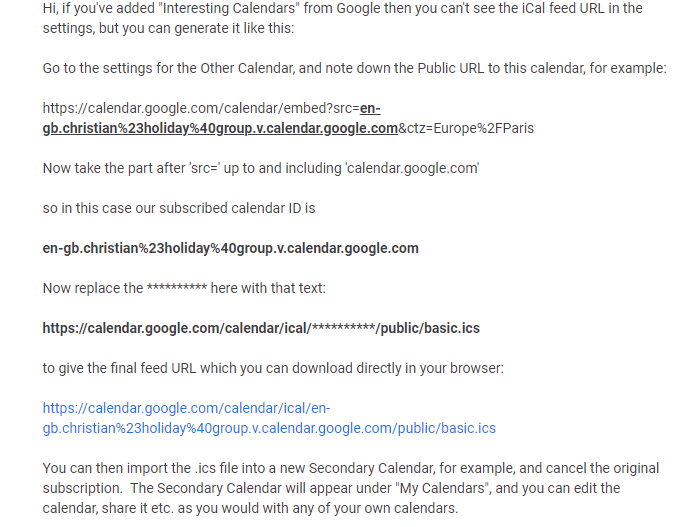
    Has anyone had any luck adding publicly available google calendars to either of the modules I have listed in the title? I’ve tried using this guy’s advice on how to create an .ics from the “calendar ID” available from google calendars but i’m getting errors. [image: 1591327745163-annotation-2020-06-04-212851.png] Any help would be appreciated. Thanks!
  • Wallberry Clock - Timezone issue

    7
    0 Votes
    7 Posts
    1k Views
    D
    No no all good. It worked like a charm! Many thanks!
  • 0 Votes
    6 Posts
    1k Views
    S
    looks like you didn’t run the npm install step of the module install I’d suggest getting the new module MMM-GoogleAssistant that came out just this week. it replaces both old modules and it much easier to install. https://forum.magicmirror.builders/topic/12324/mmm-googleassistant?_=1591203920585
  • MMM-GrafanaChart - scrolling issue

    1
    0 Votes
    1 Posts
    313 Views
    evroomE
    Hi, I have position: 'fullscreen_above', but I do not see the complete dashboard. I can scroll the dashboard up and down, but I would like to see the complete dashboard on my MM display. Is this a Grafana issue, or a MMM-GrafanaChart issue ? With kind regards, @evroom See GitHub issue: https://github.com/SvenSommer/MMM-GrafanaChart/issues/8
  • Can't get any google distance module running

    2
    0 Votes
    2 Posts
    414 Views
    S
    Ok, scratch that, Mycommute seems to be working again ( l literally just tried re-enabling it, I have no idea what made it work again). Kudos :) I’m not sure how to close a topic, but please consider this closed.
  • Sorry. One more...

    2
    0 Votes
    2 Posts
    393 Views
    S
    @blacter said in Sorry. One more...: /home/pi/package.json have to be IN the MagicMirror folder before u can do anything with npm commands /home/pi/package.json if u meant to use pm2, then it would have been ok anywhere pm2 restart MagicMirror
  • What does this mean? Clone this repo...

    3
    0 Votes
    3 Posts
    699 Views
    B
    Thanks. Appreciate the help.
  • Error on loading script (new module not working)

    3
    0 Votes
    3 Posts
    265 Views
    B
    @sdetweil Thank you! That one is edited for the forum actually, but anyway, you solved my problem ;)
  • Need help!

    4
    0 Votes
    4 Posts
    678 Views
    S
    i don’t understand that these scripts can be used to automate installation of release upgrades. raspberry.sh is the installation script, upgraded from the core package to execute the install script, cut/paste this line into the terminal window on your device (I can't say PI, cause it works in a lot of other places too) bash -c “$(curl -sL https://raw.githubusercontent.com/sdetweil/MagicMirror_scripts/master/raspberry.sh)”
  • This topic is deleted!

    1
    0 Votes
    1 Posts
    1 Views
  • How to add mk2 assistant to the magic mirror

    11
    0 Votes
    11 Posts
    3k Views
    D
    @Bugsounet said in How to add mk2 assistant to the magic mirror: Unfortunately MMM-AssistantMk2 is now dead … I can’t tell you more :( @sdetweil is aware of the problem I can tell you now, that a new project will start in a few days! @sdetweil: the news is very very good! @Bugsounet: With a little bit of coding Mk2 assistant it still working on my private mirror but I cant wait for your next move. Sounds promissing :-) :-)
  • MagicMirror shutting down automatically

    2
    0 Votes
    2 Posts
    522 Views
    S
    @HK so, I would look thru tall the modules and dependencies to try to find where it is used cd ~ find MagicMirror -name \*.js | xargs grep OutgoingMessage\._headers 2>/dev/null I find a bunch of modules using OutgoingMessage.setHeader
  • iCloud "Reminders ⚠️" issue - Sync?

    1
    1
    1 Votes
    1 Posts
    590 Views
    D
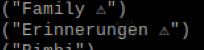
    Hi. Does anyone have issue with syncing the “Reminders” from iCloud? I can sync all calendars very good. New ones, old ones, delete and add etc. all ok. When I do discover I see the lists from Reminders. Can I sync them and can I show them also in the calendar app? I see the Reminders name has a sign behind the name while all calendars dont. [image: 1590836171209-bildschirmfoto-2020-05-30-um-12.55.43.png] If I copy paste its like this “Erinnerungen ⚠️” Erinnerungen is German for Reminders. I have added it to the vdirsync config like this item_types = ["VEVENT", "VTODO"] Anyone here who can help?
  • Only some modules freeze up at times

    6
    0 Votes
    6 Posts
    784 Views
    S
    @BurgerLoverMx there are all kinds of combinations that might freeze… some were written long ago, before many of the new node and javascript features to minimize cpu usage (promises and async) I have one module that has been thru all three lifetimes… over 4 years, some don’t handle errors well, (or at all) and some have conflicting requirements. and os and hardware levels matter too…
  • trouble to login in MM forum

    Solved
    8
    0 Votes
    8 Posts
    827 Views
    K
    Yes, works for me again as well. Thanks to all
  • white screen flash on startup

    4
    1 Votes
    4 Posts
    991 Views
    R
    @sdetweil said in white screen flash on startup: electronOptions:{backgroundColor:‘#00000001’}, Not working for me either :) But thank you for trying. Hopefully we will see a solution, my mirror is only on between certain times (with a Google Home routine and Sonoff switch) and the white bg is super annoying.
  • Youtube or streaming... impossible!

    youtube streaming videoplayer video
    8
    0 Votes
    8 Posts
    2k Views
    S
    @duxnobis changing size of the video window makes a big difference…course on a 4k screen, 800c600 is pretty small already