A New Chapter for MagicMirror: The Community Takes the Lead
Read the statement by Michael Teeuw here.
  • MMM-Profile

    8
    1 Votes
    8 Posts
    4k Views
    A
    @kurtern84 first of all thanks for this great module it given to my mirror another aspect and i enjoy it. But i have a problem when i use it after 20 or 25seconds all my modules bug i don’t know why so if you or any other person can help me it will help me
  • PDF Implementation

    10
    0 Votes
    10 Posts
    4k Views
    J
    @BD0G said in PDF Implementation: If others load one .pdf file to the google drive and then delete all other files in that directory well then the file extension would still be .pdf (right) ? So then one could script it using *.pdf (file that ends in .pdf) So whatever actions that were taken were performed upon a file that ended with .pdf The file name becomes inconsequential. Just grab all .pdf files (as there will only be one) , download them to a specific directory you create on a local system (ftp sounds like it may be a good option for this) and then use the convert action that @ember1205 speaks of within ImageMagick, upload back to Google Drive via ftp and then (damn! Google Drive will then rename it with another file ID and then the URL that is within the config.js that points to the url will be broken and not display -ugggggg) . I think I understand now. Here is a Google Chrome Add on that allows one to Overwrite the same file without changing the file name. It “may” be helpful? https://chrome.google.com/webstore/detail/drive-overwrite-file-repl/llanhaaigblafdecdihpppjaeekpddfl?hl=en-US It really sounds like you may have to delve into Google App Script to accomplish this. https://developers.google.com/apps-script If you have questions about using this scripting tool then I think there is support over on www.stackoverflow.com I am not a Google Script Coder so I cannot be of any help there. Thank you buddy. I still haven’t really found a way that works but the Chrome Addon did actually help me in another case as well. I’m now going to try to connect google drive with the Pi via rclone4pi and then somehow try to adapt the thoughts from @BD0G with creating a script that converts them into .jpeg and moves the images into a specific folder. (Happy for any help since I’m not a coder at all)
  • MMM-OpenhabFloorplan

    23
    4 Votes
    23 Posts
    29k Views
    paphkoP
    @teddy Sorry for the late reply, I didn’t check the forum for quite a while. But from your post, I don’t know how to help. It’s as if you say “my car is not working, what am I doing wrong?” If you want some help, please check logs for errors and post them here. @zdenek It should be possible to run openhab on the same RPi. I didn’t try it but I don’t see any reason why it should not work. You only have to change the port of one of them because both use 8080 by default.
  • Search module

    2
    0 Votes
    2 Posts
    568 Views
    FoziF
    @SARCux simply put following option into the clock module displayType: "both", // options: digital, analog, both
  • MMM-Xbox

    2
    2 Votes
    2 Posts
    999 Views
    ?
    Hi, After a very long time for debugging, my module is ready for use :) There is 2 Styles of display Default Mini It can detect on/off xbox with auto start/stop module It display : Name of the Game (or Application) Cover of the game (or Application) Achievement of the game Name of the Xbox Real Time Gaming It send notification: Status of the Xbox (on/off) Name of current the game/app It can receive notification: Turn on xbox Turn off xbox It work with TelegramBot ! I add command for turn on and turn off your Xbox Happy Games !
  • MMM-Assistantmk2 & MMM-Webradio

    help
    4
    0 Votes
    4 Posts
    1k Views
    L
    ::: Spoiler Text ::: @Sean Yes I use this module well: https://github.com/MunichStef/MMM_Webradio I made my code in the config.js as below. The assistantmk2 detects my sentence, it pauses, but nothing happens. /* Magic Mirror Config Sample * * By Michael Teeuw http://michaelteeuw.nl * MIT Licensed. * * For more information how you can configurate this file * See https://github.com/MichMich/MagicMirror#configuration * */ var config = { address: "localhost", // Address to listen on, can be: // - "localhost", "127.0.0.1", "::1" to listen on loopback interface // - another specific IPv4/6 to listen on a specific interface // - "", "0.0.0.0", "::" to listen on any interface // Default, when address config is left out, is "localhost" port: 8080, ipWhitelist: ["127.0.0.1", "::ffff:127.0.0.1", "::1"], // Set [] to allow all IP addresses // or add a specific IPv4 of 192.168.1.5 : // ["127.0.0.1", "::ffff:127.0.0.1", "::1", "::ffff:192.168.1.5"], // or IPv4 range of 192.168.3.0 --> 192.168.3.15 use CIDR format : // ["127.0.0.1", "::ffff:127.0.0.1", "::1", "::ffff:192.168.3.0/28"], language: "fr", timeFormat: 24, units: "metric", modules: [ { module: "compliments", position: "lower_third", config: { compliments: { anytime: [ "Bonjour", "comment vas-tu?" ], morning: [ "Bien dormi?", "Bonne journée!", "Bonjour!" ], evening: [ "Bonne soirée!", "Repose toi bien!", "Bonne nuit..." ] } } }, { module: "MMM_Webradio", header: "Webradio", position: "bottom_right", config: { startindex: 1, initialVolume: 50, streams: [ { text: "radio NRJ", url: "http://185.52.127.163/fr/30001/mp3_128.mp3?origine=fluxradios" }] } }, { module: "clock", position: "top_left", // This can be any of the regions. config: { displayType: "analog", secondsColor: "#ff0000"// The config property is optional. // See 'Configuration options' for more information. } }, { module: "MMM-LocalTemperature", position: "top_right", // Only add a position if you want this module to display the data header: "temperature de la piece", config: { sensorPin: 16, sendTemperature: "true", sendHumidity: "true", showTemperature: "true", showHumidity: "true", iconView: "true", updateInterval: 0.5, } }, { module: 'MMM-Screencast', position: 'bottom_right', // This position is for a hidden <div /> and not the screencast window config: { position: 'bottomRight', height: 300, width: 500, } }, { module: "MMM-DarkSkyForecast", header: "Weather", position: "top_right", classes: "default everyone", disabled: false, config: { apikey: ", latitude: "", longitude: ", iconset: "4c", concise: false, language: "fr", label_timeFormat: "k[h]", label_days: ["Dim", "Lun", "Mar", "Mer", "Jeu", "Ven", "Sam"], forecastLayout: "table" } }, { module: "MMM-Hotword", config: { chimeOnFinish: null, mic: { recordProgram: "arecord", device: "plughw:1" }, models: [ { hotwords: "computer", file: "computer.umdl", sensitivity: "0.5", }, ], commands: { "computer": { notificationExec: { notification: "ASSISTANT_ACTIVATE", payload: (detected, afterRecord) => { return {profile:"default"} } }, restart:false, afterRecordLimit:0 } } } }, { module: "MMM-AssistantMk2", position: "top_right", config: { deviceLocation: { coordinates: { // set the latitude and longitude of the device to get localized information like weather or time. (ref. mygeoposition.com) latitude: longitude: }, }, record: { recordProgram : "arecord", device : "plughw:1", }, transcriptionHook: { "START_RADIO" : { pattern : "play radio", command: "RADIO_ONOFF" }, "STOP_RADIO" : { pattern : "stop radio", command: "RADIO_ONOFF" }, }, command: { "START_RADIO": { notificationExec: { notification: "WEBRADIO_ONOFF", } }, "STOP_RADIO": { notificationExec: { notification: "WEBRADIO_ONOFF" } }, "SHOW_ALL_MODULES": { pattern: "show all", command: "SHOWMODULES" }, "SCREEN_ON": { pattern: "allume l'écran", command: "SCREENON" }, "SCREEN_OFF": { pattern: "éteins l'écran", command: "SCREENOFF" }, "REBOOT": { pattern: "redémarre", command: "REBOOT" }, "SHUTDOWN": { pattern: "éteins le miroir", command: "SHUTDOWN" } }, notifications: { ASSISTANT_ACTIVATED: "HOTWORD_PAUSE", ASSISTANT_DEACTIVATED: "HOTWORD_RESUME", SAY_TEXT: "ASSISTANT_SAY", DEFAULT_HOOK_NOTIFICATION: "ASSISTANT_HOOK", WEBRADIO_ONOFF: "WEBRADIO_ONOFF", }, screenDuration: 3000, pauseOnYoutube: false, youtubePlayQuality: "small", useWelcomeMessage: "", profiles: { "default" : { lang: "fr-FR" } }, } }, ] }; /*************** DO NOT EDIT THE LINE BELOW ***************/ if (typeof module !== "undefined") {module.exports = config;} Do I have to create a recipe.js in the folder MMM-AssistantMk2 / recipes?

  • MMM-AirParif

    1
    1 Votes
    1 Posts
    429 Views
    ?
    J’ai créé un module pour afficher la pollution en île-de-france j’utilise l’api de AirParif afin d’avoir la localisation de votre ville. Ce module affiche les ville voulu, la qualité de l’air, ainsi que les polluants [image: screenshoot.jpg] [card:bugsounet/MMM-AirParif]
  • MMM-CalendarExtMinimonth

    13
    1 Votes
    13 Posts
    4k Views
    BKeyportB
    For those who run across this and want to do it yourself: @Sean said in MMM-CalendarExtMinimonth: @mrdenmark I think multi-instances are possible, but all the instances will display same result unless you modify the source of each instance. This is correct. I’ve got it completely solved. Instructions are written for Raspberry Pi. Install the module once using original directions. Change to the modules home directory: cd ~/MagicMirror/modules Copy the module from it’s install directory to a new directory, so you have multiple copies (I used MMM-CalendarExtMinimonth2): cp -r MMM-CalendarExtMinimonth MMM-CalendarExtMinimonth2 Change to new directory: cd MMM-CalendarExtMinimonth2 Rename files MMM-CalendarExtMinimonth.css and MMM-CalendarExtMinimonth.js to new directory name. mv MMM-CalendarExtMinimonth.css MMM-CalendarExtMinimonth2.css mv MMM-CalendarExtMinimonth.js MMM-CalendarExtMinimonth2.js 5. Modify the following lines - // and everything after it is my note: ```js dom.id = "CXMM" // Change "CXMM" to another id, I used CXMM2 colors.id = "CXMM_COLOR_TRICK" // Change CXMM to same as dom.id var trick = document.getElementById("CXMM_COLOR_TRICK") // Change CXMM again Module.register("MMM-CalendarExtMinimonth", { // Change MMM-CalendarExtMinimonth to name of directory return ["MMM-CalendarExtMinimonth.css"] // change to name of CSS file. Change every instance of ‘moment()’ to ‘moment().add(1, “month”)’ in the file except for the two “Today” calls: Example: // Change var startCalDate = moment().locale(locale).startOf('month').startOf('week') var endCalDate = moment().locale(locale).endOf('month').endOf('week') // To: var startCalDate = moment().add(1, "month").locale(locale).startOf('month').startOf('week') var endCalDate = moment().add(1, "month").locale(locale).endOf('month').endOf('week') ```js // DO NOT CHANGE THESE // var startToday (If today is the 15th, it'll mark the 15th of next month as today if it's changed) // var endToday (If today is the 15th, it'll mark the 15th of next month as today if it's changed) // moment. (No "()") - Other function, not using moment library // moment(anything) - special function In the renamed CSS file change all instances of CXMM to new dom.id name - If you don’t do this, you’ll get a string of numbers up the side. In your config.js file - call it as a separate module: { module: "MMM-CalendarExtMinimonth2", position: "bottom_right", refreshInterval: 60*2.5*1000, }, { module: "MMM-CalendarExtMinimonth", position: "bottom_right", refreshInterval: 60*2.5*1000, }, Make other changes to CSS as for default instructions. Enjoy! [image: 1574317442375-capture.png]
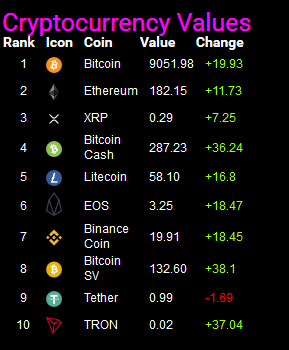
  • MMM-CoinRanking

    4
    1
    2 Votes
    4 Posts
    1k Views
    Mykle1M
    @cowboysdude Your modules are annoyingly pleasant to look at. :-)
  • MMM-HomeStatus

    iot homestatus
    1
    0 Votes
    1 Posts
    1k Views
    ?
    Hi, I made a module to display status of all connected thing in my home. You can scan 7 modules. MagicHome , Freebox V6 (French ISP), Freebox Crystal (French ISP), Philips TV, PC, Xbox and Internet MagicHome: return color and state TV: return state and current source PC: return state and NetBios name Internet: return ping to web Freebox: return state and display current rate adsl synchronization Xbox: return state and XBox Game/App Screenshot [image: screen.jpg] You can display more than one device in MagicHome, TV, PC and Xbox modules [card:bugsounet/MMM-HomeStatus]
  • MMM-MyStudyLife

    7
    2 Votes
    7 Posts
    2k Views
    Mykle1M
    @ethanpartida said in MMM-MyStudyLife: @Mykle1 Thanks for the good words and suggestion! :thumbsup:
  • This topic is deleted!

    1
    0 Votes
    1 Posts
    4 Views
  • This topic is deleted!

    1
    0 Votes
    1 Posts
    1 Views
  • MMM-Smartthings

    4
    1 Votes
    4 Posts
    3k Views
    buzzkcB
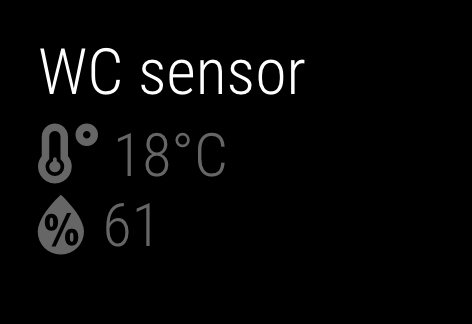
    I’ve added the temperature icons as well as a couple of config options for low and high temps, tempLowValue & tempHighValue. They default to 65 & 80, so you’ll want to set them to your celsius values. Icons will be green for between low and high (normal), blue when low, and red when high. If you’ve already installed, besides adding the two config options you just need to change to the ~/MagicMirror/modules/MMM-Smartthings folder and do a git pull No need to run npm install as the dependencies haven’t changed.
  • MM-DHTSensor (Temperature and Humidity)

    1
    1
    1 Votes
    1 Posts
    638 Views
    D
    Temperature and Humidity sensor plugin for the DHT11/DHT22 sensors [image: 1570125513283-screenshot-2019-10-03-at-18.56.46.png] [card:doddi/MM-DHTSensor]
  • 0 Votes
    2 Posts
    1k Views
    brobergB
    @D34n08713 then you probably have a broken config file. pleas post your config file, it’s probably too many or too few brackets somewhere.
  • Volume control

    4
    0 Votes
    4 Posts
    1k Views
    S
    Last time I bug you with that I promise.:smiling_face_with_halo: I fixed it that way case this.config.notifications.VOLUME_DOWN: var vol = parseInt(this.currentVolume) - curUpDownScale if (vol < 0) vol = 0 this.sendSocketNotification(this.config.notifications.VOLUME_SET, vol) break case this.config.notifications.VOLUME_UP: var vol = parseInt(this.currentVolume) + curUpDownScale if (vol > 100) vol = 100 this.sendSocketNotification(this.config.notifications.VOLUME_SET, vol) break By adding the parseInt to make sure that it’s an integer. All working fine now!! Thank again, really like your module!
  • Timezones incorrect display

    1
    0 Votes
    1 Posts
    463 Views
    I
    Re: MMM-CalendarWeek All, terrific module. Have been using it for months and it is amazing. Thanks. I have multiple calendars and ICS feeds and they all work well. The other day I noticed a noon appointment was showing as 9:00 am. It is a feed from O365. I checked all settings I can think of with no result. It was an invite created by our west coast team. Original time on their end is 9:00 am and all my calendars change to noon based on my local timezone of EST. Is there a way to show the correct timezone for me? Thanks Don
  • MagicMirror on Mac with iSight camera

    gestures camera mac
    1
    0 Votes
    1 Posts
    1k Views
    rafaelcotaR
    Hi, I just installed MM in an old Mac (mid 2007 with El Capitan 10.11.6) and is working just fine, but I want to control some modules with gestures using the iSight camera already in the Mac. Is there any module that can do it? I’m using the MMM-GroveGestures in another MM with a Pi. Thank you in advanced.
  • MMM-Hue

    hue home automation
    25
    0 Votes
    25 Posts
    25k Views
    D
    Not a fork but hue lights https://github.com/michael5r/mmm-hue-lights