A New Chapter for MagicMirror: The Community Takes the Lead
Read the statement by Michael Teeuw here.
  • MMM-Bluelinky module still working?

    6
    0 Votes
    6 Posts
    1k Views
    J
    Hi, I have a question and perhaps someone could help me. I installed the module and get the “Loading …”, too. I have a Hyundai PHEV with working Bluelink App. Doesn´t it works with PHEV or what am I´m doing wrong? Regards Jose
  • MMM-BambuLabNotify - 3D printer notifications

    12
    1 Votes
    12 Posts
    6k Views
    T
    @LuckyDucker HEy, I wanted to connect my X1C with a PIN and the Bambulab doc says, X1C cannot connect via PIN. Will there be a future update for the X1C to connect it? This would be great since a lot of people bought this model. Thanks in advance!
  • MMM-Remote-Control

    27
    4
    0 Votes
    27 Posts
    333 Views
    S
    @KristjanESPERANTO maybe, if you never use sudo, but we use it very often
  • MMM-CalendarExt3

    689
    3 Votes
    689 Posts
    3m Views
    S
    @bicolorbore586 there is a fix for this in the next release.
  • MMM-Chores - Manage and keep track of your household Chores

    84
    5
    1 Votes
    84 Posts
    24k Views
    E
    I’ve done a lot of testing and submitted PR-220 . It turns out there are some really complicated date functions that worked—unless they didn’t (edge cases with creating a weekday only task, setting start date on a Weekend, etc). else if (recurring === "daily-weekdays") { // We ignore the d.setDate(+1) and just find the next valid weekday from today let testDate = new Date(); testDate.setDate(testDate.getDate() + 1); while (testDate.getDay() === 0 || testDate.getDay() === 6) { testDate.setDate(testDate.getDate() + 1); } // Force 'd' to be this specific date, bypassing module interference d.setTime(testDate.getTime()); } else if (recurring === "daily-weekends") { let testDate = new Date(); testDate.setDate(testDate.getDate() + 1); while (testDate.getDay() >= 1 && testDate.getDay() <= 5) { testDate.setDate(testDate.getDate() + 1); } d.setTime(testDate.getTime()); [image: 1766302755481-14991c0d-e8fa-4d9d-95c1-d87e58757d59-image.png] The logic is working (finally)- I wish I was better at this stuff, I’m a DevOps guy, so I’m lazy and not particularly talented at coding unless I can break thousands of servers with automation (then I’m a pro lol). I also went through and added the requisite language support for the 10 supported languages for the two new elements included in admin.html <div class="col-sm-auto"> <select id="taskRecurring" class="form-select"> <option value="">One time</option> <option value="daily">Daily</option> <option value="weekly">Weekly</option> <option value="daily-weekdays">Daily (Weekdays Only)</option> <option value="daily-weekends">Daily (Weekends Only)</option> <option value="monthly">Monthly</option> <option value="yearly">Yearly</option> <option value="every_X_days_2">Every 2 Days</option> <option value="every_X_days_3">Every 3 Days</option> <option value="every_X_weeks_2">Every 2 Weeks</option> <option value="every_X_weeks_3">Every 3 Weeks</option> <option value="first_monday_month">First Monday of Month</option> </select> </div> I’m testing a few .css changes to improve touchscreen support - you can see plenty of other .css issues I’ll nave to sort out, sreenshots from chrome of the MM page shows it’s not adjusting well to different browsers… [image: 1766303041939-9d065f9d-8c5e-4214-abd5-fdd57392da87-image.png] I also put together a mini-module to provide a placard showing the options in the ‘reward store’ - My kid is super goal oriented, so being able to take advantage of @pierregode 's awesome reward system is going to be a big win! I’m going to look further into making this interactive and set up some kind of email to us to indicate she’s redeemed her coins on a particular reward. The current MMM-ChoreRewards is super crude and rude - you can see plenty of other .css issues I’ll have to sort out. @sdetweil hopefully I’ve formatted this post better - thank you for the #mod help!
  • Home Assistant Sensor

    17
    0 Votes
    17 Posts
    374 Views
    S
    @ChrisKelley woohoo… great news… thanks for the feedback!!
  • MMM-DWD-WarnWeather - Wetterwarnungen

    2
    0 Votes
    2 Posts
    99 Views
    S
    @StefanL. The readme says region The link in the readme brings up an interactive map that you can zoom in on to select that area/region and get its name from the info display after selection
  • MMM-MarineWeather troubleshooting

    2
    0 Votes
    2 Posts
    118 Views
    R
    J’ai finalement trouvé le problème qui vient de Node.js (node-fetch) qui n’était pas installé sur ma version de Magic Mirror. Je l’ai donc installé dans le répertoire du module : /…/MMM-MarineWeather npm install node-fetch@2 -> Il faut installer la version 2 car la version 3 n’est pas compatible. puis redémarrer le Magic Mirror est le tour est joué.
  • MMM-FRITZ-Box-Callmonitor-py3 and MMM-Callmonitor-Current-Call

    51
    1
    0 Votes
    51 Posts
    12k Views
    J
    said in MMM-FRITZ-Box-Callmonitor-py3 and MMM-Callmonitor-Current-Call: I’m not sure if this is correct: In your config a username is missing. As far as I’m aware of you have to use a username/password combination - therefore I remember that I had to create a separate user for using the module. Well, until now I didn’t need more. Everything is working fine except the arrows and colours. But I will see if sth. is needed. That was the reason. Don`t know it shows the calls without a password but not the arrows. Now everything is working fine. Thanks a greets Jose
  • Added MMM-ModuleUpdateNotifier and MMM-AptUpdateNotifier

    10
    0 Votes
    10 Posts
    465 Views
    S
    @CrashTest I saw update for the doc It should automagically put up an update banner for all Modules in config.js if their git GitHub ( source repo) commit status changes It as also outputs messsges where npm start is logged as it scans the repository
  • MMM-Solarwatt, Anzeige von Live-Daten der Solarwatt PV-Anlage

    Solved
    1
    0 Votes
    1 Posts
    98 Views
    W
    📷 Screenshot (Platzhalter) ![alt text]https://github.com/wiiare/MMM-Solarwatt/blob/main/screenshots/solarblock.jpg?raw=true) ⚡ Features Anzeige von Live-Daten der Solarwatt PV-Anlage Batteriestatus inkl. Ladezustand und Lade-/Entladeleistung Tageswerte persistent in dailyData.json gespeichert Reset der Tageswerte automatisch um Mitternacht Intervallgesteuerte Updates, konfigurierbar Responsive Darstellung passend zu MagicMirror² 📦 Installation Wechsle ins modules Verzeichnis von MagicMirror: cd ~/MagicMirror/modules Repository klonen: git clone https://github.com/wiiare/MMM-Solarwatt.git Abhängigkeiten installieren: cd MMM-Solarwatt npm install (Optional) Leere dailyData.json erstellen (wird automatisch angelegt): touch dailyData.json ⚙️ Konfiguration Füge das Modul in config/config.js ein: { module: “MMM-Solarwatt”, position: “top_right”, config: { ip: “Deine_IP”, password: “”, batteryIp: “Deine_IP”, updateInterval: 30000 } } 📊 Anzeige 🔆 Solar Block Erzeugung (W) Verbrauch (W) Einspeisung (W) Netzbezug (W) 🔋 Batterie Block Ladezustand (%) Lade-/Entladeleistung (W) Visualisierung als Balken 📅 Tageswerte Block Kumulierte kWh für: - Produktion - Verbrauch - Einspeisung - Netzbezug ⚡ Hinweise Tageswerte starten nach MagicMirror-Neustart bei 0 kWh Werte werden automatisch kumuliert basierend auf dem Updateintervall dailyData.json wird automatisch im Modulordner angelegt und persistent gespeichert
  • Issues with Newsfeed module since 3 days

    8
    0 Votes
    8 Posts
    401 Views
    R
    @chris1971 Your welcome. It felt good to be able offer some help instead of always asking for it. Good luck finding your problem.
  • MMM-CountEvents - ignoreBefore/ignoreAfter

    3
    0 Votes
    3 Posts
    184 Views
    S
    @benhmin no, that is different 15 minutes is 15 x 60 x 1000 1000 ms/second 60 seconds/minute
  • MMM-Multimonth Size

    3
    0 Votes
    3 Posts
    343 Views
    BKeyportB
    @bill63 The entire visual appearance is controlled by CSS, max-width in conjunction with the regions is how it would be handled. Please review the MMM-Multimonth.css file, copy over what you need into the custom.css master file, and change to your needs. CSS tutorials are available if you’re not comfortable with it. Even though the project is effectively mothballed due to my time constraints, there is another maintainer on the project who may or may not update the project, so please don’t modify the project files directly. if you have any questions, feel free to ask, I’m still kinda active on here, as well as our resident experts are always lurking. – Brendan (author)
  • [MMM-Skolmaten] Shows school lunch menus in Sweden from skolmaten.se

    19
    3 Votes
    19 Posts
    11k Views
    B
    @retroflex I´ve got some problems with the module. It just says loading. Tried some of the things posted in this thread but could not get it to work. Any ideas what to do? Svenska funkar utmärkt då jag antar att du är svensk som skapat denna :D
  • MMM-AmbientWeather Module for personal weather stations

    4
    2
    2 Votes
    4 Posts
    554 Views
    plainbrokeP
    @hearter Does it cost to use the api? Do I need any hardware to attach to the Pi or does it pull the information from that website.?
  • MMM-Emby

    4
    0 Votes
    4 Posts
    2k Views
    B
    Does it work for Jellyfin (Emby fork) aswell ?
  • Issues with MMM-Screen-Powersave-Notification

    12
    0 Votes
    12 Posts
    977 Views
    R
    @schlomm ## I just thoght of uploading the Summary of Attempts - All Failed. It is really getting frustrating. My Monitor was working perfectly well the desired rotation and resolution 1080x1960, and now is stuck at 1024x768. config.txt modifications:** Custom hdmi_timings for 1920x1080 Various hdmi_mode settings (82, 87) hdmi_ignore_edid=0xa5000080 Different boost levels and drive settings Result: Monitor only shows up to 1024x768 max cmdline.txt kernel parameters:** video=HDMI-A-1:1920x1080@60D Various video= parameter combinations Result: No effect on available resolutions Custom EDID firmware:** Created multiple EDID files (256 bytes, 268 bytes, 285 bytes) Placed in /lib/firmware/edid/ and /boot/firmware/edid/ Used drm.edid_firmware=HDMI-A-1:edid/1920x1080.bin Rebuilt initramfs to include EDID early Result: Kernel loads file but rejects it as “Invalid firmware EDID” Wayland/X11 rotation scripts:** wlr-randr (Wayland) - can’t set non-existent 1920x1080 mode xrandr (X11) - output name issues Result: Can only work with available modes (max 1024x768) Core Problem: Acer HA270 monitor provides NO EDID data** to the Pi Bookworm OS + Labwc Wayland compositor won’t accept forced resolutions Same monitor worked with Pi 3B + Bullseye (older firmware stack) Raspberry Pi detects only: 1024x768, 800x600, 848x480, 640x480 Current Status: Stuck at 1024x768 rotated = 768x1024 instead of desired 1080x1920. Wonder if we the Rpi OS team is aware f this issue.
  • 4 Votes
    29 Posts
    27k Views
    N
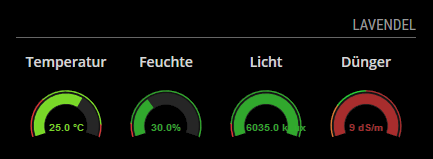
    @planet4 Hi - I have seen your temperature module, it looks nice, I am not a developer, Would you be kind enough to share your Temperature module with me…the one with the gauge - Thank you.
  • [MMM-CyberSecNews] AI-curated cybersecurity news from Hacker News

    1
    1
    2 Votes
    1 Posts
    220 Views
    R
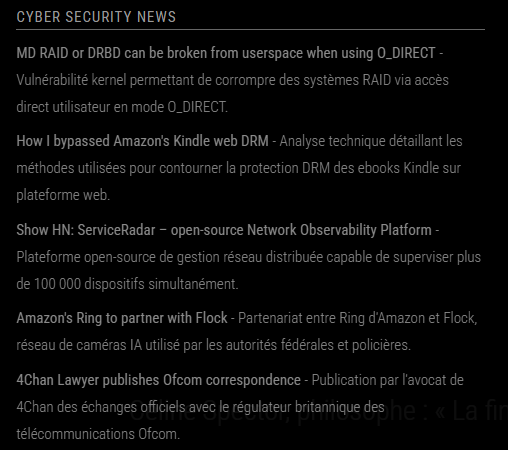
    Description: A MagicMirror module that displays AI-curated cybersecurity news from Hacker News, powered by Claude. Features Claude automatically selects the most relevant cybersecurity articles from Hacker News AI-generated concise summaries optimized for quick reading Prioritizes CVEs, breaches, malware analysis, tooling, GRC and architecture - Customizable Minimalist interface that matches default MagicMirror aesthetics Updates once per 24 hours (~$0.02/day with Claude API) Screenshots: [image: 1760805678352-2025-10-18_18-33.png] Note : The summaries are in french as I configured the module prompts to be in french. It is by default in english. Download: [https://github.com/Minerale-RDK/MMM-CyberSecNews] Version 1 Initial release Creates a summary of the most important cybersecurity news