A New Chapter for MagicMirror: The Community Takes the Lead
Read the statement by Michael Teeuw here.
  • MMM-PIR-Sensor execute .py script

    2
    0 Votes
    2 Posts
    448 Views
    B
    MMM-PIR-Sensor by paviro node_helper.js txt here
  • OpenCV-Raspberry-Pi-4-Package-for-Python/nischi / MMM-Face-Reco-DNN

    1
    0 Votes
    1 Posts
    352 Views
    A
    have tried to install this and I think I will then have to install the whole opencv 4.5 but there is also a similar but with opencv 4.1 and when I try it and will go with (pip3 install face_recognition) for I this error medldin in orange text. (Downloading https://www.piwheels.org/simple/face-recognition-models/face_recognition_models-0.3.0-py2.py3-none-any.whl (100.6MB) 100% | ████████████████████████████████ | 100.6MB 4.3kB / s Installing collected packages: face-recognition-models, face-recognition The scripts face_detection and face_recognition are installed in ‘/home/pi/.local/bin’ which is not on PATH. Consider adding this directory to PATH or, if you prefer to suppress this warning, use --no-warn-script-location. ) The scripts face_detection and face_recognition are installed in ‘/home/pi/.local/bin’ which is not on PATH. Consider adding this directory to PATH or, if you prefer to suppress this warning, use --no-warn-script-location. I follow all installation line by line but from my pc there is something wrong I do here during the installation.please Help. Sincerely, someone who has never used a raspberry pi before or has programmed anything. Roy Bråthe Norway
  • MMM_Webradio and MMM-Remote-Control won't work

    1
    0 Votes
    1 Posts
    211 Views
    D
    Hi Guys To be honest: This is my first day programming my PI with MagicMirror and I love it. At the moment my goal is that I can create a standalone solution for showing me Date/Time, Weather forecast and to provide me the possibility to control my webradio. I use a Pi3b with a 7" TouchDisplay. I was able to manage my WebRadio stations with MMM_Webradio and installed also MMM-Remote-Control. My Idea is to setup a small menu on the Bottom_Left to control MMM_Webradio. Therefore I configured my config.json with the following code: { module: 'MMM-Remote-Control', header: 'Steuerung', config: { // showModuleApiMenu: false, // apiKey: '*********', customCommand: { 'Webradio ON or OFF': 'WEBRADIO_ONOFF' } } } I can access my Pi with http://IP:8080/remote.html and I’m also able to show in the bottom_left corner the IP Address of this MagicMirror but my menu is not shown. I can see on my display my date/time, weatherforecast, my webradio initial screen but no MMM-Remote-Control menu. Can anyone tell me what I’m doing wrong? BR DBLAKE76
  • "No Signal" message when PIR sensor is triggered

    Moved
    16
    0 Votes
    16 Posts
    6k Views
    cruunnerrC
    Long time ago I visited this forum, so I don’t know if this will help. but the MMM-ModuleScheduler can hide all modules per notifications. So maybe you can trigger the module with your pir-module. Or take a look at point 6 in this tutorial https://forum.magicmirror.builders/topic/6291/howto-turn-on-off-your-monitor-time-based-pir-button-app/2
  • MMM-TomTomTrafficIncidents display issue on PI zero

    1
    0 Votes
    1 Posts
    285 Views
    S
    Hi, I am new to this. First thanks to the community, your work is fantastic. Just made my mirror, I will share some picts soon. For integration purpose I choose to run MagicMirror on a pi4 that stay with all my house IT systems. The mirror itself run a pi zero in a kiosk mode. So, for all my modules are working (weather, air pollution, time zone, news and train info). MMM-TomTomTrafficIncidents is working well if I display the dashboard on my computer with Chrome or even directly on the PI4. However, the PI zero doesn’t load the picture of the traffic. I can only see the TomTom copyright. I was wondering if someone could drive me to some direction? I don’t think it is coming from MagicMirror configuration or the module. Rather PI Zero and the Kiosk, web browser… thanks. Ju.
  • Black screen

    Moved
    7
    1
    0 Votes
    7 Posts
    1k Views
    TravelbaconT
    Nice work. I will also add in my documentation that Fake KMS must be set. :) Btw: Did you check the Pi settings on: https://github.com/MichMich/MagicMirror/wiki/Configuring-the-Raspberry-Pi ? There might be a change that you can have other options. @MichMich The FAQ seems to be outdated. In the newest Raspberry Pi OS (Raspbian) the whole raspi-config has changed for the driver settings. [image: 1604229155682-screenshot-from-2020-11-01-12-10-33.png]
  • MMM-Tasmota in combination with Sonoff basic r2 and mosquito as broker

    2
    0 Votes
    2 Posts
    420 Views
    J
    After some debugging in with npm start dev and checking the console this pointed me to an error in my config; showPowerStats is a global setting, not per device. After that it started at least to the point where it would subscribe to the mqtt topic, however I should have considered the obvious; my mqtt structure is not the default suggestion of tasmota, so the code does not correspond with that. Currently trying to adapt for that.
  • Magic Mirror

    Moved
    2
    0 Votes
    2 Posts
    384 Views
    S
    @Aquamannno as i said before, you have to add class names to EVERYTHING you want to display… so ‘default’ is the class when there is no user detected then if I want clock and weather when I am detected (sam) i would make classes :"default,sam" for both those modules… and sam ONLY on those two modules
  • Belgium calendar ics

    7
    0 Votes
    7 Posts
    1k Views
    R
    ok, i am newbie,…no coder ;)
  • Not able to exclude events from default calendar

    2
    0 Votes
    2 Posts
    422 Views
    S
    @theskyisthelimit hm… I used your excluded list (cut/paste) and ics and they were excluded… ( I had a second excluded: in the config.js cal entry and it won the 1st time)
  • Weather

    1
    0 Votes
    1 Posts
    259 Views
    H
    Hello, I wanted to know, with the compliments module, is it possible to use the times of the day, and at the same time the weather for the compliments? Or is it either one or the other? Whether in external file or not
  • MMM VolvoOnCall module problem setup

    1
    0 Votes
    1 Posts
    260 Views
    K
    Hi! Totaly new in this! I have sucsessfully installed magicmirror and added modules. I have a Volvo car but have problem to get thisone work Im following https://github.com/eouia/MMM-VolvoOnCall After typing username and password in voc.conf I´m trying to do the command “voc list” I then get the message "missing configuration: init() missing 2 required positional arguments: username and password Can somebody please help me? The username and password is correct . Is it possible to find the file in file manager and not only in terminal?
  • MMM-NetworkScanner (spitzlbergerj) Text Color State

    1
    0 Votes
    1 Posts
    280 Views
    S
    Re: MMM-NetworkScanner (spitzlbergerj) This was very helpful! I am experiencing another issue now that the columns are working. Although the icon colors are successfully changing with the color state, the name associated with the icon stays light gray (i.e., does not dynamically change with state). What line would I need to change in the .js file (or elsewhere) to enable this behavior? In other words, I want the color to behave the same as when devices are listed in a row, where both the icon and name change to the same color based on their state.
  • What is wrong with my url?

    Moved
    16
    1
    0 Votes
    16 Posts
    5k Views
    S
    @EllyJ go to github on the original project push the fork button top right. now u have a copy, and ‘could’ submit changes back to the author as ‘pull request’, pull from your repo back to his. now, rename your current module folder and then git clone your fork, and do npm install if the original asked for it now, copy the changed files from the renamed folder to the new one. if all is good then we can work on getting the changes pushed up to your fork
  • 0 Votes
    3 Posts
    919 Views
    RaspiManuR
    Dear @strawberry-3-141 , thank you very much for replying. At the moment I’m quite busy, too, but I will give this method a try as soon as possible :)
  • MMM-UKLiveBusStopInfo Bus Icons not working

    2
    1
    0 Votes
    2 Posts
    487 Views
    A
    This works for me: https://zoomadmin.com/HowToInstall/UbuntuPackage/fonts-font-awesome
  • Color Online - Offline

    Moved
    1
    0 Votes
    1 Posts
    210 Views
    C
    Re: MMM-NetworkScanner Hello, I still cannot get color if online or not my config: module: “MMM-NetworkScanner”, position: “top_right”, header: “Geräte im Netzwerk”, config: { devices: [ { ipAddress: “192.168.1.109”, name: “Carmine Phone”, icon: “android”, colorStateOnline: “#00ff00”, colorStateOffline: “#ff0000”, }, { ipAddress: “192.168.1.39”, name: “Temperature”, icon: “temperature-low”, colorStateOnline: "#00ff00, colorStateOffline: “#ff0000”, }, ], sort: false, showUnknown: false, showDeviceColums: true, coloredState: true, } } in MMM-NeetworkScanner.css : .MMM-NetworkScanner .device { text-align: left; } .MMM-NetworkScanner .device i { padding-left: 0; padding-right: 10px; } .MMM-NetworkScanner .date { padding-left: 30px; text-align: right; } .MMM-NetworkScanner table tr.dimmed td i { color: #ff0000; } .MMM-NetworkScanner table tr.bright { color: #00ff00; but everythiong is red :-( Could you help me? also tried to change custom.css of MagicMirror Thank you

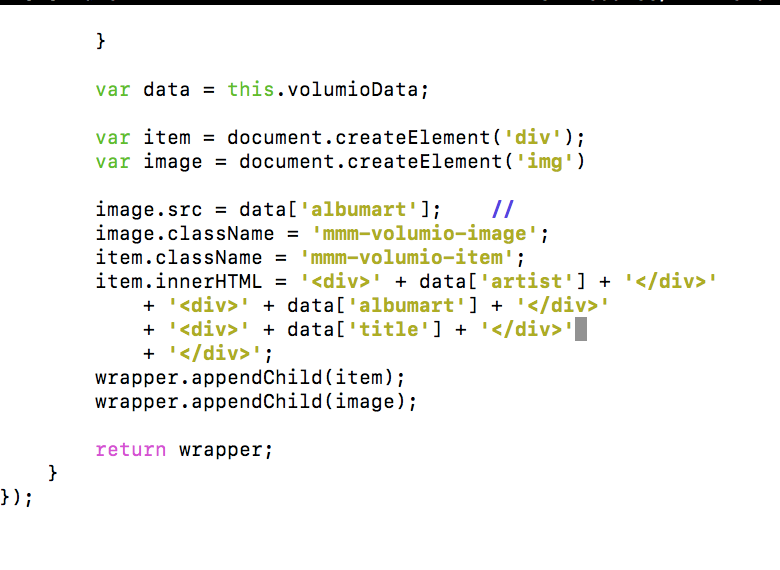
  • I can't display an image and need help.

    Moved
    3
    2
    0 Votes
    3 Posts
    1k Views
    E
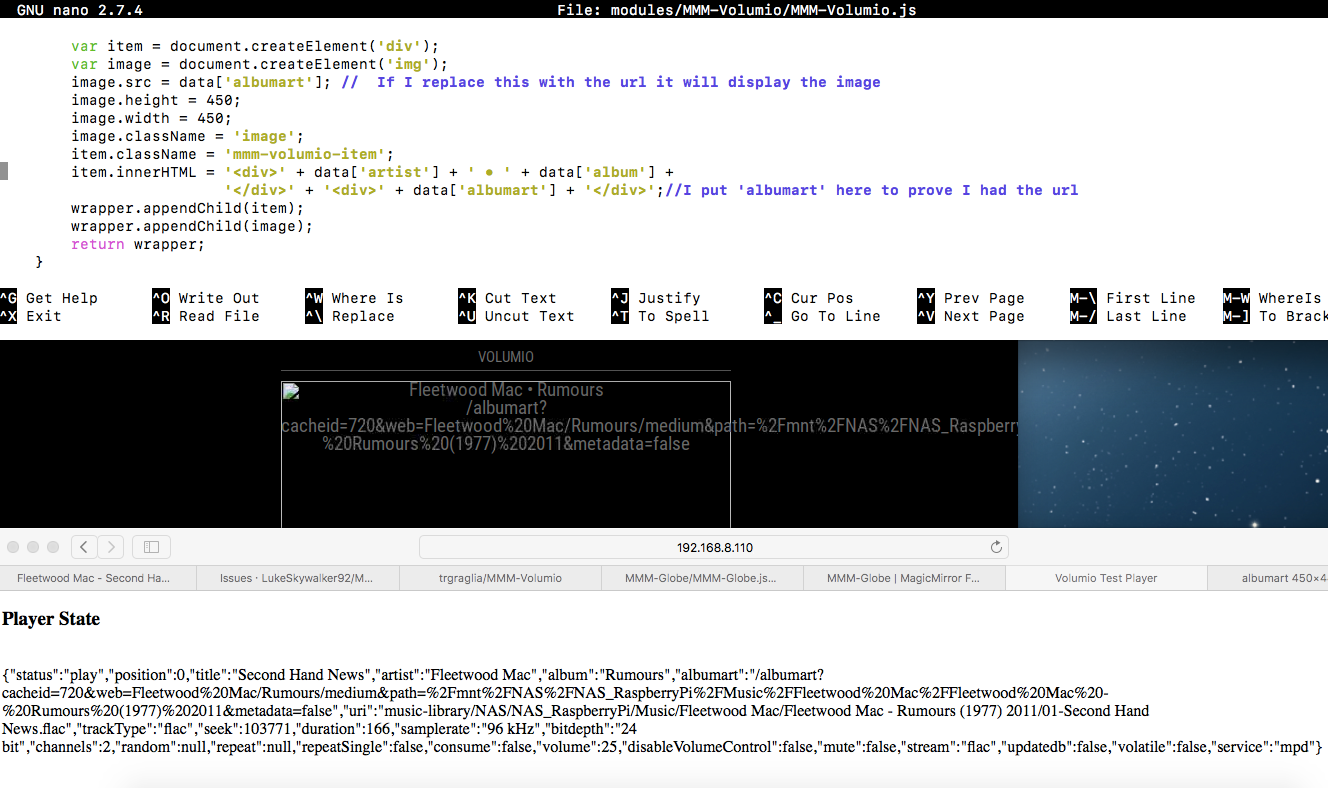
    var data = this.volumioData; var item = document.createElement('div'); item.className = 'mmm-volumio-item'; item.innerHTML = '<div>' + data['artist'] + '</div>' + '<div>' + data['album'] + '</div>' + '<div><img src=' + data['albumart'] + '></div>'; wrapper.appendChild(item); return wrapper; This is the from the example.
  • Recurring events Calender

    Solved
    20
    0 Votes
    20 Posts
    8k Views
    D
    @sdetweil I have sorted it now, I just deleted the stuck file, and did the upgrade/update to 2.14 and all is good. My calendar is now fixed. Thank you for your help
  • MMM-RTSPstream won't shut off.

    9
    0 Votes
    9 Posts
    2k Views
    A
    @swvalenti I changed the stream to VLC and now it works. When i open a photo, the streaming module goes to the background.