MagicMirror Forum
    • Recent
    • Tags
    • Unsolved
    • Solved
    • MagicMirror² Repository
    • Documentation
    • 3rd-Party-Modules
    • Donate
    • Discord
    • Register
    • Login
    A New Chapter for MagicMirror: The Community Takes the Lead
    Read the statement by Michael Teeuw here.

    MMM-RAIN-MAP (new: version 2.x)

    Scheduled Pinned Locked Moved Utilities
    192 Posts 38 Posters 277.2k Views 41 Watching
    Loading More Posts
    • Oldest to Newest
    • Newest to Oldest
    • Most Votes
    Reply
    • Reply as topic
    Log in to reply
    This topic has been deleted. Only users with topic management privileges can see it.
    • H Offline
      hogedir @Jalibu
      last edited by

      @Jalibu ok no problem. can you indicate me where i can find some logs for this module especially?

      JalibuJ 1 Reply Last reply Reply Quote 0
      • JalibuJ Offline
        Jalibu Module Developer @hogedir
        last edited by

        @hogedir in the Browser‘s console log and net tab

        1 Reply Last reply Reply Quote 0
        • H Offline
          hogedir
          last edited by

          @Jalibu it’s simply a raspi 4B 8GB, with a normal installation of MMM. I don’t know if i need to open a bug, it’s just the dump of the map that doesn’t work as you see on the screen.

          A question : Your module accept FRENCH locations no for the rain map ?

          Your module works well here, it’s only the map that is not get.

          I don’t have any blocker in the dns. so I don’t undertand because all the other modules works fine, except of that map dump.

          Here is my config.js :

          {
          module: “MMM-RAIN-MAP”,
          position: “top_center”,
          config: {
          animationSpeedMs: 400,
          colorScheme: 2,
          colorizeTime: true,
          defaultZoomLevel: 8,
          displayTime: true,
          displayTimeline: true,
          displayClockSymbol: true,
          displayHoursBeforeRain: -1,
          extraDelayLastFrameMs: 1000,
          extraDelayCurrentFrameMs: 3000,
          // markers: [
          // { lat: 49.41, lng: 8.717, color: “red” },
          // { lat: 48.856, lng: 2.35, color: “green” },
          // ],
          // mapPositions: [
          // { lat: 8.717, lng: -2.725, zoom: 9, loops: 1 },
          // { lat: 8.717, lng: -2.725, zoom: 6, loops: 2 },
          // { lat: 48.856, lng: 2.35, zoom: 6, loops: 1 },
          // { lat: 48.856, lng: 2.35, zoom: 9, loops: 2 },
          // { lat: 49.15, lng: 6.154, zoom: 5, loops: 2 },
          // ],
          // mapUrl: “https://a.tile.openstreetmap.de/48.2649/{x}/{y}.png”,
          mapUrl: “https://a.tile.openstreetmap.de/#map=8/48.471/-2.725”,
          // mapUrl: “https://tiles.wmflabs.org/bw-mapnik/8/48.471/-2.725”,
          mapHeight: “420px”, // must be a pixel value (no percent)
          mapWidth: “420px”, // must be a pixel value (no percent)
          maxHistoryFrames: -1,
          maxForecastFrames: -1,
          substitudeModules: [],
          updateIntervalInSeconds: 300,
          }
          },

          JalibuJ 1 Reply Last reply Reply Quote 0
          • JalibuJ Offline
            Jalibu Module Developer @hogedir
            last edited by Jalibu

            @hogedir your configuration is buggy. Please read the module’s Readme.
            You don’t have to (and should not) change the mapUrl at all.
            Use mapPositions to justify it. The module should work world-wide.
            I’d recommend to use the default values whenever possible and just to set values you need to override.

            Does that work for you?

            {
             module: "MMM-RAIN-MAP",
             position: "top_center",
             config: {
              mapPositions: [
               { lat: 48.472, lng: -2.725 }    
              ]
             }
            }
            
            H 1 Reply Last reply Reply Quote 0
            • H Offline
              hogedir @Jalibu
              last edited by

              @Jalibu Thanks. I copied your code, and nothing again. No map.
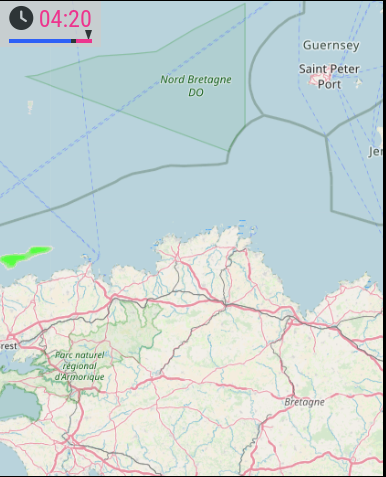
              f701d2bd-9f62-42b3-9922-eab8b1a5702a-image.png

              S JalibuJ 2 Replies Last reply Reply Quote 0
              • S Offline
                sdetweil @hogedir
                last edited by

                @hogedir can you show the messages at mm startup?

                either npm start or if you use pm2, then

                pm2 logs --lines=50

                Sam

                How to add modules

                learning how to use browser developers window for css changes

                1 Reply Last reply Reply Quote 0
                • JalibuJ Offline
                  Jalibu Module Developer @hogedir
                  last edited by

                  @hogedir I noticed there were wrong double quote characters in the code of my last post.
                  Please try again with the code below. Otherwise, please open an issue on GitHub and provide all the information asked in the form (entire config & logs)

                  {
                   module: "MMM-RAIN-MAP",
                   position: "top_center",
                   config: {
                    mapPositions: [
                     { lat: 48.472, lng: -2.725 }    
                    ]
                   }
                  }
                  
                  H 1 Reply Last reply Reply Quote 0
                  • H Offline
                    hogedir
                    last edited by hogedir

                    @hogedir @Jalibu it’s working now Thanks ! : the map is showing well now BUT the rain is not showed very well !

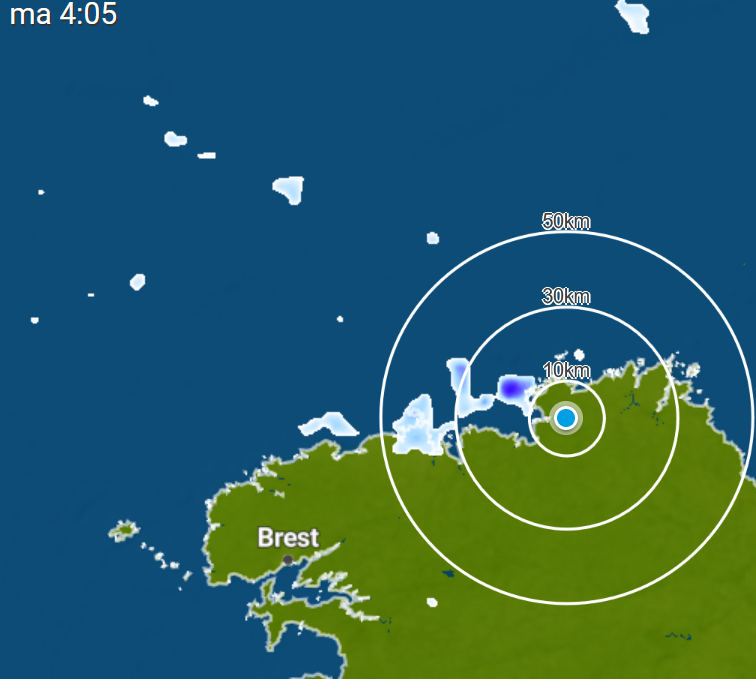
                    I compared what i see outside of my home and we had 5minutes before some rain and your data flow is not precise at all, i did not saw a rain in my region on your map but i saw it in weatherplaza.

                    I give you the page which is more precise and realistic than the rain data you have in the module : https://www.weerplaza.nl/regenradar/europa/frankrijk/

                    Map of rains with weather plaza : :
                    fdac3039-d82d-4f7c-bedf-b7d959e375fc-image.png

                    Map of rains with your module : :

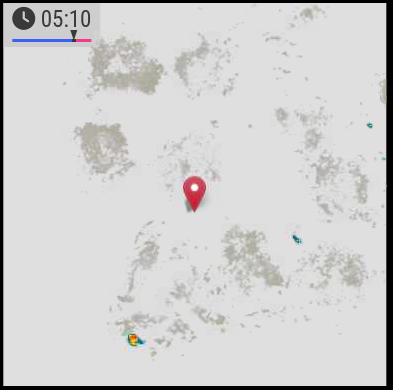
                    de450518-6d5d-4101-8ea5-4a2a2f1c0265-image.png

                    Lots of difference, weather plaza is realistic (i checked outside 2 times yesterday, your module did not show well the rain.)

                    • Second thing, I noticed something too : i want the “pause” time before the red zone to be more fast (some mms more fast). is it possible to change the “pause timer” ? Thanks
                    1 Reply Last reply Reply Quote 1
                    • H Offline
                      hogedir @Jalibu
                      last edited by hogedir

                      @Jalibu Look Here is the map of Weatherplaza (meteoplaza) in the same time than yours, if it can help.
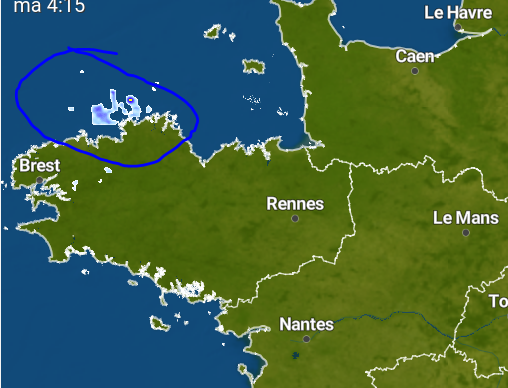
                      3a971133-4157-43ea-8012-e5a259516b48-image.png

                      and then the data flow on the module (less rain and less precise) :
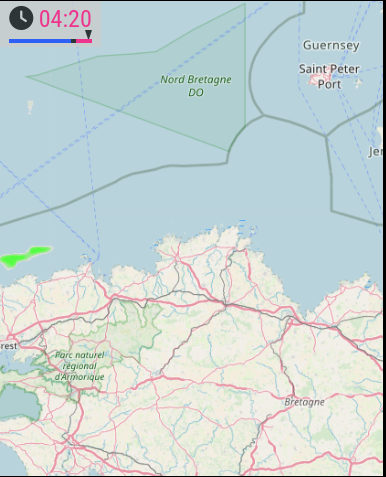
                      d6608816-5d56-42be-bff5-4b551658c684-image.png

                      thanks

                      S 1 Reply Last reply Reply Quote 0
                      • S Offline
                        sdetweil @hogedir
                        last edited by

                        @hogedir it’s not ‘his’ data. he is requesting a graphic from a service, and displaying what they give.

                        Sam

                        How to add modules

                        learning how to use browser developers window for css changes

                        H 2 Replies Last reply Reply Quote 0
                        • H Offline
                          hogedir @sdetweil
                          last edited by

                          This post is deleted!
                          1 Reply Last reply Reply Quote 1
                          • H Offline
                            hogedir @sdetweil
                            last edited by hogedir

                            @sdetweil @Jalibu Obiviously !

                            I mean it’s Rainviewer data but rainviewer is not 100% legit.

                            weerplaza is the best radar information worldwide. They use sevral radar information worldwide and unite all these data for free. I think the only one very precise to offer this type of information.

                            They have a widget API too ! you could integrate in addition to Openweather+rainviewer.

                            The weerplaza api is here : https://www.weerplaza.nl/weerwidgets/

                            And @Jalibu Thanks for your work, I like the zoom option and the ultimate option you added and it’s very useful.

                            1 Reply Last reply Reply Quote 0
                            • M Offline
                              MajorC Project Sponsor
                              last edited by

                              I have also often had the feeling that Rainviewer’s data is not particularly accurate.
                              If the option to switch to another provider were to be built in, I could only welcome that.

                              JalibuJ 1 Reply Last reply Reply Quote 0
                              • JalibuJ Offline
                                Jalibu Module Developer @MajorC
                                last edited by

                                @MajorC @hogedir
                                Unfortunately, Weerplaza.nl does not offer an API. I can’t just take their weather data and use it in MMM-RAIN-MAP.
                                They only allow to embed their service as an iFrame. You can easily do this on your own with https://github.com/alberttwong/MMM-iFrame


                                H 1 Reply Last reply Reply Quote 0
                                • H Offline
                                  hogedir @Jalibu
                                  last edited by hogedir

                                  @Jalibu Is it possible to add a second source possible to be selected in the module ? the goal could be to show CLOUDS via SATELLITE RADAR too. Using IFRAME is not a solution. I prefer to use a unique MAP with rain + clouds included.

                                  because lots of people needs to know if some clouds will be showed

                                  Could be very very a master class module with that option.

                                  here an example of sat clouds : http://en.sat24.com/en

                                  Here the code you could use to integrate that data in the module : http://en.sat24.com/en/freeimages

                                  RAINVIEWER DATA is not accurate at all like said MajorC(Project Sponsor). It doesn’t represent the reality.

                                  Check

                                  JalibuJ 1 Reply Last reply Reply Quote 0
                                  • JalibuJ Offline
                                    Jalibu Module Developer @hogedir
                                    last edited by

                                    @hogedir I understand the need and desire. However, neither the weather data/layers from Weerplaza.nl, nor those from sat24.com are in any way compatible with the previous module. It is technically not so easy to put their layers just “over” the map ;-)
                                    If someone finds a solution and takes care of the programming, then I would be happy to put this extension into the module.
                                    However, I don’t have the time to take care of it myself.

                                    1 Reply Last reply Reply Quote 0
                                    • W Offline
                                      whimsicality
                                      last edited by

                                      Is there a basic resource on how to generate maps? I am struggling with this basic concept. I’ve been to open street maps but I don’t see any way to generate a file like you did in the example.

                                      S 1 Reply Last reply Reply Quote 0
                                      • S Offline
                                        sdetweil @whimsicality
                                        last edited by

                                        @whimsicality the api provides the drawing of the maps

                                        Sam

                                        How to add modules

                                        learning how to use browser developers window for css changes

                                        W 1 Reply Last reply Reply Quote 0
                                        • W Offline
                                          whimsicality @sdetweil
                                          last edited by

                                          @sdetweil according tot he config it looks like I’m supposed to input all kinds of GPS coordinates for the edges of the map as well as the link to the picture of the map… I think I’m just confused.

                                          S 1 Reply Last reply Reply Quote 0
                                          • S Offline
                                            sdetweil @whimsicality
                                            last edited by sdetweil

                                            @whimsicality he’s telling the api the size and shape of the map to draw… because thats what they do…

                                            I do the same thing with chartjs… I tell it the size and shape and all the points in the data, and what kind of chart to draw, and it generates the graphics.

                                            Sam

                                            How to add modules

                                            learning how to use browser developers window for css changes

                                            W 1 Reply Last reply Reply Quote 0

                                            Hello! It looks like you're interested in this conversation, but you don't have an account yet.

                                            Getting fed up of having to scroll through the same posts each visit? When you register for an account, you'll always come back to exactly where you were before, and choose to be notified of new replies (either via email, or push notification). You'll also be able to save bookmarks and upvote posts to show your appreciation to other community members.

                                            With your input, this post could be even better 💗

                                            Register Login

                                            • 1
                                            • 2
                                            • 6
                                            • 7
                                            • 8
                                            • 9
                                            • 10
                                            • 9 / 10
                                            • First post
                                              Last post
                                            Enjoying MagicMirror? Please consider a donation!
                                            MagicMirror created by Michael Teeuw.
                                            Forum managed by Sam, technical setup by Karsten.
                                            This forum is using NodeBB as its core | Contributors
                                            Contact | Privacy Policy