MagicMirror Forum
    • Recent
    • Tags
    • Unsolved
    • Solved
    • MagicMirror² Repository
    • Documentation
    • 3rd-Party-Modules
    • Donate
    • Discord
    • Register
    • Login
    A New Chapter for MagicMirror: The Community Takes the Lead
    Read the statement by Michael Teeuw here.

    MMM-CalendarExt3

    Scheduled Pinned Locked Moved Utilities
    689 Posts 82 Posters 2.8m Views 86 Watching
    Loading More Posts
    • Oldest to Newest
    • Newest to Oldest
    • Most Votes
    Reply
    • Reply as topic
    Log in to reply
    This topic has been deleted. Only users with topic management privileges can see it.
    • F Offline
      flemmingss @MMRIZE
      last edited by

      @MMRIZE
      314d2201-b56e-4221-832d-e32888bd5085-image.png

      M 1 Reply Last reply Reply Quote 0
      • M Offline
        MMRIZE @flemmingss
        last edited by

        @flemmingss
        You may still need to complete the installation of the module. You may have missed these instructions on installation;

        npm install
        git submodule update --init --recursive
        

        Or, you are using Docker, and for some reason, css/custom.css and modules/MMM-CalendarExt3/CX3_Shared/CX3_Shared.mjs seems not being loaded. I’m not familiar with Docker so not sure.

        F 1 Reply Last reply Reply Quote 0
        • F Offline
          flemmingss @MMRIZE
          last edited by

          @MMRIZE
          Hmm, these commands di not solve anyhing.
          To be more accurate, I am running this on UnRAID with this image: https://hub.docker.com/r/ich777/magic-mirror2
          The modules are installed by entering the URL in a text-file “magicmirror2\modules\modules.txt”.

          # Paste the links from the git repository wich you want to install here.
          # The Y or N is the indication if the module needs 'npm install' to work.
          # Also you can delete the # in front of any line below to install a module
          # from the corresponding github repository (please don't delete the last line).
          
          N https://github.com/MMRIZE/MMM-LogExt
          Y https://github.com/MMRIZE/MMM-CalendarExt3.git
          #Y https://github.com/ItayXD/MMM-Admin-Interface.git
          #N https://github.com/werthdavid/MMM-BurnIn.git
          #N https://github.com/barnabycolby/MMM-Carousel
          #N https://github.com/Toreke/MMM-Dynamic-Modules.git
          #N https://github.com/Kreshnik/MMM-JokeAPI.git
          #Y https://github.com/slametps/MMM-NetworkConnection.git
          #Y https://github.com/PoOwAa/MMM-network-signal.git
          #N https://github.com/glitch452/MMM-ViewNotifications.git
          #N https://github.com/ulrichwisser/MMM-HTMLSnippet
          #Y https://github.com/eouia/MMM-AVStock
          #N https://github.com/jeroenpeters1986/MMM-bitcoin-portfolio.git
          #Y https://github.com/Elaniobro/MMM-stocks.git
          #N https://github.com/rehne/MMM-Ecosia-Tree-Counter.git
          #N https://github.com/amcolash/MMM-GoogleFit.git
          #Y https://github.com/eouia/MMM-News
          #Y https://github.com/pinsdorf/MMM-WeeklySchedule.git
          #N https://github.com/mihairinzis/MMM-wiki
          #Y https://github.com/Jopyth/MMM-Remote-Control.git
          #Y https://github.com/ronny3050/phone-notification-mirror.git
          #Y https://github.com/ianperrin/MMM-Strava.git
          #N https://github.com/PtrBld/MMM-Scrobbler.git
          #N https://github.com/MitchSS/MMM-Hue.git
          
          # Don't delete this line!
          

          It it is for any helt, this is the content of my MMM-CalendarExt3 module folder
          https://fastupload.io/0UNy4rcEJ3b4nrI/file

          M 1 Reply Last reply Reply Quote 0
          • M Offline
            MMRIZE @flemmingss
            last edited by

            @flemmingss
            Your RAR is not downloadable by security issue. Anyway, is there CX3_Shared/CX3_Shared.mjs in position? Your error log says it is not accessible on your system.

            F 1 Reply Last reply Reply Quote 0
            • F Offline
              flemmingss @MMRIZE
              last edited by

              @MMRIZE
              The “CX3_Shared” folder is empty, maybe that one is missing somthing?
              Yo can try this: https://nextcloud.flemmingss.top/s/QBE24rBABaao7ci

              karsten13K 1 Reply Last reply Reply Quote 0
              • karsten13K Offline
                karsten13 @flemmingss
                last edited by

                @flemmingss said in MMM-CalendarExt3:

                The “CX3_Shared” folder is empty

                this is the problem which is caused by the strange installation procedure in the used docker image.

                The module installation is done via

                npm init -y
                npm install request --save
                

                You have to ask the author of this script why he is doing this.

                With this construction the postinstall/postupgrade scripts defined in the package,json of MMM-CalendarExt3 are never called so the CX3_Shared folder is empty.

                F 1 Reply Last reply Reply Quote 0
                • F Offline
                  flemmingss @karsten13
                  last edited by flemmingss

                  @karsten13
                  Looks like your right, I did the install procedure manual inside the docker container and it is working like it should :D
                  Thanks for your help, I will inform the container developer about this issue.

                  root@413f2db9a7a6:/tmp# cd ..
                  root@413f2db9a7a6:/# cd magicmirror2/modules
                  root@413f2db9a7a6:/magicmirror2/modules# git clone https://github.com/MMRIZE/MMM-CalendarExt3
                  Cloning into 'MMM-CalendarExt3'...
                  remote: Enumerating objects: 301, done.
                  remote: Counting objects: 100% (117/117), done.
                  remote: Compressing objects: 100% (62/62), done.
                  remote: Total 301 (delta 65), reused 81 (delta 54), pack-reused 184
                  Receiving objects: 100% (301/301), 119.61 KiB | 1.21 MiB/s, done.
                  Resolving deltas: 100% (170/170), done.
                  root@413f2db9a7a6:/magicmirror2/modules# cd MMM-CalendarExt3
                  root@413f2db9a7a6:/magicmirror2/modules/MMM-CalendarExt3# npm install
                  
                  > mmm-calendarext3@1.8.1 postinstall
                  > git submodule update --init --recursive
                  
                  Submodule 'CX3_Shared' (https://github.com/MMRIZE/CX3_Shared) registered for path 'CX3_Shared'
                  Cloning into '/magicmirror2/modules/MMM-CalendarExt3/CX3_Shared'...
                  Submodule path 'CX3_Shared': checked out '44c7176e2b79a12e76badb78a49455bd7fbb22e3'
                  
                  up to date, audited 1 package in 2s
                  
                  found 0 vulnerabilities
                  npm notice 
                  npm notice New minor version of npm available! 10.2.3 -> 10.5.0
                  npm notice Changelog: https://github.com/npm/cli/releases/tag/v10.5.0
                  npm notice Run npm install -g npm@10.5.0 to update!
                  npm notice 
                  root@413f2db9a7a6:/magicmirror2/modules/MMM-CalendarExt3# git submodule update --init --recursive
                  root@413f2db9a7a6:/magicmirror2/modules/MMM-CalendarExt3# 
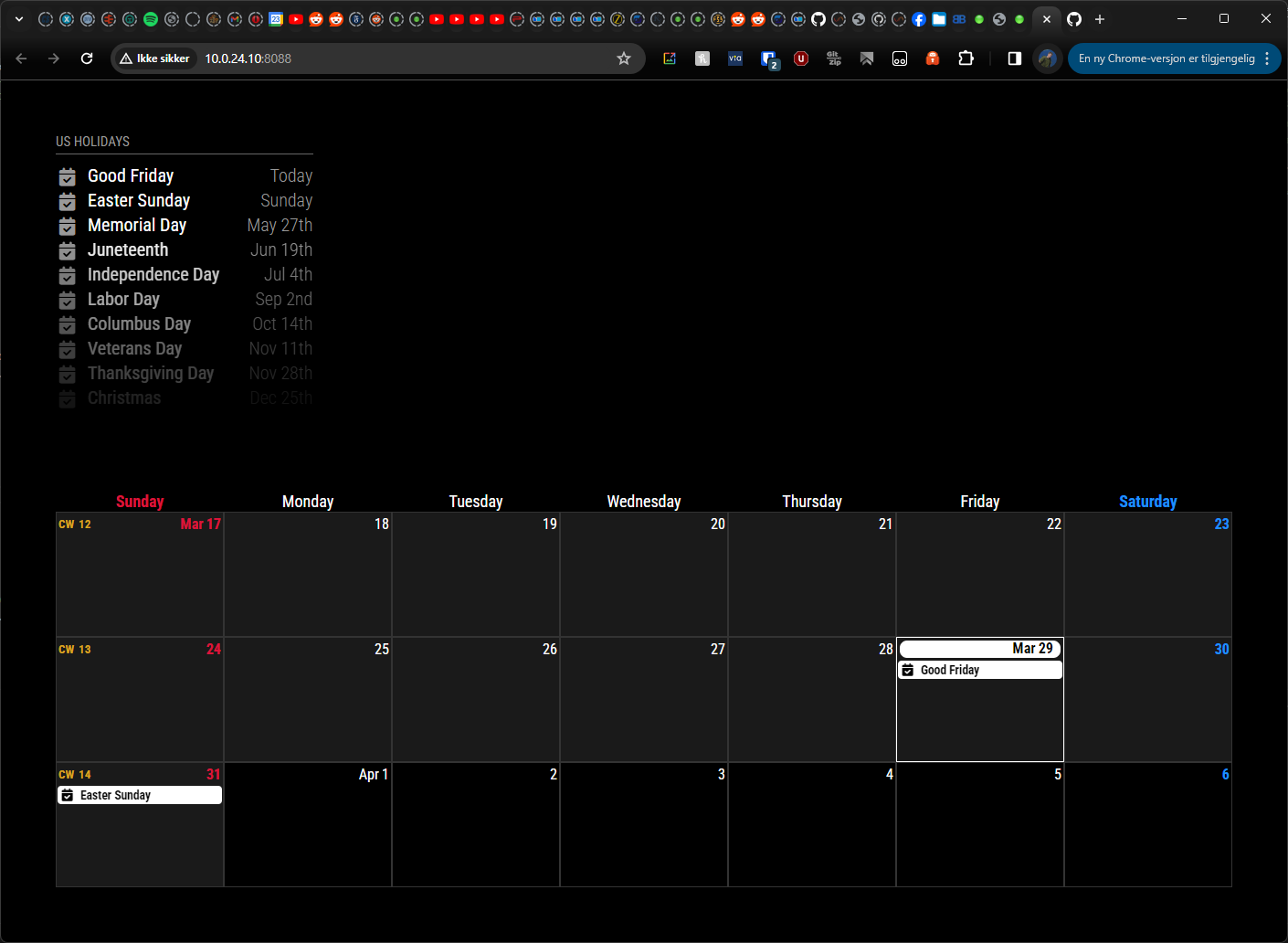
                  

                  da3fe8d1-ef16-4df6-b54b-67de44eae7d6-image.png

                  EDIT: Github issue: https://github.com/ich777/docker-magicmirror2/issues/4

                  1 Reply Last reply Reply Quote 0
                  • bugsounetB bugsounet referenced this topic on
                  • F Offline
                    flemmingss
                    last edited by flemmingss

                    okay, new issue, I have gotten this working, but not with past days. I see events from now and forward, but nothing before, even if I have enabled broadcastPastEvents.

                    /* Magic Mirror Config Sample
                     *
                     * By Michael Teeuw http://michaelteeuw.nl
                     * MIT Licensed.
                     *
                     * For more information on how you can configure this file
                     * See https://github.com/MichMich/MagicMirror#configuration
                     *
                     */
                    
                    var config = {
                    	address: "0.0.0.0", // Address to listen on, can be:
                    	                      // - "localhost", "127.0.0.1", "::1" to listen on loopback interface
                    	                      // - another specific IPv4/6 to listen on a specific interface
                    	                      // - "0.0.0.0", "::" to listen on any interface
                    	                      // Default, when address config is left out or empty, is "localhost"
                    	port: 8080,
                    	ipWhitelist: [], // Set [] to allow all IP addresses
                    	                                                       // or add a specific IPv4 of 192.168.1.5 :
                    	                                                       // ["127.0.0.1", "::ffff:127.0.0.1", "::1", "::ffff:192.168.1.5"],
                    	                                                       // or IPv4 range of 192.168.3.0 --> 192.168.3.15 use CIDR format :
                    	                                                       // ["127.0.0.1", "::ffff:127.0.0.1", "::1", "::ffff:192.168.3.0/28"],
                    
                    	useHttps: false, 		// Support HTTPS or not, default "false" will use HTTP
                    	httpsPrivateKey: "", 	// HTTPS private key path, only require when useHttps is true
                    	httpsCertificate: "", 	// HTTPS Certificate path, only require when useHttps is true
                    
                    	language: "no",
                    	timeFormat: 24,
                    	units: "metric",
                    	serverOnly:  "true" ,
                    			     // local for armv6l processors, default
                    			     //   starts serveronly and then starts chrome browser
                    			     // false, default for all  NON-armv6l devices
                    			     // true, force serveronly mode, because you want to.. no UI on this device
                    
                    	modules: [
                    		{
                    			module: "alert",
                    		},
                    		{
                    			module: "calendar",
                    		//	position: "top_left", 					**Hide this module**
                    			
                    			config: {
                    				broadcastPastEvents: true,
                    				calendars: [
                    					{
                    						symbol: "calendar-check",
                    						name: "Felles",
                    						color: "cyan",
                    						url: "https://calendar.google.com/calendar/ical/xxx%40group.calendar.google.com/private-xxx/basic.ics" //felles
                    					},
                    					{
                    						symbol: "calendar-check",
                    						name: "Samayeh Turnus",
                    						color: "red",
                    						url: "https://calendar.google.com/calendar/ical/xxx%40group.calendar.google.com/private-xxx/basic.ics" //felles
                    					}
                    				]
                    			}
                    		},
                    		{
                    			module: "MMM-CalendarExt3",
                    			position: "top_bar",
                    			title: "Kalender",
                    			config:
                    				{
                    				//mode: "month",
                    				useMarquee: true, //animasjon for å se hele teksten
                    				}
                    		},
                    	
                    	]
                    
                    };
                    
                    /*************** DO NOT EDIT THE LINE BELOW ***************/
                    if (typeof module !== "undefined") {module.exports = config;}
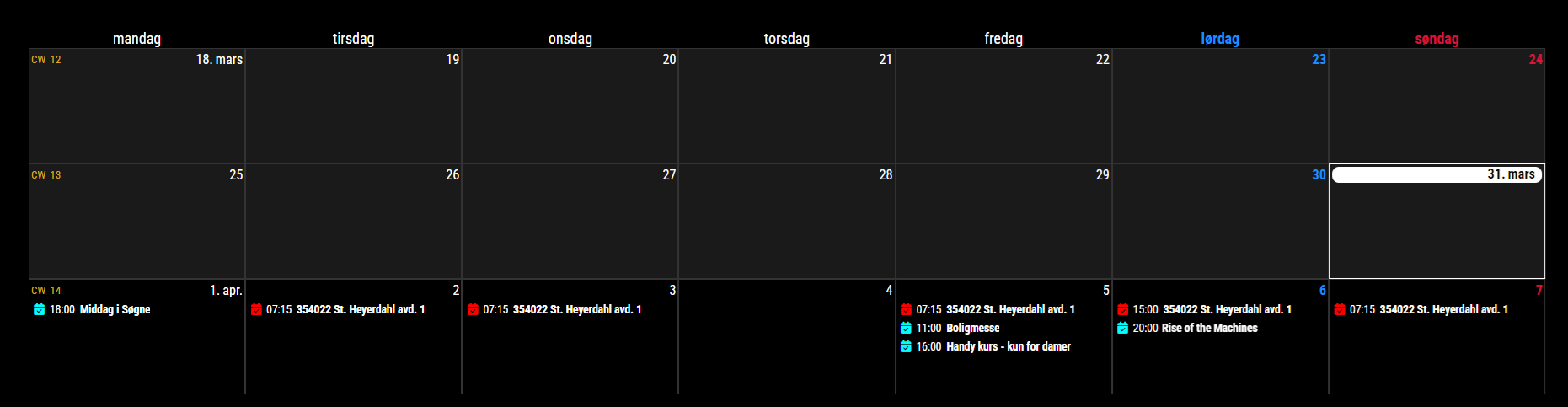
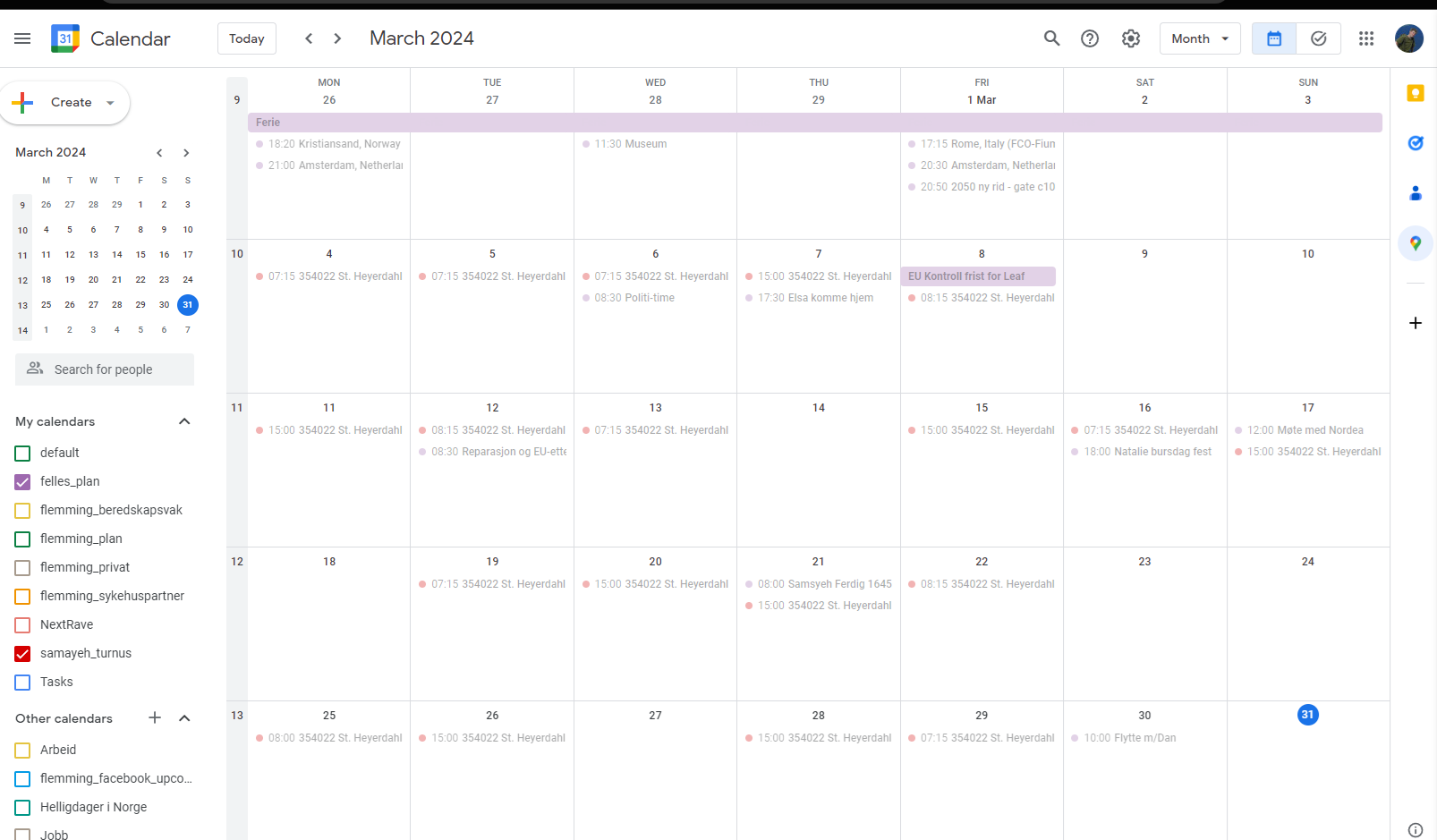


                    mm.png gc.png

                    EDIT: Looks like the calendar settings did not refresh until i rebooted my system, working now

                    M 1 Reply Last reply Reply Quote 0
                    • M Offline
                      MMRIZE @flemmingss
                      last edited by

                      @flemmingss
                      Set enough ‘maximumEntries’, ‘maximumNumberOfDays’ and ‘pastDaysCount’ of the default calendar.

                      F 1 Reply Last reply Reply Quote 0
                      • F Offline
                        flemmingss @MMRIZE
                        last edited by flemmingss

                        @MMRIZE Tested that, and did not work, but when I rebooted the service, it worked. So these settings must need a restart somehow.
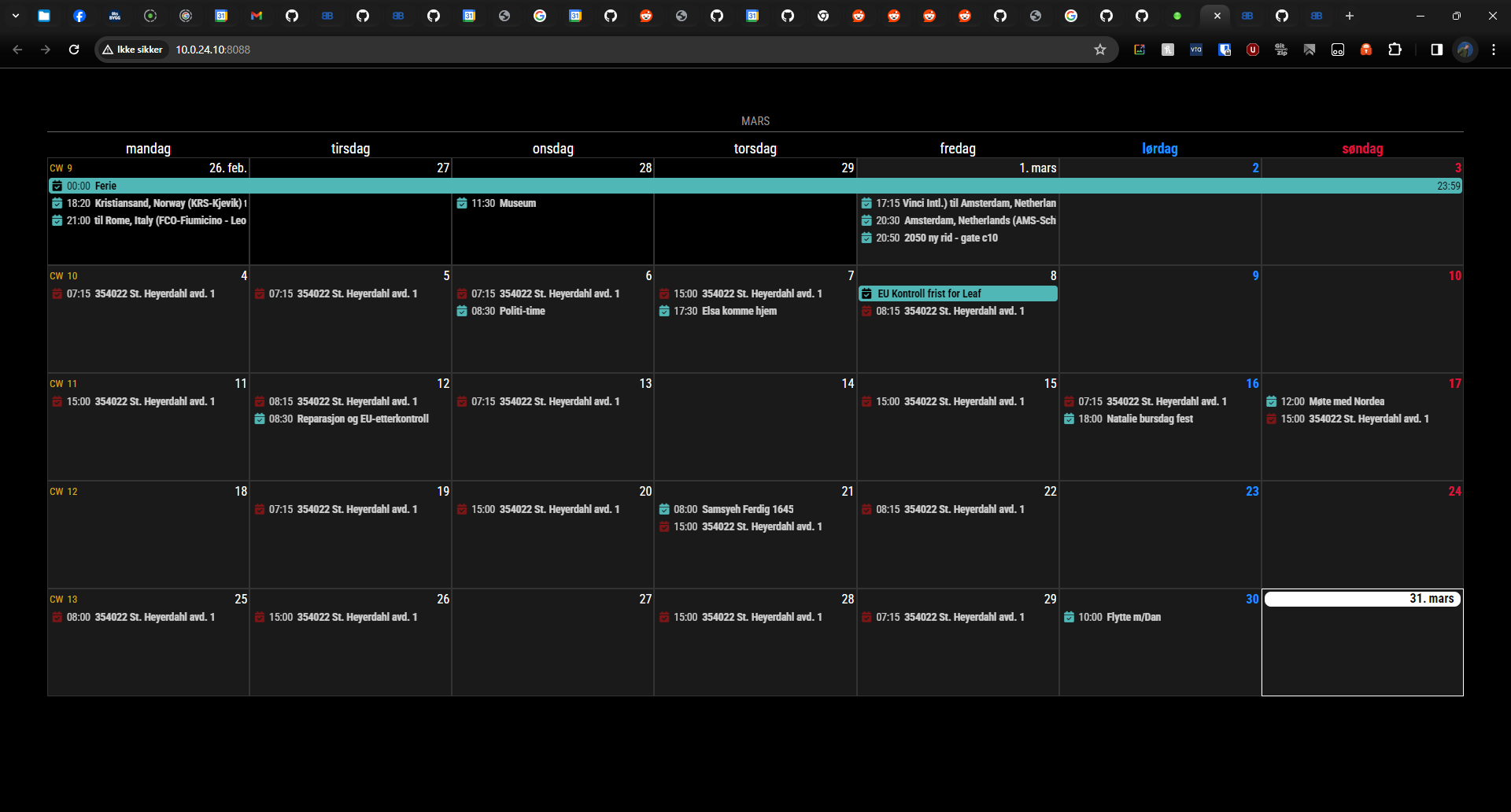
                        b8f40d5c-46d0-48f0-ac62-3fb7be5cd9a0-image.png

                        S 1 Reply Last reply Reply Quote 0
                        • S Offline
                          sdetweil @flemmingss
                          last edited by

                          @flemmingss yes, the fetcher is started once, the web page can be refreshed, but the fetcher does not restart.

                          Sam

                          How to add modules

                          learning how to use browser developers window for css changes

                          W 1 Reply Last reply Reply Quote 0
                          • W Offline
                            Welle05 @sdetweil
                            last edited by

                            Problem with full day events since summer time in Germany.

                            Full-day events which are part of a series are now spawn over two days. All series were built in winter time. I checked the original (google) Calendar : fine, also the Standard Calendar Module, but when it comes to Ext3 there are shown like this:

                            08309741-b3f9-4cb2-8414-ffa5a8d707fd-grafik.png

                            single full dayevents (not part of a series): fine
                            serial events with start date: also fine

                            Any idea?

                            Best regards

                            Chris

                            F 1 Reply Last reply Reply Quote 0
                            • F Offline
                              fedale @Welle05
                              last edited by

                              @Welle05 have you found a solution for this? i have the same issue in Sweden.
                              And it´s only for fullday events.

                              S M 2 Replies Last reply Reply Quote 0
                              • S Offline
                                sdetweil @fedale
                                last edited by sdetweil

                                @fedale ext3 is expecting full day events to have 00:00 as the time.

                                with some change they come with utc offset

                                02:00

                                or whatever.

                                he could check the full day event flag and ignore the time

                                Sam

                                How to add modules

                                learning how to use browser developers window for css changes

                                F 1 Reply Last reply Reply Quote 0
                                • M Offline
                                  MMRIZE @fedale
                                  last edited by

                                  @fedale @Welle05

                                  See this.
                                  https://github.com/MMRIZE/MMM-CalendarExt3/wiki/To-fix-wrong-repeated-fullday-event-displaying-(MM-2.27)

                                  1 Reply Last reply Reply Quote 0
                                  • F Offline
                                    fedale @sdetweil
                                    last edited by

                                    @sdetweil

                                    Where can i input the offset?
                                    Can i do that in the default calendar?

                                    S 1 Reply Last reply Reply Quote 0
                                    • S Offline
                                      sdetweil @fedale
                                      last edited by

                                      @fedale see the post before yours that gives you the fix

                                      Sam

                                      How to add modules

                                      learning how to use browser developers window for css changes

                                      1 Reply Last reply Reply Quote 0
                                      • B Offline
                                        bobbylx
                                        last edited by

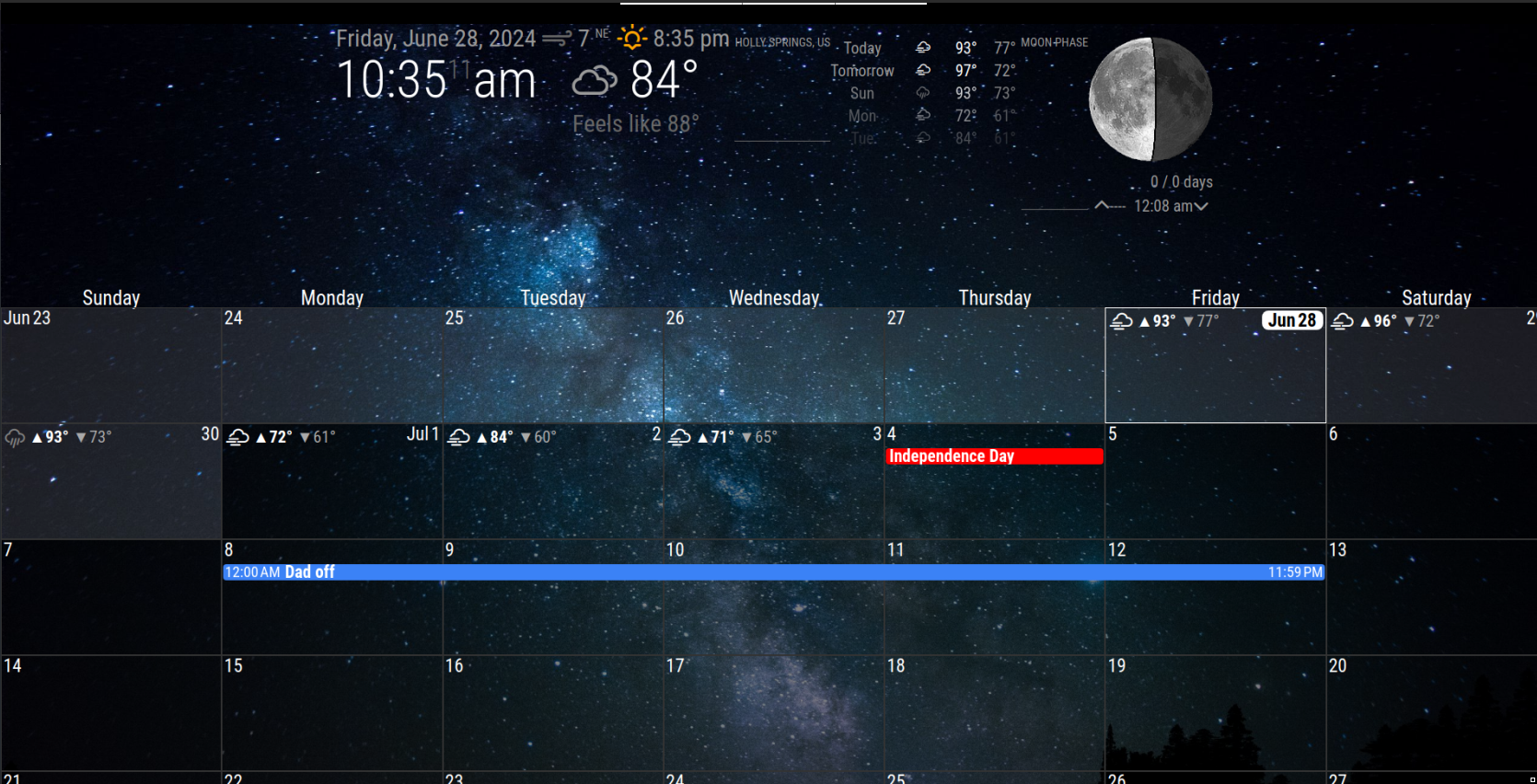
                                        Hello all, so I’ve got MMM-Calendarext3 working just how I want and now working on some personalization. Can anyone advise what to change and where to add some shadow behind the date cells? Kind of like the shadow behind the previous days, I’d like to add some light gray or something to the entire calendar just so it doesn’t get lost in my wallpaper.
                                        Second, anyone know how/where to change the border thickness for the current day?

                                        thanks in advance.Screenshot_2024-06-28_10-34-55.png

                                        M 1 Reply Last reply Reply Quote 0
                                        • M Offline
                                          MMRIZE @bobbylx
                                          last edited by

                                          @bobbylx
                                          For today cell border; Append this into your css/custom.css

                                          /* css/custom.css */
                                          .CX3 .cell.today {
                                            border: 2px solid #fff; /* default was 1px, so you can change to 2px or whatever */
                                          }
                                          
                                          For shadow behind the cell... Could you tell me more details or example?
                                          B 1 Reply Last reply Reply Quote 0
                                          • B Offline
                                            bobbylx @MMRIZE
                                            last edited by

                                            @MMRIZE said in MMM-CalendarExt3:

                                            @bobbylx
                                            For today cell border; Append this into your css/custom.css

                                            /* css/custom.css */
                                            .CX3 .cell.today {
                                              border: 2px solid #fff; /* default was 1px, so you can change to 2px or whatever */
                                            }
                                            
                                            For shadow behind the cell... Could you tell me more details or example?
                                            

                                            Thank you, I’ll give that a try.

                                            For the shadow, maybe not the right term, in my screenshot see how the previous days have a light but transparent white color to them. I’d like all the cells to be shaded like that, i can play with the colors, ie white vs gray etc. but I’m just not sure how to add the background color to all cells then make it transparent. That make sense? I know my terms are not correct…

                                            M 1 Reply Last reply Reply Quote 0

                                            Hello! It looks like you're interested in this conversation, but you don't have an account yet.

                                            Getting fed up of having to scroll through the same posts each visit? When you register for an account, you'll always come back to exactly where you were before, and choose to be notified of new replies (either via email, or push notification). You'll also be able to save bookmarks and upvote posts to show your appreciation to other community members.

                                            With your input, this post could be even better 💗

                                            Register Login

                                            • 1
                                            • 2
                                            • 24
                                            • 25
                                            • 26
                                            • 27
                                            • 28
                                            • 34
                                            • 35
                                            • 26 / 35
                                            • First post
                                              Last post
                                            Enjoying MagicMirror? Please consider a donation!
                                            MagicMirror created by Michael Teeuw.
                                            Forum managed by Sam, technical setup by Karsten.
                                            This forum is using NodeBB as its core | Contributors
                                            Contact | Privacy Policy