MagicMirror Forum
    • Recent
    • Tags
    • Unsolved
    • Solved
    • MagicMirror² Repository
    • Documentation
    • 3rd-Party-Modules
    • Donate
    • Discord
    • Register
    • Login
    A New Chapter for MagicMirror: The Community Takes the Lead
    Read the statement by Michael Teeuw here.

    [Remote-Control] Shutdown, Configure and Update your MagicMirror

    Scheduled Pinned Locked Moved System
    274 Posts 78 Posters 873.7k Views 77 Watching
    Loading More Posts
    • Oldest to Newest
    • Newest to Oldest
    • Most Votes
    Reply
    • Reply as topic
    Log in to reply
    This topic has been deleted. Only users with topic management privileges can see it.
    • F Offline
      febreezey
      last edited by

      Hello,

      I’m building my first MagicMirror. I tried to add MMM-Remote_Control, and have it showing the website on my MagicMirror that would be used to access the MMM-Remote-Control. The only problem is once I go to the website it says “This device is not allowed to access your mirror. Please check your config.js or config.js.sample to change this.” I am not sure how to know whether I am not running with ‘sudo’ rights like noted in the README.md

      F 1 Reply Last reply Reply Quote 0
      • F Offline
        febreezey @febreezey
        last edited by

        @febreezey NVM!! I changed my ipwhitelist in my config.js like lolobyte noted. Works perfectly now!

        @lolobyte said in MMM-Remote-Control:

        Hi all,

        it works.

        That is my part of config with the ipwhitelist.

            ipWhitelist: [
                            "127.0.0.1",
                            "::ffff:127.0.0.1",
                            "::1",
                            "::ffff:192.168.1.1/24",
                    ],
        

        hope it will help all other user.

        1 Reply Last reply Reply Quote 0
        • AlessandroRaA Offline
          AlessandroRa
          last edited by

          It works, and it’s awesome!!
          Now, time for a stupid question: since I’m building a touch screen smart mirror, can I run the remote menu on an iFrame? I want to be able to manage the modules and shut down the mirror when I’m not using it

          in_a_daysI 1 Reply Last reply Reply Quote 0
          • AlessandroRaA Offline
            AlessandroRa
            last edited by

            I just tried to use the “Hello World” module, but that’s what I’ve got 0_1483883271656_2017-01-08-144602_1920x1080_scrot.png

            1 Reply Last reply Reply Quote 0
            • in_a_daysI Offline
              in_a_days @AlessandroRa
              last edited by in_a_days

              @AlessandroRa said in MMM-Remote-Control:

              It works, and it’s awesome!!
              Now, time for a stupid question: since I’m building a touch screen smart mirror, can I run the remote menu on an iFrame? I want to be able to manage the modules and shut down the mirror when I’m not using it

              You might find this module more useful for your particular build. I don’t think it features power and restart buttons yet, but that will be a pretty simple addition.

              https://github.com/chr1syy/MM-navbar

              https://forum.magicmirror.builders/topic/1128/mm-navbar-navigation-bar-for-touchscreens-to-hide-show-modules

              What ship would bear me ever back across so wide a Sea?

              AlessandroRaA 1 Reply Last reply Reply Quote 0
              • AlessandroRaA Offline
                AlessandroRa @in_a_days
                last edited by

                @in_a_days thank you, I tried that module and I really liked it! But I’m not really a good programmer so it would be complicate for me to add new icons for every module.
                Also, I don’t know why, with this module on, the Hide/show all module disappeared. How can I fix it?

                1 Reply Last reply Reply Quote 0
                • G Offline
                  Gooral
                  last edited by

                  Hi,
                  very nice module!
                  one day it might be remote configurator for a mirror.
                  You could do a querry for all installed modules and create a simple drag and drop interface for putting modules in their places of a screen and then regenerate mirror config file.

                  I hope you will do it one day.
                  regards
                  Mike

                  1 Reply Last reply Reply Quote 0
                  • E Offline
                    ejmina
                    last edited by

                    Hi @Jopyth
                    Awesome module!

                    A couple of questions - how can I use it to enable-disable MMM-PIR-Sensor?

                    Is it possible to use it to disable/enable certain aspects of a module?
                    e.g.: for the newsfeed, i’d like to switch on/off certain feeds

                    TIA

                    1 Reply Last reply Reply Quote 0
                    • SnilleS Offline
                      Snille Module Developer
                      last edited by

                      Hi!
                      Thank you for this great module!
                      I’m thinking it would be good to have menu entry for the “logs”.
                      Basically just “display” the logs (maybe last 100 lines) of the ~/.pm2/logs/mm* files.
                      What do you say? :)

                      Best regards Snille

                      If you cant find it, make it and share it!
                      Modules: MMM-homeassistant-sensors, MMM-Modulebar, MMM-Profilepicture, MMM-Videoplayer

                      J 1 Reply Last reply Reply Quote 1
                      • J Offline
                        Jopyth Moderator @Snille
                        last edited by

                        @Snille I like the idea, will probably add this to my “want to do” features.

                        Helpful sticky: How to troubleshoot

                        1 Reply Last reply Reply Quote 1
                        • J Offline
                          Jopyth Moderator
                          last edited by

                          Also, I decided to release all the stuff I have worked on as version 1.1.0, some of it is still experimental, but I put a (hopefully) clear warning before you can mess up your config.

                          [1.1.0] - 2017-01-26

                          Added

                          • First version of installer script
                          • Menu to send Alerts and/or Notifications to your mirror
                          • Menu to update your MagicMirror installation and your modules (through git pull)
                          • Menu to change the config.js
                            • Modules can be installed, added, removed, configured
                            • There will be backups of the five last versions of the config.js in the config folder
                            • Some of these parts are hidden behind an “exprimental” warning, do not ignore that warning
                          • NOTIFICATION action, see README.md for details

                          Changed

                          • Menu structure
                            • Old “Edit” and “Settings” are now under “Edit view”
                          • Smaller font sizes in lists

                          Fixed

                          • Issues coming from disabled modules since MM version 2.1.0

                          Helpful sticky: How to troubleshoot

                          1 Reply Last reply Reply Quote 2
                          • O Offline
                            open_book
                            last edited by

                            Well done for getting the update out!

                            Can’t wait to give it a try.

                            sudo insert motivational.quote

                            1 Reply Last reply Reply Quote 0
                            • in_a_daysI Offline
                              in_a_days
                              last edited by in_a_days

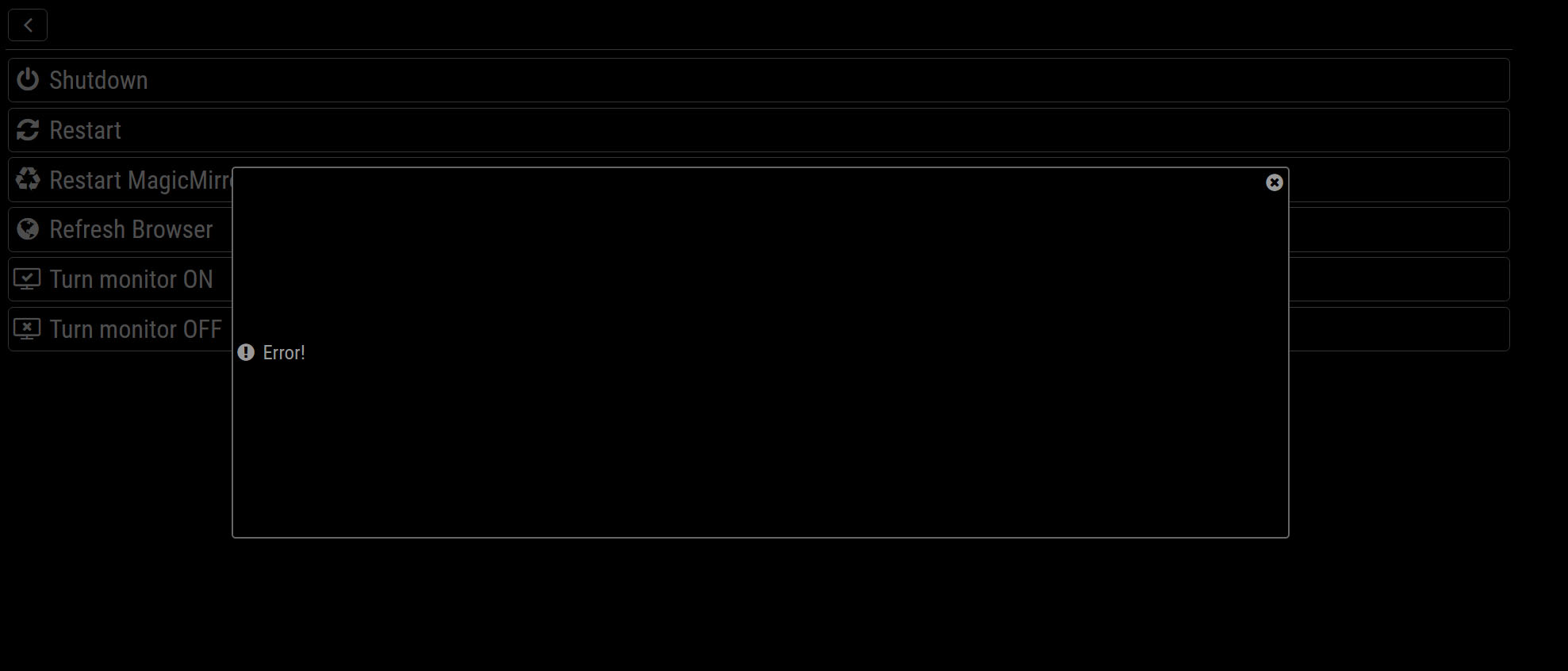
                              Loving the update so far. But I’m experiencing a couple small bugs. On re-boot I am losing my active/hidden module settings. I get the “Done” confirmation after Saving, but on reboot it’s showing all modules rather than just the ones I had active. I’m also getting “! Error!” when I attempt Power > Restart MagicMirror2.

                              Remote-Control is one of my favs. Happy to check some logs anything that may help isolate the problem.

                              What ship would bear me ever back across so wide a Sea?

                              schlachtkreuzer6S J 2 Replies Last reply Reply Quote 1
                              • A Offline
                                AAPS
                                last edited by

                                Is it worth updating? I have been excited for this update, but I have waited to see if it would be better than the previous version. Since it appears that some people experience bugs, I might just stay with the version I have. Is this a smart choice?

                                J 1 Reply Last reply Reply Quote 0
                                • schlachtkreuzer6S Offline
                                  schlachtkreuzer6 @in_a_days
                                  last edited by

                                  @in_a_days Funny I also got that bug on the previous remote version, after updating to MM v2.1 . If I´m rebooting the MM or Power Off and starting it later, all changes of visible Modules are gone. So basically i tested some modules and later hide them cause i don´t want to delete them from the config, or just show them when i need some of them. It´s not a big deal, just saying.

                                  1 Reply Last reply Reply Quote 1
                                  • J Offline
                                    Jopyth Moderator @AAPS
                                    last edited by Jopyth

                                    @AAPS (and everyone else): You can try the new version, but you can also go back to a previous version afterwards with the commands:

                                    cd MagicMirror/modules/MMM-Remote-Control # or wherever you installed the Mirror and the module
                                    git checkout v1.0.0 # or the version you want
                                    

                                    Currently, there is v1.0.0 (which is probably the one you are on) and v1.1.0 as older versions. To check out the most recent version use git checkout master again.

                                    Helpful sticky: How to troubleshoot

                                    foxF 1 Reply Last reply Reply Quote 2
                                    • B Offline
                                      Brice
                                      last edited by

                                      I’m experiencing a white screen issue after updating MMM-Remote to the latest version. Anyone knows how to solve this ? I’ve disabled the module for now.

                                      J 1 Reply Last reply Reply Quote 0
                                      • J Offline
                                        Jopyth Moderator @Brice
                                        last edited by

                                        @Brice Check this thread.

                                        Helpful sticky: How to troubleshoot

                                        1 Reply Last reply Reply Quote 0
                                        • C Offline
                                          ChrisLaurie
                                          last edited by

                                          Notifications does not obey the length parameter. I have installed this module and it looks fantastic! I have tried both the alert and notification features. The alert works and only shows for the length of time specified, but a notification displays (at the top) for only about 3 to 4 seconds and then disappears, no matter what the seconds parameter is set to.

                                          J 1 Reply Last reply Reply Quote 0
                                          • J Offline
                                            Jopyth Moderator @ChrisLaurie
                                            last edited by

                                            @ChrisLaurie That is because a notification has a fixed length of time. There is no way to change the time of a notification to be displayed longer or shorter (see documentation). Maybe I should make this more clear, that the duration option only works for an alert?

                                            Helpful sticky: How to troubleshoot

                                            C 1 Reply Last reply Reply Quote 0

                                            Hello! It looks like you're interested in this conversation, but you don't have an account yet.

                                            Getting fed up of having to scroll through the same posts each visit? When you register for an account, you'll always come back to exactly where you were before, and choose to be notified of new replies (either via email, or push notification). You'll also be able to save bookmarks and upvote posts to show your appreciation to other community members.

                                            With your input, this post could be even better 💗

                                            Register Login

                                            • 1
                                            • 2
                                            • 5
                                            • 6
                                            • 7
                                            • 8
                                            • 9
                                            • 13
                                            • 14
                                            • 7 / 14
                                            • First post
                                              Last post
                                            Enjoying MagicMirror? Please consider a donation!
                                            MagicMirror created by Michael Teeuw.
                                            Forum managed by Sam, technical setup by Karsten.
                                            This forum is using NodeBB as its core | Contributors
                                            Contact | Privacy Policy