Read the statement by Michael Teeuw here.
MMM-OpenhabFloorplan
-
A magic mirror is the ideal place for showing the state of lights, window contacts, and other labels from openhab on a floorplan of your house / apartment! I already implemented this inside main.js of the old version of the magic mirror, but this does not work with MM2. So I re-implemented the entire module to be properly configurable and with push events via http requests instead of polling. This way, state changes of lights / window contacts / labels are immediately updated on the magic mirror :-)
To comfort configuration of the module, there is a draft mode which shows all configured items:
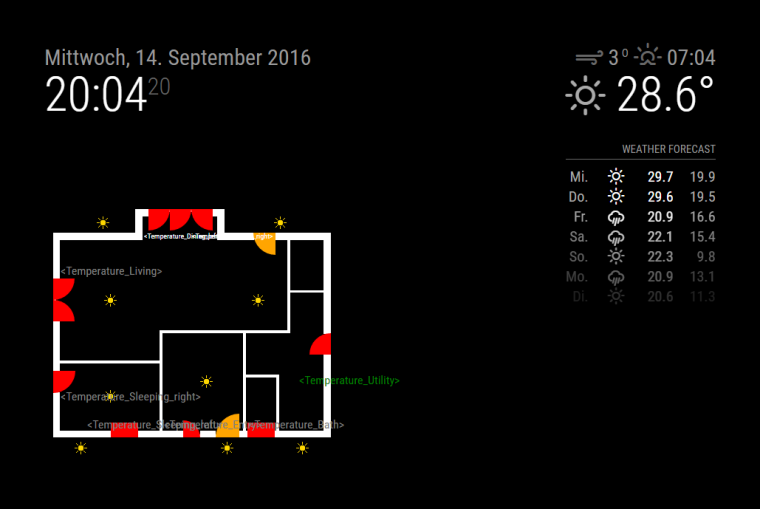
In regular mode, lights are only shown if they are switched on, window and door contacts are only shown if they are open, and labels are shown with their actual contents.
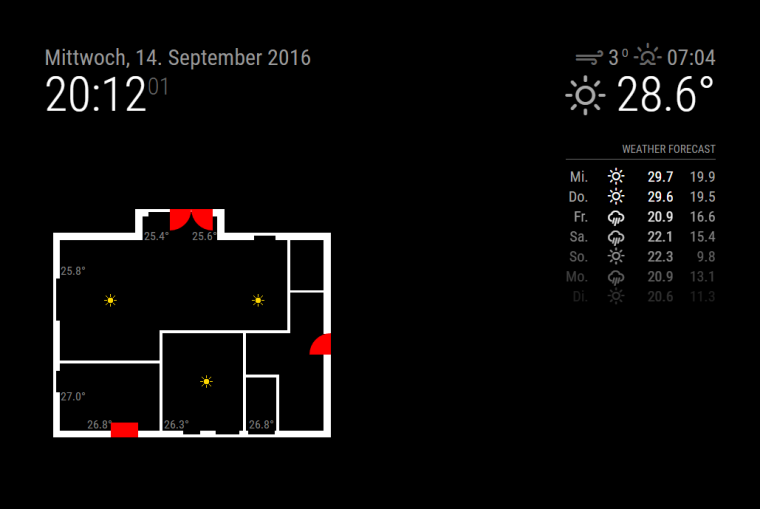
Labels can actually be configured for any item, for example:
- Currently played title from sonos speaker or another internet radio
- Current channel on your LG, Samsung, or Panasonic TV
- Fan speed of your Swegon ventilation system
- Current state of your Somfy Rollershutters
- Basically each item which is fed by an openhab binding
Check out the module page for instructions how to set up your individual floorplan.
Please vote this topic up, if you installed and enjoy this module :-) -
This is incredible!
I’ve not really looked at openhab - what do you have in your current set up?
I really like this module though
-
@Mitchfarino said in MMM-OpenhabFloorplan:
I’ve not really looked at openhab - what do you have in your current set up?
I use Anel and MiLight for the lights, OneWire for temperatures, and a shell script for setting reed contacts via REST API.
-
@paphko I have Vera Edge Zwave home automation installed in my house, any possibility to get the information of the lights Status on the Mirror.
-
@shashank If you get the light states in openhab, then yes. But I don’t have any experience with Zwave devices on openhab, I would suggest to research in the openhab community and ask there how to set it up: https://community.openhab.org
-
Hola! Anyone got the floor plan working with openHab2? I’m so close, but can’t seem to get any statuses from openHab (I think). I’m sort of a noob so I might be doing something wrong.
-
@YourhighnessLeender
Having the same issue here with OpenHab2 running on a seperate Pi. I am using Philipps Hue and can control the lights via OpenHab but I cannot get the states with the Magic Mirror.Anyone have any suggestions?
-
@schummi84 did you try the adjustments explained in this issue? https://github.com/paphko/mmm-openhabfloorplan/issues/1
-
@schummi84 Please make sure your openhab installation has the REST API installed/enabled. You can check that in a browser, e.g.: http://localhost:8080/rest/items/Light_Garden_Garage
The result should be similar to this:{ "link": "http://localhost:8080/rest/items/Light_Garden_Garage", "state": "OFF", "type": "Switch", "name": "Light_Garden_Garage", "label": "Garage", "tags": [ "Lighting" ], "groupNames": [ "Garden", "Lights" ] }Does that work for you? If so, please write the URL of one of your items.
-
@paphko When I adjust your link with one of my items I get the following result:
{
  "link": "http://192.168.2.122:8080/rest/items/L_ZELT",
  "state": "ON",
  "type": "Switch",
  "name": "L_ZELT",
  "label": "Switch_Zelt",
  "category": "Light",
  "tags": [],
  "groupNames": []
}
Adding the Light in the config.js is still not working.
Here the config code:
	//------------- OPENHAB FLOORPLAN ----------------------------------------------------------

	 {
        module: 'mmm-openhabfloorplan',
        position: 'bottom_center', // this can be any of the regions
        config: {
            updateInterval: 60 * 60 * 1000, // refreshing all windows / lights / labels once per hour; 0 to disable periodic update
            draft: false, // if true, all lights, windows, and label names are shown; if false, get states from openhab
            openhab: {
                url: "http://localhost:8080", // must not have a trailing slash!
            },
            floorplan: {
                image: "egog2.png", // image in subfolder 'images'; change to floorplan.png to avoid git repository changes
                width: 800, // this must be the width of the image above
                height: 333, // this must be the height of the image above
            },
             light: { // this part shows default settings for lights; may optionally be overwritten
              image: "light.png", // located in subfolder 'images'
              width: 19, // image width
              height: 19, // image height
             },

   		lights: { // list all light items to be shown (must be of openhab type Switch or Dimmer)

		//=== ERDGESCHOSS ================
		L_ZELT: {left:200, top:05},

//ALTERNATIVEITEM CODE
L_ZELT_Toggle: {left:200, top:05},

            },
            windows: { // list all window / door contacts to be shown (must be of openhab type Switch or Contact)
                // openhab item: left, top, radius (draws quadrant), midPoint, and optionally counterwindow and color
                // Reed_Sleeping_right: { left: 12,  top: 231, radius: 30, midPoint: "top-left" },
                // openhab item: left, top, width, height (draws rectangle), and optionally color
                // Reed_Sleeping_left:  { left: 90,  top: 301, width: 37, height: 20 },
            },
            labels: { // list all strings to be shown (may probably be any openhab type, resonable for String and Number)
                // openhab item: left, top, and optionally color, font size, prefix, postfix, and number of decimals for floating numbers
                //Temperature_Entry:          { left: 162, top: 280 },
                //Temperature_Bath:           { left: 277, top: 280, postfix: "°C", decimals: 1 },
            }


	}
    },
Configuring the module as draft shows all configured lights correctly.
Is there anything I am missing?
-
As additional Information here my OpenHab configuration:
lights.things
Bridge hue:bridge:1 [ ipAddress="192.168.2.100" ]
{
	0100	L_HUE_BEDROOM_WHITE_Toggle 	[ lightId="1" ]
	0210	L_HUE_BEDROOM_COLOR_Toggle 	[ lightId="2" ]
	0210	L_HUE_STRIP_Toggle 		[ lightId="3" ]
	0210	L_HUE_WZ-MITTE_Toggle 		[ lightId="4" ]
	0210	L_HUE_ZELT_Toggle 		[ lightId="5" ]
	0200	L_HUE_IRIS_Toggle		[ lightId="6" ]
	0210	L_HUE_SOFA_Toggle 		[ lightId="7" ]
	0210	L_HUE_ESSECKE_Toggle 		[ lightId="8" ]
	0100	L_HUE_ESSTISCH_Toggle 		[ lightId="9" ]
	0100	L_HUE_KUECHE_Toggle		[ lightId="10" ]

}

//----------------------------------------------
lights.sitemap
sitemap lights label="Main Menu"
{
	Frame {
		Switch item=	L_HUE_SOFA_Toggle
		Switch item= 	L_HUE_SOFA_Toggle
		Switch item=	L_HUE_STRIP_Toggle
		Switch item=	L_HUE_ZELT_Toggle
		Switch item=	L_HUE_IRIS_Toggle
		Switch item= 	L_HUE_ESSECKE_Toggle
		Switch item=	L_HUE_ESSTISCH_Toggle
		Switch item= 	L_HUE_WZ-MITTE_Toggle
		Switch item=	L_HUE_KUECHE_Toggle
		Switch item= 	L_HUE_BEDROOM_COLOR_Toggle
		Switch item= 	L_HUE_BEDROOM_WHITE_Toggle
	}
}

//----------------------------------------------
Lights.item

//=====SWITCHES======================================
Switch 		L_HUE_BEDROOM_WHITE_Toggle 	{ channel="hue:0100:0017881c28a8:1:brightness" }
Switch 		L_HUE_BEDROOM_COLOR_Toggle 	{ channel="hue:0210:0017881c28a8:2:color" }
Switch 		L_HUE_STRIP_Toggle 		{ channel="hue:0210:0017881c28a8:3:color" }
Switch 		L_HUE_WZ-MITTE_Toggle 		{ channel="hue:0210:0017881c28a8:4:color" }
Switch 		L_HUE_ZELT_Toggle 		{ channel="hue:0210:0017881c28a8:5:color" }
Switch 		L_HUE_IRIS_Toggle 		{ channel="hue:0200:0017881c28a8:6:color" }
Switch 		L_HUE_SOFA_Toggle 		{ channel="hue:0210:0017881c28a8:7:color" }
Switch 		L_HUE_ESSECKE_Toggle 		{ channel="hue:0210:0017881c28a8:8:color" }
Switch 		L_HUE_ESSTISCH_Toggle 		{ channel="hue:0100:0017881c28a8:9:brightness" }
Switch 		L_HUE_KUECHE_Toggle 		{ channel="hue:0100:0017881c28a8:10:brightness" }
Strangly the Config via files seems not to work as the “L_ZELT” item was configured via the PAPERUI and the files are obviously ignored:
http://192.168.2.122:8080/rest/items/L_HUE_ZELT_Toggle{ "error": { "message": "Item L_HUE_ZELT_Toggle does not exist!", "http-code": 404 } }I found the Openhab on the raspberry in:
/etc/openhab2Is this the correct location?
Thanks for any help!
-
Update:
I reinstalled a clean Jessie on the Raspi and installed Openhab according to the guide on the openhab.org homepage.This time I did not install anything via PAPERUI besides the HUE Binding. I copied my item/things/sitemap files as described above to the openhab2 folder.
Checking the PAPERUI on localhost:8080 shows that the the bridge and lights get listet under the THINGS menue but no items appear.
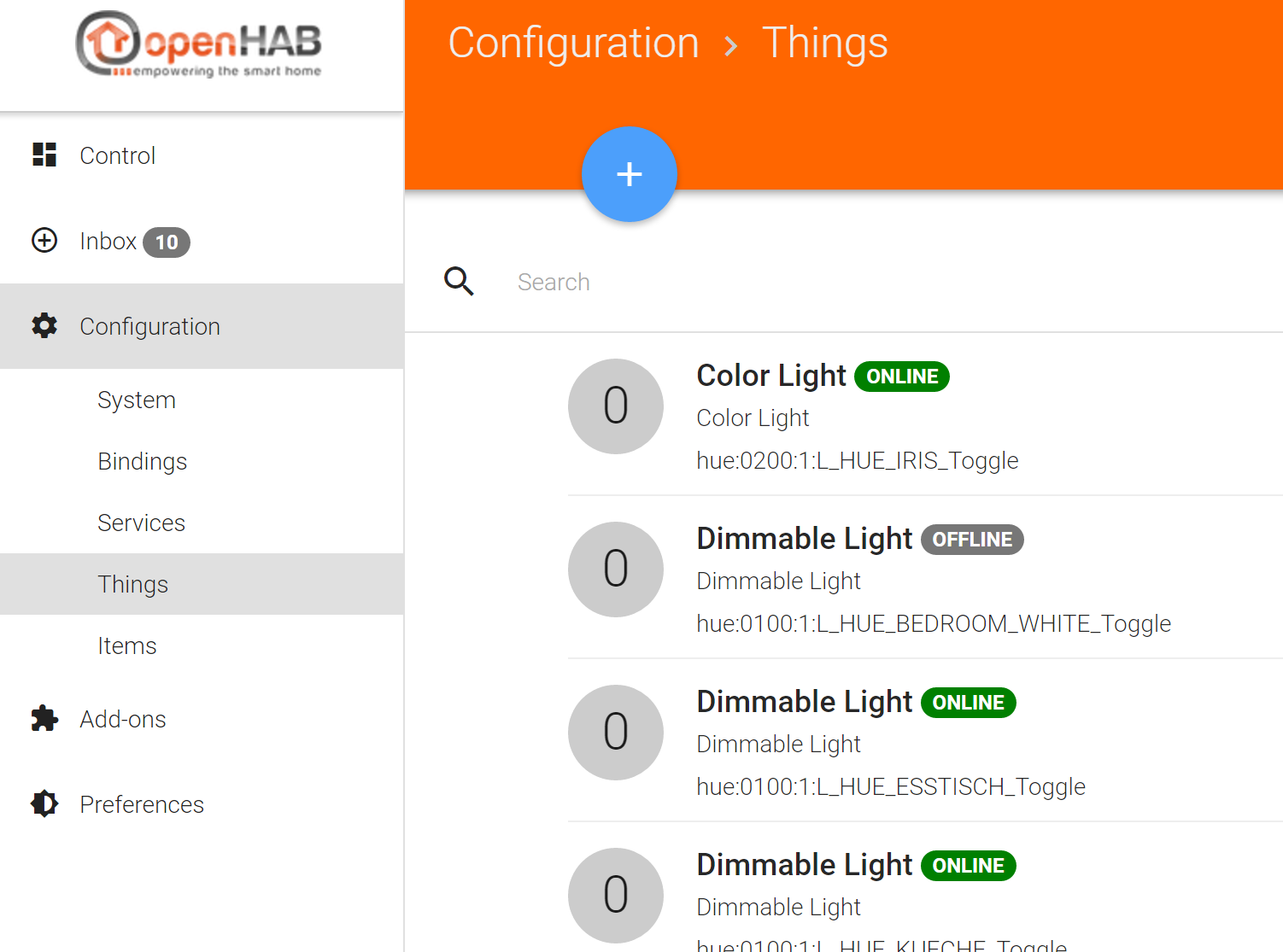
When I link one of the lights with a “new item” I can see the item but with a confusing name. I can control it with openhab though.
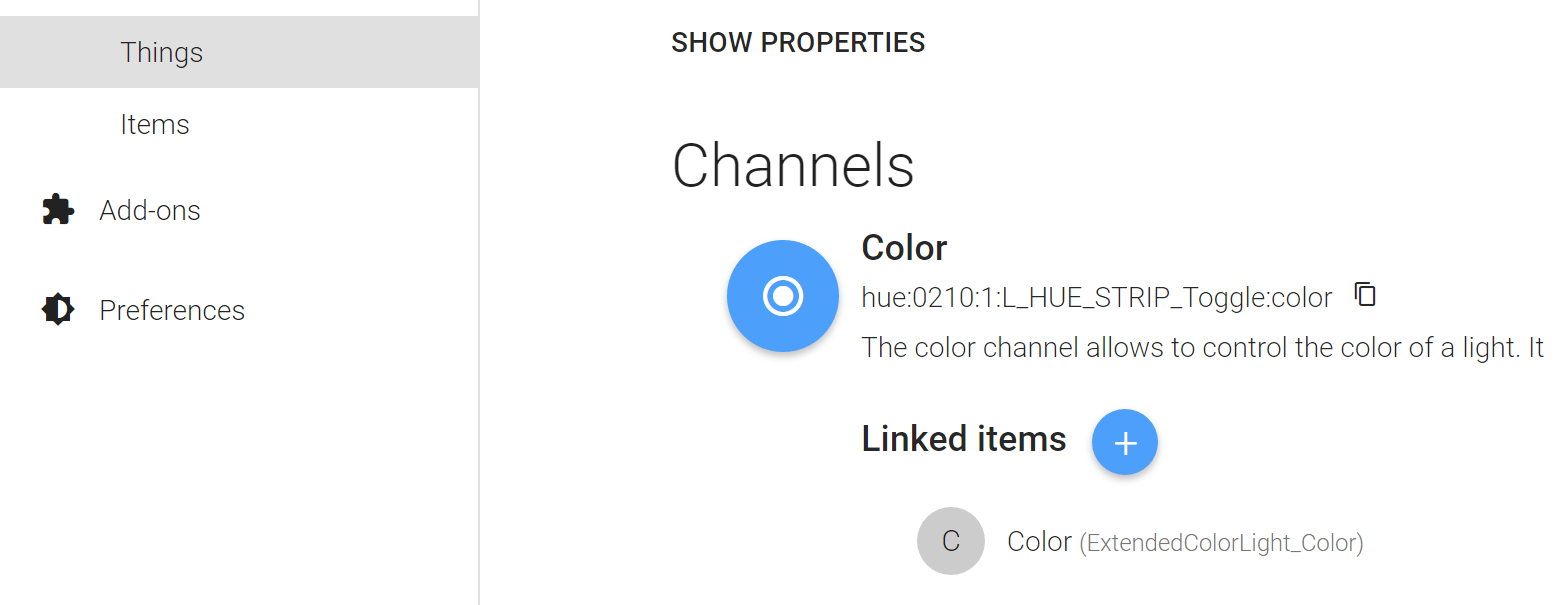
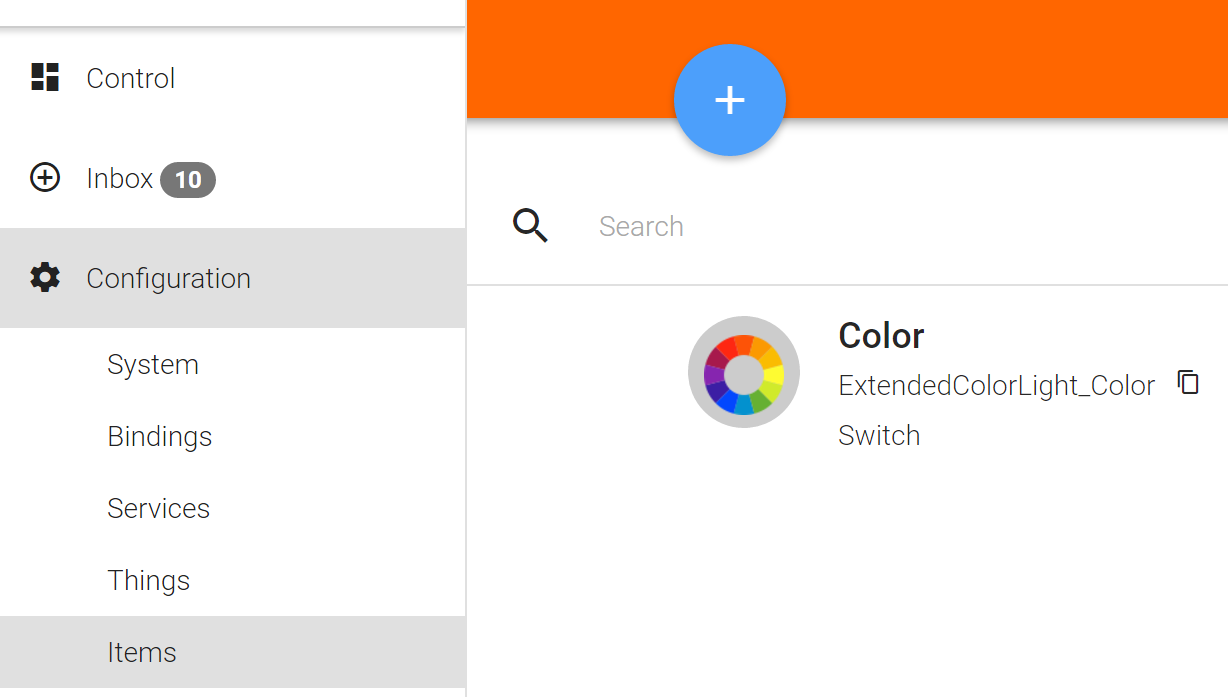
Your hint with checking the status in the browser just gives me this:
{
http://192.168.2.122:8080/rest/items/L_HUE_STRIP_Toggle

 "error": {
    "message": "Item L_HUE_STRIP_Toggle does not exist!",
    "http-code": 404
  }
}
Accordingly in the Magicmirror no connection is made.
Is this a basic OpenHab setup or configuration error?
Note: trying to change the name of the item manually resutls in a “conflict error”
Sorry for the long post. Any help is appreciated!
Cheers
Schummi -
@schummi84 that sounds strange, it seems as if the rest api does not cover all items. I’ll try to check that as soon as I find some time.
-
@schummi84 Please open http://192.168.2.122:8080/rest/items to get a (huge) list of all items that are available via the REST API. I realized that items that are automatically created via the Paper UI get an auto-generated name. However, you should be able to find them in the huge list of all items by searching the item labels.
For example, the Paper UI created yahoo weather item ‘Luftfeuchtigkeit’ has item name ‘yahooweather_weather_berlin_humidity’ on my setup. Then the item URL for such an item would be: http://192.168.2.122:8080/rest/items/yahooweather_weather_berlin_humidity
-
@paphko thanks for the hint. I will try it this afternoon and come back with the result.
-
@paphko I tried you hint with the following result:
[{"link":"http://192.168.2.122:8080/rest/items/ExtendedColorLight_Color","state":"ON","type":"Switch","name":"ExtendedColorLight_Color","label":"Color","category":"ColorLight","tags":[],"groupNames":[]},{"link":"http://192.168.2.122:8080/rest/items/SOFA_Switch","state":"ON","type":"Switch","name":"SOFA_Switch","label":"Color","category":"ColorLight","tags":[],"groupNames":[]},{"link":"http://192.168.2.122:8080/rest/items/SOFA_Color","state":"274,87,24","type":"Color","name":"SOFA_Color","label":"Color","category":"ColorLight","tags":[],"groupNames":[]},{"link":"http://192.168.2.122:8080/rest/items/SOFA_ColorTemperature","state":"0","type":"Dimmer","name":"SOFA_ColorTemperature","label":"Color Temperature","category":"ColorLight","tags":[],"groupNames":[]}]Basically it shows two items at the moment, both created with PaperUI. I still don’t undertsand why the file based setup/configuration is not working. I wouldn’t mind if th efloorplan integration would work but still doesn’t. I added the two items to the config.js but without success. I checked the pm2 logs to see the follwoing error:
0|mm       | TypeError: Cannot read property 'statusCode' of undefined
0|mm       |     at Request._callback (/home/pi/MagicMirror/modules/mmm-openhabfloorplan/node_helper.js:38:65)
0|mm       |     at self.callback (/home/pi/MagicMirror/node_modules/request/request.js:186:22)
0|mm       |     at emitOne (events.js:96:13)
0|mm       |     at Request.emit (events.js:188:7)
0|mm       |     at Request.onRequestError (/home/pi/MagicMirror/node_modules/request/request.js:845:8)
0|mm       |     at emitOne (events.js:96:13)
0|mm       |     at ClientRequest.emit (events.js:188:7)
0|mm       |     at Socket.socketErrorListener (_http_client.js:308:9)
0|mm       |     at emitOne (events.js:96:13)
0|mm       |     at Socket.emit (events.js:188:7)
Note: I already modified the mmm-openhabfloorplan.js according to your other thread. Unfortunatelly I cannot attach the files here - If required I can post the sourcecode.
Any idea ?
Cheers
Schummi -
@schummi84 I’ll test that as soon as I find some time - maybe tomorrow, maybe next week.
-
@schummi84 @YourhighnessLeender : OH2 has a slightly different JSON format in items response which I had to deal with. Please pull latest changes, set new ‘version’ option is your config, and try again.
-
@paphko Thank you very much for your effort. I’ll give it a try and report on the outcome!
-
@paphko With you Update everything works as expected!!!
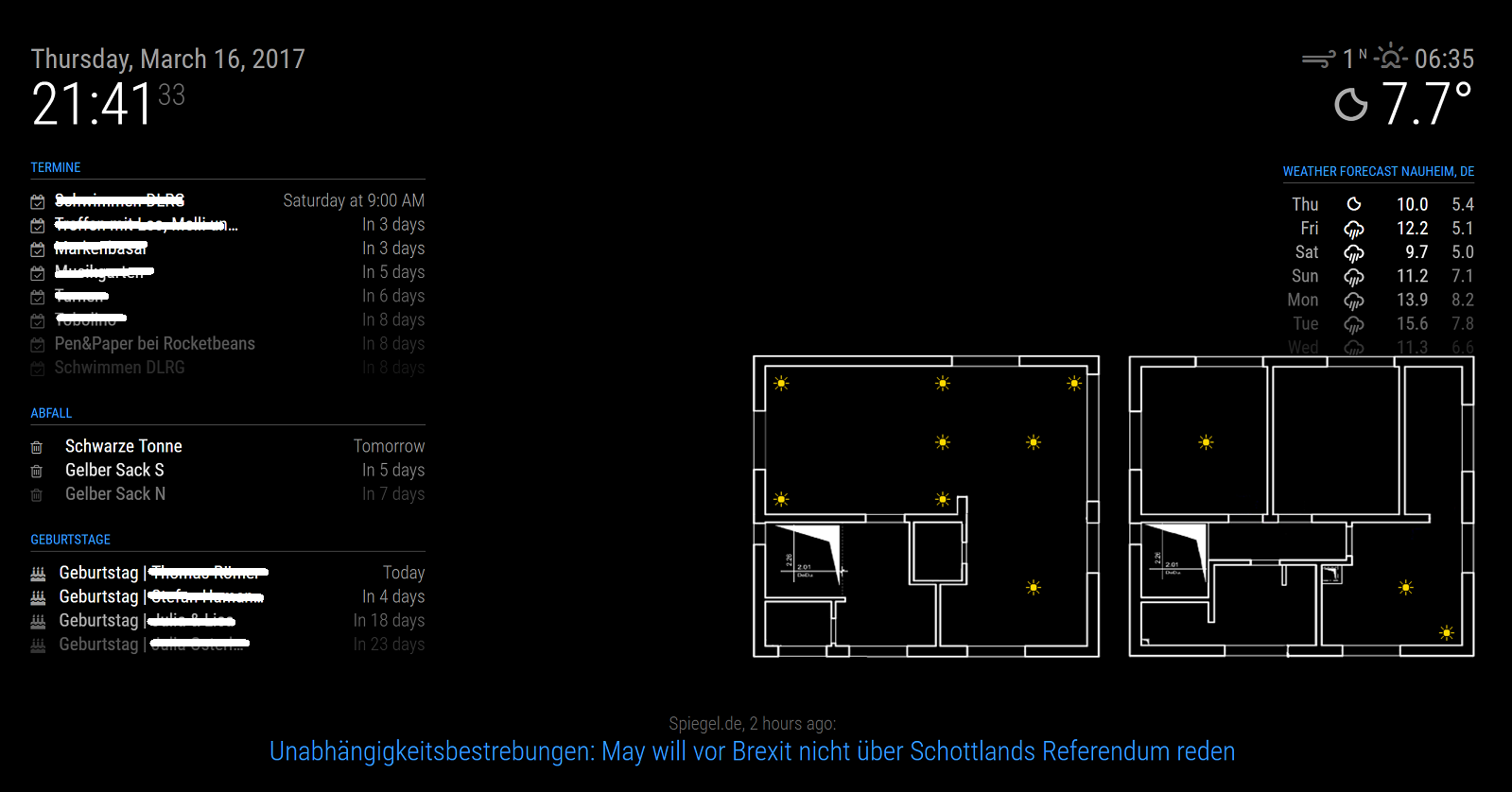
Again, thank you very much for your help and the effort you put in your module!
:grinning:
Best regards
Schummi



Hello! It looks like you're interested in this conversation, but you don't have an account yet.
Getting fed up of having to scroll through the same posts each visit? When you register for an account, you'll always come back to exactly where you were before, and choose to be notified of new replies (either via email, or push notification). You'll also be able to save bookmarks and upvote posts to show your appreciation to other community members.
With your input, this post could be even better 💗
Register Login