Read the statement by Michael Teeuw here.
27" custom framed magic mirror - fun to get done
-
First and foremost, thanks to Michael Teeuw for creating the MagicMirror and to the whole community that has continued to make this platform fun. I’ve scoured the forums and finally took the plunge to build my own.
So here it is…
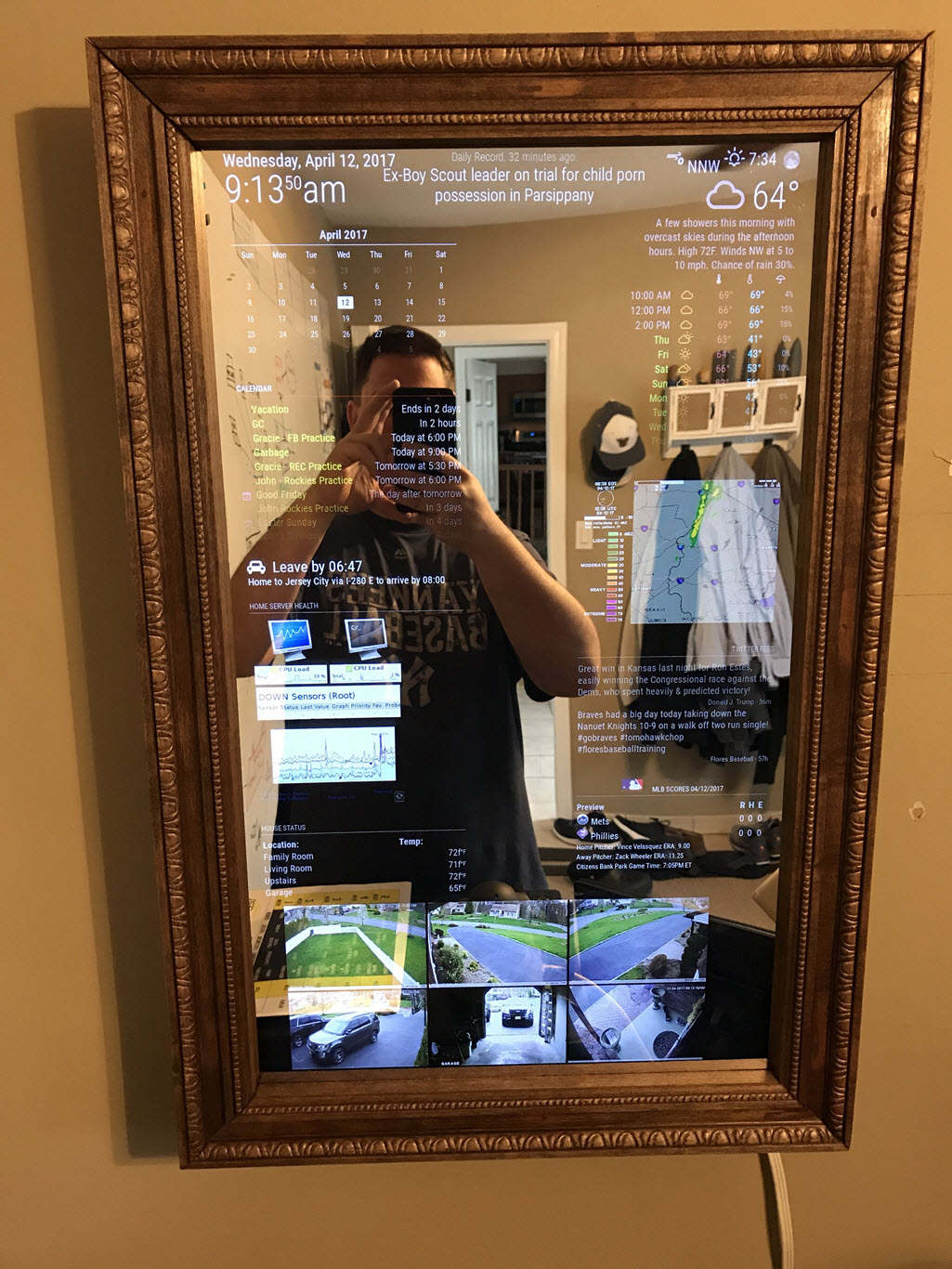
I was thinking of putting together a more detailed punch list/tutorial. If you guys are looking for one let me know. I’ll at least add some more pics and answer any questions.
The details:
Hardware
Frame:
Built the frame using 1x3 pine and decorative molding all found at my local Home Depot. With a little bit of stain, it came out pretty nice.CPU:
Using a Raspberry Pi 3 MB with a 16gb MicroSDMonitor:
Using a Dell 27" Widescreen LED LCD Monitor, SE2717HX. I got it for $99 through a deal I found on slickdeals.net via Office Depot. Noticed it isn’t the best from the side angles (looks washed out), not bright) but good enough… Suggest anyone looking for a monitor to setup an alert via slickdeals…Mirror:
I went with an acrylic see-through mirror. 12x24, 3mm thick. Picked it up from amazon for about $35. It’s ok, not as clean & crisp (seems wavy) as a real mirror but good to start on a budget. I will replace it with a real mirror at some point.MagicMirror Setup
I originally had MM2 installed and setup on the Pi running raspbian, but I found once I loaded up multiple modules it started to bog down. I found that if I just used the browser (chromium) on the Pi and pointed to a hosted version (serveronly on another machine) it ran much better. I actually have MM2 running on a windows machine I use for other purposes (Home automation, etc…) You can use node.js for windows to run MM2- https://nodejs.org/en/download/I then found FullPageOS distro that ran just enough OS (based on jessie lite) and just runs Chromium. This was perfect and found it ran faster than my original raspbian. Get it from here - https://github.com/guysoft/FullPageOS
I played around with many modules, configs and css files to finally get the data and layout I was looking.
Modules
Default:- Cock
- Newsfeed
- Calendar
Additional:
- Calendar_monthly - shows month
- MMM-MLB - Baseball scores. Go Yanks!!
- MMM-Rest - Used to pull data from my home automation system (homeseer)
- MMM-SimpleLogo - pulls updated radar image from wundergound
- MMM-Traffic - When to leave to get to work
- MMM-TweetsByTimelineOrList - Latest twitter posts
- MMM-WunderGround - Current weather & forecast
- iFrame - Used to display web pages for real-time data from PRTG network monitor & Netcam Studio tied into my Q-see house cams
So that’s my build. Hope you like it and let me know if you have any questions. It’s been a lot of fun building it…
-
Absolute great job!!! A few questions/comments if you don’t mind. I have a decent build, but like you am looking at a future upgrade.
- Have you considered the Intel Compute Stick so you can eliminate the hosting computer?
- Any research on touch screen?
-
Thanks! I actually tried an older Azullestick pc but had problems getting the display to show up on the 27" Dell. Think it didn’t support the resolution. Still think running it on another machine is the way to go. It allows you to point multiple mirrors to it keeping mangagement of it centralized.
Touch screen as well as others sensors are on my list of todos. Will post updates…
-
@iwaldrum said in 27" custom framed magic mirror - fun to get done:
decorative molding all found at my local Home Depot. With a little bit of stain, it came out pretty nice.
Hell yeah! I used casing from Home Depot and some stain I had on hand. And as you say, it did come out pretty nice. Love your frame! Nice work! And, oh yeah, Go Yankees! Greetings from NYC!
-
@cohron said in 27" custom framed magic mirror - fun to get done:
sear
Hello @iwaldrum , may you please tell us how to add stream from IP Cameras ?
Thanks. -
I’m using a program called Netcam Studio on the same pc that I’m running MM in serveronly mode. Netcam Studio allows you to connect to multiple types of cameras, either local or IP based. I’m using it to connect my q-see surveillance system using RSTP connections, as well as several Foscam and PC connected cams.
Once the cameras are connected to netcamstudio, you can then generate a secure token based url for each one. I then took each url and placed them into a single html file and put it on a webserver (same pc). Using the iFrame module I pointed to the html file to display it on my MM. You’ll need to play with the positioning and sizing of the iframe, as well as the webpage layout and image sizes in the html.
I typically get 5-10 fps for each camera. Depending on the # of cameras you will be displaying and the type of system your running MM on will drive the performance of the playback.
I know the setup is a little complex, but I felt it was the best way to get a flexible, integrated look that performed the best.
Let me know if you have any questions.
-
@iwaldrum
Thanks a lot for answer. I have some hikvision cameras and i’m able to reach RSTP stream of each one. Do you think that i’m able to put RSTP stream into iFrame directly ? -
@disakos
The challenge is you’ll need some sort of media plugin to view the rstp stream. It will need to run at the end point - MM. Something like vlc or quicktime which I’m not sure can be done. You may be able to use something like https://ipcamlive.com to pull your rstp stream through their service. -
Excellent, great job! Can you share your css file, I like the days a different color in the forecast.
-
Here is the section in my custom.css file for the MMM-WunderGround module.
/* MMM-Weatherunderground */ } .region.top.right .MMM-WunderGround table th { display: none; /* removes icons above max-temp, min-temp and % chance of rain */ } .MMM-WunderGround .max-temp { color: #f66; } .MMM-WunderGround .min-temp { color: #0ff; } .MMM-WunderGround .weather-icon { color: #f93; } .MMM-WunderGround .day { color: #6f6; } .region.top.center .MMM-WunderGround table.small, /* selector for ONLY current weather Thanks to Strawberry-3.141 */ .region.top.right .MMM-WunderGround table:not(.small), /* selector for ONLY weather forecast */ .region.top.right .MMM-WunderGround table.small td:nth-child(6) { display: none; /* this line and line above selector for NO rain amount column */ } -
I’d be interested in how you hooked your security cameras to it…
-
This is how I integrated my security cameras. If you have any questions or want more details let me know.
@iwaldrum said in 27" custom framed magic mirror - fun to get done:
I’m using a program called Netcam Studio on the same pc that I’m running MM in serveronly mode. Netcam Studio allows you to connect to multiple types of cameras, either local or IP based. I’m using it to connect my q-see surveillance system using RSTP connections, as well as several Foscam and PC connected cams.
Once the cameras are connected to netcamstudio, you can then generate a secure token based url for each one. I then took each url and placed them into a single html file and put it on a webserver (same pc). Using the iFrame module I pointed to the html file to display it on my MM. You’ll need to play with the positioning and sizing of the iframe, as well as the webpage layout and image sizes in the html.
I typically get 5-10 fps for each camera. Depending on the # of cameras you will be displaying and the type of system your running MM on will drive the performance of the playback.
I know the setup is a little complex, but I felt it was the best way to get a flexible, integrated look that performed the best.
Let me know if you have any questions.
-
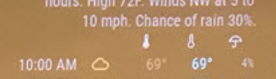
I cant find the little weather icons. Temp hi and lo and the umbrella.
-
@cohron nevermind im a dummy, copied the custom.css without really reading it:
.region.top.right .MMM-WunderGround table th {
display: none; /* removes icons above max-temp, min-temp and % chance of rain */
} -
This mirror looks great! It’s been the inspiration to take a stab at making one as well. I like the idea of running MM on an existing windows server I have in the house and just rely on the Pi3 to load the webpage.
With your mirror do you turn off the screen when no motion is detected or does it display everything constantly? If you do turn off the screen, how are you triggering it on and off? I see there are PIR modules for MM but since you’ve made the decision to simply view the MM page remotely, I was wondering if you had some way to turn off the screen?
Thanks for taking the time to detail this out!
-
Glad I could inspire you. I do like running it centrally. Since I made this one, I’ve setup another one in my son’s room. Different size screen and content. .All I had to do is run another instance on my server - copy and paste folder and change the config file to my liking… done…
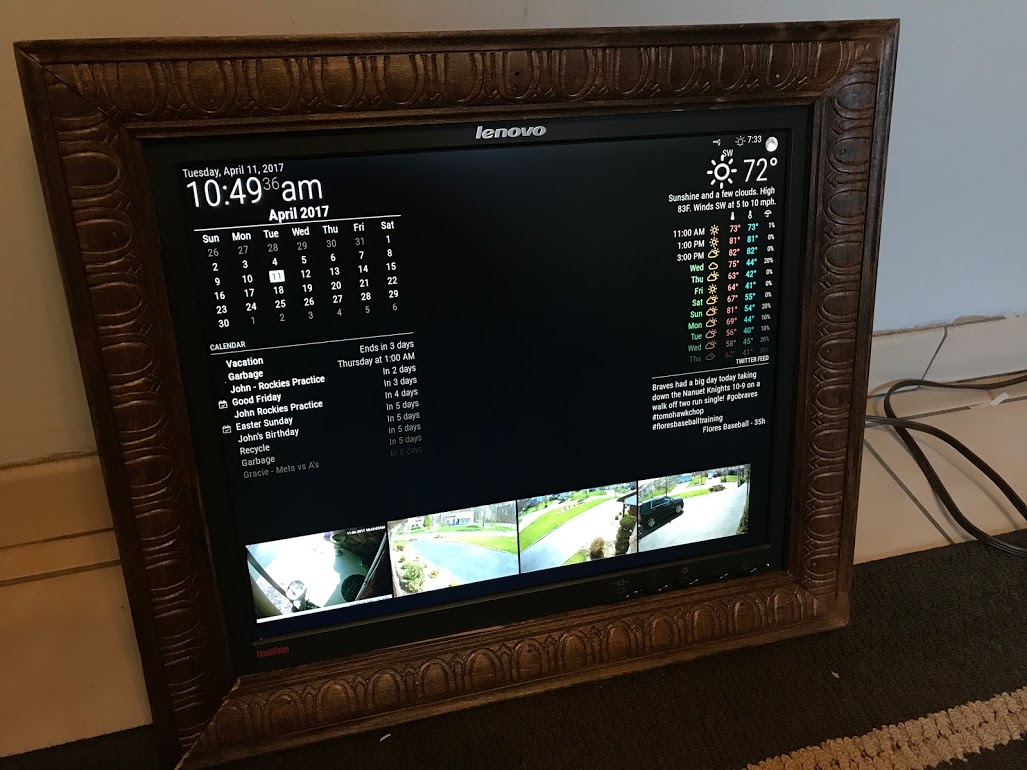
I do not turn my screen off. It’s on my todo list… To your point, it might be a little trick to do so since MM isn’t running locally. We’ll need to find an external solution to do so that works on fullpageOS or whatever platform you are running at the endpoint. If I find something Ill post…
-
@iwaldrum your project looks great! It is almost the module configuration I am also aiming for. Could you share how you integrated the surveillance cameras (iframe code)? I have trouble integrating mine. They offer rtsp and also jpegs that you can pull via http request. Which seems to be very similar to your setup. I would be interested in how you used the iframes to do it. Did you simply put the token-url in the iFrame-Module? How did you handle the refresh? Maybe you could share some code.
Thanks very much
Wolf -
@wbleek I achieved the cameras on my mirror pretty easily with Blue Iris. I simply made a custom .HTM file and placed it in the /modules directory of the MagicMirror then using iFrameReload i just call the /modules/custom.htm URL to load the cameras. Below is my custom.htm file I am calling in the iFrameReload module:
<table> <tr> </tr><tr> <td> <img src="http://192.168.1.108:81/mjpg/BackyardCam/video.mjpg?q=25&s=25" alt="BackyardCam" /> </td> <td> <img src="http://192.168.1.108:81/mjpg/FrontDoor/video.mjpg?q=40&s=40" alt="DrivewayCam" /> </td> </tr> <tr> <td> <img src="http://192.168.1.108:81/mjpg/DriveWayCam/video.mjpg?q=25&s=25" alt="FrontdoorCam" /> </td> </tr> </table>In lieu of having blue iris you could possibly simply pull the mjpg streams straight from each cameras individually and slap them in the img tag. That may be a better way actually but it seems to be working fine for me through Blue Iris this way.
Below is the code from my config.js showing how I am calling this custom HTM file:
{
	module: 'MMM-iFrameReload',
	position: 'bottom_bar', // This can be any of the regions.
		config: {
		// See 'Configuration options' for more information.
		url: "http://192.168.1.108:9000/modules/custom.htm",
		width: "100%", // Optional. Default: 400px
		height: "850px", // Optional. Default: 800px
		scrolling:"no",
		refreshInterval: 600, //Optional. Default: 3600 = 1 hour
		animationSpeed: 4000,
		}
	},
My setup is similar to the OP in terms of running the MagicMirror server on a central server and simply running fullpageos on the raspberry pi to call the magicmirror page.
Hope this helps.
-
Hi! Looks awesome! Congrats!
Do you have any photo from the sides and/or back? -
@cmille34 Hey, thanks for your answer. I appreciate that. My NVR only provides still JPEGs or RTSP for pictures. If I use JPEGs I have to reload them in a 200ms interval to achieve acceptable motion.
At this point, I have tried the following:
- uses MMM-iFrame
- do the reload via embedded HTML meta-tag
- strong flickers (approx. half of the time blank)
- works, but not visually accaptable
- does not scale due to the flickering
- use MMM-iFrame
- do the reload via embedded Java-Script function
- almost no flicker, almost fluid motion
- works for 30-60 minutes, then the module stops
- does not scale since it stops earlier with more modules
- use oxmplayer as an overlay
- needs '–avdict rtsp_transport:tcp ’ switches to work without banding
- rtsp with 640x360 works with 30fps
- tested to concurrent streams
I am happy with the omxplayer solution even though it is not integrated in the MagicMirror. But for the user it looks integrated and it delivery a very good video quality.
Cheers
wolf



Hello! It looks like you're interested in this conversation, but you don't have an account yet.
Getting fed up of having to scroll through the same posts each visit? When you register for an account, you'll always come back to exactly where you were before, and choose to be notified of new replies (either via email, or push notification). You'll also be able to save bookmarks and upvote posts to show your appreciation to other community members.
With your input, this post could be even better 💗
Register Login