MagicMirror Forum
    • Recent
    • Tags
    • Unsolved
    • Solved
    • MagicMirror² Repository
    • Documentation
    • 3rd-Party-Modules
    • Donate
    • Discord
    • Register
    • Login
    A New Chapter for MagicMirror: The Community Takes the Lead
    Read the statement by Michael Teeuw here.

    Calendar times in 24 hour format?

    Scheduled Pinned Locked Moved Feature Requests
    31 Posts 9 Posters 26.3k Views 9 Watching
    Loading More Posts
    • Oldest to Newest
    • Newest to Oldest
    • Most Votes
    Reply
    • Reply as topic
    Log in to reply
    This topic has been deleted. Only users with topic management privileges can see it.
    • J Offline
      jtyle6
      last edited by

      Change the timeFormat: in the config.js file in config folder so looks like this.

      
      /* Magic Mirror Config
       *
       * By Michael Teeuw http://michaelteeuw.nl
       * MIT Licensed.
       */
      
      var config = {
              port: 8080,
      
              language: 'en',
              timeFormat: 12,
              units: 'metric',
      

      Note: I Have only copied top half of mine.

      D 1 Reply Last reply Reply Quote 0
      • D Offline
        dinkybluebug245 @jtyle6
        last edited by

        @jtyle6 Mine is already showing timeformat as 24, which shows the clock in 24 hour format. But calendar items are still showing 12 hour format with AM/PM

        J 1 Reply Last reply Reply Quote 0
        • J Offline
          jtyle6 @dinkybluebug245
          last edited by

          @dinkybluebug245 said in Calendar times in 24 hour format?:

          @jtyle6 Mine is already showing timeformat as 24, which shows the clock in 24 hour format. But calendar items are still showing 12 hour format with AM/PM

          ah, whoops sorry miss read the Topic.

          1 Reply Last reply Reply Quote 0
          • M Offline
            MrEdOne
            last edited by

            Sorry for Dig this topic from grave but i have the same problem like @dinkybluebug245
            I have meeting on 15:00 but calendar say its 03:00. Without PM
            I have in config timeFormat: 24.
            Everything work fine, only wrong time is show.
            And this is bug after update to last version.

            Mykle1M 1 Reply Last reply Reply Quote 0
            • Mykle1M Offline
              Mykle1 Project Sponsor Module Developer @MrEdOne
              last edited by

              @MrEdOne

              Two things to try.

              Is your time and time zone set correctly on your Pi itself?

              You could also try timeFormat: 24, in the module entry of the config.

              Create a working config
              How to add modules

              1 Reply Last reply Reply Quote 0
              • M Offline
                MrEdOne
                last edited by MrEdOne

                timeFormat: 24, in calendar module not work.
                How can i check is my time and timezone correctly set?
                Im from Poland so i set Europe/Warsaw time in raspi-config.
                My clock works correctly.

                When i change timeFormat to 12 calendar add PM to 03:00 so it’s correctly, but when i change to 24, PM disappear.

                Mykle1M 1 Reply Last reply Reply Quote 0
                • Mykle1M Offline
                  Mykle1 Project Sponsor Module Developer @MrEdOne
                  last edited by

                  @MrEdOne said in Calendar times in 24 hour format?:

                  but when i change to 24, PM disappear.

                  That makes perfect sense. 24 hour format would NOT show AM/PM, only 12 hour format would do that.

                  3:00 PM in 12 hour format

                  1500 in 24 hour format (no PM)

                  Create a working config
                  How to add modules

                  1 Reply Last reply Reply Quote 0
                  • M Offline
                    MrEdOne
                    last edited by

                    Yes, but it won’t change 03:00 to 15:00

                    Mykle1M 1 Reply Last reply Reply Quote 0
                    • Mykle1M Offline
                      Mykle1 Project Sponsor Module Developer @MrEdOne
                      last edited by

                      @MrEdOne

                      Oh ok, that’s different

                      It sounds like something is overriding the timeFormat: setting. Have you made any changes to the calendar.js file?

                      Create a working config
                      How to add modules

                      1 Reply Last reply Reply Quote 0
                      • M Offline
                        MrEdOne
                        last edited by

                        Nope. A search only where is a timeformat in js but my knowledge is to small. :)

                        Mykle1M 1 Reply Last reply Reply Quote 0
                        • Mykle1M Offline
                          Mykle1 Project Sponsor Module Developer @MrEdOne
                          last edited by

                          @MrEdOne

                          Are you typing timeformat ? That won’t work.

                          It has to be timeFormat with a capital F.

                          Wait a minute, the only options for timeFormat in the calendar module are absolute or relative

                          Create a working config
                          How to add modules

                          1 Reply Last reply Reply Quote 0
                          • M Offline
                            MrEdOne
                            last edited by

                            But it not change anything.
                            With absolute and relative is the same.

                            Mykle1M 1 Reply Last reply Reply Quote 0
                            • Mykle1M Offline
                              Mykle1 Project Sponsor Module Developer @MrEdOne
                              last edited by

                              @MrEdOne

                              It has to be timeFormat with a capital F. And at the top of your config also

                              /* Magic Mirror Config
                               *
                               * By Michael Teeuw http://michaelteeuw.nl
                               * MIT Licensed.
                               */
                              
                              var config = {
                                      port: 8080,
                              
                                      language: 'en',
                                      timeFormat: 24,
                                      units: 'metric',
                              

                              Create a working config
                              How to add modules

                              1 Reply Last reply Reply Quote 0
                              • M Offline
                                MrEdOne
                                last edited by MrEdOne

                                Yes. I have everywhere timeFormat. on a top of config and in calendar module with capital F

                                1 Reply Last reply Reply Quote 0
                                • M Offline
                                  MrEdOne
                                  last edited by

                                  I give up. I don’t know where is error.

                                  1 Reply Last reply Reply Quote 0
                                  • SvenSommerS Offline
                                    SvenSommer
                                    last edited by SvenSommer

                                    @MrEdOne
                                    timeFormat uses the formatting of your operating system.
                                    When “24” is configured the format “hh:mm” is returned. Which is exactly, what you are looking for.
                                    Here is the code snippet from calender.js:

                                    		switch (config.timeFormat) {
                                    		case 12: {
                                    			moment.updateLocale(config.language, {
                                    				longDateFormat: {
                                    					LT: "h:mm A"
                                    				}
                                    			});
                                    			break;
                                    		}
                                    		case 24: {
                                    			moment.updateLocale(config.language, {
                                    				longDateFormat: {
                                    					LT: "hh:mm"
                                    				}
                                    			});
                                    			break;
                                    		}
                                    

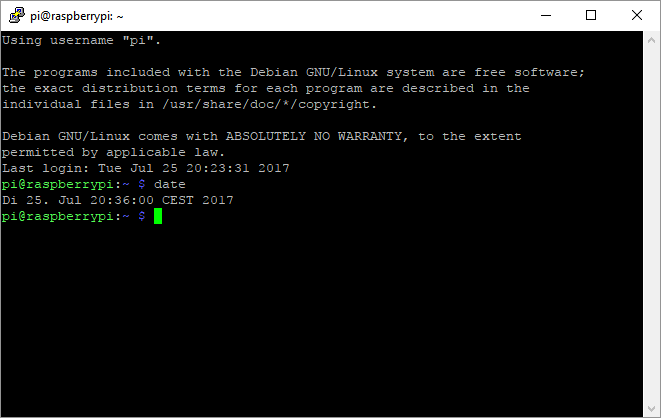
                                    What do you get, when typing date in your console?

                                    0_1501007853673_492bdac5-1124-4fcf-b5bf-c69605f21853-image.png
                                    If it’s not in displayed in a format of 24h, change the setting of your OS.

                                    Maybe this helps?

                                    Looking for some building inspiration?
                                    Check out my large, thin and metal framed mirror on robstechlog.com.

                                    Modules released:
                                    MMM-GoogleAnalytics
                                    MMM-GrafanaChart
                                    MMM-GrafanaGauges

                                    1 Reply Last reply Reply Quote 1
                                    • M Offline
                                      MrEdOne
                                      last edited by

                                      Here is output from date

                                      pi@MagicMirror:~ $ date
                                      wto, 25 lip 2017, 20:59:48 CEST
                                      

                                      Yes in 12, but in 24 I have 03:00 instead 15:00

                                      1 Reply Last reply Reply Quote 0
                                      • SvenSommerS Offline
                                        SvenSommer
                                        last edited by

                                        I think there is simply an understanding problem. You wrote:
                                        “When i change timeFormat to 12 calendar add PM to 03:00 so it’s correctly, but when i change to 24, PM disappear.”

                                        So, if I’m interpreting this right, you are looking for something that isn’t the usual case. You want to display something like: “20:59 PM”
                                        Is this correct?

                                        Looking for some building inspiration?
                                        Check out my large, thin and metal framed mirror on robstechlog.com.

                                        Modules released:
                                        MMM-GoogleAnalytics
                                        MMM-GrafanaChart
                                        MMM-GrafanaGauges

                                        1 Reply Last reply Reply Quote 0
                                        • M Offline
                                          MrEdOne
                                          last edited by

                                          This post is deleted!
                                          1 Reply Last reply Reply Quote 0
                                          • SvenSommerS Offline
                                            SvenSommer
                                            last edited by SvenSommer

                                            Is your google calendar in the correct time zone?

                                            Looking for some building inspiration?
                                            Check out my large, thin and metal framed mirror on robstechlog.com.

                                            Modules released:
                                            MMM-GoogleAnalytics
                                            MMM-GrafanaChart
                                            MMM-GrafanaGauges

                                            1 Reply Last reply Reply Quote 0

                                            Hello! It looks like you're interested in this conversation, but you don't have an account yet.

                                            Getting fed up of having to scroll through the same posts each visit? When you register for an account, you'll always come back to exactly where you were before, and choose to be notified of new replies (either via email, or push notification). You'll also be able to save bookmarks and upvote posts to show your appreciation to other community members.

                                            With your input, this post could be even better 💗

                                            Register Login

                                            • 1
                                            • 2
                                            • 1 / 2
                                            • First post
                                              Last post
                                            Enjoying MagicMirror? Please consider a donation!
                                            MagicMirror created by Michael Teeuw.
                                            Forum managed by Sam, technical setup by Karsten.
                                            This forum is using NodeBB as its core | Contributors
                                            Contact | Privacy Policy