Read the statement by Michael Teeuw here.
MMM-NOAA - Another Weather Module
-
uncomment the “air stuff” for the moment
/* if (this.config.useAir != false || aquis != undefined) { var aqius = this.air.aqius; var aqi = document.createElement("div"); aqi.classList.add("xsmall", "bright"); if (aqius < 51) { aqi.innerHTML = this.translate("Air Quality Index: ") + "" + aqius + ""; } else if (aqius > 50 && aqius < 101) { aqi.innerHTML = this.translate("Air Quality Index: ") + "" + aqius + ""; } else if (aqius > 100 && aqius < 151) { aqi.innerHTML = this.translate("Air Quality Index: ") + "" + aqius + ""; } else if (aqius > 150 && aqius < 201) { aqi.innerHTML = this.translate("Air Quality Index: ") + "" + aqius + ""; } else { aqi.innerHTML = this.translate("Air Quality Index: ") + "" + aqius + ""; } wrapper.appendChild(aqi); } */@cowboysdude needs to check it, since the “aquis” variabel is undefined it quits. Had the same error and i needed some time to find the cause
edit: while i am reading i guess it is just a typo in the first line. should be “aqius” instead of “aquis” ;)
edit2: yes. thats it. just change
the lineif (this.config.useAir != false || aquis != undefined) {to
if (this.config.useAir != false || aqius != undefined) {and you are good to go again.
Sadly i have no idea how to push the fix to the git repository
-
It did work like a charm, thanks alot dude!
Also thanks to @Mykle1 for chatting with me and updating me on the social status of @cowboysdude hehe.
For a first time post, i must say you guys have impressed me of how welcoming a Forum can be. It’s rare from my experience. -
@barnosch said in MMM-NOAA - Another Weather Module:
and you are good to go again.
Sadly i have no idea how to push the fix to the git repositoryNice catch you guys.
Nice remedy @barnosch
If you go to the modules repo https://github.com/cowboysdude/MMM-NOAA
and click on the file you want to fix, then click on the “pencil” icon to the right, github will fork the repo for you. There you can make the edit and submit a pull request which will go to cowboysdude -
@Nystro0m said in MMM-NOAA - Another Weather Module:
Also thanks to @Mykle1 for chatting with me and updating me on the social status of @cowboysdude hehe.
I just finishing texting with @cowboysdude. I told him, “Don’t rush home from work. Someone else fixed your $h1t”.
:^)
-
cool. thats easy.
Thanks for the explanation. Fix added ;) -
@barnosch said in MMM-NOAA - Another Weather Module:
cool. thats easy.
Thanks for the explanation. Fix added ;)You’re welcome.
I’m sure @cowboysdude will appreciate it
-
-
@cowboysdude said in MMM-NOAA - Another Weather Module:
Merged the pull request! :)
He ran all the way home just to fix his module.
Yeah, he’s that good! :^)
And, well done @barnosch !
-
thanks guys. Very nice to have some guys like you here. Like this it’s fun.
-
@cowboysdude said in MMM-NOAA - Another Weather Module:
Please PM me if you’d be interested in making any other translation files for this
Just send you the dutch translation by Github. Don’t now if I did it the right way, so here it is as well.
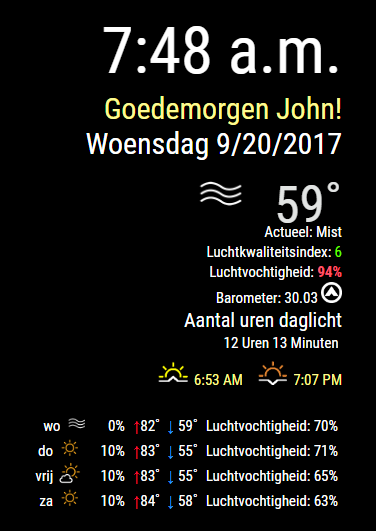
{ "GATHERING WEATHER STUFF": "Ontvangen weerdata...", "Currently: ": "Actueel: ", "Current Temp: ": "Huidige temperatuur: ", "UV Index: ": "UV-Index: ", "Wind: ": "Wind: ", "From: ": "van: ", "Barometer: ": "Barometer: ", "Monday": "Maandag", "Tuesday": "Dinsdag", "Wednesday": "Woensdag", "Thursday": "Donderdag", "Friday": "Vrijdag", "Saturday": "Zaterdag", "Sunday": "Zondag", "High: ": "Hoog: ", "Low: ": "Laag: ", "Humidity: ": "Luchtvochtigheid: ", "Safe": "Veilig", "Moderate": "Gemiddeld", "Very High": "Zeer hoog", "Extreme": "Extreem", "Sunset": "Zonsondergang", "Sunrise": "Zonsopgang", " hours ": " Uren ", " minutes ": " Minuten ", "Amount of Daylight": "Aantal uren daglicht", "Good Morning ":"Goedemorgen ", "Good Afternoon ": "Goedenmiddag ", "Good Evening ": "Goedenavond ", "Air Quality Index: ":"Luchtkwaliteitsindex: " } -
-
@cowboysdude
You’re welcome -
@cowboysdude
I got a error after the update with following:/home/pi/MagicMirror/modules/MMM-NOAA/MMM-NOAA.js:399 ======= ^^^ SyntaxError: Unexpected token ===I removed the ====== on line 399 with success to get the module working.
Im not sure if this is just on my side, im still new to this. But i thought it could good to be shared.
Edit: This could make a problem with updating the the module. I experience the clock getting stuck from time to time.
-
@Nystro0m
Looks to me that there is two times the same code in the js-file ecxept for the language settings. So @cowboysdude has to look into this. -
@pjkoeleman said in MMM-NOAA - Another Weather Module:
So @cowboysdude has to look into this.
He’s doing a roofing job in 90° heat at the moment. On a Sunday! Who does that?
I’m sure he’ll fix it as soon as possible. That’s what he does.
-
@Nystro0m and @pjkoeleman
Thank you both!!! IT was doubled, not sure how that happened but all fixed!! :)
-
installed module last night, settings all according the help file, but nothing is displayed.
Switched back to the wunderground module, that’s working fine.
any idea. I suppose that when the API key is working with the Wunderground module it should work with yours too.what information do i need to provide for further investigation - also tell me how to get that. (I’m newbee - sorry for this - i’m in a learning process )
(language was set to “nl” and then changed again to “en”).
And I see module is loaded, but not displayed. -
@Johans check the console log and see what that tells you when it’s loading…
You need to start your mirror and hit the ‘ALT’ key there will be a menu at the top…you want ‘toggle developer…’
That’ll open up a side panel on the right and it will tell you what error there is…let me know so I can help you fix it :)
-
@Johans
Im running on a Raspberry pi B ver.1 and it have some problems loading information from time to time when it been pushed to far.
I would make sure that it is no error in the console from NOAA or other modules:
Either by Comwboysdude method, but you could also run: “npm start dev” when starting MagicMirror.
Another way that i did find more speed efficient is to open the MagicMirror interface on a secondary computer by going to: “Your.PI.LocalIP:8080/”.
And then right-click and choose “inspect” in Chrome. Here you can find the console.Make sure to have your WhitelistIP set properly.
I could also recommend Jophys - Remote Control Module.
With this you can restart you MagicMirror, enter the web interface and such remotely if you are not comfortable with ssh. -
@Nystro0m
thanks, learned again something new, on how to remotely connect to the MagicMirror.
Meanwhile problem is solved.removed the line 400.
these chars created an error ==========



Hello! It looks like you're interested in this conversation, but you don't have an account yet.
Getting fed up of having to scroll through the same posts each visit? When you register for an account, you'll always come back to exactly where you were before, and choose to be notified of new replies (either via email, or push notification). You'll also be able to save bookmarks and upvote posts to show your appreciation to other community members.
With your input, this post could be even better 💗
Register Login