MagicMirror Forum
    • Recent
    • Tags
    • Unsolved
    • Solved
    • MagicMirror² Repository
    • Documentation
    • 3rd-Party-Modules
    • Donate
    • Discord
    • Register
    • Login
    A New Chapter for MagicMirror: The Community Takes the Lead
    Read the statement by Michael Teeuw here.

    MMM-Gas

    Scheduled Pinned Locked Moved Transport
    56 Posts 13 Posters 36.6k Views 12 Watching
    Loading More Posts
    • Oldest to Newest
    • Newest to Oldest
    • Most Votes
    Reply
    • Reply as topic
    Log in to reply
    This topic has been deleted. Only users with topic management privileges can see it.
    • richland007R Offline
      richland007 @cowboysdude
      last edited by

      @cowboysdude Hey buddy i just installed your module and all i get is “updated at XDate@Time” and no other information?? Is the module currently working? can you test it with zip codes 75252 and 75093 and see if you get any info please?? Maybe there is no information on my area

      Thank you
      Denis

      3 1 Reply Last reply Reply Quote 0
      • 3 Offline
        3d @richland007
        last edited by

        @cowboysdude . . . I am having the same exact issue. It only displays the [updated] line with nothing else.

        @richland007 Hi…the module calls autoblog as follows:

        http://www.autoblog.com/[zipcode]-gas-prices/

        replace [zipcode] with your zip code to see if your zip code is valid.

        richland007R 1 Reply Last reply Reply Quote 0
        • richland007R Offline
          richland007 @3d
          last edited by richland007

          @3d thank you for the tip did not know that …and of course i would get values, i am in the middle of Dallas and Plano what was i thinking LOL… and i also get values for Costco and Sams that i asked a few posts above…so that’s a good thing cause we always use those 99% of the time as a small business.
          Anyhow the issue remains just “Updating…”
          D

          3 1 Reply Last reply Reply Quote 0
          • 3 Offline
            3d @richland007
            last edited by

            @richland007 Excellent. I am having the same issue as well and can’t figure it out yet.

            BTW, I lived in Plano as well…actually graduated from Univ Texas Dallas and Baylor Law. Plano is a great place. Glad I could help a bit.

            1 Reply Last reply Reply Quote 0
            • cowboysdudeC Offline
              cowboysdude Module Developer
              last edited by

              Yes they’ve changed their page so the data it’s asking for is incorrect. I will fix it when I can get some time to do it… Sorry everyone.

              1 Reply Last reply Reply Quote 0
              • mochmanM Offline
                mochman Module Developer
                last edited by

                @cowboysdude I just sent you a pull request that should fix their new page.

                cowboysdudeC Mykle1M 2 Replies Last reply Reply Quote 2
                • cowboysdudeC Offline
                  cowboysdude Module Developer @mochman
                  last edited by

                  @mochman said in MMM-Gas:

                  @cowboysdude I just sent you a pull request that should fix their new page.

                  I got it and it’s been merged!! HUGE Thank you for fixing this…time is killing me right now :)

                  "You can now get fuel data for regular (default), mid-grade, premium, and diesel. I also threw in a way to sort by price or distance (default). I saw you had an items variable in the default config section as well. I assume that was to only show X number of items. I added that to your for loop that iterates through the gas array. "

                  He not only fixed it but enhanced it to make it 100% even better! Here’s an example config:

                            disabled: false,
                            module: "MMM-Gas",
                            position: "top_left",
                            config: {
                               zip: "14904",
                               items: 10,
                               typeGas: "",	//premium, mid-grade, diesel, or blank for regular
                               sortBy: "price" 	//distance, price
                    		}			   
                        }, 
                  

                  See the // notes for added features! Thank you again @mochman

                  Do a git pull to update and update your config accordingly :)

                  3 1 Reply Last reply Reply Quote 1
                  • Mykle1M Offline
                    Mykle1 Project Sponsor Module Developer @mochman
                    last edited by

                    @mochman said in MMM-Gas:

                    I just sent you a pull request that should fix their new page.

                    Well done, sir! Well done!

                    Create a working config
                    How to add modules

                    1 Reply Last reply Reply Quote 0
                    • 3 Offline
                      3d @cowboysdude
                      last edited by

                      @cowboysdude and @mochman … WOW, nice work!

                      The only thing I had to fix was put the ITEMS in quotes…the proper syntax for me was:

                      items: "10",
                      
                      mochmanM 1 Reply Last reply Reply Quote 1
                      • mochmanM Offline
                        mochman Module Developer @3d
                        last edited by mochman

                        @3d Hmm, the code is supposed to use that variable as an integer. What kind of error were you getting when you had items: 10,?

                        Edit: Guess it doesn’t matter. Math.min() still works using a string.

                        3 1 Reply Last reply Reply Quote 1
                        • 3 Offline
                          3d @mochman
                          last edited by

                          @mochman It wasn’t loading the config.js. So I just stepped through line by line until if failed. Once if failed I put the 10 in quotations and it loaded.

                          1 Reply Last reply Reply Quote 0
                          • justjim1220J Offline
                            justjim1220 Module Developer
                            last edited by

                            Ok, so I deleted my current GAS module. and reinstalled it.

                            I went to the website to check my zip code, which is good.

                            I tried it with & without the quotes around the 10.

                            Still not working for me… :slightly_frowning_face:

                            "Life's Too Short To Dance With Ugly People"
                            Jim Hallock - 1995

                            1 Reply Last reply Reply Quote 0
                            • justjim1220J Offline
                              justjim1220 Module Developer
                              last edited by

                              NVM!!!

                              When in doubt, Reboot it out!!!

                              :smiling_face_with_sunglasses:

                              "Life's Too Short To Dance With Ugly People"
                              Jim Hallock - 1995

                              1 Reply Last reply Reply Quote 0
                              • R Offline
                                rob73
                                last edited by

                                Is there any way to remove the Distance column? I live in a small town and dont really need the distances on the display. I hunted around the files a little bit and didnt see anything that I could maybe edit or delete that would remove it.

                                Rob

                                1 Reply Last reply Reply Quote 0
                                • mochmanM Offline
                                  mochman Module Developer
                                  last edited by mochman

                                  @rob73 I haven’t tried this to see how it looks, but you may just be able to comment out a few of the lines in MMM-Gas.js
                                  Try commenting out the last 2 lines of this code in the getDom() function.

                                   var td5 = document.createElement("td");
                                   td5.innerHTML = dist;
                                   TDrow.appendChild(td5);
                                   weatherTable.appendChild(TDrow);
                                  

                                  It should look like this when you’re done.

                                  var td5 = document.createElement("td");
                                  td5.innerHTML = dist;
                                  //TDrow.appendChild(td5);
                                  //weatherTable.appendChild(TDrow);
                                  

                                  You should also comment out this part as well.

                                  var bjumpy = document.createElement("th");
                                  bjumpy.setAttribute("style", "text-align:center");
                                  bjumpy.classList.add("xsmall");
                                  bjumpy.innerHTML = "Distance";
                                  //xFCRow.appendChild(bjumpy);
                                  //weatherTable.appendChild(xFCRow);
                                  
                                  R 1 Reply Last reply Reply Quote 1
                                  • R Offline
                                    rob73 @mochman
                                    last edited by

                                    @mochman … Awesome… I followed your instructions and it worked! Thank you! I would have never figured that out on my own…

                                    Thanks again!

                                    Rob

                                    1 Reply Last reply Reply Quote 1
                                    • cowboysdudeC Offline
                                      cowboysdude Module Developer
                                      last edited by cowboysdude

                                      New config option to hide or show distance column.

                                      example config:

                                      {
                                                disabled: false,
                                                module: "MMM-Gas",
                                                position: "top_left",
                                                config: {
                                                   zip: "14904",
                                                   items: 10,
                                                   typeGas: "",	//premium, mid-grade, diesel, or blank for regular
                                                   sortBy: "price", 	//distance, price
                                             distance: false //default is true, so using true just don't use distance in your config
                                        		}			   
                                            },
                                      

                                      DO a git pull in the MagicMirror/modules/MMM-Gas dir to update!

                                      AND a HUGE Thanks to @mochman for all the help!!!

                                      Mykle1M 1 Reply Last reply Reply Quote 2
                                      • Mykle1M Offline
                                        Mykle1 Project Sponsor Module Developer @cowboysdude
                                        last edited by

                                        @cowboysdude

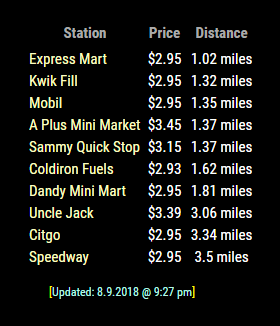
                                        Thanks. I really like this module alot. Very nice options and I love the mouse overs. Fantastic work! :thumbsup:

                                        0_1538787518808_gasas.png

                                        Create a working config
                                        How to add modules

                                        1 Reply Last reply Reply Quote 2
                                        • R Offline
                                          rob73
                                          last edited by

                                          Awesome!

                                          1 Reply Last reply Reply Quote 0
                                          • richland007R Offline
                                            richland007
                                            last edited by

                                            Is this still working?? It was working flawlessly for me before but i turned the MM off for like 3 months when i was doing some work around the house and when i turned it back on i do not see anything on my list of gas stations.

                                            It just says updated at this time and date but nothing listed.
                                            I did a git pull thinking that something might have been updated in those 3 months but nothing changed.

                                            Anyone else experiencing difficulties ???

                                            D

                                            Mykle1M cowboysdudeC 2 Replies Last reply Reply Quote 0

                                            Hello! It looks like you're interested in this conversation, but you don't have an account yet.

                                            Getting fed up of having to scroll through the same posts each visit? When you register for an account, you'll always come back to exactly where you were before, and choose to be notified of new replies (either via email, or push notification). You'll also be able to save bookmarks and upvote posts to show your appreciation to other community members.

                                            With your input, this post could be even better 💗

                                            Register Login

                                            • 1
                                            • 2
                                            • 3
                                            • 1 / 3
                                            • First post
                                              Last post
                                            Enjoying MagicMirror? Please consider a donation!
                                            MagicMirror created by Michael Teeuw.
                                            Forum managed by Sam, technical setup by Karsten.
                                            This forum is using NodeBB as its core | Contributors
                                            Contact | Privacy Policy