MagicMirror Forum
    • Recent
    • Tags
    • Unsolved
    • Solved
    • MagicMirror² Repository
    • Documentation
    • 3rd-Party-Modules
    • Donate
    • Discord
    • Register
    • Login
    A New Chapter for MagicMirror: The Community Takes the Lead
    Read the statement by Michael Teeuw here.

    MMM-SystemStats (cpu temp/load, fre ram ...)

    Scheduled Pinned Locked Moved Utilities
    74 Posts 36 Posters 71.8k Views 35 Watching
    Loading More Posts
    • Oldest to Newest
    • Newest to Oldest
    • Most Votes
    Reply
    • Reply as topic
    Log in to reply
    This topic has been deleted. Only users with topic management privileges can see it.
    • D Offline
      djuscha
      last edited by

      I want to move module 10 px to the right. if i change custom css it’s not what i do wrong

      .MMM-SystemStats  {
         margin-right: 10px;
      
      }
      

      it does not change even after the reboot

      lavolp3L 1 Reply Last reply Reply Quote 0
      • lavolp3L Offline
        lavolp3 Module Developer @djuscha
        last edited by

        @djuscha I think you cannot move a module itself. Usually you need to use the main container inluding the content. Here you can try the td with class “title”.

        .MMM-SystemStats .title  {
           margin-right: 10px;
        
        }
        

        OR the table itself

        .MMM-SystemStats table {
           margin-right: 10px;
        
        }
        

        How to troubleshoot modules
        MMM-soccer v2, MMM-AVStock

        1 Reply Last reply Reply Quote 0
        • D Offline
          djuscha
          last edited by

          @lavolp3 said in MMM-SystemStats (cpu temp/load, fre ram ...):

          MMM-SystemStats .title

          I tried both, that did not work :(

          1 Reply Last reply Reply Quote 0
          • T Offline
            thedk
            last edited by

            How can i change the size of the module? Doesnt work for me in custom.css. When i change width or heigt the module moves outside the display.

            1 Reply Last reply Reply Quote 0
            • qu1queQ Offline
              qu1que Project Sponsor
              last edited by qu1que

              @BenRoe

              Hi,

              I’ve updated this module to the last version a few days ago. Before the update, it worked perfectly, but now it does not show anything about SystemStats on my smart mirror.

              I’ve have not changed the lines for this module on the config.js file. They are the same before the update. This is my config:

              {
                                      module: "MMM-SystemStats",
                                      position: "top_right", // This can be any of the regions.
                                      classes: "small dimmed", // Add your own styling. Optional.
                                      config: {
                                              updateInterval: "3000",
                                              align: "right" // align labels
                                      }
                              },


              What could be wrong with it? Maybe I would have to add something else in this file after the update?

              Thanks!
              Quique.

              D 1 Reply Last reply Reply Quote 0
              • D Offline
                dazza120 @qu1que
                last edited by

                @qu1que don’t know I had the same thing but I had to delete the JS for it to go on, then it didn’t work with the new JS so I managed to get the JS out of the waste bin and it’s back working again but measuring in kelvin.

                1 Reply Last reply Reply Quote 0
                • A Offline
                  axis155
                  last edited by

                  I also had the same problem. I even removed the module, re-installed, but still cant view it.

                  1 Reply Last reply Reply Quote 0
                  • CyruS1337C Offline
                    CyruS1337 Project Sponsor
                    last edited by

                    I have the same problem. After the upload, it shows me nothing more

                    1 Reply Last reply Reply Quote 0
                    • B Offline
                      Babene1 Project Sponsor
                      last edited by

                      i have a solution,
                      it is only a comma missing in “MMM-SystemStats.js” in line 20

                       baseURLSyslog: 'http://127.0.0.1:8080/syslog',
                      
                      qu1queQ CyruS1337C bheplerB 3 Replies Last reply Reply Quote 3
                      • qu1queQ Offline
                        qu1que Project Sponsor @Babene1
                        last edited by

                        @Babene1

                        Thanks! It works for me, that was the problem.

                        1 Reply Last reply Reply Quote 0
                        • CyruS1337C Offline
                          CyruS1337 Project Sponsor @Babene1
                          last edited by

                          @Babene1 It works for me too, thank you !!

                          1 Reply Last reply Reply Quote 0
                          • bheplerB Offline
                            bhepler Module Developer @Babene1
                            last edited by

                            @Babene1 - Great work. Did you generate a PR for the module developer?

                            B 1 Reply Last reply Reply Quote 0
                            • B Offline
                              Babene1 Project Sponsor @bhepler
                              last edited by

                              @bhepler it is a new release with the bugfix from MMM-SystemStats available

                              1 Reply Last reply Reply Quote 0
                              • C Offline
                                chinesesich
                                last edited by

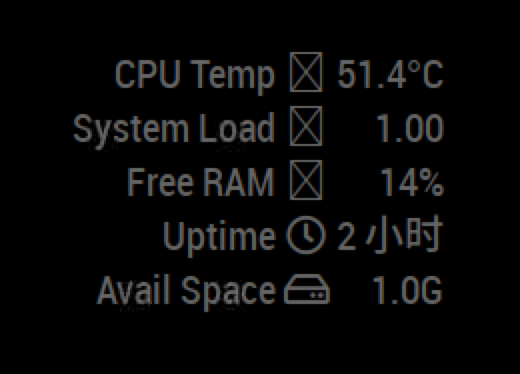
                                0_1560484638460_acaabf82-8175-4f0e-a869-906fe0f0cde0-image.png
                                I have a mistake, as shown in the figure.
                                It was good at first, but then it was. I don’t know why.

                                StoffbeuteluweS F 2 Replies Last reply Reply Quote 0
                                • StoffbeuteluweS Offline
                                  Stoffbeuteluwe Project Sponsor @chinesesich
                                  last edited by

                                  does the Module work on mac?

                                  C 1 Reply Last reply Reply Quote 0
                                  • C Offline
                                    chinesesich @Stoffbeuteluwe
                                    last edited by

                                    @Stoffbeuteluwe
                                    no
                                    on Raspberry Pi 2B

                                    1 Reply Last reply Reply Quote 0
                                    • F Offline
                                      Fifin404 @chinesesich
                                      last edited by

                                      @chinesesich Same issue… something new?

                                      lavolp3L 1 Reply Last reply Reply Quote 0
                                      • lavolp3L Offline
                                        lavolp3 Module Developer @Fifin404
                                        last edited by

                                        @Fifin404 @chinesesich The issue seems to be the change in version of Font Awesome icons.

                                        Try changing line 122 in MMM-SystemStats.js

                                                c2.innerHTML = `< i class="fa ${sysData[item].icon} fa-fw"></i>`;
                                        

                                        to

                                                c2.innerHTML = `< i class="fas ${sysData[item].icon} fa-fw"></i>`;
                                        

                                        ONLY change the “fa” to “fas”.
                                        The rest can stay the same.
                                        Don’t copy my input! I neede to put in a space for it to be viewable.

                                        How to troubleshoot modules
                                        MMM-soccer v2, MMM-AVStock

                                        1 Reply Last reply Reply Quote 0
                                        • LordyL Offline
                                          Lordy
                                          last edited by

                                          How can you only display individual parameters?
                                          I just want to see “Free memory” for example.
                                          Thank you very much in advance

                                          lavolp3L 1 Reply Last reply Reply Quote 0
                                          • lavolp3L Offline
                                            lavolp3 Module Developer @Lordy
                                            last edited by

                                            @Lordy
                                            if you mean free RAM, try this out in your custom.css

                                            .MMM-SystemStats tr { 
                                              display: none; 
                                            }
                                            
                                            .MMM-SystemStats tr:nth-child(3n+0) { 
                                              display: table-row; 
                                            }
                                            

                                            For free disk space it would be

                                            .MMM-SystemStats tr { 
                                              display: none; 
                                            }
                                            
                                            .MMM-SystemStats tr:nth-child(5n+0) { 
                                              display: table-row; 
                                            }
                                            

                                            No guarantees!! I haven’t tried it!!

                                            How to troubleshoot modules
                                            MMM-soccer v2, MMM-AVStock

                                            LordyL 1 Reply Last reply Reply Quote 1

                                            Hello! It looks like you're interested in this conversation, but you don't have an account yet.

                                            Getting fed up of having to scroll through the same posts each visit? When you register for an account, you'll always come back to exactly where you were before, and choose to be notified of new replies (either via email, or push notification). You'll also be able to save bookmarks and upvote posts to show your appreciation to other community members.

                                            With your input, this post could be even better 💗

                                            Register Login

                                            • 1
                                            • 2
                                            • 3
                                            • 4
                                            • 2 / 4
                                            • First post
                                              Last post
                                            Enjoying MagicMirror? Please consider a donation!
                                            MagicMirror created by Michael Teeuw.
                                            Forum managed by Sam, technical setup by Karsten.
                                            This forum is using NodeBB as its core | Contributors
                                            Contact | Privacy Policy