Read the statement by Michael Teeuw here.
-
Hi,
i had big problems by switching off my screen with the PIR or another module with camera. The problem was not the module itself it is a firmware problem of the PI. I could see the same problem outside of MagicMirror as well by trying different things.
Reported also here:
https://github.com/raspberrypi/linux/issues/487The symptom is that after a while of switching on and off the screen it remains off.
Dmesg reports the problem:
Nov  1 08:22:00 MagicMirror kernel: [86411.138649] raspberrypi-firmware soc:firmware: Request 0x00048003 returned status 0x80000001
Nov  1 08:22:00 MagicMirror kernel: [86411.138665] bcm2708_fb soc:fb: Failed to allocate GPU framebuffer (-22)
Nov  1 08:22:00 MagicMirror kernel: [86411.138670] detected fb_set_par error, error code: -22
Nov  1 08:22:00 MagicMirror kernel: [86411.139138] raspberrypi-firmware soc:firmware: Request 0x00048003 returned status 0x80000001
Nov  1 08:22:00 MagicMirror kernel: [86411.139148] bcm2708_fb soc:fb: Failed to allocate GPU framebuffer (-22)
Nov  1 08:22:00 MagicMirror kernel: [86411.139152] detected fb_set_par error, error code: -22
Nov  1 08:22:00 MagicMirror kernel: [86411.140642] raspberrypi-firmware soc:firmware: Request 0x00048003 returned status 0x80000001
Nov  1 08:22:00 MagicMirror kernel: [86411.140654] bcm2708_fb soc:fb: Failed to allocate GPU framebuffer (-22)
Nov  1 08:22:00 MagicMirror kernel: [86411.140659] detected fb_set_par error, error code: -22
Nov  1 08:22:00 MagicMirror kernel: [86411.140777] raspberrypi-firmware soc:firmware: Request 0x00048003 returned status 0x80000001
Nov  1 08:22:00 MagicMirror kernel: [86411.140785] bcm2708_fb soc:fb: Failed to allocate GPU framebuffer (-22)
Nov  1 08:22:00 MagicMirror kernel: [86411.140789] detected fb_set_par error, error code: -22
Nov  1 08:22:00 MagicMirror kernel: [86411.140856] raspberrypi-firmware soc:firmware: Request 0x00048003 returned status 0x80000001
Nov  1 08:22:00 MagicMirror kernel: [86411.140863] bcm2708_fb soc:fb: Failed to allocate GPU framebuffer (-22)
Nov  1 08:22:00 MagicMirror kernel: [86411.140868] bcm2708_fb_pan_display(0,0) returns=-22
Nov  1 08:22:00 MagicMirror systemd[1]: Started Getty on tty6.
Nov  1 08:22:00 MagicMirror kernel: [86411.256398] raspberrypi-firmware soc:firmware: Request 0x00048003 returned status 0x80000001
Nov  1 08:22:00 MagicMirror kernel: [86411.256413] bcm2708_fb soc:fb: Failed to allocate GPU framebuffer (-22)
Nov  1 08:22:00 MagicMirror kernel: [86411.256418] detected fb_set_par error, error code: -22
Nov  1 08:22:00 MagicMirror kernel: [86411.256758] raspberrypi-firmware soc:firmware: Request 0x00048003 returned status 0x80000001
Nov  1 08:22:00 MagicMirror kernel: [86411.256770] bcm2708_fb soc:fb: Failed to allocate GPU framebuffer (-22)
Nov  1 08:22:00 MagicMirror kernel: [86411.256775] bcm2708_fb_pan_display(0,0) returns=-22
Nov  1 08:22:00 MagicMirror kernel: [86411.296428] raspberrypi-firmware soc:firmware: Request 0x00040002 returned status 0x80000001
Nov  1 08:22:00 MagicMirror kernel: [86411.296455] bcm2708_fb soc:fb: bcm2708_fb_blank(0) failed: -22
Switching off the screen with
/opt/vc/bin/tvservice -o
and on with
/opt/vc/bin/tvservice --preferred && sudo chvt 6 && sudo chat 7
does not work reliable! The git issue tells you more about.
The workaround is a not yet described solution inside the config.txt
https://github.com/raspberrypi/documentation/pull/245/files
the option “hdmi_blanking=1” is your friend in this case! :D
Now i’m switching off the screen with
vcgencmd display_power 0
and on with
vcgencmd display_power 1
And it is working now like a charm! Did started to use it one day before this report and it is still working without any issue :)
Honestly speaking i don’t use any MM module for switching off anymore. But maybe my discovered solution will help any other and might be a way to change the module as well.
If you have trouble with on/off as well please check the output of dmesg. If you have the frambuffer problem you can fix it.
My personal solution is to have the PIR state at FHEM and from FHEM i’m using a script to switch the screen. But that’s a special case and for the most people here the usage of a MM Module will be the better way.
regards
Dirk -
@paviro said in PIR-Sensor - put your mirror to sleep if not used:
MMM-PIR-Sensor will monitor a connected PIR-sensor and putt your mirror to sleep if no one uses it either by disabling HDMI output or by turning of a relay.
Developer note
If you are a developer and want to pause your module while no one uses it (if it is processor intense), you can listen to the
USER_PRESENCEbroadcast. It will returntrueorfalseas its payload.will vga / dvi monitor work with this module?
[card:paviro/MMM-PIR-Sensor]
-
This post is deleted! -
i have bought a sensor.
This is not a troubleshooting post. I want only know how to connect it.
Please add this to the description.
Three wires from the sensor and to which raspi port? -
@fox pop the plastic dome off and you’ll see the labeling. I believe the middle pin is the digital output and the ground and 5V power are on the outside.
-
@Them-Russians said in PIR-Sensor - put your mirror to sleep if not used:
@fox pop the plastic dome off and you’ll see the labeling. I believe the middle pin is the digital output and the ground and 5V power are on the outside.
The sensor is labeled. But on which pin on the raspi? Have i missed something in the module how-to?
-
@fox You define the pin in the config.js file.
Make sure you sue the GPIO pin number, and not the generic pin number.
For instance, in the pin diagram the pin 1 down from the top left is GPIO pin 2, but regular pin 3. In the config file, you would define it a SensorPIN = 2.
-
@Them-Russians said in PIR-Sensor - put your mirror to sleep if not used:
@fox You define the pin in the config.js file.
Make sure you sue the GPIO pin number, and not the generic pin number.
For instance, in the pin diagram the pin 1 down from the top left is GPIO pin 2, but regular pin 3. In the config file, you would define it a SensorPIN = 2.
Thank you very much. I understood.
Does someone control this with a timeout? Or when switches the script the HDMI Port off? Perhaps some want x minutes to be shown?Edit. I am a noob. I just have to adjust the delay knob on the PIR-Sensor PCB :)
-
Love this Module, thanks.
I’m a noob and looking for some assistance to add a delay to turn off the display. Ideally the display would turn off 30 seconds after the last detected movement. Any help would be greatly appreciated.
-
I originally wasn’t going to use this module, but it seems pretty cool, so I’ll try. I, however, have no clue how to physically connect the raspberry pi to the PIR sensor without a breadboard. I understand that I must specify the GPIO pins I connect to in the config file, but that will only help me if I figure out how to connect everything (soldering?). Could someone help me? I’m completely new to motion detection. :dizzy_face:
-
@AAPS
(Raspi 3)
Just connect the PIR sensor Pins with three of these connector cables (female on both sides) directly to the GPIO pins on the PI, without soldering.

You need to know the pin assignments of your PIR sensor. I used:
(4) +5V
(6) GND (ground)
(32) GPIO12
i think you can also use (15) instead of my (32) then you don’t need to change the pin in the config file.
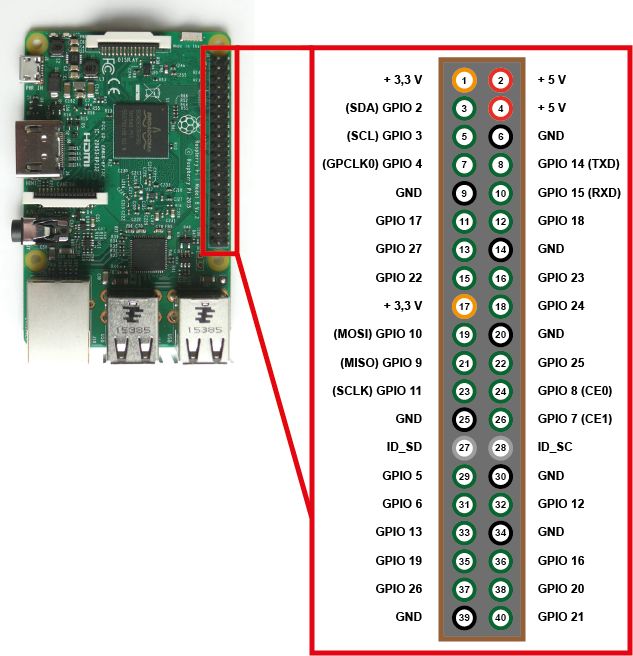
Hope that helps.
-
@Morningstar Thanks! Where could I buy everything? Amazon?
-
@AAPS
Yes, Amazon, ebay, electronic stores in your city. And there are dozens of online shops for raspberry, arduino and all kinds of add-ons. -
Is this the right cable to use? https://www.amazon.com/Icstation-Female-Jumper-Cable-Connector/dp/B01F59QFMM/ref=sr_1_2? ie=UTF8&qid=1486697807&sr=8-2&keywords=female+to+female+Rainbow+%2F+DuPont+Wire
-
@AAPS
Yes that’s the right one. -
Is it possible to switch the monitor on and off with the PIR? I would like to hide the sensor and turn on the monitor with a hand movement and then switch it off again with a new hand movement. The sensor should be hidden so that it registers only this hand movement and no other movements in the room. If the manual movement for switching off is once forgotten, the monitor should turn itself off after 30 minutes, for example.
Is this possible?
-
@Goldjunge_Chriz you might want to use the gesture module of mochman for it
-
Does it work well? I thought that with the PIR could be easier since I do not need any special gesture, only some individual movement.
-
Hello,
1st off I’m a total noob at coding so please forgive me. I have been able to set up my mirror and get several modules up and running. However, I am having quite a bit of difficulty with the PIR-Sensor. I have it wired directly to the GPIO(pins 2, 6, 15). I installed the MMM-PIR-Sensor via paviros instruction. At first I got the white screen. Somehow that issue is gone. Now I can’t get the module to work. I know the PIR sensor is working, because I am able to run a python script to detect motion. The script just keeps in running though even when I walk away from the sensor. Maybe the sensor is faulty?Any help would be greatly appreciated.
Thanks in advance
-
Hey Dirk, i was having some issues and was using “/opt/vc/bin/tvservice -o” and “/opt/vc/bin/tvservice --preferred && sudo chvt 6 && sudo chat 2” to turn my screen on and off as that seems to be what everyone is using. This worked reliably since i started using the PIR sensor.
All of a sudden this started making my screen go white when it issued the monitor on command…and the screen would stay white for a few minutes and sometimes it would come back.
Using your “vcgencmd” commands in place of the previous in my monitor on/off scripts everything is back to working again.
I had a couple questions. Firstly i didnt understand what you mean by hdmi_blanking=1…what does this do/should i put this in my boot/config.txt?? And secondly what is the difference between the two ways of toggling the monitor?
(I did ask my question here: https://forum.magicmirror.builders/topic/1780/white-screen-after-screen-resumes-from-pir-or-sometimes-randomly-can-still-access-via-ssh-requires-restart-sometimes/4 incase but stumbled upon this after.)

Hello! It looks like you're interested in this conversation, but you don't have an account yet.
Getting fed up of having to scroll through the same posts each visit? When you register for an account, you'll always come back to exactly where you were before, and choose to be notified of new replies (either via email, or push notification). You'll also be able to save bookmarks and upvote posts to show your appreciation to other community members.
With your input, this post could be even better 💗
Register Login