MagicMirror Forum
    • Recent
    • Tags
    • Unsolved
    • Solved
    • MagicMirror² Repository
    • Documentation
    • 3rd-Party-Modules
    • Donate
    • Discord
    • Register
    • Login
    A New Chapter for MagicMirror: The Community Takes the Lead
    Read the statement by Michael Teeuw here.

    Not really a mirror at all - but is really helpful

    Scheduled Pinned Locked Moved Showcase
    24 Posts 10 Posters 38.5k Views 20 Watching
    Loading More Posts
    • Oldest to Newest
    • Newest to Oldest
    • Most Votes
    Reply
    • Reply as topic
    Log in to reply
    This topic has been deleted. Only users with topic management privileges can see it.
    • paviroP Offline
      paviro
      last edited by

      Would be great if you would upload your CSS to Github and share it here! :)

      We're all stories in the end. Just make it a good one, eh?

      – The Doctor

      1 Reply Last reply Reply Quote 1
      • yawnsY Offline
        yawns Moderator
        last edited by

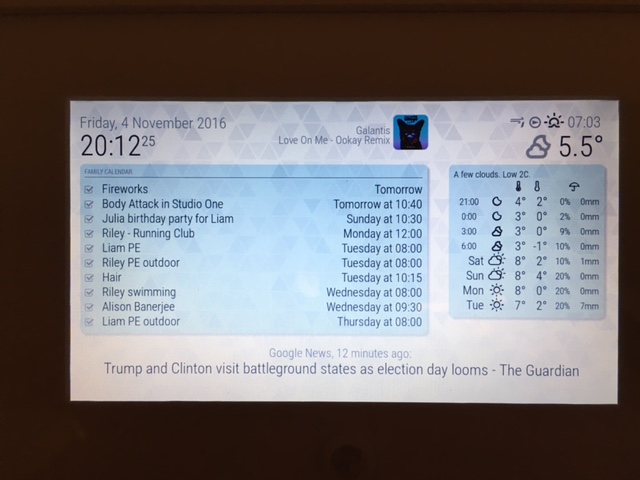
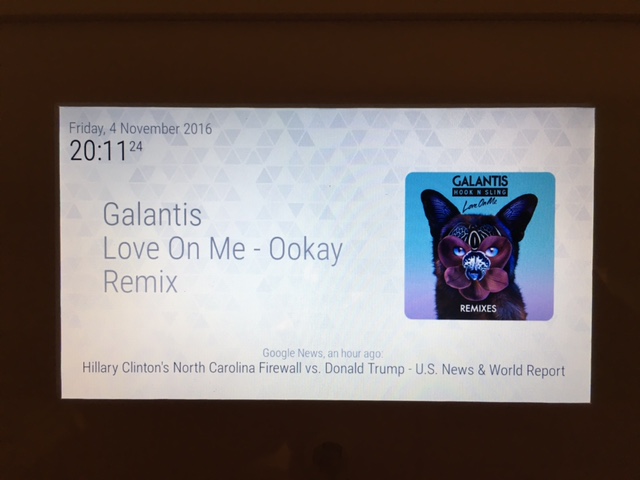
        Wow, looks really cool when it’s used without a mirror.

        D 1 Reply Last reply Reply Quote 1
        • D Offline
          dinkybluebug245 @yawns
          last edited by dinkybluebug245

          thanks - Uploaded the code here.

          https://github.com/dinkybluebug/MMM-CustomCSSv2

          yawnsY 1 Reply Last reply Reply Quote 2
          • yawnsY Offline
            yawns Moderator @dinkybluebug245
            last edited by yawns

            @dinkybluebug245
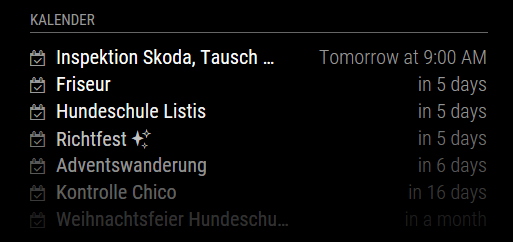
            maybe a dumb question, but what did you do to the calendar module to make it show the day and the time for each entry?

            D 1 Reply Last reply Reply Quote 1
            • D Offline
              dinkybluebug245 @yawns
              last edited by

              This post is deleted!
              yawnsY 1 Reply Last reply Reply Quote 0
              • yawnsY Offline
                yawns Moderator @dinkybluebug245
                last edited by yawns

                @dinkybluebug245

                it looks like this.
                0_1479720459121_Unbenannt.PNG

                If I change it to timeFormat: 'absolute' I see the real date (e.g. November 26th) but still no time.

                D 2 Replies Last reply Reply Quote 1
                • D Offline
                  dinkybluebug245 @yawns
                  last edited by

                  This post is deleted!
                  1 Reply Last reply Reply Quote 1
                  • D Offline
                    dinkybluebug245 @yawns
                    last edited by

                    @yawns Ive uploaded my version of calendar.js to github. access it here : https://github.com/dinkybluebug/MMM-CustomCSSv2

                    It has amended javascript for calendar to show day of week and time.

                    D yawnsY 2 Replies Last reply Reply Quote 2
                    • D Offline
                      dinkybluebug245 @dinkybluebug245
                      last edited by yawns

                      I had installed the remote control module too, and tweaked it slightly, so I can move between Normal and Party mode, instead of using bash scripts via SHH
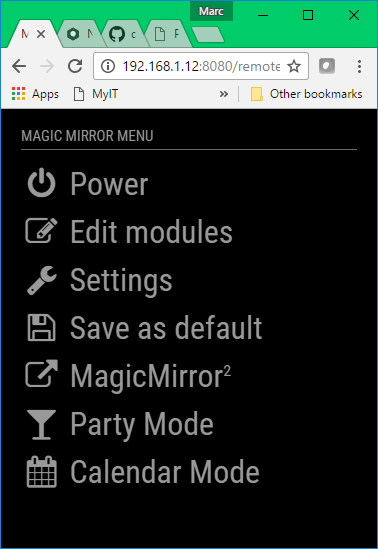
                      0_1479750249211_upload-7516ce5e-a72d-486b-b4ae-75f901144e0c

                      schlachtkreuzer6S 1 Reply Last reply Reply Quote 1
                      • yawnsY Offline
                        yawns Moderator @dinkybluebug245
                        last edited by

                        @dinkybluebug245 said in Not really a mirror at all - but is really helpful.:

                        @yawns Ive uploaded my version of calendar.js to github. access it here : https://github.com/dinkybluebug/MMM-CustomCSSv2

                        It has amended javascript for calendar to show day of week and time.

                        Thanks for this, very much appreciated!

                        1 Reply Last reply Reply Quote 0
                        • MichMichM Offline
                          MichMich
                          last edited by

                          I really really really like your setup! :) Nice work!

                          D 1 Reply Last reply Reply Quote 1
                          • D Offline
                            dinkybluebug245 @MichMich
                            last edited by

                            @MichMich Thanks Michael - Im new to all this - so appreciate your comment

                            1 Reply Last reply Reply Quote 1
                            • schlachtkreuzer6S Offline
                              schlachtkreuzer6 @dinkybluebug245
                              last edited by

                              @dinkybluebug245 hey nice work! What did you change in the remote control module to switch between partymodus and normal?

                              D 1 Reply Last reply Reply Quote 0
                              • D Offline
                                dinkybluebug245 @schlachtkreuzer6
                                last edited by dinkybluebug245

                                @schlachtkreuzer6 In Nodehelper.js - I changed lines 104-117. I didnt need the option of monitor on and off, as I have a PIR sensor attached to my display.

                                if (query.action === 'MONITORON')
                                		{
                                			exec('cp ../MagicMirror/css/party_custom.css ../MagicMirror/css/custom.css', opts, function(error, stdout, stderr){ self.checkForExecError(error, stdout, stderr, res); });
                                			exec('cp ../MagicMirror/config/party_config.js ../MagicMirror/config/config.js', opts, function(error, stdout, stderr){ self.checkForExecError(error, stdout, stderr, res); });
                                			exec('pm2 restart mm', opts, function(error, stdout, stderr){ self.checkForExecError(error, stdout, stderr, res); });
                                			return true;
                                		}
                                		if (query.action === 'MONITOROFF')
                                		{
                                			exec('cp ../MagicMirror/css/normal_custom.css ../MagicMirror/css/custom.css', opts, function(error, stdout, stderr){ self.checkForExecError(error, stdout, stderr, res); });
                                			exec('cp ../MagicMirror/config/normal_config.js ../MagicMirror/config/config.js', opts, function(error, stdout, stderr){ self.checkForExecError(error, stdout, stderr, res); });
                                			exec('pm2 restart mm', opts, function(error, stdout, stderr){ self.checkForExecError(error, stdout, stderr, res); });
                                			return true;
                                		}
                                

                                As the functions had changed, I then changed the text displayed in the app , by changing the text in the remote.html file. Line 80- 87

                                               <div id="monitor-on-button" class="menu-element button main-menu">
                                                    <span class="fa fa-fw fa-glass" aria-hidden="true"></span>
                                                    <span class="text">Party Mode</span>
                                                </div>
                                                <div id="monitor-off-button" class="menu-element button main-menu">
                                                    <span class="fa fa-fw fa-calendar" aria-hidden="true"></span>
                                                     <span class="text">Calendar Mode</span>
                                                </div>```
                                1 Reply Last reply Reply Quote 2
                                • BangeeB Offline
                                  Bangee Module Developer
                                  last edited by

                                  nice work! :-)

                                  1 Reply Last reply Reply Quote 1
                                  • N Offline
                                    nobita @dinkybluebug245
                                    last edited by

                                    @dinkybluebug245 , I Would like to know what is your forecast weather module? It not like from openweathermap.org , Thanks so much your kinds

                                    1 Reply Last reply Reply Quote 0
                                    • yawnsY Offline
                                      yawns Moderator
                                      last edited by

                                      According to his config on github he uses MMM-WunderGround

                                      1 Reply Last reply Reply Quote 1
                                      • N Offline
                                        nobita
                                        last edited by

                                        How to Build frame around MMM-WunderGround and Calendar,Thanks for your help

                                        yawnsY 1 Reply Last reply Reply Quote 0
                                        • yawnsY Offline
                                          yawns Moderator @nobita
                                          last edited by

                                          @nobita
                                          Please take a look at his css file, escpacially this part:

                                          .calendar, div#module_2_MMM-WunderGround table.small {
                                          	background-color: rgba(63, 182, 236, 0.23);
                                              border-radius: 10px;
                                          	padding: 10px;
                                          	box-shadow: 5px 5px 5px 1px #d3d3d3;
                                          	
                                          }
                                          

                                          Add these to your custom.css file and play around with it

                                          johnnyboyJ 1 Reply Last reply Reply Quote 2
                                          • lucallmonL Offline
                                            lucallmon
                                            last edited by

                                            Could you please write a more detailed Readme file on how to install and how to make adjustments to MMM-Remote-Control? I’d like to do this for a display in my kitchen as well but I’m a NOOB and some of the stuff you mention just doesn’t make sense to me. Thanks.

                                            1 Reply Last reply Reply Quote 1

                                            Hello! It looks like you're interested in this conversation, but you don't have an account yet.

                                            Getting fed up of having to scroll through the same posts each visit? When you register for an account, you'll always come back to exactly where you were before, and choose to be notified of new replies (either via email, or push notification). You'll also be able to save bookmarks and upvote posts to show your appreciation to other community members.

                                            With your input, this post could be even better 💗

                                            Register Login

                                            • 1
                                            • 2
                                            • 1 / 2
                                            • First post
                                              Last post
                                            Enjoying MagicMirror? Please consider a donation!
                                            MagicMirror created by Michael Teeuw.
                                            Forum managed by Sam, technical setup by Karsten.
                                            This forum is using NodeBB as its core | Contributors
                                            Contact | Privacy Policy