Read the statement by Michael Teeuw here.
UPDATE: Replaced my PIR-Sensor with a Doppler Microwave Sensor.
-
@Fozi said in UPDATE: Replaced my PIR-Sensor with a Doppler Microwave Sensor.:
sooner than expected I modified the sensor with a trimmer resistor.
For that I also updated my initial post and enhanced the tutorial, where now both options are described.Dude, (can I call you dude?) although I don’t use a sensor (I have a cam on my first mirror w/Pi) I appreciate what you’ve done here. I’ll say it again (in different words), I think this is the death knell of the PIR sensor. So, thanks. :thumbsup:
Peace!
-
@cowboysdude I‘m totally happy that I cold help and to receive so positive feedback! I love it when a plan works!😁 Thanks!
This T-shaped holder, is it 3D-printed or an off-the-shelf available part? It‘s totally cool! -
@Mykle1 said
Dude, (can I call you dude?) although I don’t use a sensor (I have a cam on my first mirror w/Pi) I appreciate what you’ve done here. I’ll say it again (in different words), I think this is the death knell of the PIR sensor. So, thanks. :thumbsup:
Sure, call me Dude, if you like😁
Let‘s get the warts outta here!🤣 and thanks for the overwhelming feedback!
-
Ok so here’s my final and it’s working perfectly! I tried it in various spots.
Thanks to @Fozi again…now there’s a very complete forum topic that anyone can follow!!
I added 2 additional layers of aluminum tape… there are no untaped spaces on the box anywhere… then moved it to the back of the cabinet and now you have to walk up to it to make it come on… PERFECT!! :)
I tried behind the glass… too sensitive
I tried taped to the back of the monitor … too sensitive.
Moved to the back of the cabinet which makes it about 4" away from the glass… BINGO!![PS… don’t mind my ugly wiring LOL]
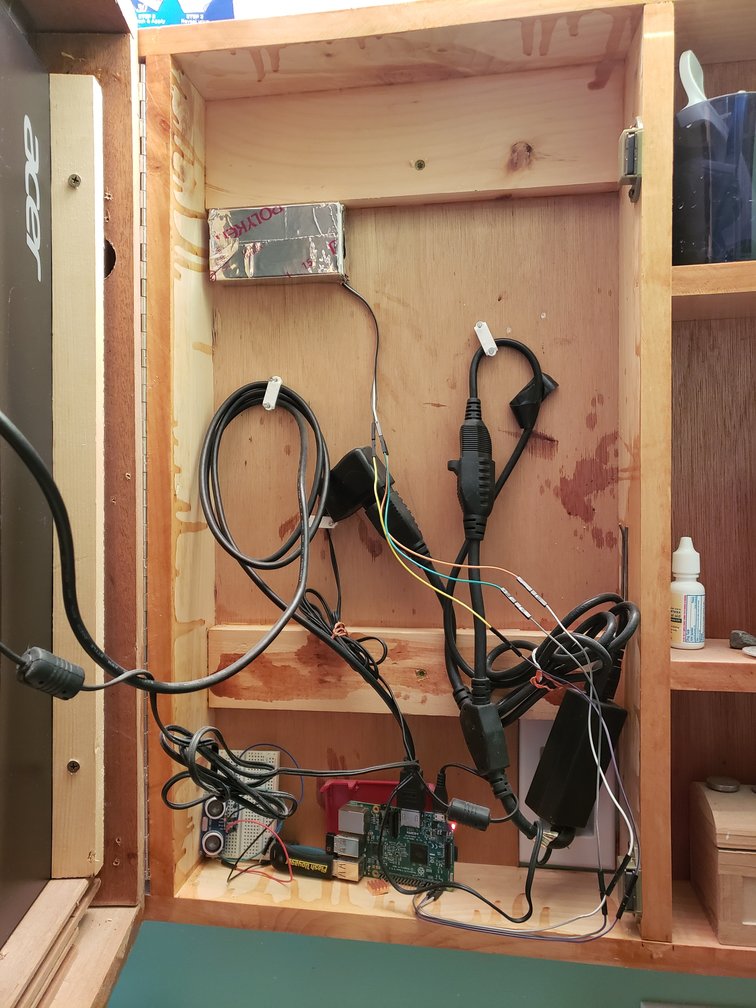
-
@cowboysdude Great News, excellent!👍🏻
-
@cowboysdude
am I seeing it right that also the side of the case looking at you is aluminium taped?
So the whole case is taped in your case? -
@cowboysdude @Fozi Guys, which module are you using for the recognition?
I can’t get neither MMM-PIR-Sensor nor MMM-PIR to work currently. Both have the same problem with epoll which is installed via the node module “onoff”, if I see correctly.
What are you using?
THe mirror won’t load with any of the modules activated giving the errorThe module '/home/pi/MagicMirror/modules/MMM-PIR/node_modules/onoff/node_modules/epoll/build/Release/epoll.node' was compiled against a different Node.js version using NODE_MODULE_VERSION 67. This version of Node.js requires NODE_MODULE_VERSION 64. Please try re-compiling or re-installing the module (for instance, using `npm rebuild` or `npm install`).@cowboysdude I remember you’re using your own script?
@Fozi you?node v 11.4.0
npm v 6.13.0 -
@lavolp3 I use my own for that… it’s not a module but it’s right here.
https://github.com/cowboysdude/Pir-Sensor
Easy to follow :)
The box is just a cardboard box taped with alum duct tape. I am however waiting for my trimmer resister so I can tune it down and take it out of the box. I only want the mirror to come on when someone walks up to it…say like 2 ft. away… so it doesn’t come on when I walk by the bathroom doorway… looks more like a pro thing :)
-
@lavolp3 I use MMM-PIR-Sensor without any modifications. Are you using @paviro master oder any other fork of the module?
As I see, you have more recent npm/node versions installed.
I am still on node 10.17.0 / npm 6.11.3.Edit: I’d recommend to try the script from @cowboysdude . It is robust against any node.js stuff as it written in python.
-
This post is deleted! -
@Norton said in UPDATE: Replaced my PIR-Sensor with a Doppler Microwave Sensor.:
It is important to replace the PIR sensor with a Doppler Microwave Sensor.
This spam bot is sooo right!:face_with_tears_of_joy:
-
@Fozi Hi
Can i solder pin 1 and 2 of the resistor to the radar sensor? I accidentally broke pin no 3. -
@bachoo786 yes, you can also use pin 1 and 2.
An example:
The max value of the resistor (Rmax) is between pin 1 and 3.
Between pin 1 and 2 is the restitor value R1, and
between pin 2 and 3 is the resistor value R2.Rmax = R1 + R2. (or R1=Rmax - R2, resp, R2=Rmax - R1)
Thus, you can use both options (R1 pin 1/2 or R2 pin 2/3).
-
@Fozi so I got a new radar sensor set the resistance to 80ohms which would give me around 40 to 50cm detection distance. I am using @cowboysdude script.
My mm is running on my rpi 4b 4g and at present its connected to my TV. However the rada sensor is not working as the script is meant to detect motion and if there is no motion it would turn the tv off after 20 seconds. I tried many times but have failed.
Any ideas? Or maybe my sensor is not working. Is there a simple script that I could test the sensor?
Thanks.
-
@bachoo786 First re-check if the sensor is cabled correctly to the GPIO as described in my tutorial. Further check if the resistor is soldered correctly to the sensor. Maybe there is a “cold soldering joint”. Sounds trivial, but the devil is a squirrel (old german saying
 )
)
Then, extend the detection range to the max, to check if the sensor is generally OK (200 Ohms) and re-run @cowboysdude script. If this works, then reduce the resistor step by step until you reach the desired detection range. Theoretically 80 Ohms should provide a range of 40-50 cm, but from my experience this may vary strongly as the resistor value does not correspond linearly to the detection range. -
@Fozi ok will do thanks.
-
@Fozi Hi
I am on raspberry pi 4 and I think wiringPi does not work with it as the guy has stopped developing it any further. Is there any other way I could make this work?
Thanks.
-
@bachoo786 there exist alternative libs like piGPIO or GPIOzero, but I have no experience with them. Why not try MMM-PIR-Sensor? It is easy to install and to configure and works out of the box with the RCWL-0516.
-
@Fozi nope none of them worked for me very surprising.
-
@bachoo786 Same for me. Couldn’t get neither MMM-PIR nor MMM-PIR-Sensor to work, but on a Raspi3B+





Hello! It looks like you're interested in this conversation, but you don't have an account yet.
Getting fed up of having to scroll through the same posts each visit? When you register for an account, you'll always come back to exactly where you were before, and choose to be notified of new replies (either via email, or push notification). You'll also be able to save bookmarks and upvote posts to show your appreciation to other community members.
With your input, this post could be even better 💗
Register Login