Read the statement by Michael Teeuw here.
MMM-RottenTomatoes displays awaiting update
-
@haywire Thanks for this. I’m a newbie, could you walk me through the steps of updating this file with the one that you provided? I tried searching my MMM-RottenTomatoes folder for any mention of index.js or rt-scraper and nothing came up.
EDIT: Found the file, located here: /MagicMirror/modules/node_modules/rt-scraper/index.js. I’ve copied and pasted the text from the git link however it’s still Awaiting Update. Not sure if I did something wrong.
-
I also copied and pasted your code and it is still stuck in awaiting update? Any help getting this cool little module to work would be greatly appreciated.
-
Sorry to hear it didn’t work for you. I am making the assumption your using the original pull which were from https://github.com/AdamMoses-GitHub/NPMJS-rt-scraper.
Unfortunately, I modified the original MMM-RottenTomatoes, so I don’t have a like for a like environment, but assumed correction would work for the original module.The root of the problem is Rotten Tomato new web format, which is part of rt-scraper (which you found).
As indicate my fix were based on another user correction. You can attempt to pull or replace using his build.
https://github.com/parnic/NPMJS-rt-scraper
He has also updated his repo for RottenTomatoes module it self and updated the dependency. I haven’t tried it, but seem he best overall re-package solution.
https://github.com/parnic/MMM-RottenTomatoesIf that still doesn’t work and have time I can re-package my update, but it would be base on slight modified version of MMM-RottenTomatoes.
-
@haywire it worked. took some time for the first update but after that it has been working perfectly. THANKS!
-
Hey @haywire!
I tried this but it did not work for me…
Tried removing old MMM-RottenTomatoes and installing https://github.com/parnic/MMM-RottenTomatoes
It got the “Awaiting update” message fixed but the only thing showing up now is the:
box office, opening this week, coming soon
without any movies.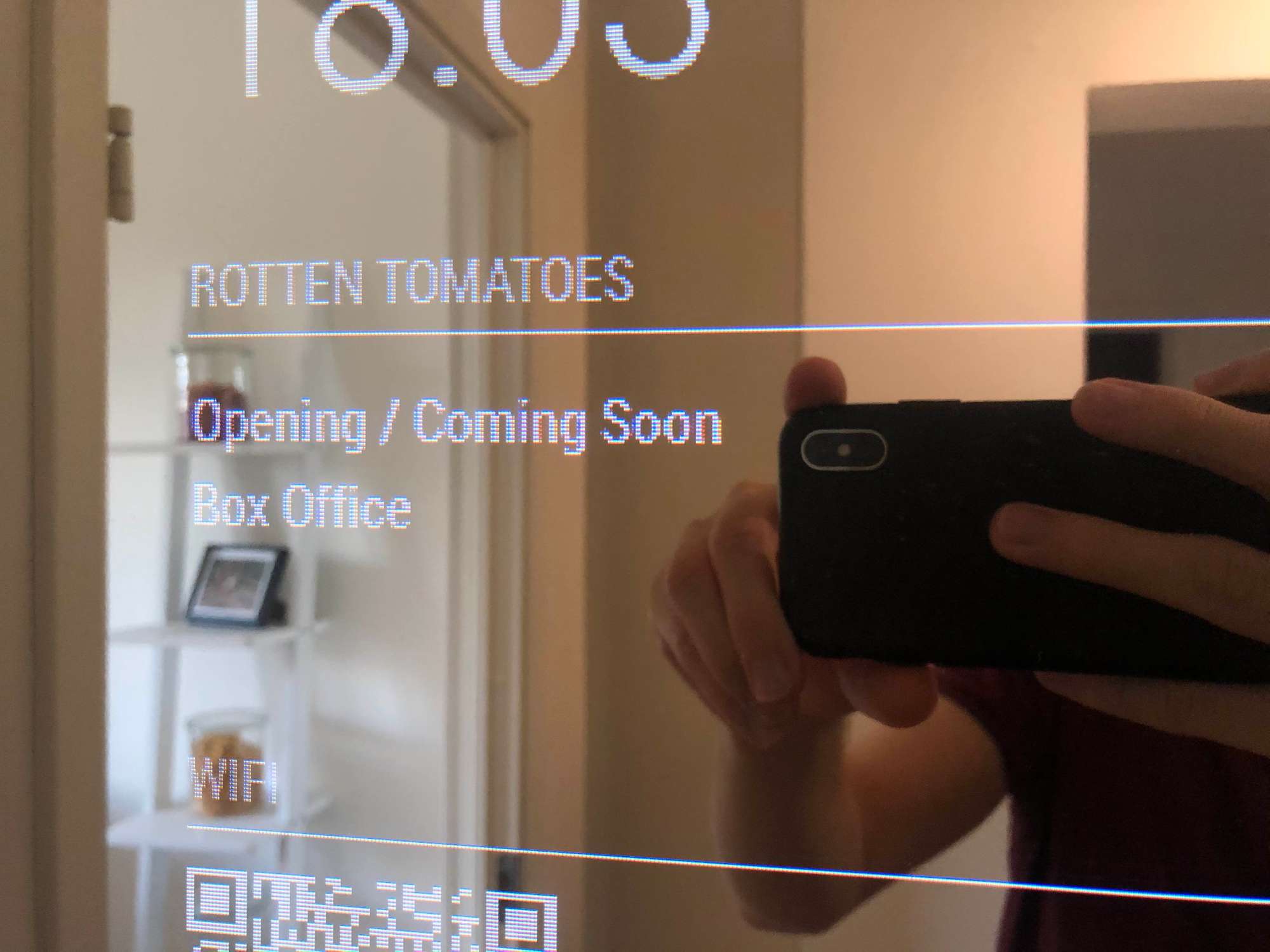
Using the same config.js as I did for the old MMM-RottenTomatoes
Also tried manually removing rt-scraper and then cloning from https://github.com/parnic/NPMJS-rt-scraper but still no success…
Any ideas?
-
I found a (dirty) workaround.
Inspecting https://www.rottentomatoes.com/m/dream_horse, you can see the sidebar that used to be on the homepage. The structure is the same as before, except that the name of the div-element is different than assumed in the rt-scraper code.So, this is what I did to get it working:
- Go to the node-modules/rt-scraper directory in your MagicMirror installation dir.
- Edit index.js
- Replace the three instances of “homepage-top-box-office” with “movies_sidebar”
- Replace the request uri rottentomatoes.com to rottentomatoes.com/m/dream_horse
- Restart MagicMirror and you should now see the RT movie listing appearing again.
Now, this is dirty, because of the Dream Horse link. I’m think about a better way (take the first movie on the site?) and commit to github. But for now we can at least enjoy the movie listings again.
-
@airs747 said in MMM-RottenTomatoes displays awaiting update:
’m think about a better way (take the first movie on the site?) and commit to github
find the github repo for the module you fixed,
fork it (now YOU have a linked ‘copy’)make the same changes, commit to YOUR copy
and then offer a Pull Request (new pull request button) to the source to fix the problem for all -
Hi, thanks for all the help so far! When I cloned the parnic’s rt-scraper and MMM-RottenTomatoes fork it still just displayed “awaiting update”. Has anyone else managed to get this module fixed?
-
@airs747 Hi. I tried that, but I didn’t find any instance of homepage-top-box-office in index.js. I can see in the code source the movies_sidebar, but I don’t know where to place it. Can you please give more details about what you did ? I’ve installed RottenTomatoes via parnic code, and the rt-scrapper linked to it. Thank you very much.
-
@tomyboy96 Same here, did you get it to work ? Thanks
-
@rdemets
Nope… still nothing… -
-
Is this something that can be installed manually?
-
@tomyboy96 I would try to overwrite index.js with the one from the PR.
/*
MIT License

Copyright (c) 2017 Adam Moses

Permission is hereby granted, free of charge, to any person obtaining a copy
of this software and associated documentation files (the "Software"), to deal
in the Software without restriction, including without limitation the rights
to use, copy, modify, merge, publish, distribute, sublicense, and/or sell
copies of the Software, and to permit persons to whom the Software is
furnished to do so, subject to the following conditions:

The above copyright notice and this permission notice shall be included in all
copies or substantial portions of the Software.

THE SOFTWARE IS PROVIDED "AS IS", WITHOUT WARRANTY OF ANY KIND, EXPRESS OR
IMPLIED, INCLUDING BUT NOT LIMITED TO THE WARRANTIES OF MERCHANTABILITY,
FITNESS FOR A PARTICULAR PURPOSE AND NONINFRINGEMENT. IN NO EVENT SHALL THE
AUTHORS OR COPYRIGHT HOLDERS BE LIABLE FOR ANY CLAIM, DAMAGES OR OTHER
LIABILITY, WHETHER IN AN ACTION OF CONTRACT, TORT OR OTHERWISE, ARISING FROM,
OUT OF OR IN CONNECTION WITH THE SOFTWARE OR THE USE OR OTHER DEALINGS IN THE
SOFTWARE.
*/

// parses the HTML body that the request operation received
// uses the cheerio package to achieve this
function parseRottenTomatoesHTML(fileData) {
    var cheerio = require("cheerio");
    // prep the return object
    var allTomatoData = { openingThisWeek: [ ]
                           , boxOffice: [ ]
                           , comingSoon: [ ] };
    var errorFlag = true;
    // sanity check that this is rotten tomatoes web html
    if (fileData.indexOf('Rotten Tomatoes') != -1) {
        // set error flag to false for passing sanity check
        errorFlag = false;
        // load the html into the cheerio doc
        var fullDoc = cheerio.load(fileData);
        // find the stub for movies opening this week
        var openingThisWeekDoc = cheerio.load(fullDoc('[id="opening-this-week"]').html());
        // iterate through movies and strip useful parts, add each to return object
        openingThisWeekDoc('tr').each(function() {
            var movieDoc = cheerio.load(openingThisWeekDoc(this).html());
            var movieMeter = movieDoc('.media-lists__td-rating').text().trim();
            var movieTitle = movieDoc('.media-lists__td-title').text().trim();
            var movieDate  = movieDoc('.media-lists__td-date').text().trim();
            var movieObj = {
                meter: movieMeter,
                title: movieTitle,
                date: movieDate
            };
            allTomatoData.openingThisWeek[allTomatoData.openingThisWeek.length] = movieObj;
        });
        // find the stub for top box office this week
        var topBoxOfficeDoc = cheerio.load(fullDoc('[id="top-box-office"]').html());
        // iterate through movies and strip useful parts, add each to return object
        topBoxOfficeDoc('tr').each(function() {
            var movieDoc = cheerio.load(topBoxOfficeDoc(this).html());
            var movieMeter = movieDoc('.media-lists__td-rating').text().trim();
            var movieTitle = movieDoc('.media-lists__td-title').text().trim();
            var movieGross = movieDoc('.media-lists__td-date').text().trim();
            var movieObj = {
                meter: movieMeter,
                title: movieTitle,
                gross: movieGross
            };
            allTomatoData.boxOffice[allTomatoData.boxOffice.length] = movieObj;
        });
        // find the stub for top movies coming soon
        var topComingSoonDoc = cheerio.load(fullDoc('[id="coming-soon-theaters"]').html());
        // iterate through movies and strip useful parts, add each to return object
        topComingSoonDoc('tr').each(function() {
            var movieDoc = cheerio.load(topComingSoonDoc(this).html());
            var movieMeter = movieDoc('.media-lists__td-rating').text().trim();
            var movieTitle = movieDoc('.media-lists__td-title').text().trim();
            var movieDate  = movieDoc('.media-lists__td-date').text().trim();
            var movieObj = {
                meter: movieMeter,
                title: movieTitle,
                date: movieDate
            };
            allTomatoData.comingSoon[allTomatoData.comingSoon.length] = movieObj;
        });
    }
    // return error flag and the data
    return {error: errorFlag, data: allTomatoData};
}

// makes a call to get the HTML from the rotten tomatoes front page
// uses the request package to achieve this
function requestRottenTomatoesHTML(callback) {
    var request = require("request");
    request({ uri: "http://www.rottentomatoes.com" },
        function(error, response, body) {
            if (!error) {
                var parsedData = parseRottenTomatoesHTML(body);
                if (parsedData.error == false)
                    callback(false, parsedData.data);
                else
                    callback(true, null);
            }
            else {
                callback(true, null);
            }
        });
}

// the export function exposed via the package
// uses a callback since the request call itself is asynchronous
exports.getRottenTomatoesScraperData = function(callback) {
    requestRottenTomatoesHTML(callback);
}

//  --- the end ---
That would be the manual DIRTY way. But since the PR is from Feb and not merged yet it is getting more unlikely.
Don’t know if this has been tried already -
Nope not working…
if you change the id’s to “movies_sidebar”
and uri: “http://www.rottentomatoes.com/m/dream_horse”
It seems like it’s loading again. but the loading is not correct.would be super good if there would be a way to manually add the PR just replacing the index do not work.
-
@lavolp3 where did the pr come from? what repo? git clone that repo to install and test
-
@sdetweil it’s old stuff as I see, has been explained before already
https://forum.magicmirror.builders/post/70295When I install @parnic’s fork,
- I have a node.js error since the NodeHelper has not been declared in this file.
This can be resolved by adding
var NodeHelper = require("node_helper")below the declaration of the rt-scraper.
- then see only the headers and no movies as has been described above.
That’s the problem with scrapers. Small cosmetic changes in the website break them.
- I have a node.js error since the NodeHelper has not been declared in this file.
-
RT has obviously changed their content more towards TV shows since cinemas are not well visited at the moment.
-
@lavolp3 yeh, one of the TV show scrapers failed too for similar cause.
-
Still nothing new here?
Saw that https://github.com/parnic/MMM-RottenTomatoes has gotten a new push but still seems like the same problem.

Hello! It looks like you're interested in this conversation, but you don't have an account yet.
Getting fed up of having to scroll through the same posts each visit? When you register for an account, you'll always come back to exactly where you were before, and choose to be notified of new replies (either via email, or push notification). You'll also be able to save bookmarks and upvote posts to show your appreciation to other community members.
With your input, this post could be even better 💗
Register Login