Read the statement by Michael Teeuw here.
MMM-aviationwx (Aviation weather)
-
@Mykle1 said in MMM-aviationwx (Aviation weather):
Oh, I see. I will take a look at the data. You are interested in both METAR and TAF data? Can you give me a url to the data that you do want?
Firstly, thanks for your help. As I told before, I’m not a expert in Java.
Yea, I would like to get both METAR/TAF data. And I would like to keep a initial MMM-aviationwx layout for METAR (Wind, Visibility, clouds, temperature and runaway codition). For the TAF reports - I just want to see all available time periods with data above.If I got you correctly, as initial reference you can take next data (it’s my base airport):
https://avwx.rest/api/taf/uudd
https://avwx.rest/api/metar/uuddP.S. If I go deeply into the detail - my company use AIMS Crew Management System, for which I have iPad iAIMS application, which creates events in my calendar like “3355 DME GYD”. Number - it’s a flight number and DME/GYD - IATA departure and arrival airports. As a best solution I would like to see both METAR/TAF reports for the next upcoming flight in the calendar. For the calendar - I have set up sync of my MagicMirror with iCloud based calendar via vdirsyncer:
{ module: "calendar", header: "Main calendars", position: "bottom_left", config: { colored: true, // Activate coloring fetchInterval: 100000, // ~2 mins timeFormat: "relative", calendars: [ ...... { symbol: 'plane', maximumEntries: 5, maximumNumberOfDays: 31, color: '#16416B', url: 'http://localhost:8080/modules/calendars/my_iCloud_ID_for_calendar.ics', }, -
In its simplest form, the data from the TAF url
https://avwx.rest/api/taf/uudd
It appears somewhat incomplete, as some of the elements have no data within them. Also, the data for TAF does not include flight information that I can see. I can take a look at the METAR data later today if you like
-
-
@Mykle1 Yea, I have seen these data for both METAR/TAF: it’s a pure JSON which may be (I hope) easily adopted for that module. If you may adopt initial module with a new data source, it will be very nice.
For the empty fields, which contains no data logic is very simple: no observation/forecast=no data in the fields.
For the TAF report it seems that you must follow all elements of the “Forecast” array and display it like:
“Start-Time”/“End-Time”, “Type” (in case of BECMG or TEMPO);
“Wind-Direction”, “Wind-Gust”, “Wind-Shear”,“Wind-Speed” - if they are presented;
“Visibility”;
“Cloud-List”;
and last but do not least:
“Icing-List”;
“Other-List”;
“Probability”.
Or you just can follow each “Raw-Line” element of “Forecast” array (this is ok for me, but I’m not sure about all others person, who would like to use this module). -
@320fan said in MMM-aviationwx (Aviation weather):
it’s a pure JSON which may be (I hope) easily adopted for that module.
JSON data, for me, is most easily used. :-)
If you may adopt initial module with a new data source, it will be very nice.
I usually don’t take someone else’s module and modify it, preferring to create something of my own. Especially, as in this case, where the author has specific license requirements regarding the use of their code
Or you just can follow each “Raw-Line” element of “Forecast” array (this is ok for me, but I’m not sure about all others person, who would like to use this module).
Oh, I don’t think that is a problem. I don’t know any other pilots that have been asking for this type of module.
Question: Do you prefer the data to be displayed one object at a time, rotating through each? Or do you prefer all the objects displayed simultaneously (static)?
-
@Mykle1 I think that the best way to show all objects simultaneously. But that will be good only if all information can be fitted in the one screen.
-

So, I tried to make a “tech spec” for a new module. It’s very briefly and dirty, but we can start with that.
displaying of the METAR:
- Symbol for the “Flight-Rules”: VFR/IFR/etc. You can take samples from MMM-aviationwx.css file of the MMM-aviationwx module.
- IATA/ICAO Airport code. IATA - three symbols “Station”, ICAO - four. Best way to make that configurable (to show IATA/ICAO/Both). I think that the best way to put this conversion table inside new module.
- Time of METAR observation. Be carefull, “Time” field is in Zulu time (GMT+0). Need to be cofigurable: to keep initial (Zulu time) or convert that to the local time based on timezone.
For the datafields below I propose to make a possibility to see a “brief format” or “full data” . It must be done via config.
For a brief format:
4.1) “Wind-Direction”,“Wind-Gust”,“Wind-Speed”,“Wind-Variable-Dir”: Best way to show that like “Wind-Direction”/“Wind-Speed"G"Wind-Gust” “Wind-Variable-Dir"V"Wind-Variable-Dir”…
Display of “Units”/“Wind-Speed” in current case is mandatory due to different units in different countries.
4.2) “Visibility” (with “Units”/“Visibility”)
4.3) “Cloud-List”: display all (or just first? make configurable?) layer of clouds. You can keep that “as is”, for example BKN030 means BroKeN clouds at 3000 ft.
4.4) “Temperature”/“Dewpoint” (with “Units”/“Temperature”)
4.5) “Altimeter” (with “Units”/“Altimeter”). Make that field configurable (show/do not show).
4.6) “Remarks”. Make that field configurable (show/do not show).For a full data format - it must be done using “Raw-Report” fiels. In that case you just need to clean up ICAO 4 letter code and Time from “Raw-Report” and display the rest part of this field.
displaying of the TAF:
- Showing of TAF must be configurable (show/do not show).
- I propose to display TAF one line below METAR, without repeating of “Flight-Rules” and “Station”.
And here we can make a “brief format” or “full data” like it was above.
For a brief format:
3.1) Each time group of “Forecast” array must be displayed in the new string (tbd).
3.2) “Start-Time”/“End-Time”, “Type” (in case of BECMG or TEMPO);
3.3) “Wind-Direction”, “Wind-Gust”, “Wind-Shear”,“Wind-Speed”, so like it was above for METAR.
3.4) “Visibility” the same
3.5) “Cloud-List” the same
3.6) “Icing-List”,“Turb-List”, “Other-List”;
3.7) “Probability”For a full data format - it must be done using “Raw-Report” field same as above.
-
+some ideas regarding layout may be taken here (this is my lovely AeroWeather app for iPad).

-
Whoa!
You’re not asking for much. :-)
Let me be as clear as possible here. This is my hobby. I do this for the fun of it. I will see what I can do, as time allows. I make no promises, meaning it may never get done. If it gets done, it may not be to the small amount of specifics you outlined above.
-
@Mykle1 hi. Yea, I’m fully understand that. And same for me - it’s just a hobby. However, some posts above I’ve just shared my ideas/vision of this plugin (nothing personal ;). In any case, thanks for your support in advance. I’m especially push this topic to find a persons, who will be interested in that too.
-
I’m interested!! I know what great work you do too @mykle1
I’m a private pilot so already have this module on my screen but I fly transatlantic quite often so seeing UK airports would also be helpful!
Cheers,
Steve.
-
@stephenmelody said in MMM-aviationwx (Aviation weather):
I’m interested!! I know what great work you do too @mykle1
Oh, you just had to get involved, Stephen? :-)
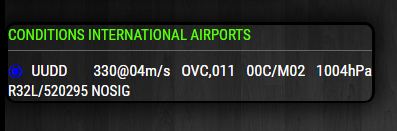
You know, there’s football on right now? :-)Here’s a little something to wet your whistle. “Whet” your whistle is incorrect. Evidently, you can “whet your appetite” but not your whistle. :-)

From left to right:
- Flight rules
- ICAO
- Wind Direction/Wind Speed/units
- Cloud List (first element)
- Temperature/Units/Dewpoint
- Altimeter/Units
Under that
- Remarks
-
@320fan said in MMM-aviationwx (Aviation weather):
And same for me - it’s just a hobby.
Sooooo, you’re NOT a pilot?
However, some posts above I’ve just shared my ideas/vision of this plugin (nothing personal ;).
I get it. I just hope you understand the magnitude of what you are asking for. :-)
In any case, thanks for your support in advance. I’m especially push this topic to find a persons, who will be interested in that too.
You’re welcome, and while I’m not that interested in aviation (although it is interesting) I am interested in learning new things and challenging myself by making MM modules.
This is a bit of a cheat (at the moment) but here are two instances of the module at the same time, one showing UUDD data and the other showing KJFK data.

-
@Mykle1 I like how it’s switching between hectopascals and inches of mercury, as well as m/s and knots!
That was always the one thing missing on this module for me, international airports
-
@stephenmelody said in MMM-aviationwx (Aviation weather):
I like how it’s switching between hectopascals and inches of mercury, as well as m/s and knots!
According to @320fan, "Display of “Units” is mandatory due to different units in different countries. Happily for me, there was no conversion necessary on my part. Included in the data for each station are the units that apply for that station. And good thing, too, as I have no idea what the hell hectopascals are. :-)
That was always the one thing missing on this module for me, international airports.
Well, we aim to please. :-)
And just for the record, this is not that module. I chose to create my own rather than fork and edit the existing one.Ok, time for the two of you to contribute to the cause.
- Does the “Remarks” line need the word “Remarks”? Is it preferred or not?
- Flight Rules come before the Station, or after? Seems odd to me.
- Find/create/make/conjure me a url from the API that can fetch multiple ICAO’s in a single GET request.
That’s all, for now. :-)
-
Here’s my thoughts, but they’re just preferences.
RMK stands for Remarks, so having it show “Remarks: RMK…” is a little redundant. AO2 just means it’s automated. Also, this info differs from country to country, so I’d say keep it.
Flight rules tend to be a coloured dot (as per the original code) so it’s often common for that to be first, at least in the US.
You know my coding skills… but I was wondering if there might be any hints in the original module, as that pulls multiple codes.
What does a UK airport give you? Maybe EGLL or EGNX as the codes?
-
@stephenmelody said in MMM-aviationwx (Aviation weather):
Also, this info differs from country to country, so I’d say keep it.
But you, as an interested user, would know those were the remarks, regardless? And by the format of the module itself, that line would always be the remarks. For the sake of space, I’m going to remove it. Let’s see if you miss it. :-)
Flight rules tend to be a coloured dot (as per the original code) so it’s often common for that to be first, at least in the US.
Understood, but does the data (ex. IFR) tell you the same thing as the colored dot? Less coding for me if “IFR” is immediately recognizable and understandable by you.
You know my coding skills… but I was wondering if there might be any hints in the original module, as that pulls multiple codes.
Only what you’ve told me. :-) API’s don’t conform to one protocol when it comes to formulating a url for data. This is a different API. I was hoping you guys would do some of the leg work. :-)
What does a UK airport give you? Maybe EGLL or EGNX as the codes?
I was going to test those but at the moment, the API is down.

I hope this is not a sign that this API is unreliable.
However, I get the rest of the night off! :-)
-
Anything I can to help? Im actually an Air Force aviator trying to get a module like this for our Operations Center.
There is a universal coding standard for METARS in the Flight Information Handbook (FIH).
Also, I’d stick to ICAO identifiers as they automatically include international.
If you use the API from NOAA: https://aviationweather.gov/metar/data?ids=Rodn&format=raw&date=0&hours=0, the results always come imperial.
Bryan
-
Thanks for the work on this - I am a pilot in Europe so very interested in seeing the outcome.
Unfortunately like many others, my coding is useless to everyone ;-)
Thanks again.
Johnny -
@Mykle1 said in MMM-aviationwx (Aviation weather):
Sooooo, you’re NOT a pilot?
I’ve just mean that building of the MagicMirror is my hobby, but the aviation is my profession ;). I’m the Airbus driver in our real world.
This is a bit of a cheat (at the moment) but here are two instances of the module at the same time, one showing UUDD data and the other showing KJFK data.
It’a good step forward in the right direction!
So, just some comments from my side:- Using of colored dot before ICAO code is a best solution (It’s more user-frendly than just a IFR/VFR etc.)
- For the remarks - I’m agree that the best way to remove that.
- About different units - it’s nice to have a possibility to convert all units in the one base, but that request is not mandratory. In any case I can provide simple formulas for coversion of hPa into Hdg, F to C, kt to m/s and etc.
And if we going back to beginning: could you please make for the brief data format something like that from my lovely iPad AeroWeather application? This app is very popular for the pilots and it wiil be nce to keep more-less same base:

Hello! It looks like you're interested in this conversation, but you don't have an account yet.
Getting fed up of having to scroll through the same posts each visit? When you register for an account, you'll always come back to exactly where you were before, and choose to be notified of new replies (either via email, or push notification). You'll also be able to save bookmarks and upvote posts to show your appreciation to other community members.
With your input, this post could be even better 💗
Register Login