MagicMirror Forum
    • Recent
    • Tags
    • Unsolved
    • Solved
    • MagicMirror² Repository
    • Documentation
    • 3rd-Party-Modules
    • Donate
    • Discord
    • Register
    • Login
    A New Chapter for MagicMirror: The Community Takes the Lead
    Read the statement by Michael Teeuw here.

    MMM-CalendarExt3

    Scheduled Pinned Locked Moved Utilities
    689 Posts 82 Posters 2.8m Views 86 Watching
    Loading More Posts
    • Oldest to Newest
    • Newest to Oldest
    • Most Votes
    Reply
    • Reply as topic
    Log in to reply
    This topic has been deleted. Only users with topic management privileges can see it.
    • M Offline
      MMRIZE @flemmingss
      last edited by

      @flemmingss
      Set enough ‘maximumEntries’, ‘maximumNumberOfDays’ and ‘pastDaysCount’ of the default calendar.

      F 1 Reply Last reply Reply Quote 0
      • F Offline
        flemmingss @MMRIZE
        last edited by flemmingss

        @MMRIZE Tested that, and did not work, but when I rebooted the service, it worked. So these settings must need a restart somehow.
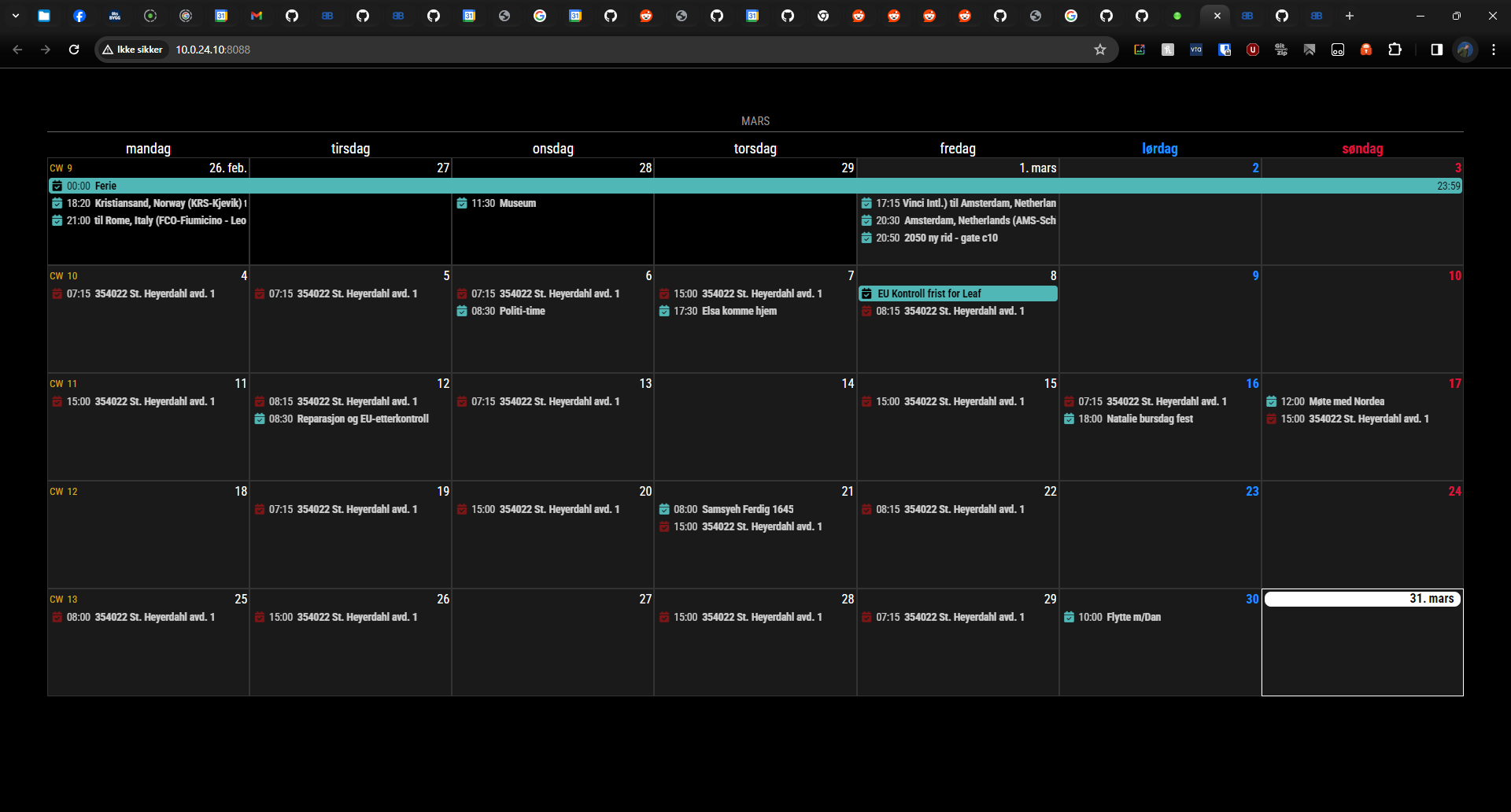
        b8f40d5c-46d0-48f0-ac62-3fb7be5cd9a0-image.png

        S 1 Reply Last reply Reply Quote 0
        • S Offline
          sdetweil @flemmingss
          last edited by

          @flemmingss yes, the fetcher is started once, the web page can be refreshed, but the fetcher does not restart.

          Sam

          How to add modules

          learning how to use browser developers window for css changes

          W 1 Reply Last reply Reply Quote 0
          • W Offline
            Welle05 @sdetweil
            last edited by

            Problem with full day events since summer time in Germany.

            Full-day events which are part of a series are now spawn over two days. All series were built in winter time. I checked the original (google) Calendar : fine, also the Standard Calendar Module, but when it comes to Ext3 there are shown like this:

            08309741-b3f9-4cb2-8414-ffa5a8d707fd-grafik.png

            single full dayevents (not part of a series): fine
            serial events with start date: also fine

            Any idea?

            Best regards

            Chris

            F 1 Reply Last reply Reply Quote 0
            • F Offline
              fedale @Welle05
              last edited by

              @Welle05 have you found a solution for this? i have the same issue in Sweden.
              And it´s only for fullday events.

              S M 2 Replies Last reply Reply Quote 0
              • S Offline
                sdetweil @fedale
                last edited by sdetweil

                @fedale ext3 is expecting full day events to have 00:00 as the time.

                with some change they come with utc offset

                02:00

                or whatever.

                he could check the full day event flag and ignore the time

                Sam

                How to add modules

                learning how to use browser developers window for css changes

                F 1 Reply Last reply Reply Quote 0
                • M Offline
                  MMRIZE @fedale
                  last edited by

                  @fedale @Welle05

                  See this.
                  https://github.com/MMRIZE/MMM-CalendarExt3/wiki/To-fix-wrong-repeated-fullday-event-displaying-(MM-2.27)

                  1 Reply Last reply Reply Quote 0
                  • F Offline
                    fedale @sdetweil
                    last edited by

                    @sdetweil

                    Where can i input the offset?
                    Can i do that in the default calendar?

                    S 1 Reply Last reply Reply Quote 0
                    • S Offline
                      sdetweil @fedale
                      last edited by

                      @fedale see the post before yours that gives you the fix

                      Sam

                      How to add modules

                      learning how to use browser developers window for css changes

                      1 Reply Last reply Reply Quote 0
                      • B Offline
                        bobbylx
                        last edited by

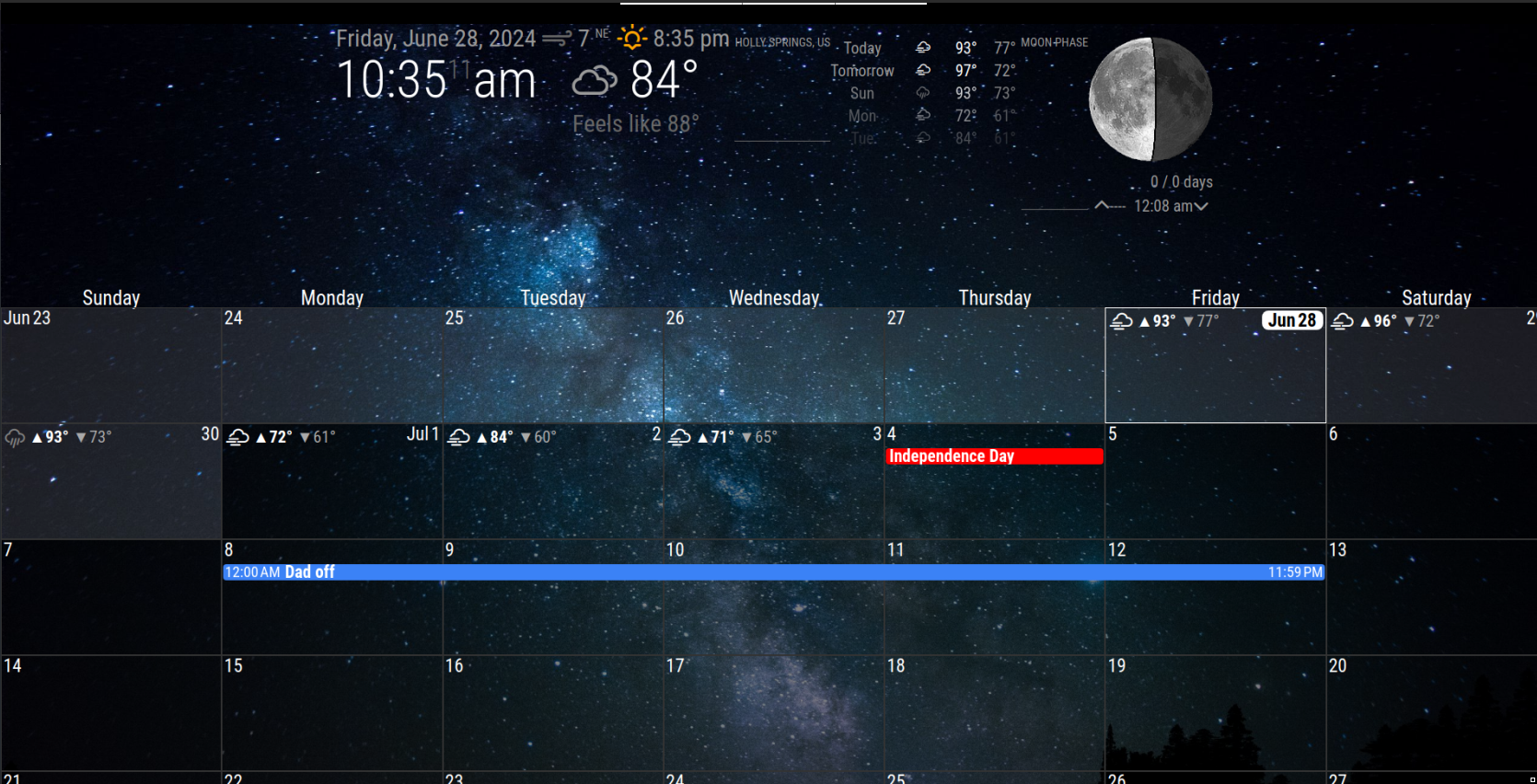
                        Hello all, so I’ve got MMM-Calendarext3 working just how I want and now working on some personalization. Can anyone advise what to change and where to add some shadow behind the date cells? Kind of like the shadow behind the previous days, I’d like to add some light gray or something to the entire calendar just so it doesn’t get lost in my wallpaper.
                        Second, anyone know how/where to change the border thickness for the current day?

                        thanks in advance.Screenshot_2024-06-28_10-34-55.png

                        M 1 Reply Last reply Reply Quote 0
                        • M Offline
                          MMRIZE @bobbylx
                          last edited by

                          @bobbylx
                          For today cell border; Append this into your css/custom.css

                          /* css/custom.css */
                          .CX3 .cell.today {
                            border: 2px solid #fff; /* default was 1px, so you can change to 2px or whatever */
                          }
                          
                          For shadow behind the cell... Could you tell me more details or example?
                          B 1 Reply Last reply Reply Quote 0
                          • B Offline
                            bobbylx @MMRIZE
                            last edited by

                            @MMRIZE said in MMM-CalendarExt3:

                            @bobbylx
                            For today cell border; Append this into your css/custom.css

                            /* css/custom.css */
                            .CX3 .cell.today {
                              border: 2px solid #fff; /* default was 1px, so you can change to 2px or whatever */
                            }
                            
                            For shadow behind the cell... Could you tell me more details or example?
                            

                            Thank you, I’ll give that a try.

                            For the shadow, maybe not the right term, in my screenshot see how the previous days have a light but transparent white color to them. I’d like all the cells to be shaded like that, i can play with the colors, ie white vs gray etc. but I’m just not sure how to add the background color to all cells then make it transparent. That make sense? I know my terms are not correct…

                            M 1 Reply Last reply Reply Quote 0
                            • M Offline
                              MMRIZE @bobbylx
                              last edited by

                              @bobbylx
                              To emphasize this month, I added this to the cells of this month.

                              .CX3 .thisMonth {
                                background-color: rgb(255 255 255 / 10%);
                              }
                              

                              rgb(RED GREEN BLUE / TRANSPARENCY); could be what you were searching.

                              B 1 Reply Last reply Reply Quote 0
                              • B Offline
                                bobbylx @MMRIZE
                                last edited by

                                @MMRIZE said in MMM-CalendarExt3:

                                @bobbylx
                                To emphasize this month, I added this to the cells of this month.

                                .CX3 .thisMonth {
                                  background-color: rgb(255 255 255 / 10%);
                                }
                                

                                rgb(RED GREEN BLUE / TRANSPARENCY); could be what you were searching.

                                Thanks again, this did it.

                                1 Reply Last reply Reply Quote 0
                                • A Offline
                                  almightyyoshi
                                  last edited by

                                  I have a Cozi calendar for dinner and the event comes over as “All: Pork Tenderloin”. Is there any way to get rid of the “All:” (with either Transform or preProcessor) and keep the rest?

                                  M 1 Reply Last reply Reply Quote 0
                                  • M Offline
                                    MMRIZE @almightyyoshi
                                    last edited by MMRIZE

                                    @almightyyoshi

                                    eventTransformer: (ev) => {
                                      ev.title = ev.title.replace("All:", "")
                                      return ev
                                    },
                                    
                                    A 1 Reply Last reply Reply Quote 0
                                    • A Offline
                                      almightyyoshi @MMRIZE
                                      last edited by

                                      @MMRIZE Sigh. I knew it was going to be something easy like that and I was overthinking it. Thanks! Couple more questions:

                                      1. How can I remove the CW? I’ve tried:
                                      .CX3 .cell.cellHeader .cw {
                                              display: none;
                                      }
                                      
                                      .CX3 .cell .cellHeader .cw {
                                              display: none;
                                      }
                                      
                                      .CX3 .cellHeader .cw {
                                              display: none;
                                      }
                                      

                                      and

                                      .CX3 .cell .cw {
                                              display: none;
                                      }
                                      
                                      1. How can I remove the start time in an instance? I’ve tried:
                                      .CX3_currentMonth .event .time.startTime {
                                              display: none;
                                      }
                                      

                                      I got it working with a specific calendar using:

                                      .CX3 .event.calendar_Dinner .time.startTime {
                                              display: none;
                                      }
                                      
                                      M 2 Replies Last reply Reply Quote 0
                                      • M Offline
                                        MMRIZE @almightyyoshi
                                        last edited by

                                        @almightyyoshi
                                        For removing calendarWeek number;
                                        https://github.com/MMRIZE/MMM-CalendarExt3/wiki/Examples-%26-Tips

                                        A 1 Reply Last reply Reply Quote 0
                                        • M Offline
                                          MMRIZE @almightyyoshi
                                          last edited by MMRIZE

                                          @almightyyoshi
                                          For the second question, I cannot understand. More details for TO-BE and AS-IS be needed. (Show me the example)

                                          A 1 Reply Last reply Reply Quote 0
                                          • A Offline
                                            almightyyoshi @MMRIZE
                                            last edited by

                                            @MMRIZE Perfect. Thanks!

                                            1 Reply Last reply Reply Quote 0

                                            Hello! It looks like you're interested in this conversation, but you don't have an account yet.

                                            Getting fed up of having to scroll through the same posts each visit? When you register for an account, you'll always come back to exactly where you were before, and choose to be notified of new replies (either via email, or push notification). You'll also be able to save bookmarks and upvote posts to show your appreciation to other community members.

                                            With your input, this post could be even better 💗

                                            Register Login

                                            • 1
                                            • 2
                                            • 31
                                            • 32
                                            • 33
                                            • 34
                                            • 35
                                            • 35 / 35
                                            • First post
                                              Last post
                                            Enjoying MagicMirror? Please consider a donation!
                                            MagicMirror created by Michael Teeuw.
                                            Forum managed by Sam, technical setup by Karsten.
                                            This forum is using NodeBB as its core | Contributors
                                            Contact | Privacy Policy